Why Docker Compose Needs build.pull and pull_policy Set to build
A service that has both image: and build: looks like it is built from its Dockerfile. In practice, Docker Compose often doesn’t build it at all: it reuses an old local image, or pulls whatever is in the registry under that name. When it does build, it uses the copy of the base image already on the machine. Two settings fix this, and you need both:
services:
  app:
    image: localhost:5000/app:latest
    build:
      context: .
      dockerfile: Dockerfile
      pull: true            # always check the registry for a newer FROM image
    pull_policy: build      # always build this service, never pull it
Everything below was tested with Docker Compose v5.8.0, Docker CLI 29.10.1, buildx v0.39.1 (BuildKit v0.30.0) and Docker Engine 29.5.2 (containerd image store), with a local registry:3 on localhost:5000.
What Each Setting Does
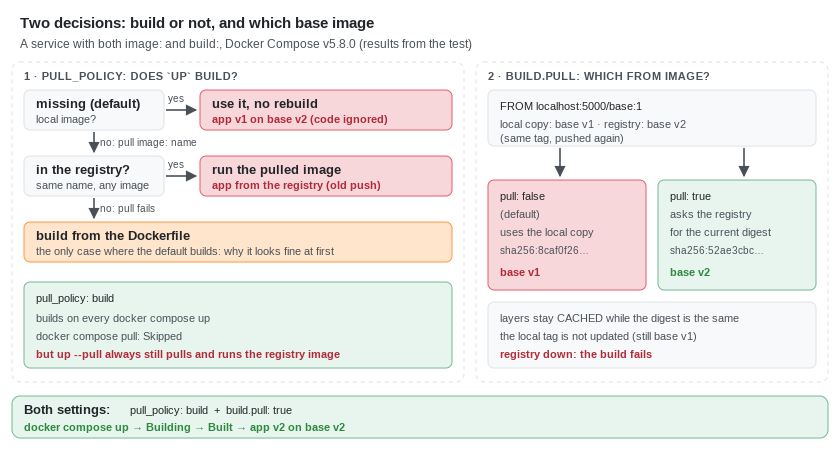
They answer two different questions:
| Setting | Question it answers | Default | With the setting |
|---|---|---|---|
pull_policy (service) |
Does docker compose up build the service, or use an image? |
missing: use the local image; if there is none, pull the image: name; build only if that pull fails |
build: build on every up, skip it in docker compose pull |
build.pull |
When it builds, which base image (FROM) does it use? |
false: the copy already on the machine |
true: ask the registry for the tag’s current digest |
pull_policy: build alone gets your code changes in but keeps building on an old base image. build.pull: true alone refreshes the base, but only on the rare occasions Compose actually builds.
The Test Setup
The app is two files on top of a base image from the local registry:
# Dockerfile
FROM localhost:5000/base:1
COPY app.sh /app.sh
CMD ["sh", "/app.sh"]
# app.sh
echo "app v1 on $(cat /base-version)"
localhost:5000/base:1 is a one-line image that writes its version into /base-version. It was pushed as base v1, then a base v2 was pushed under the same tag, the way python:3.12-slim or alpine:3.23 gets a security update, while the machine kept its local v1:
local base:1:    base v1
registry base:1: base v2
local:    sha256:8caf0f26c0fcd8f5f3b940fb470d3945878c23060d11076daf5e716874bbb5d8
registry: "sha256:52ae3cbc92e50fd96d8a47bd47160b73960d046df9dfd28b93268561d26b395b"
The starting compose.yaml has neither setting:
services:
  app:
    image: localhost:5000/app:latest
    build:
      context: .
      dockerfile: Dockerfile
Problem 1: The Build Uses the Old Base Image
After the first build (app v1 on base v1), the registry got base v2. Building again with the plain file:
$ docker compose build
#3 [internal] load metadata for localhost:5000/base:1
#6 [1/2] FROM localhost:5000/base:1@sha256:8caf0f26c0fcd8f5f3b940fb470d3945878c23060d11076daf5e716874bbb5d8
#6 resolve localhost:5000/base:1@sha256:8caf0f26c0fcd8f5f3b940fb470d3945878c23060d11076daf5e716874bbb5d8 done
#7 [2/2] COPY app.sh /app.sh

$ docker compose run --rm app
app v1 on base v1
BuildKit found base:1 on the machine and used it (8caf…, the local digest). It never asked the registry. With build.pull: true added under build::
$ docker compose build
#3 [internal] load metadata for localhost:5000/base:1
#6 [1/2] FROM localhost:5000/base:1@sha256:52ae3cbc92e50fd96d8a47bd47160b73960d046df9dfd28b93268561d26b395b
#6 resolve localhost:5000/base:1@sha256:52ae3cbc92e50fd96d8a47bd47160b73960d046df9dfd28b93268561d26b395b done
#7 [2/2] COPY app.sh /app.sh

$ docker compose run --rm app
app v1 on base v2
Now it resolved 52ae…, the registry’s digest. The local tag is not updated by this: afterwards docker run --pull never localhost:5000/base:1 still printed base v1, so a build without pull would go back to the old base.
The command-line equivalent is docker compose build --pull.
Problem 2: docker compose up Doesn’t Rebuild
app.sh was changed to print app v2. With the plain file, up ran the image built earlier:
$ docker compose up
 Container demo-app-1 Creating
 Container demo-app-1 Created
Attaching to app-1
 Container demo-app-1 Starting
app-1  | app v1 on base v2
 Container demo-app-1 Started
app-1 exited with code 0
With the default pull_policy (missing), an image that exists locally is used as it is. The code change is ignored until someone runs docker compose build or up --build. With pull_policy: build added to the service:
$ docker compose up
 Image localhost:5000/app:latest Building
 Image localhost:5000/app:latest Built
 Container demo-app-1 Creating
 Container demo-app-1 Created
 Container demo-app-1 Starting
app-1  | app v2 on base v1
 Container demo-app-1 Started
app-1 exited with code 0
The code is current, but the base went back to v1: without build.pull the build used the local base again. With both settings:
$ docker compose up
 Image localhost:5000/app:latest Building
 Image localhost:5000/app:latest Built
app-1  | app v2 on base v2
docker compose up --build gives the same rebuild for one run, still on the local base: it printed app v2 on base v1.
Problem 3: Compose Pulls the Image Instead of Building It
image: is both the name the build is tagged with and a name Compose can pull. If an image with that name is in the registry (an old CI push, a colleague’s test, an unrelated image with the same name) and not on the machine, the default policy pulls it and never looks at the Dockerfile. An old image was pushed as localhost:5000/app:latest and the local copy removed:
$ docker compose up
 Image localhost:5000/app:latest Pulling
 68600b42eeb9 Download complete 0B
 Image localhost:5000/app:latest Pulled
 Container demo-app-1 Creating
 Container demo-app-1 Created
Attaching to app-1
 Container demo-app-1 Starting
app-1  | app from the registry (old push)
 Container demo-app-1 Started
app-1 exited with code 0
That’s a fresh clone or a new CI runner running code from somewhere else. With both settings, the same command built from the Dockerfile:
$ docker compose up
 Image localhost:5000/app:latest Building
 Image localhost:5000/app:latest Built
app-1  | app v2 on base v2
docker compose pull does the same thing on purpose. With the plain file it replaced the local build with the registry image; with pull_policy: build the service is skipped:
$ docker compose pull                 # plain file
 Image localhost:5000/app:latest Pulling
 68600b42eeb9 Download complete 0B
 Image localhost:5000/app:latest Pulled

$ docker compose pull                 # with pull_policy: build
 Image localhost:5000/app:latest Skipped
Why the Default Seems to Work
When the name exists nowhere, the default policy tries to pull, fails, and falls back to building:
$ docker compose up                   # image: localhost:5000/nothere:latest
 Image localhost:5000/nothere:latest Pulling
 Image localhost:5000/nothere:latest failed to resolve reference "localhost:5000/nothere:latest": localhost:5000/nothere:latest: not found
 Image localhost:5000/nothere:latest Building
#1 [internal] load local bake definitions
So the first up on a new machine builds, and everything looks fine. The problems start once an image with that name exists, locally or in the registry.
Results Side by Side
The same project, with the registry holding base v2, an old app image, and the code at app v2:
| Setup | Command | Result |
|---|---|---|
| plain | docker compose build + run |
app v1 on base v1 (before the code change) |
build.pull: true |
docker compose build + run |
app v1 on base v2 |
| plain, image built earlier | docker compose up |
app v1 on base v2: no rebuild |
pull_policy: build |
docker compose up |
app v2 on base v1: old base |
| plain, no local image | docker compose up |
app from the registry (old push) |
| plain | docker compose up --build |
app v2 on base v1 |
| plain | docker compose build --pull, then up |
app v2 on base v2 |
| both | docker compose up |
app v2 on base v2 |
Gotchas
up --pull alwaysoverridespull_policy: build. With both settings in the file,docker compose up --pull alwayspulledlocalhost:5000/app:latestand ranapp from the registry (old push). Don’t use that flag for projects with built services.build.pull: trueneeds the registry. With the registry stopped, the build failed:failed to solve: localhost:5000/base:1: failed to resolve source metadata for localhost:5000/base:1: ... connect: connection refused. The plain file still built offline from the local base. For offline work, rundocker compose buildwithout it, or keep a second Compose file.- The layer cache still works.
pull: trueonly checks the digest. With nothing changed, the second build still showed#7 CACHEDforCOPY app.sh. Layers are rebuilt only when the base digest really changed. - Pick an
image:name nobody pushes if the image is only built locally, or leaveimage:out: Compose then names the image after the project and service, a name that nobody has pushed to a registry. pull_policy: buildbuilds on everyup. With the cache that takes seconds, but it does a BuildKit run each time. For a service you deploy from a registry,pull_policy: always(pull, never build) is the matching setting instead.