AWS Backup: Plans, Vaults, Copies, Vault Lock and Restore Testing
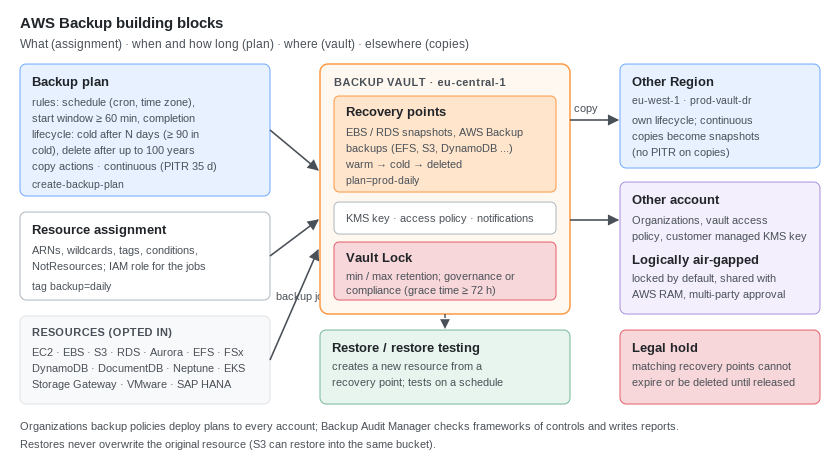
AWS Backup is the central backup service for AWS: one place to schedule backups of EBS, EC2, RDS and Aurora, EFS, FSx, DynamoDB, S3 and more, keep them for a set time, copy them to another Region or account, lock them against deletion, and prove that they restore. You describe what to back up (resources, usually selected by tag), when and for how long (a backup plan), and where (a backup vault); AWS Backup runs the jobs.
The facts come from the AWS Backup Developer Guide and its feature tables (November 2026). The commands were checked with AWS CLI 2.39.3. Account IDs, ARNs and names are placeholders.
1. The Short Version
| Question | Answer |
|---|---|
| What does it back up? | EC2, EBS, S3, RDS, Aurora, DynamoDB, EFS, the four FSx file systems, DocumentDB, Neptune, Redshift, Timestream, Storage Gateway volumes, EKS, CloudFormation stacks, SAP HANA on EC2 and VMware VMs |
| Building blocks | Backup vault (where), backup plan with rules (when, how long, copies), resource assignment (what), recovery points (the backups), jobs (backup, copy, restore) |
| Schedules | Cron in UTC by default, or a time zone per rule. Snapshots as often as every hour; continuous backups give point-in-time restore for up to 35 days |
| Retention | Up to 100 years. Cold storage for supported types needs at least 90 days in cold |
| Copies | To another Region or account in the same rule (copy actions) or on demand |
| Immutability | Vault Lock (governance or compliance mode), logically air-gapped vaults, legal holds |
| Proof | Restore testing on a schedule, Backup Audit Manager frameworks and reports |
| Cost | You pay for backup storage (warm and cold), restores, copies (data transfer), and some features per GB; the service itself has no fee |
| Biggest traps | Resource types not opted in, missing tags, a lifecycle with less than 90 days in cold, backups in the same account as the workload, and never testing a restore |
2. Building Blocks
| Piece | What it is |
|---|---|
| Backup vault | A container for recovery points, encrypted with a KMS key (AWS managed by default, or yours). Has an access policy, notifications and an optional Vault Lock. Every Region has a Default vault |
| Backup plan | One or more backup rules. Each rule: target vault, schedule, start and completion windows, lifecycle, recovery point tags, copy actions, continuous backup on or off |
| Resource assignment (backup selection) | Which resources a plan protects: ARNs, wildcards, tags and conditions, and an IAM role that AWS Backup uses for the jobs |
| Recovery point | One backup of one resource (an EBS snapshot, an RDS snapshot, an EFS backup …) |
| Jobs | Backup, copy and restore jobs, each with a state (CREATED, RUNNING, COMPLETED, FAILED, EXPIRED …) |
Some services, such as EFS, DynamoDB with advanced features, S3, Timestream and Aurora DSQL, are fully managed by AWS Backup: their backups are AWS Backup recovery points with AWS Backup’s own encryption, independent of the source’s key. For the others (EBS, RDS …) the recovery point is the service’s own snapshot, encrypted like the source.
3. What Each Service Supports
From the feature availability table (a selection of columns):
| Resource | Cross-Region copy | Cross-account copy | Continuous / PITR | Cold storage | Restore testing | Air-gapped vault |
|---|---|---|---|---|---|---|
| Amazon EC2 | ✓ | ✓ | ✓ | ✓ | ||
| Amazon EBS | ✓ | ✓ | ✓ | ✓ | ✓ | |
| Amazon S3 | ✓ | ✓ | ✓ | ✓ | ✓ | |
| Amazon RDS instance | ✓ | ✓ | ✓ | ✓ | ||
| Amazon Aurora | ✓ | ✓ | ✓ | ✓ | ✓ | |
| Amazon EFS | ✓ | ✓ | ✓ | ✓ | ✓ | |
| Amazon FSx (all four) | ✓ | ✓ | ✓ | ✓ | ||
| DynamoDB, advanced features on | ✓ | ✓ | ✓ | ✓ | ✓ | |
| DynamoDB, advanced features off | ✓ | |||||
| SAP HANA on EC2 | ✓ | ✓ | ✓ | ✓ | ||
| VMware virtual machines | ✓ | ✓ | ✓ | ✓ |
- A resource type with no copy checkmarks cannot be copied at all, not even to another vault in the same Region and account.
- A copy of a continuous backup becomes a snapshot backup: point-in-time restore is not available on copies.
- RDS, Aurora, DocumentDB and Neptune can copy cross-Region and cross-account in a single action; RDS Multi-AZ clusters cannot be copied.
- DynamoDB advanced features must be turned on (
update-region-settingsor the console) for cross-account copies, cold storage and AWS Backup encryption.
4. First Steps: Opt-In, Role and Vault
New resource types are often not opted in in a Region: a plan silently skips them. Check and enable:
aws backup describe-region-settings
aws backup update-region-settings --resource-type-opt-in-preference EFS=true,DynamoDB=true,S3=true
AWS Backup needs an IAM role it can assume. The console creates AWSBackupDefaultServiceRole with the managed policies AWSBackupServiceRolePolicyForBackup and AWSBackupServiceRolePolicyForRestores
(S3 backups need the S3 policies as well). Use your own role per plan if you want to limit what it can read.
# A vault with your own KMS key (the default vault uses an AWS managed key)
aws backup create-backup-vault --backup-vault-name prod-vault \
  --encryption-key-arn arn:aws:kms:eu-central-1:123456789012:key/<key-id> --backup-vault-tags team=platform
The create call returns the vault’s name, ARN and creation date, for example
"BackupVaultArn": "arn:aws:backup:eu-central-1:123456789012:backup-vault:prod-vault". A vault’s key cannot be changed after creation.
5. Backup Plans and Rules
A plan with three rules: a daily backup kept 35 days and copied to Ireland, a monthly one kept a year with cold storage, and continuous backups for point-in-time restore over 7 days:
{
  "BackupPlanName": "prod-daily",
  "Rules": [
    {
      "RuleName": "daily-35d",
      "TargetBackupVaultName": "prod-vault",
      "ScheduleExpression": "cron(0 3 ? * * *)",
      "ScheduleExpressionTimezone": "Europe/Bucharest",
      "StartWindowMinutes": 60,
      "CompletionWindowMinutes": 480,
      "Lifecycle": { "DeleteAfterDays": 35 },
      "RecoveryPointTags": { "plan": "prod-daily" },
      "CopyActions": [
        {
          "DestinationBackupVaultArn": "arn:aws:backup:eu-west-1:123456789012:backup-vault:prod-vault-dr",
          "Lifecycle": { "DeleteAfterDays": 35 }
        }
      ]
    },
    {
      "RuleName": "monthly-1y-cold",
      "TargetBackupVaultName": "prod-vault",
      "ScheduleExpression": "cron(0 4 1 * ? *)",
      "StartWindowMinutes": 120,
      "Lifecycle": { "MoveToColdStorageAfterDays": 30, "DeleteAfterDays": 365, "OptInToArchiveForSupportedResources": true }
    },
    {
      "RuleName": "pitr-7d",
      "TargetBackupVaultName": "prod-vault",
      "ScheduleExpression": "cron(0 * ? * * *)",
      "EnableContinuousBackup": true,
      "Lifecycle": { "DeleteAfterDays": 7 }
    }
  ]
}
aws backup create-backup-plan --backup-plan file://plan.json --query '{Id:BackupPlanId,Version:VersionId}'
aws backup get-backup-plan --backup-plan-id <plan-id> \
  --query 'BackupPlan.Rules[].{Rule:RuleName,Schedule:ScheduleExpression,Cold:Lifecycle.MoveToColdStorageAfterDays,Delete:Lifecycle.DeleteAfterDays,PITR:EnableContinuousBackup}'
Rule by rule:
- Schedule: an EventBridge-style cron (
cron(minutes hours day-of-month month day-of-week year), Sunday is 1). It runs in UTC unlessScheduleExpressionTimezoneis set. Without a schedule the default iscron(0 5 ? * * *). Snapshot rules can run as often as hourly. - Start window: how long a job may wait in
CREATEDbefore it is cancelled; at least 60 minutes. Completion window: how long a started job may run. The console default is 8 hours to start (from 05:00 UTC) and 7 days to complete. - Lifecycle:
DeleteAfterDaysup to 100 years.MoveToColdStorageAfterDaysonly for types that support cold storage (EBS, EFS, DynamoDB advanced, SAP HANA, VMware …); other types ignore it. A backup must stay 90 days in cold, soDeleteAfterDaysmust be at leastMoveToColdStorageAfterDays + 90, and the cold setting cannot be changed after a backup has moved.OptInToArchiveForSupportedResourcescovers the types where cold storage is opt-in, such as EBS snapshot archive; EBS archive is allowed only for rules that run monthly or less often, and a restore from it takes hours longer. - Continuous backup (
EnableContinuousBackup): for S3, RDS, Aurora and SAP HANA. Point-in-time restore to the second, kept at most 35 days. Pair it with a snapshot rule for long-term retention. - Copy actions: the destination vault ARN, with its own lifecycle.
- A plan can be updated (
update-backup-plan) and keeps versions;export-backup-plan-templateandlist-backup-plan-templateshelp reuse them.
6. Choosing the Resources
A resource assignment selects by ARN, wildcard, tags and conditions. Protecting everything tagged backup=daily, except env=dev:
{
  "SelectionName": "tagged-prod",
  "IamRoleArn": "arn:aws:iam::123456789012:role/service-role/AWSBackupDefaultServiceRole",
  "Resources": ["*"],
  "Conditions": {
    "StringEquals": [ { "ConditionKey": "aws:ResourceTag/backup", "ConditionValue": "daily" } ],
    "StringNotEquals": [ { "ConditionKey": "aws:ResourceTag/env", "ConditionValue": "dev" } ]
  }
}
aws backup create-backup-selection --backup-plan-id <plan-id> --backup-selection file://selection.json
aws backup list-protected-resources --query 'Results[].{Type:ResourceType,Arn:ResourceArn,Last:LastBackupTime}'
Resourceswith*plus conditions means “every supported, opted-in resource that matches”.Conditionsare ANDed;ListOfTags(the older field) ORs its tags.NotResourcesexcludes ARNs or types, for examplearn:aws:ec2:*:*:volume/*to back up instances but not their volumes twice.- A resource matched by several plans is backed up by each of them; that is fine for different schedules, wasteful otherwise.
- Tag new resources at creation (or with a tag policy) so nothing is left out.
7. On-Demand Backups and Jobs
aws backup start-backup-job --backup-vault-name prod-vault \
  --resource-arn arn:aws:ec2:eu-central-1:123456789012:volume/vol-0123456789abcdef0 \
  --iam-role-arn arn:aws:iam::123456789012:role/service-role/AWSBackupDefaultServiceRole \
  --lifecycle DeleteAfterDays=7

aws backup list-backup-jobs --by-state FAILED --by-created-after 2026-11-01T00:00:00Z \
  --query 'BackupJobs[].{Resource:ResourceArn,State:State,Message:StatusMessage}'
aws backup list-backup-job-summaries --aggregation-period ONE_DAY
aws backup list-recovery-points-by-backup-vault --backup-vault-name prod-vault \
  --query 'RecoveryPoints[].{Type:ResourceType,Created:CreationDate,Status:Status,Arn:RecoveryPointArn}'
Send job events to SNS with put-backup-vault-notifications, or use the EventBridge events AWS Backup emits (state changes of backup, copy and restore jobs), and alarm on failed jobs.
8. Restores and Restore Testing
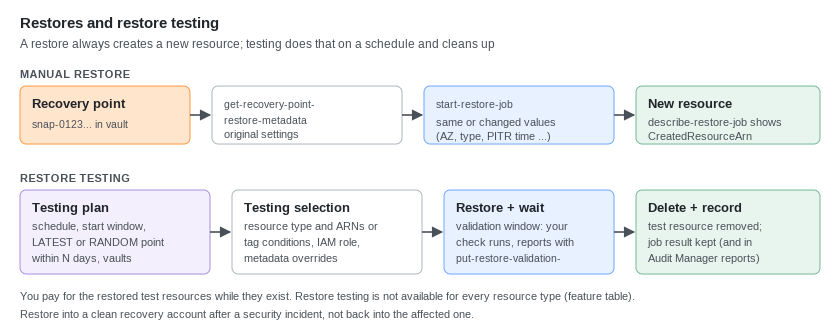
A restore creates a new resource from a recovery point; it does not overwrite the original (S3 can restore into the same bucket). Start from the recorded metadata:
aws backup get-recovery-point-restore-metadata --backup-vault-name prod-vault --recovery-point-arn <recovery-point-arn>

aws backup start-restore-job --recovery-point-arn arn:aws:ec2:eu-central-1::snapshot/snap-0123456789abcdef0 \
  --iam-role-arn arn:aws:iam::123456789012:role/service-role/AWSBackupDefaultServiceRole \
  --resource-type EBS \
  --metadata availabilityZone=eu-central-1a,volumeType=gp3,encrypted=true

aws backup describe-restore-job --restore-job-id <restore-job-id> --query '{Status:Status,Created:CreatedResourceArn}'
Continuous backups add a restoreTime (or “latest restorable time”) to the metadata for point-in-time restore. Item-level restore (single files, S3 objects, EBS files) is available for S3, EBS, EFS, VMware
and a few others.
Restore testing automates the part everybody skips. A plan picks recovery points on a schedule; a selection says which resource type to restore and how; AWS Backup restores, keeps the resource for the validation window, deletes it and records the result:
aws backup create-restore-testing-plan --restore-testing-plan '{
  "RestoreTestingPlanName": "weekly-restore-test",
  "ScheduleExpression": "cron(0 6 ? * MON *)",
  "StartWindowHours": 4,
  "RecoveryPointSelection": { "Algorithm": "LATEST_WITHIN_WINDOW", "IncludeVaults": ["*"],
                              "RecoveryPointTypes": ["SNAPSHOT"], "SelectionWindowDays": 7 } }'

aws backup create-restore-testing-selection --restore-testing-plan-name weekly-restore-test --restore-testing-selection '{
  "RestoreTestingSelectionName": "ebs-volumes",
  "ProtectedResourceType": "EBS",
  "IamRoleArn": "arn:aws:iam::123456789012:role/service-role/AWSBackupDefaultServiceRole",
  "ProtectedResourceArns": ["*"],
  "ValidationWindowHours": 2 }'
RANDOM_WITHIN_WINDOW tests an older point instead of always the newest. During the validation window you can run your own check (EventBridge rule, Lambda) and report it with put-restore-validation-result.
9. Copies to Another Region or Account
A backup in the same account and Region as the workload shares its fate: a compromised account or a Regional outage takes both. Copy them out:
- In the plan:
CopyActionswith the destination vault ARN (section 5). Copies are made after the backup completes, with their own lifecycle. - On demand:
aws backup start-copy-job --recovery-point-arn <recovery-point-arn> --source-backup-vault-name prod-vault \
  --destination-backup-vault-arn arn:aws:backup:eu-west-1:210987654321:backup-vault:central-dr \
  --iam-role-arn arn:aws:iam::123456789012:role/service-role/AWSBackupDefaultServiceRole --lifecycle DeleteAfterDays=90
aws backup list-copy-jobs --by-state FAILED --query 'CopyJobs[].{Source:SourceRecoveryPointArn,Message:StatusMessage}'
- Cross-account copies need AWS Organizations, cross-account backup turned on in the management account (
update-global-settings), and a vault access policy on the destination vault that allowsbackup:CopyIntoBackupVaultfrom the source account or organization. - The KMS key must be usable by the destination: for services whose backups use the source’s key (EBS, RDS …), copies of backups encrypted with the AWS managed key cannot be shared across accounts; use a customer managed key and allow the destination account in its key policy.
10. Protecting the Backups Themselves
A backup is only useful if an attacker, or a tired administrator, cannot delete it.
Vault access policy. Deny deletes for everyone except a break-glass role:
{
  "Version": "2012-10-17",
  "Statement": [
    {
      "Sid": "DenyRecoveryPointDeletion",
      "Effect": "Deny",
      "Principal": "*",
      "Action": ["backup:DeleteRecoveryPoint", "backup:UpdateRecoveryPointLifecycle", "backup:PutBackupVaultAccessPolicy"],
      "Resource": "*",
      "Condition": { "ArnNotEquals": { "aws:PrincipalArn": "arn:aws:iam::123456789012:role/backup-break-glass" } }
    }
  ]
}
aws backup put-backup-vault-access-policy --backup-vault-name prod-vault --policy file://vault-policy.json
AWS Backup Vault Lock enforces a minimum and maximum retention on every recovery point in the vault (WORM):
# Governance mode: can be changed or removed by users with the right IAM permissions
aws backup put-backup-vault-lock-configuration --backup-vault-name prod-vault --min-retention-days 7 --max-retention-days 400

# Compliance mode: --changeable-for-days (3 to 36,500) is the grace time; after it nobody can remove the lock
aws backup put-backup-vault-lock-configuration --backup-vault-name prod-vault \
  --changeable-for-days 3 --min-retention-days 7 --max-retention-days 400

aws backup describe-backup-vault --backup-vault-name prod-vault --query '{Locked:Locked,Min:MinRetentionDays,Max:MaxRetentionDays,LockDate:LockDate}'
After the governance lock the vault reads back as "Locked": true with "Min": 7 and "Max": 400. With compliance mode, LockDate is the end of the grace time: until then
delete-backup-vault-lock-configuration still works, afterwards the lock, the vault and its recovery points within retention are permanent (the same idea as
S3 Object Lock compliance mode, but with a grace time of at least 72 hours).
- With a minimum set, every backup or copy job into the vault must have a lifecycle with at least that retention, or the vault fails the job: set
DeleteAfterDayson every rule and copy action. - Recovery points stored before the lock are not affected by it.
Logically air-gapped vault: a vault type that is locked by default (compliance mode), encrypted with an AWS-owned key (or your own KMS key), and shared with other accounts through AWS RAM so they can restore directly without copying first. Backups get there by copy actions. Use it in a separate “data bunker” account; multi-party approval can share it with a recovery account even when the owning account is lost.
aws backup create-logically-air-gapped-backup-vault --backup-vault-name prod-lag-vault --min-retention-days 7 --max-retention-days 400
Legal hold: keeps matching recovery points from expiring or being deleted until the hold is released, for litigation or audits:
aws backup create-legal-hold --title "case-2026-114" --description "Hold for litigation case 2026-114" \
  --recovery-point-selection '{"VaultNames":["prod-vault"],"DateRange":{"FromDate":"2026-01-01T00:00:00Z","ToDate":"2026-10-31T23:59:59Z"}}'
aws backup list-legal-holds
aws backup cancel-legal-hold --legal-hold-id <legal-hold-id> --cancel-description "Case closed"
11. At Organization Scale
- Backup policies in AWS Organizations deploy the same backup plan (as JSON policy) to every account in an OU; local admins cannot change them. A delegated administrator account can manage them and the cross-account monitoring.
- Cross-account monitoring shows jobs from all member accounts in the management or delegated account.
- AWS Backup Audit Manager evaluates frameworks of controls (for example “resources are protected by a backup plan”, “backups are encrypted”, “retention at least N days”, “recovery points are in a
locked vault”, “cross-Region copies exist”) and produces reports to S3 (
create-framework,create-report-plan). It relies on AWS Config recording.
12. Cost and Quotas
- No charge for the service; you pay for backup storage per GB-month (warm and cold tiers, by resource type), restores (per GB for some types), cross-Region data transfer for copies, continuous backups, item-level restores and search, and the resources created by restore tests while they run.
- Snapshot-based types are incremental: only changed blocks are stored after the first full backup. Cold storage is cheaper per GB but needs the 90-day minimum, and early deletion is billed for the rest.
- Quotas: 300 vaults (backup and logically air-gapped together) and 300 backup plans per Region per account (adjustable), 100 resource assignments per plan (fixed), 1,000,000 recovery points per vault, one backup or copy job at a time per resource, 50 legal holds per account.
13. Tips and Gotchas
- Opt in the resource types in every Region you use, or new services are silently skipped.
- Tag-based selection plus a tag policy beats lists of ARNs. Check
list-protected-resourcesfor what is really covered. - Copy to another account and Region, and lock that vault. Backups next to the workload are lost with it.
- Test restores with a restore testing plan; a backup nobody has restored is a hope, not a backup.
- Mind the 90 days in cold, the monthly-or-less rule for EBS archive, and that copies of continuous backups lose PITR.
- Use customer managed KMS keys for anything that will be copied across accounts, and protect those keys.
- Start window at least 60 minutes, completion window long enough for the first full backup of a big resource.
- Compliance-mode Vault Lock is final after its grace time: test with governance first, and give every rule a
DeleteAfterDayswithin the lock’s limits. - Restores create new resources: plan the names, networking and DNS change of a real recovery.