AWS Storage Gateway Cheatsheet
AWS Storage Gateway is a VM (or EC2 instance) that you run next to your applications. It speaks NFS, SMB or iSCSI on the local network, keeps a local cache,
and stores the data in Amazon S3, S3 Glacier or EBS snapshots in AWS. Every aws command below passes the parameter and --query checks of AWS CLI 2.39.3, and the
limits come from the Storage Gateway user guides and quotas page (November 2026). Names, ARNs and IDs are placeholders.
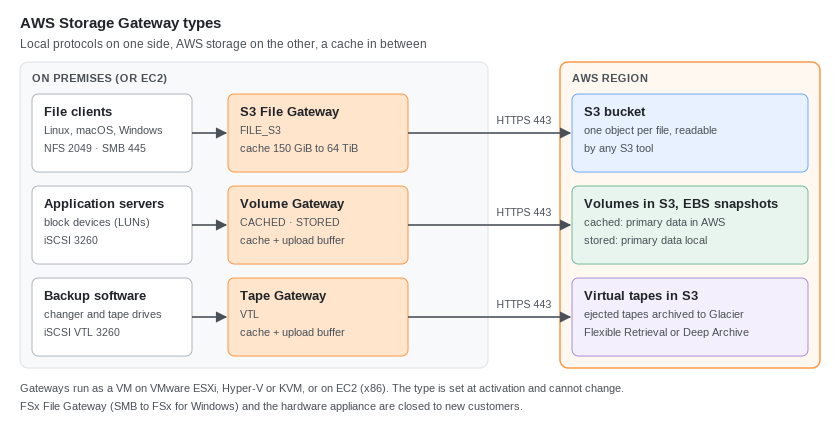
Gateway Types
| Type | --gateway-type |
Local protocol | Data stored in AWS as | Typical use |
|---|---|---|---|---|
| S3 File Gateway | FILE_S3 |
NFS v3/v4.1, SMB v2/v3 | One S3 object per file, readable with any S3 tool | File shares backed by S3, backups and database dumps, data lake ingest |
| FSx File Gateway | FILE_FSX_SMB |
SMB | Files on FSx for Windows File Server | No longer available to new customers (since October 28, 2024) |
| Volume Gateway, cached | CACHED (the API default) |
iSCSI block | Volume in S3 (not visible as objects), point-in-time EBS snapshots | Block storage in AWS with hot data cached locally |
| Volume Gateway, stored | STORED |
iSCSI block | Full copy on premises, backed up asynchronously as EBS snapshots | Low-latency access to the whole dataset, cloud backup and DR |
| Tape Gateway | VTL |
iSCSI virtual tape library (VTL) | Virtual tapes in S3, archived to S3 Glacier Flexible Retrieval or Deep Archive | Replace physical tape with your existing backup software |
The type is chosen at activation and cannot be changed later. The Storage Gateway Hardware Appliance is no longer sold (since May 12, 2025); existing appliances are supported until May 2028. New deployments run as a VM on VMware ESXi (7.0 or 8.0), Microsoft Hyper-V (2019, 2022 or 2025), Linux KVM or Nutanix AHV (10.0.1.1 and later), or as an EC2 instance.
Which Gateway?
| You need | Use |
|---|---|
| Files on premises that end up as normal S3 objects (lifecycle rules, Athena, other apps read them) | S3 File Gateway |
| Windows file shares in FSx for Windows File Server | FSx File Gateway if you already have it, otherwise FSx for Windows directly over VPN or Direct Connect |
| A block device (iSCSI LUN) with the primary copy in AWS | Volume Gateway, cached |
| A block device with the primary copy on premises and backups in AWS | Volume Gateway, stored |
| Backup software that writes to tape (Veeam, Commvault, NetBackup and others) | Tape Gateway |
| A one-time bulk migration rather than ongoing access | DataSync or Snowball, not Storage Gateway |
Quick Facts
| Fact | Value |
|---|---|
| On-premises VM minimum | 4 vCPUs, 16 GiB RAM, 80 GiB root disk, plus separate cache disks |
| EC2 gateway | At least xlarge (2xlarge for compute-optimized), x86 only: the AMI does not run on Graviton |
| Network | At least 100 Mbps to download, activate and update the gateway |
| Cache | 150 GiB to 64 TiB for every gateway type |
| Upload buffer (Volume and Tape) | 150 GiB to 2 TiB |
| Cache | Write-back: writes are acknowledged from the local cache, then uploaded asynchronously over HTTPS. Read-through: reads come from the cache, and missing data is fetched from AWS (byte-range reads for S3 File Gateway) |
| Where data lives | Volumes, snapshots and tapes in the Region where the gateway was activated. File data in the S3 bucket, in the bucket’s Region (--bucket-region on the share; required with a VPC endpoint or access point) |
| Encryption | TLS in transit; at rest SSE-S3 by default, or SSE-KMS / DSSE-KMS with your key |
| Activation | Port 80 on the gateway, only during activation, from the machine that activates it |
| Price | Per GB of data written to AWS, capped at $125 per gateway per month; first 100 GB per account free. Plus S3, Glacier, EBS snapshot storage, requests and data transfer out. EC2 gateways pay for the instance. Volumes and tapes are billed for the data stored, not their provisioned size, and that data is compressed before upload |
| Durability | Data in AWS has the durability of S3, Glacier or EBS snapshots. Data still only in the cache does not |
| Compliance | In scope of SOC, PCI DSS, ISO, FedRAMP and HIPAA, among others (reports in AWS Artifact) |
Quotas
| Quota | Value |
|---|---|
| File shares per gateway | 50 |
| Maximum file size (S3 File Gateway) | 5 TiB (the S3 object limit) |
| Path / file name length | 1,024 bytes / 255 bytes |
| Files with cached metadata | GatewayCapacity Small 5M, Medium 10M, Large 20M |
| Cached volume size / per gateway / total | 32 TiB / 32 volumes / 1,024 TiB |
| Stored volume size / per gateway / total | 16 TiB / 32 volumes / 512 TiB |
| Virtual tape size | 100 GiB to 15 TiB |
| Tapes per virtual tape library | 1,500, at most 1 PiB in total |
| Archived tapes | No limit |
None of these can be raised.
Network Ports
| Port | Direction | Used for |
|---|---|---|
| TCP 443 | Gateway → AWS | Control plane, data upload, S3 endpoints, activation (CloudFront) |
| TCP 80 | Your browser or CLI host → gateway | Activation only, can be closed afterwards |
| TCP/UDP 53, 123 | Gateway → DNS, NTP | Name resolution, time sync (NTP not needed on EC2) |
| TCP 22 | Gateway → AWS Support | Support channel, only when you open it |
| TCP 1026, 1027, 1028, 1031, 2222 | Gateway → VPC endpoint | Only with a Storage Gateway interface VPC endpoint |
| TCP/UDP 2049, 111, 20048 | NFS clients → gateway | NFS (111 and 20048 for NFSv3 only) |
| TCP/UDP 445, 139 | SMB clients → gateway | SMB |
| TCP/UDP 88, 389, 135, 49152-65535 | Gateway → Active Directory | Domain join for SMB shares |
| TCP 3260 | iSCSI initiators → gateway | Volume Gateway and Tape Gateway |
Deploy and Activate
# 1. Deploy the VM image (or launch the Storage Gateway AMI on EC2) and attach cache disks
# 2. Get an activation key from the gateway itself (port 80); the response is the key
curl "http://<gateway-ip>/?activationRegion=eu-central-1&no_redirect"

# 3. Activate it (type cannot be changed later)
aws storagegateway activate-gateway --activation-key <activation-key> \
  --gateway-name files-bucharest --gateway-timezone GMT+2:00 \
  --gateway-region eu-central-1 --gateway-type FILE_S3

# Tape Gateway: also pick the emulated library and drives
aws storagegateway activate-gateway --activation-key <activation-key> \
  --gateway-name vtl-bucharest --gateway-timezone GMT+2:00 --gateway-region eu-central-1 \
  --gateway-type VTL --medium-changer-type AWS-Gateway-VTL --tape-drive-type IBM-ULT3580-TD5
--medium-changer-type accepts STK-L700, AWS-Gateway-VTL and IBM-03584L32-0402, and --tape-drive-type only IBM-ULT3580-TD5. Use the values your backup software supports.
A gateway that should talk to AWS privately gets the activation key with &vpcEndpoint=<vpc-endpoint-dns-name> added to the URL and needs the extra VPC endpoint ports above.
Gateway Management
List and Inspect
aws storagegateway list-gateways \
  --query 'Gateways[].{Name:GatewayName,Type:GatewayType,State:GatewayOperationalState,ARN:GatewayARN}' --output table

aws storagegateway describe-gateway-information --gateway-arn <gateway-arn> \
  --query '{State:GatewayState,Type:GatewayType,Version:SoftwareVersion,Endpoint:EndpointType,Host:HostEnvironment,IPs:GatewayNetworkInterfaces[].Ipv4Address}'
Local Disks: Cache and Upload Buffer
# Disks the gateway sees and whether they are already allocated
aws storagegateway list-local-disks --gateway-arn <gateway-arn> \
  --query 'Disks[].{Id:DiskId,Path:DiskPath,GiB:DiskSizeInBytes,Use:DiskAllocationType,Status:DiskStatus}' --output table

# Add a new disk as cache (all gateway types)
aws storagegateway add-cache --gateway-arn <gateway-arn> --disk-ids <disk-id>

# Add a new disk as upload buffer (Volume and Tape Gateway)
aws storagegateway add-upload-buffer --gateway-arn <gateway-arn> --disk-ids <disk-id>

aws storagegateway describe-cache --gateway-arn <gateway-arn>
aws storagegateway describe-upload-buffer --gateway-arn <gateway-arn>
Allocated cache disks cannot be removed or shrunk. To grow the cache, add a new disk; do not resize an existing cache disk.
Settings, Maintenance and Updates
# Name, time zone, CloudWatch log group, metadata cache size (S3 File Gateway)
aws storagegateway update-gateway-information --gateway-arn <gateway-arn> \
  --gateway-name files-bucharest --gateway-capacity Medium \
  --cloud-watch-log-group-arn arn:aws:logs:eu-central-1:<account-id>:log-group:/storagegateway/files-bucharest

# Weekly maintenance window (gateway time zone), and regular updates on or off
aws storagegateway update-maintenance-start-time --gateway-arn <gateway-arn> \
  --day-of-week 0 --hour-of-day 3 --minute-of-hour 0 \
  --software-update-preferences AutomaticUpdatePolicy=ALL_VERSIONS
aws storagegateway describe-maintenance-start-time --gateway-arn <gateway-arn>

# Apply a pending update now (the gateway restarts)
aws storagegateway update-gateway-software-now --gateway-arn <gateway-arn>
AutomaticUpdatePolicy=EMERGENCY_VERSIONS_ONLY turns regular updates off; emergency security or durability fixes still arrive in the maintenance window.
--day-of-week 0 is Sunday.
Bandwidth Limits
# Flat limit for uploads and downloads, bits per second (here 100 and 200 Mbit/s)
aws storagegateway update-bandwidth-rate-limit --gateway-arn <gateway-arn> \
  --average-upload-rate-limit-in-bits-per-sec 100000000 \
  --average-download-rate-limit-in-bits-per-sec 200000000

# Or a schedule: throttle uploads to 50 Mbit/s during business hours on weekdays
aws storagegateway update-bandwidth-rate-limit-schedule --gateway-arn <gateway-arn> \
  --bandwidth-rate-limit-intervals '[{"StartHourOfDay":8,"StartMinuteOfHour":0,"EndHourOfDay":17,"EndMinuteOfHour":59,"DaysOfWeek":[1,2,3,4,5],"AverageUploadRateLimitInBitsPerSec":50000000}]'

aws storagegateway describe-bandwidth-rate-limit-schedule --gateway-arn <gateway-arn>
aws storagegateway delete-bandwidth-rate-limit --gateway-arn <gateway-arn> --bandwidth-type ALL
Stop, Start and Delete
aws storagegateway shutdown-gateway --gateway-arn <gateway-arn>
aws storagegateway start-gateway --gateway-arn <gateway-arn>

# Removes the gateway from AWS; volumes, file shares and tapes on it stop working
aws storagegateway delete-gateway --gateway-arn <gateway-arn>
Warning: before you shut down, delete or stop the EC2 instance of a gateway, wait until
CachePercentDirtyis 0. Writes still in the cache are not in AWS yet, and data on EC2 instance store cache disks is lost when the instance stops. Deleting the gateway does not delete the S3 bucket, EBS snapshots or archived tapes, which keep costing money.
S3 File Gateway
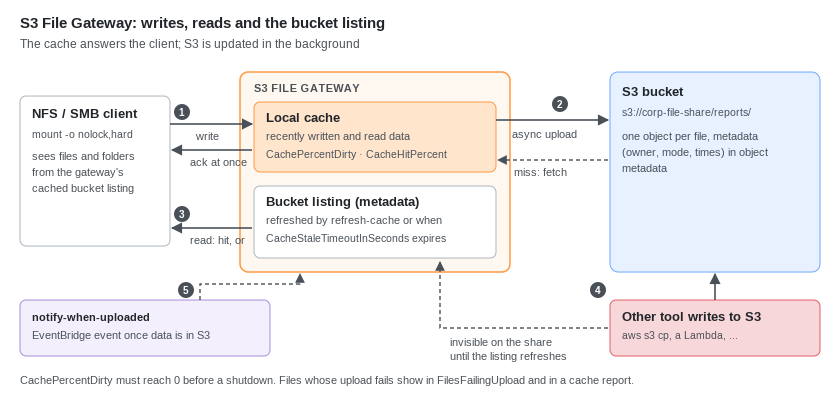
- Each file becomes one S3 object with the same key (the share path), and file metadata (owner, group, permissions, timestamps) goes into S3 object metadata.
- A file share maps to one bucket (optionally a prefix, in the
--location-arn). Several shares can use the same bucket only with non-overlapping prefixes. - The gateway needs an IAM role it can assume (
storagegateway.amazonaws.com) withs3:GetObject,PutObject,DeleteObject,ListBucketand the multipart actions on the bucket. - Storage classes for new objects:
S3_STANDARD(default),S3_INTELLIGENT_TIERING,S3_STANDARD_IA,S3_ONEZONE_IA. Lifecycle rules can move objects further (Glacier), but the gateway then cannot read them until they are restored. - No NFS file locking: always mount with
nolock. A rename is a copy and a delete in S3. Changes upload only the changed parts (multipart upload and copy), but every change writes a new object, or a new version when the bucket has versioning. - Add a bucket lifecycle rule with
AbortIncompleteMultipartUpload: parts of an upload interrupted by a host or network failure can stay in the bucket and cost money. - Versioning and S3 Object Lock work with the gateway. On a bucket with Object Lock (WORM), a client can still edit, rename or delete a file: the gateway writes a new version or a delete marker, and the locked version stays. Without a lock, versioning keeps the old versions the same way. Expect extra versions: an SMB write uploads the data and then the metadata, which is two versions of the object.
- Buckets in another account work too: the bucket owner grants the gateway’s role access in the bucket policy, the role also needs
s3:GetObjectAclands3:PutObjectAcl, and the share sets--object-acl bucket-owner-full-controlso the owner can read what the gateway writes.
NFS File Share
aws storagegateway create-nfs-file-share --client-token nfs-reports-1 \
  --gateway-arn <gateway-arn> --role arn:aws:iam::<account-id>:role/StorageGatewayS3Access \
  --location-arn arn:aws:s3:::corp-file-share/reports/ --file-share-name reports \
  --client-list 10.10.0.0/16 --squash RootSquash \
  --default-storage-class S3_INTELLIGENT_TIERING --encryption-type SseS3 \
  --cache-attributes CacheStaleTimeoutInSeconds=3600 \
  --notification-policy '{"Upload":{"SettlingTimeInSeconds":60}}'
# Linux client (hard mount, no locking)
sudo mount -t nfs -o nolock,hard <gateway-ip>:/reports /mnt/reports
--squash is RootSquash (default), NoSquash or AllSquash. --client-list takes IPs or CIDR blocks allowed to mount (default 0.0.0.0/0).
SMB File Share
# Join Active Directory first (or use guest access instead)
aws storagegateway join-domain --gateway-arn <gateway-arn> --domain-name corp.example.com \
  --organizational-unit "OU=Gateways,DC=corp,DC=example,DC=com" \
  --user-name svc-storagegw --password '<password>'

aws storagegateway create-smb-file-share --client-token smb-finance-1 \
  --gateway-arn <gateway-arn> --role arn:aws:iam::<account-id>:role/StorageGatewayS3Access \
  --location-arn arn:aws:s3:::corp-file-share/finance/ --file-share-name finance \
  --authentication ActiveDirectory --smbacl-enabled --access-based-enumeration \
  --valid-user-list @Finance --admin-user-list @Admins \
  --audit-destination-arn arn:aws:logs:eu-central-1:<account-id>:log-group:/storagegateway/audit

# Guest access instead of AD (workgroup)
aws storagegateway set-smb-guest-password --gateway-arn <gateway-arn> --password '<password>'
aws storagegateway describe-smb-settings --gateway-arn <gateway-arn>
# Windows client
net use S: \\<gateway-ip>\finance
--smbacl-enabled stores Windows ACLs on the objects; without it the share uses POSIX-style permissions. Groups in the user lists start with @.
See Objects Written Directly to S3
The gateway lists the bucket and caches that listing. Objects that other tools write straight into S3 are not visible on the share until the listing is refreshed:
# Refresh now: whole share, or only some folders
aws storagegateway refresh-cache --file-share-arn <file-share-arn>
aws storagegateway refresh-cache --file-share-arn <file-share-arn> --folder-list /incoming /exports --no-recursive

# Or refresh automatically when a directory is read after the TTL (300 s to 2,592,000 s)
aws storagegateway update-nfs-file-share --file-share-arn <file-share-arn> \
  --cache-attributes CacheStaleTimeoutInSeconds=300
refresh-cacheonly starts the refresh. At most two can run at once (a third fails withInvalidGatewayRequestException); wait at least 60 seconds between calls and use the refresh-complete EventBridge event to know when it finished.- A short TTL means more S3
LISTrequests on every directory read, which shows up on the S3 bill. - The refresh updates the listing only; it does not download data. Do not write the same object from S3 and from the share: there is no locking between them, and the last writer wins.
Know When Files Are in S3
# EventBridge "Notify When Uploaded" event once everything written before this call is in S3
aws storagegateway notify-when-uploaded --file-share-arn <file-share-arn>
With a share --notification-policy '{"Upload":{"SettlingTimeInSeconds":60}}' the gateway also sends a per-file Object Upload Complete event 60 seconds after the last write to a file. Use them to start
downstream jobs (Lambda, Step Functions) instead of polling S3.
List, Update and Delete Shares
aws storagegateway list-file-shares --gateway-arn <gateway-arn> \
  --query 'FileShareInfoList[].{ARN:FileShareARN,Type:FileShareType,Status:FileShareStatus}' --output table
aws storagegateway describe-nfs-file-shares --file-share-arn-list <file-share-arn>
aws storagegateway describe-smb-file-shares --file-share-arn-list <file-share-arn>

aws storagegateway update-nfs-file-share --file-share-arn <file-share-arn> --read-only
aws storagegateway update-smb-file-share --file-share-arn <file-share-arn> --default-storage-class S3_STANDARD_IA

# Bucket in another account: give the bucket owner full control of new objects
aws storagegateway update-nfs-file-share --file-share-arn <file-share-arn> --object-acl bucket-owner-full-control

# Delete the share; the S3 objects stay. --force-delete abandons data not yet uploaded
aws storagegateway delete-file-share --file-share-arn <file-share-arn>
Files Failing Upload
When FilesFailingUpload is above 0 (permissions, KMS key, bucket policy, object lock), find out which files and why:
# CSV report of the cached files that fail upload, written to an S3 bucket
aws storagegateway start-cache-report --file-share-arn <file-share-arn> \
  --role arn:aws:iam::<account-id>:role/StorageGatewayReports \
  --location-arn arn:aws:s3:::corp-sgw-reports --bucket-region eu-central-1 \
  --inclusion-filters 'Name=UploadFailureReason,Values=S3AccessDenied,InaccessibleStorageClass,ObjectMissing' \
  --client-token cache-report-1
aws storagegateway list-cache-reports \
  --query 'CacheReportList[].{ARN:CacheReportARN,Status:CacheReportStatus,Progress:ReportCompletionPercent}'

# Last resort: drop the failing files from the cache (with --force-remove their data is lost)
aws storagegateway evict-files-failing-upload --file-share-arn <file-share-arn>
Volume Gateway
| Cached volumes | Stored volumes | |
|---|---|---|
| Primary data | In AWS (S3, not visible as objects) | On premises, on a disk you give the gateway |
| Local storage | Cache of recently used data + upload buffer | Whole volume + upload buffer |
| Volume size | 1 GiB to 32 TiB, in whole GiB | 1 GiB to 16 TiB, in whole GiB |
| Total per gateway | 32 volumes, 1,024 TiB | 32 volumes, 512 TiB |
| Read latency | Low for cached data, slower on a miss | Always local |
| Backups | EBS snapshots (incremental, compressed) | EBS snapshots (incremental, compressed) |
| Restore | New cached volume, or an EBS volume on EC2 (only from snapshots of volumes up to 16 TiB) | New volume on the gateway (data downloaded), or an EBS volume |
Create Volumes
# Network interface the iSCSI target listens on
aws storagegateway describe-gateway-information --gateway-arn <gateway-arn> \
  --query 'GatewayNetworkInterfaces[].Ipv4Address' --output text

# Cached volume, 1 TiB, encrypted with your KMS key
aws storagegateway create-cached-iscsi-volume --gateway-arn <gateway-arn> \
  --volume-size-in-bytes 1099511627776 --target-name app-data \
  --network-interface-id 10.10.1.50 --client-token vol-app-data-1 \
  --kms-encrypted --kms-key arn:aws:kms:eu-central-1:<account-id>:key/<key-id>

# Cached volume from a snapshot (can be larger than the original)
aws storagegateway create-cached-iscsi-volume --gateway-arn <gateway-arn> \
  --volume-size-in-bytes 2199023255552 --snapshot-id <snapshot-id> \
  --target-name app-data-restore --network-interface-id 10.10.1.50 --client-token vol-restore-1

# Stored volume on a local disk, keeping the data already on it
aws storagegateway create-stored-iscsi-volume --gateway-arn <gateway-arn> \
  --disk-id <disk-id> --preserve-existing-data --target-name db-data \
  --network-interface-id 10.10.1.50
Volumes cannot be resized. To grow one, snapshot it and create a bigger volume from the snapshot.
Connect from Linux (iSCSI)
sudo iscsiadm --mode discovery --type sendtargets --portal <gateway-ip>:3260
sudo iscsiadm --mode node --targetname iqn.1997-05.com.amazon:app-data --portal <gateway-ip>:3260,1 --login
lsblk                         # the volume appears as a new disk, e.g. /dev/sdb
# Optional CHAP authentication for one initiator
aws storagegateway update-chap-credentials --target-arn <volume-arn>/target/iqn.1997-05.com.amazon:app-data \
  --initiator-name iqn.1994-05.com.redhat:app01 \
  --secret-to-authenticate-initiator '<12-16-char-secret>'
aws storagegateway list-volume-initiators --volume-arn <volume-arn>
Snapshots and Recovery
# On-demand snapshot (becomes an EBS snapshot)
aws storagegateway create-snapshot --volume-arn <volume-arn> --snapshot-description "before upgrade"

# Schedule: every 24 hours starting at 01:00 gateway time
aws storagegateway update-snapshot-schedule --volume-arn <volume-arn> \
  --start-at 1 --recurrence-in-hours 24 --description "daily"
aws storagegateway describe-snapshot-schedule --volume-arn <volume-arn>

# Find the snapshots
aws ec2 describe-snapshots --owner-ids self --filters Name=description,Values="before upgrade" \
  --query 'Snapshots[].{Id:SnapshotId,Size:VolumeSize,Start:StartTime,State:State}'

# Cached volumes: snapshot from the latest recovery point (for an unreachable gateway)
aws storagegateway list-volume-recovery-points --gateway-arn <gateway-arn>
aws storagegateway create-snapshot-from-volume-recovery-point --volume-arn <volume-arn> \
  --snapshot-description "dr copy"

# Restore in AWS: an EBS volume from the gateway snapshot, attached to an EC2 instance
aws ec2 create-volume --snapshot-id <snapshot-id> --availability-zone eu-central-1a --volume-type gp3
--recurrence-in-hours is between 1 and 24. Volume Gateway volumes can also be backed up with AWS Backup.
List and Delete
aws storagegateway list-volumes --gateway-arn <gateway-arn> \
  --query 'VolumeInfos[].{ARN:VolumeARN,Type:VolumeType,GiB:VolumeSizeInBytes,Status:VolumeAttachmentStatus}' --output table
aws storagegateway describe-cached-iscsi-volumes --volume-arns <volume-arn>
aws storagegateway describe-stored-iscsi-volumes --volume-arns <volume-arn>

# Move a volume to another gateway: detach, then attach
aws storagegateway detach-volume --volume-arn <volume-arn>
aws storagegateway attach-volume --gateway-arn <other-gateway-arn> --volume-arn <volume-arn> \
  --network-interface-id 10.10.2.50 --target-name app-data

aws storagegateway delete-volume --volume-arn <volume-arn>
Tape Gateway
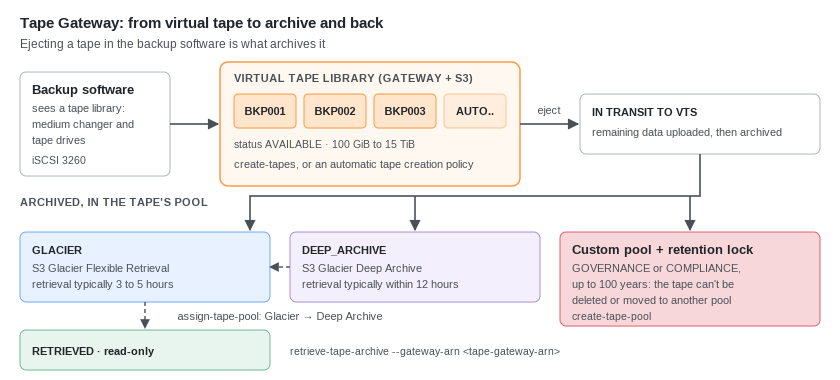
Pools and Retention Lock
| Pool | Archived in | Retrieval |
|---|---|---|
GLACIER |
S3 Glacier Flexible Retrieval | Typically 3-5 hours |
DEEP_ARCHIVE |
S3 Glacier Deep Archive | Typically within 12 hours |
| Custom pool | Either of the above, plus optional tape retention lock | Same |
# Custom pool: tapes locked for 7 years in compliance mode once archived
aws storagegateway create-tape-pool --pool-name backups-7y --storage-class DEEP_ARCHIVE \
  --retention-lock-type COMPLIANCE --retention-lock-time-in-days 2555
aws storagegateway list-tape-pools \
  --query 'PoolInfos[].{Name:PoolName,ARN:PoolARN,Class:StorageClass,Lock:RetentionLockType,Days:RetentionLockTimeInDays}'
- Compliance locks cannot be removed by anyone until they expire. Governance locks can be bypassed with the
storagegateway:BypassGovernanceRetentionpermission. A pool’s lock settings cannot be changed later. - Retention lock protects archived tapes. For tapes that must not be overwritten while still in the library, create them as WORM tapes (
--worm). - A tape archived in Glacier Flexible Retrieval can later be moved to Deep Archive with
assign-tape-pool.
Create and Use Tapes
# Five 2.5 TiB tapes with barcodes starting with BKP, in the custom pool
aws storagegateway create-tapes --gateway-arn <gateway-arn> \
  --tape-size-in-bytes 2748779069440 --num-tapes-to-create 5 \
  --tape-barcode-prefix BKP --pool-id <pool-arn-or-GLACIER> --client-token tapes-bkp-1

# Or let the gateway keep 10 blank tapes available
aws storagegateway update-automatic-tape-creation-policy --gateway-arn <gateway-arn> \
  --automatic-tape-creation-rules '[{"TapeBarcodePrefix":"AUTO","PoolId":"DEEP_ARCHIVE","TapeSizeInBytes":2748779069440,"MinimumNumTapes":10}]'

aws storagegateway list-tapes --query 'TapeInfos[].{Barcode:TapeBarcode,Status:TapeStatus,GiB:TapeSizeInBytes,Pool:PoolId}' --output table
aws storagegateway describe-tapes --gateway-arn <gateway-arn> \
  --query 'Tapes[].{Barcode:TapeBarcode,Status:TapeStatus,Used:TapeUsedInBytes,Progress:Progress}'

# The iSCSI devices your backup server connects to (medium changer and tape drives)
aws storagegateway describe-vtl-devices --gateway-arn <gateway-arn> \
  --query 'VTLDevices[].{Type:VTLDeviceType,Target:DeviceiSCSIAttributes.TargetARN}'
Barcode prefixes are 1 to 4 uppercase letters; the gateway adds the rest. Tape sizes are between 100 GiB and 15 TiB, and only the data written to a tape is billed, so creating large tapes costs nothing extra.
# Tapes encrypted with your own KMS key (symmetric keys only) instead of SSE-S3
aws storagegateway create-tapes --gateway-arn <gateway-arn> \
  --tape-size-in-bytes 2748779069440 --num-tapes-to-create 5 --tape-barcode-prefix ENC \
  --kms-encrypted --kms-key arn:aws:kms:eu-central-1:<account-id>:key/<key-id> --client-token tapes-enc-1
Archive and Retrieve
# Archiving happens when the backup software EJECTS the tape (status ARCHIVED once uploaded)
aws storagegateway describe-tape-archives \
  --query 'TapeArchives[].{Barcode:TapeBarcode,Status:TapeStatus,Archived:CompletionTime,Pool:PoolId}'

# Bring an archived tape back to a gateway, read-only (hours, see the pool table)
aws storagegateway retrieve-tape-archive --tape-arn <tape-arn> --gateway-arn <gateway-arn>
aws storagegateway cancel-retrieval --gateway-arn <gateway-arn> --tape-arn <tape-arn>

# Delete a tape in the library / an archived tape (both irreversible)
aws storagegateway delete-tape --gateway-arn <gateway-arn> --tape-arn <tape-arn>
aws storagegateway delete-tape-archive --tape-arn <tape-arn>
- An archived tape can be retrieved to another Tape Gateway, on premises or on EC2, which is how you restore in another site. Once retrieved it stays with that gateway until it is archived again.
- Glacier Flexible Retrieval has a 90-day and Deep Archive a 180-day minimum storage charge: deleting an archived tape earlier is billed for the rest.
retrieve-tape-recovery-pointrecovers a tape from its last recovery point when a gateway is unreachable.
Monitoring
| Metric | What to watch |
|---|---|
CachePercentDirty |
Share of the cache not yet uploaded. Rising steadily means writes outrun the uplink; must be 0 before shutdown |
CacheHitPercent |
Reads served locally. Low values mean the cache is too small for the working set |
CachePercentUsed, CacheFree |
Cache fill |
UploadBufferPercentUsed |
Volume and Tape: a full buffer stops writes |
CloudBytesUploaded, CloudBytesDownloaded |
Traffic to and from AWS |
IoWaitPercent |
Slow local disks |
FilesFailingUpload, FileSharesUnavailable |
File share problems: permissions, KMS, bucket policy |
HealthNotifications, AvailabilityNotifications |
AWS-recommended alarms for every gateway type |
aws cloudwatch get-metric-statistics --namespace AWS/StorageGateway --metric-name CachePercentDirty \
  --dimensions Name=GatewayId,Value=<gateway-id> Name=GatewayName,Value=files-bucharest \
  --start-time 2026-11-02T00:00:00Z --end-time 2026-11-02T12:00:00Z --period 300 --statistics Maximum

# Which metrics a gateway publishes
aws cloudwatch list-metrics --namespace AWS/StorageGateway --dimensions Name=GatewayName,Value=files-bucharest \
  --query 'Metrics[].MetricName' --output text
With a CloudWatch log group set on the gateway you also get health logs and, for SMB shares with --audit-destination-arn, file access audit logs.
API calls are in CloudTrail.
Tips and Gotchas
- The cache is not storage. Size it for the working set and the burst of writes the uplink can’t absorb. A full cache slows writes to network speed.
- Never resize a cache disk. Add a new disk and
add-cache. Cache and upload buffer disks can’t be removed without recreating the gateway. - S3 File Gateway is not a shared file system with S3. Objects written straight to the bucket need
refresh-cacheor a TTL, and the same object should not be changed from both sides. - File shares are for files, not for databases or VM disk images that are rewritten in place all the time: every change becomes a new S3 object or version.
- Lifecycle to Glacier breaks reads. The share still lists archived objects, but reading them fails until they are restored.
- Use
nolock,hardfor NFS and SMB for Windows clients. - Plan maintenance. Updates restart the gateway in its maintenance window, and clients see a short outage.
- Use a VPC endpoint for private connectivity and remember the extra ports 1026-1028, 1031 and 2222.
- Check
CachePercentDirtybefore any shutdown, and keep the EC2 gateway on EBS cache disks, not instance store, unless losing unflushed writes is acceptable. - FSx File Gateway and the Hardware Appliance are closed to new customers. Plan new deployments on S3 File Gateway, Volume Gateway or Tape Gateway VMs.
- Deleting a gateway leaves the data and its bill: S3 objects, EBS snapshots and archived tapes stay until you delete them.