cloud-init Heredocs and Logging
Patterns for writing files with heredocs in cloud-init user-data, capturing script output in log files, and debugging what cloud-init ran. Every example below was booted with cloud-init 26.2 on Ubuntu 24.04.5 (NoCloud datasource), where /bin/sh is dash 0.5.12. For when bootcmd and runcmd run, see cloud-init: bootcmd vs runcmd.
How runcmd Runs Your Heredoc
A heredoc in runcmd passes through three layers before a file appears on disk, and each one has its own rules:
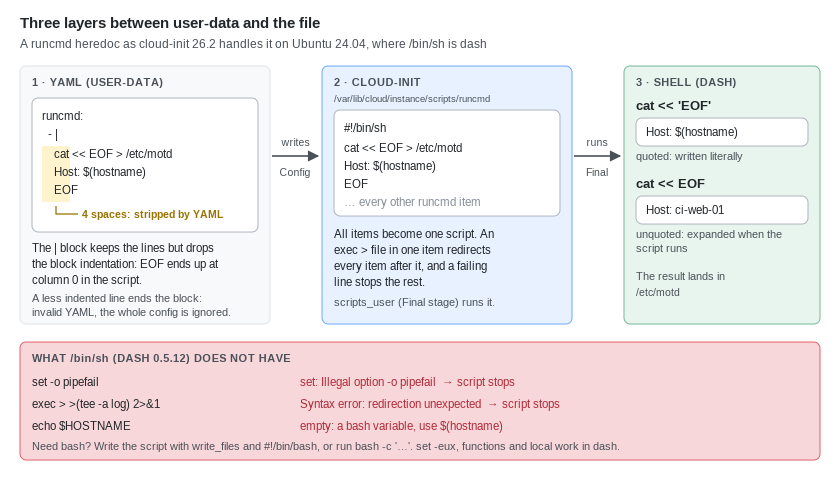
- YAML. The
|block scalar keeps the lines as they are and strips the indentation of the block, so the heredoc lines, including the closingEOF, start at column 0 in the script. - cloud-init. The
runcmdmodule (Config stage) writes all items into one script,/var/lib/cloud/instance/scripts/runcmd, and thescripts_usermodule (Final stage) runs it. The script starts with#!/bin/sh. - The shell. On Ubuntu
/bin/shisdash, not bash. A quoted delimiter ('EOF') keeps$VARand$(cmd)literal; an unquoted one expands them when the script runs.
This is the script cloud-init built from the first example below:
#!/bin/sh
cat << 'EOF' > /etc/myapp/config.yml
server:
  host: 0.0.0.0
  port: 8080
database:
  host: localhost
  name: myapp
EOF
Because it is dash, bash-only syntax fails, and a failure ends the whole script:
| In runcmd | Result under /bin/sh (dash 0.5.12) |
|---|---|
set -o pipefail |
set: Illegal option -o pipefail, script stops |
exec > >(tee -a /var/log/x.log) 2>&1 |
Syntax error: redirection unexpected, script stops |
$HOSTNAME |
Empty: it’s a bash variable, dash doesn’t set it. Use $(hostname) |
local rc=$? inside a function |
Works (dash supports local) |
When a script needs bash, write it with write_files and a #!/bin/bash line, or call bash explicitly. Both are shown below.
Heredocs in runcmd
Basic Heredoc to Create a File
#cloud-config
runcmd:
  - |
    mkdir -p /etc/myapp
    cat << 'EOF' > /etc/myapp/config.yml
    server:
      host: 0.0.0.0
      port: 8080
    database:
      host: localhost
      name: myapp
    EOF
Create the directory first. Without mkdir -p the first boot ended with cloud-init status reporting error and this in /var/log/cloud-init-output.log:
/var/lib/cloud/instance/scripts/runcmd: 2: cannot create /etc/myapp/config.yml: Directory nonexistent
Heredoc with Variable Expansion
#cloud-config
runcmd:
  - |
    HOSTNAME=$(hostname)
    INSTANCE_ID=$(cloud-init query instance-id)
    cat << EOF > /etc/motd
    ==========================================
    Hostname: ${HOSTNAME}
    Instance: ${INSTANCE_ID}
    Built:    $(date)
    ==========================================
    EOF
The unquoted EOF expands the variables and $(date) when the script runs: /etc/motd got the instance’s hostname, its instance ID from the datasource and the boot time. Setting HOSTNAME yourself is what makes it work under dash.
Heredoc Without Variable Expansion (Quoted EOF)
#cloud-config
runcmd:
  - |
    cat << 'EOF' > /usr/local/bin/health-check.sh
    #!/bin/bash
    STATUS=$(curl -s -o /dev/null -w "%{http_code}" http://localhost:8080/health)
    if [ "$STATUS" != "200" ]; then
        echo "UNHEALTHY: HTTP $STATUS" | logger -t health-check
        exit 1
    fi
    EOF
    chmod +x /usr/local/bin/health-check.sh
With 'EOF' the script landed on disk exactly as written: $(curl ...) and $STATUS stay for the health check to evaluate later.
Appending with Heredoc
#cloud-config
runcmd:
  - |
    cat << 'EOF' >> /etc/sysctl.d/99-custom.conf
    net.core.somaxconn = 65535
    net.ipv4.tcp_max_syn_backlog = 65535
    vm.swappiness = 10
    EOF
    sysctl --system
sysctl net.core.somaxconn vm.swappiness returned 65535 and 10 afterwards. >> appends on every run: after a second instance boot and one manual re-run, each line was in the file three times. For a file you own completely, write it with > instead (see Appending Duplicates on Re-Run).
Logging Patterns
Redirect All Output to a Log File
#cloud-config
runcmd:
  - |
    exec > /var/log/cloud-init-custom.log 2>&1
    set -x
    echo "=== Starting custom setup at $(date) ==="
    apt-get update
    apt-get install -y nginx
    systemctl enable nginx
    echo "=== Completed at $(date) ==="
Everything, including the set -x trace, went to the file; cloud-init-output.log got nothing from runcmd. The trace shows the command substitution too:
+ date
+ echo === Starting custom setup at Wed Nov 25 15:00:59 EET 2026 ===
=== Starting custom setup at Wed Nov 25 15:00:59 EET 2026 ===
+ apt-get update
Note:
exec >changes the output of the whole script, and allruncmditems are one script. In a test with three items, anexec > /var/log/item2.log 2>&1in the second item sent the third item’s output toitem2.logas well; only the first item reachedcloud-init-output.log. Put theexecin the last item, or in awrite_filesscript, if other items should still log to the console.
Log Individual Commands
#cloud-config
runcmd:
  - echo "Starting package install" | tee -a /var/log/setup.log
  - apt-get update >> /var/log/setup.log 2>&1
  - apt-get install -y nginx >> /var/log/setup.log 2>&1
  - echo "Package install done" | tee -a /var/log/setup.log
Only the two tee lines reached cloud-init-output.log; the apt output went to the file only.
Structured Logging Function
#cloud-config
runcmd:
  - |
    LOG_FILE="/var/log/cloud-init-custom.log"

    log() {
        echo "[$(date '+%Y-%m-%d %H:%M:%S')] $*" | tee -a "$LOG_FILE"
    }

    log "Starting instance configuration"
    log "Installing packages..."
    apt-get update -qq >> "$LOG_FILE" 2>&1
    apt-get install -y nginx certbot >> "$LOG_FILE" 2>&1
    log "Packages installed"

    log "Configuring nginx..."
    systemctl enable --now nginx >> "$LOG_FILE" 2>&1
    log "Configuration complete"
The five log lines appear both in the file and in cloud-init-output.log. Shell functions work in dash.
Logging with Exit Status
#cloud-config
runcmd:
  - |
    LOG="/var/log/cloud-init-custom.log"

    run_cmd() {
        echo "[$(date '+%H:%M:%S')] Running: $*" >> "$LOG"
        "$@" >> "$LOG" 2>&1
        local rc=$?
        if [ $rc -ne 0 ]; then
            echo "[$(date '+%H:%M:%S')] FAILED (exit $rc): $*" >> "$LOG"
        else
            echo "[$(date '+%H:%M:%S')] OK: $*" >> "$LOG"
        fi
        return $rc
    }

    run_cmd apt-get update
    run_cmd apt-get install -y docker.io
    run_cmd systemctl enable docker
    run_cmd systemctl start docker
The log from the test boot:
[15:01:16] Running: apt-get update
[15:01:17] OK: apt-get update
[15:01:17] Running: apt-get install -y docker.io
[15:01:23] OK: apt-get install -y docker.io
[15:01:23] Running: systemctl enable docker
[15:01:23] OK: systemctl enable docker
[15:01:23] Running: systemctl start docker
[15:01:23] OK: systemctl start docker
run_cmd returns the exit code but nothing stops on it: without set -e a failed step is logged and the script carries on.
Cloud-Init Output Directive
The output directive controls where cloud-init sends the stdout and stderr of its stages, including everything runcmd prints. The default on Ubuntu is all: "| tee -a /var/log/cloud-init-output.log".
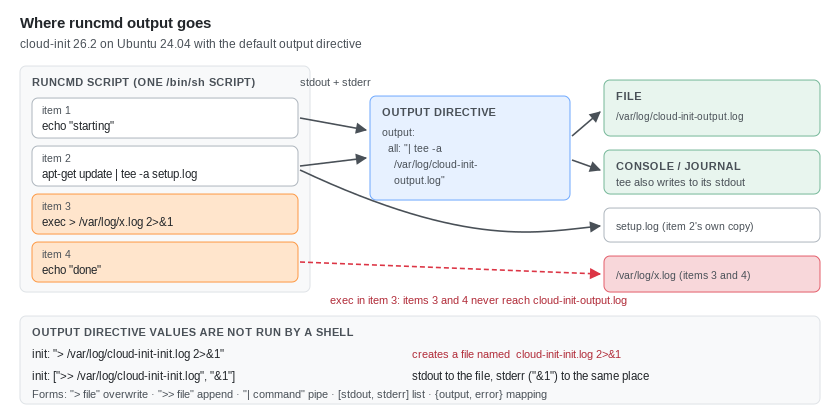
A value is not run by a shell. It takes three forms: "> file" (overwrite), ">> file" (append) or "| command" (pipe), as a string for both streams, a [stdout, stderr] list where "&1" means “the same as stdout”, or an output:/error: mapping:
#cloud-config
output:
  init: [">> /var/log/cloud-init-init.log", "&1"]
  config: [">> /var/log/cloud-init-config.log", "&1"]
  final:
    output: "| tee -a /var/log/cloud-init-final.log"
    error: ">> /var/log/cloud-init-final-errors.log"
Don’t write shell redirections such as 2>&1 into a value: init: "> /var/log/cloud-init-init.log 2>&1" created files literally named cloud-init-init.log 2>&1 and cloud-init-config.log 2>&1:
-rw-r--r--   1 root      root               116 Nov 25 15:02 cloud-init-config.log 2>&1
-rw-r--r--   1 root      root                 0 Nov 25 15:02 cloud-init-init.log 2>&1
What else the test showed:
- The init log stays (almost) empty. The Network stage reads user-data partway through, so everything before that is already in
cloud-init-output.log, followed byStdout, stderr changing to (>> /var/log/cloud-init-init.log, &1). Only output after that point (frombootcmd, for example) reaches the new file. | teeon the error stream duplicates it. Witherror: "| tee -a /var/log/cloud-init-final-errors.log", a line printed to stderr ended up in the errors file and incloud-init-final.log, becauseteealso writes to its own stdout. Use>>for the error stream.
Default Log Locations
| File | Contents |
|---|---|
/var/log/cloud-init.log |
Detailed cloud-init execution log (debug) |
/var/log/cloud-init-output.log |
stdout/stderr of the stages, including runcmd and bootcmd |
/var/lib/cloud/instance/scripts/runcmd |
The script cloud-init built from your runcmd items |
/run/cloud-init/ |
Runtime data (current boot) |
/var/lib/cloud/instance/ |
Instance-specific data and semaphores |
/var/lib/cloud/data/ |
Persistent metadata |
write_files with Heredoc-Style Content
write_files writes content as is: nothing expands, and a heredoc inside the content is only run later, by whoever runs the file. Scripts written this way choose their own shell, so #!/bin/bash and set -euo pipefail are fine here.
#cloud-config
write_files:
  # Script with bash heredoc inside it
  - path: /usr/local/bin/setup-db.sh
    permissions: '0755'
    content: |
      #!/bin/bash
      set -euo pipefail
      exec > /var/log/db-setup.log 2>&1

      echo "Creating database..."
      mysql -u root << 'SQL'
      CREATE DATABASE IF NOT EXISTS myapp;
      CREATE USER IF NOT EXISTS 'appuser'@'localhost' IDENTIFIED BY 'secret';
      GRANT ALL ON myapp.* TO 'appuser'@'localhost';
      FLUSH PRIVILEGES;
      SQL

      echo "Database setup complete"

  # Systemd unit file
  - path: /etc/systemd/system/myapp.service
    content: |
      [Unit]
      Description=My Application
      After=network.target

      [Service]
      Type=simple
      ExecStart=/usr/local/bin/myapp
      Restart=always
      StandardOutput=append:/var/log/myapp.log
      StandardError=append:/var/log/myapp-error.log

      [Install]
      WantedBy=multi-user.target

  # Logrotate config
  - path: /etc/logrotate.d/cloud-init-custom
    content: |
      /var/log/cloud-init-custom.log {
          daily
          rotate 7
          compress
          missingok
          notifempty
      }
All three files were written with the indentation stripped (setup-db.sh with mode 0755, the other two 0644). write_files only writes setup-db.sh; run it from runcmd or by hand.
Script with Full Logging Template
A file in /var/lib/cloud/scripts/per-instance/ runs once per instance in the Final stage, and write_files (Network stage) has written it by then, so it runs on the same boot. With #!/bin/bash, process substitution works:
#cloud-config
write_files:
  - path: /var/lib/cloud/scripts/per-instance/setup.sh
    permissions: '0755'
    content: |
      #!/bin/bash
      set -euo pipefail

      LOG="/var/log/instance-setup.log"
      exec > >(tee -a "$LOG") 2>&1

      echo "=========================================="
      echo "Instance Setup Started: $(date)"
      echo "Hostname: $(hostname)"
      echo "Instance ID: $(cloud-init query instance-id)"
      echo "=========================================="

      # Install packages
      echo "[STEP 1] Installing packages..."
      apt-get update -qq
      apt-get install -y nginx certbot python3-certbot-nginx

      # Configure
      echo "[STEP 2] Configuring nginx..."
      cat << 'NGINX' > /etc/nginx/sites-available/default
      server {
          listen 80 default_server;
          server_name _;
          root /var/www/html;
          index index.html index.nginx-debian.html;
      }
      NGINX
      systemctl restart nginx

      # Verify
      echo "[STEP 3] Verifying..."
      curl -s -o /dev/null -w "%{http_code}" http://localhost/ | grep -q 200 && \
          echo "OK: nginx responding" || echo "FAIL: nginx not responding"

      echo "=========================================="
      echo "Instance Setup Complete: $(date)"
      echo "=========================================="
Keep index.nginx-debian.html in the index line, or put your own index.html in /var/www/html: Ubuntu’s nginx package ships only index.nginx-debian.html. With index index.html; alone, nginx answered HTTP 403 and the script logged FAIL: nginx not responding.
Debugging Cloud-Init
View Logs
# Main cloud-init log
sudo cat /var/log/cloud-init.log

# Script output
sudo cat /var/log/cloud-init-output.log

# Tail in real-time during boot
sudo tail -f /var/log/cloud-init-output.log

# Filter for errors
sudo grep -i "error\|fail\|traceback" /var/log/cloud-init.log

# The script cloud-init built from runcmd
sudo cat /var/lib/cloud/instance/scripts/runcmd
Check Status
# Overall status
cloud-init status
cloud-init status --long

# Wait for cloud-init to finish
cloud-init status --wait
status --long lists errors and recoverable_errors; check both: user-data that isn’t valid YAML shows up only under recoverable_errors, with status: done (see Indentation in YAML).
Validate User Data
# Check user data syntax before deploying
cloud-init schema --config-file userdata.yaml

# Check what the running instance received
sudo cloud-init schema --system

# View rendered user data on a running instance
sudo cloud-init query userdata

# View what cloud-init received
sudo cat /var/lib/cloud/instance/user-data.txt
Re-Run for Testing
# Rebuild the runcmd script from the current user-data (runs nothing)
sudo cloud-init single --name runcmd --frequency always

# Run the runcmd script again
sudo cloud-init single --name scripts_user --frequency always

# Clean and re-run everything (testing only)
sudo cloud-init clean --reboot
single --name runcmd only writes /var/lib/cloud/instance/scripts/runcmd: in the test, the appending example added nothing. single --name scripts_user executes the script and added its three lines again.
Heredoc Content Invisible in Logs
The Problem
set -x only traces the command itself, not heredoc content. When you run:
set -x
cat << 'EOF' > /etc/config.yml
database:
  host: localhost
  port: 5432
EOF
The log only shows:
+ cat
You don’t see the actual content being written, making debugging difficult.
Strategy 1: Echo Before/After (Minimal)
echo "Writing configuration to /etc/myapp/config.yml"
cat << 'EOF' > /etc/myapp/config.yml
database:
  host: localhost
  port: 5432
EOF
echo "Configuration written successfully"
Strategy 2: Write Then Display (Recommended)
cat << 'EOF' > /etc/myapp/config.yml
database:
  host: localhost
  port: 5432
  name: myapp
EOF
echo "=== /etc/myapp/config.yml ==="
cat /etc/myapp/config.yml
echo "=== End ==="
This shows the exact file content in the logs, verifies the write succeeded, and reveals any variable interpolation issues.
Strategy 3: Using tee (Simultaneous Write + Display)
cat << 'EOF' | tee /etc/systemd/system/myapp.service
[Unit]
Description=My Service
After=network.target

[Service]
Type=simple
ExecStart=/usr/bin/myapp

[Install]
WantedBy=multi-user.target
EOF
Content is displayed as it’s written — visible in /var/log/cloud-init-output.log.
Strategy 4: Capture into Variable First
CONFIG_CONTENT=$(cat << 'EOF'
database:
  host: localhost
  port: 5432
EOF
)
echo "Writing content:"
echo "$CONFIG_CONTENT"
echo "$CONFIG_CONTENT" > /etc/myapp/config.yml
Strategy Comparison
| Strategy | Content Visible | Verifies Write | Complexity | Best For |
|---|---|---|---|---|
| Echo Before/After | No | No | Simple | Quick operations |
| Write Then Display | Yes | Yes | Simple | Cloud-init debugging |
| tee | Yes | Implicit | Simple | Interactive scripts |
| Capture into Variable | Yes | No | Medium | Small configs |
All four run under dash. Create /etc/myapp first, as in the first example.
Recommended Pattern for Cloud-Init
#cloud-config
write_files:
  - path: /etc/myapp/app.env
    content: |
      DB_HOST=db.internal
runcmd:
  - |
    set -eux
    . /etc/myapp/app.env
    cat << EOF > /etc/myapp/config.yml
    database:
      host: ${DB_HOST}
      port: 5432
    EOF
    echo "=== /etc/myapp/config.yml ==="
    cat /etc/myapp/config.yml
    echo "=== End ==="
set -eux, notset -euo pipefail:dashhas nopipefail, andruncmdstopped right there withset: Illegal option -o pipefail.cat << EOFwithout quotes, so${DB_HOST}expands. With'EOF'the file gets the literal text${DB_HOST}.write_filesruns beforeruncmd, so the value can come from a file it wrote (or from instance metadata throughcloud-init query). Withset -u, an unset variable stops the script instead of writing an empty value.
In /var/log/cloud-init-output.log, the trace shows + cat for the heredoc and the cat afterwards shows the expanded result:
+ . /etc/myapp/app.env
+ DB_HOST=db.internal
+ cat
+ echo === /etc/myapp/config.yml ===
=== /etc/myapp/config.yml ===
+ cat /etc/myapp/config.yml
database:
  host: db.internal
  port: 5432
+ echo === End ===
=== End ===
Common Pitfalls
Indentation in YAML
#cloud-config
runcmd:
  # WRONG — heredoc content must be part of the | block
  - |
    cat << 'EOF' > /tmp/test.txt
  content here    # This is OUTSIDE the block because of indentation
    EOF

  # CORRECT — maintain consistent indentation
  - |
    cat << 'EOF' > /tmp/test.txt
    content here
    EOF
A less indented line ends the block, and the rest is no longer valid YAML. cloud-init schema --config-file userdata.yaml reports it:
Error: Cloud config schema errors: format-l6.c3: File userdata.yaml is not valid YAML. while scanning a simple key
  in "<unicode string>", line 6, column 3:
      content here    # This is OUTSID ...
      ^
could not find expected ':'
At boot it’s worse than a failed command: cloud-init ignored the whole cloud-config, nothing in runcmd ran, and cloud-init status still said done. The only trace is a recoverable error in status --long: Failed loading yaml blob. Invalid format at line 6 column 3.
Quoting EOF vs Unquoted
#cloud-config
runcmd:
  # Quoted 'EOF' — NO variable expansion (writes the literal $(hostname))
  - |
    cat << 'EOF' > /tmp/no-expand.txt
    Host is $(hostname)
    EOF

  # Unquoted EOF — expanded when the script runs
  - |
    cat << EOF > /tmp/expanded.txt
    Host is $(hostname)
    EOF
Use $(hostname), not $HOSTNAME: with $HOSTNAME, the unquoted version wrote Host is and nothing else, because dash doesn’t set that variable.
Special Characters in YAML
#cloud-config
runcmd:
  # Colons in content need the | block scalar
  - |
    echo "key: value" > /tmp/test.yaml

  # WRONG — YAML interprets the colon
  # - echo "key: value" > /tmp/test.yaml
: (colon and space) turns the plain line into a mapping, {'echo "key': 'value" > /tmp/test.yaml'}. cloud-init schema rejects it (is not of type 'string'), and at boot the whole runcmd module failed, so none of the items ran, not even the one before it. The test user-data:
#cloud-config
runcmd:
  - touch /tmp/first-item-ran
  - echo "key: value" > /tmp/test.yaml
  - touch /tmp/third-item-ran
No file was created, cloud-init status said error, and status --long showed:
- ('runcmd', TypeError('Failed to shellify [\'touch /tmp/first-item-ran\', {\'echo "key\': \'value" > /tmp/test.yaml\'}, \'touch /tmp/third-item-ran\'] into file /var/lib/cloud/instances/i-colon/scripts/runcmd'))
tee vs Redirect
#cloud-config
runcmd:
  # tee writes to file AND stdout (visible in cloud-init-output.log)
  - echo "Setup starting" | tee /var/log/setup.log

  # Redirect only writes to file (silent in cloud-init-output.log)
  - echo "Setup starting" > /var/log/setup.log

  # tee -a appends instead of overwriting
  - echo "Step complete" | tee -a /var/log/setup.log
Appending Duplicates on Re-Run
runcmd runs once per instance, but a new instance ID (an image built from this instance, a cloned VM) or a manual cloud-init single --name scripts_user runs it again, and every >> appends again. For a file you own, write it whole with > (a drop-in such as /etc/sysctl.d/99-custom.conf is perfect for that); append to a shared file only behind a check:
grep -qxF 'vm.swappiness = 10' /etc/sysctl.conf || echo 'vm.swappiness = 10' >> /etc/sysctl.conf
exec Redirects the Rest of runcmd
An exec > file 2>&1 in one item applies to every later item too, because they share one script (see Redirect All Output to a Log File).
Quick Reference
| Goal | Pattern |
|---|---|
| Create file from heredoc | mkdir -p /dir && cat << 'EOF' > /dir/file … EOF |
| Expand variables in heredoc | cat << EOF > /path/file (unquoted); $(hostname), not $HOSTNAME |
Shell runcmd runs in |
/bin/sh (dash on Ubuntu): no pipefail, no >(...) |
| Stop on errors in runcmd | set -eux |
| Log all output | exec > /var/log/file.log 2>&1 (applies to all later runcmd items) |
| Log + show on console | exec > >(tee -a /var/log/file.log) 2>&1 in a #!/bin/bash script, or cmd 2>&1 \| tee -a /var/log/file.log per command |
| Timestamped logging | Function with date + tee |
| Redirect cloud-init output | output: directive: ">> file", "\| cmd", [stdout, stderr] with "&1" |
| View script output | /var/log/cloud-init-output.log |
| See the generated script | /var/lib/cloud/instance/scripts/runcmd |
| View cloud-init debug | /var/log/cloud-init.log |
| Validate config | cloud-init schema --config-file file.yaml |
| Re-run the runcmd commands | cloud-init single --name scripts_user --frequency always |