S3 Lifecycle Policies: Transitions, Expiration, Versions and the Rules That Surprise You
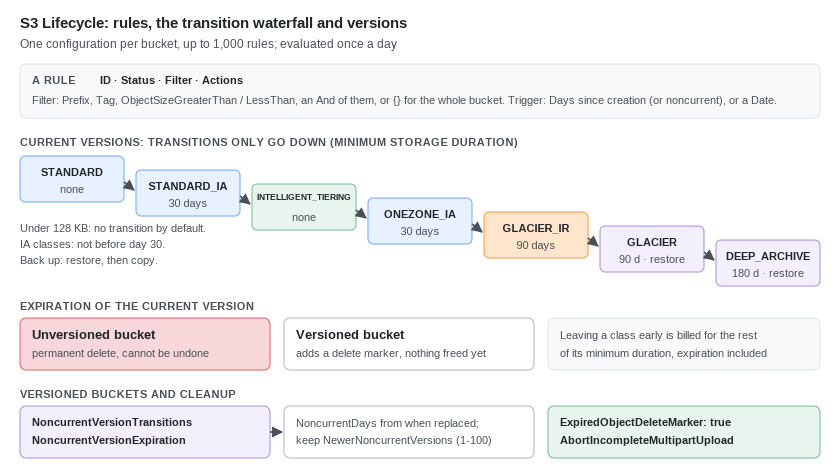
An S3 Lifecycle configuration is a set of rules on a bucket that tells S3 to move objects to a cheaper storage class (transition) or delete them (expiration) as they age, without you running a job. This article covers how the rules are built, which transitions are allowed, what the small-object and minimum-duration rules cost you, how versioned buckets behave, and the edge cases that make a rule seem not to work. The lifecycle section of the AWS S3 Cheatsheet is the quick version.
The facts come from the Amazon S3 User Guide, the CloudTrail User Guide, AWS Knowledge Center pages and the AWS Storage Blog. The commands were checked with AWS CLI 2.39.3. Prices are left out on purpose: they change and differ by Region, so read them from the S3 pricing page. Bucket names are placeholders.
1. The Short Version
| Question | Answer |
|---|---|
| What is it? | Rules on a bucket: a filter (which objects) plus actions (transition, expire, clean up) at a given age or date |
| Limits | One configuration per bucket, up to 1,000 rules (not adjustable). Rule ID up to 255 characters |
| Direction | Transitions only go down the waterfall, never back up. Going back needs a restore and a copy |
| Small objects | Since September 2024, objects under 128 KB do not transition by default. An object size filter overrides this |
| Minimum durations | Standard-IA and One Zone-IA 30 days, Glacier Instant and Flexible Retrieval 90 days, Deep Archive 180 days. Leaving early is charged for the remainder |
| Timing | Rules are evaluated once a day and run asynchronously. Dates round up to midnight UTC |
| Existing objects | A new rule applies to existing objects too, so an old bucket can see mass deletion on day one |
| Expiration in a versioned bucket | Adds a delete marker. It does not free storage by itself. Use the noncurrent version actions |
| Replication | Lifecycle rules are not replicated. Set them on each bucket. Objects with PENDING or FAILED replication are skipped |
| Biggest traps | Expiration is permanent in an unversioned bucket, transitions cost per object, a bucket policy cannot stop a lifecycle delete, and the put call replaces every rule |
2. Anatomy of a Rule
A configuration is a list of rules. Each rule has an ID, a Status (Enabled or Disabled), a Filter and one or more actions.
| Part | Details |
|---|---|
| Filter | Exactly one of Prefix, Tag, ObjectSizeGreaterThan, ObjectSizeLessThan, or an And that combines them. An empty filter ({}) means the whole bucket |
And |
Combine one prefix, any number of tags (unique keys) and a size range. The size filters exclude the boundary value, and the lower bound must be smaller than the upper one |
| Sizes | In bytes |
| Actions | Transitions, Expiration, NoncurrentVersionTransitions, NoncurrentVersionExpiration, AbortIncompleteMultipartUpload, and Expiration.ExpiredObjectDeleteMarker |
| Trigger | A number of days since creation (or since becoming noncurrent), or a fixed date for current versions |
Filter notes:
- Write a prefix without a leading slash and normally with a trailing slash:
logs/, not/logs. A leading slash does not match. - A tag filter needs the key and the value to match. A key with no value only matches objects whose tag has an empty value.
- To cover two prefixes, write two rules. A filter has one prefix.
- The older top-level
Prefixis deprecated, so useFilter.
3. Transitions: the Waterfall
S3 storage classes form a one-way ladder. A lifecycle rule can only move an object down it.
| From | Allowed destinations through a lifecycle rule |
|---|---|
| Standard | Standard-IA, Intelligent-Tiering, One Zone-IA, Glacier Instant Retrieval, Glacier Flexible Retrieval, Glacier Deep Archive |
| Standard-IA | Intelligent-Tiering, One Zone-IA, Glacier Instant Retrieval, Glacier Flexible Retrieval, Glacier Deep Archive |
| Intelligent-Tiering | Depends on the object’s access tier: Frequent or Infrequent Access to One Zone-IA, Glacier Instant, Flexible Retrieval or Deep Archive; Archive Instant Access to Glacier Instant, Flexible Retrieval or Deep Archive; Archive Access to Flexible Retrieval or Deep Archive; Deep Archive Access to Deep Archive |
| One Zone-IA | Glacier Flexible Retrieval, Glacier Deep Archive |
| Glacier Instant Retrieval | Glacier Flexible Retrieval, Glacier Deep Archive |
| Glacier Flexible Retrieval | Glacier Deep Archive only |
| Glacier Deep Archive | Nowhere. It is a one-way transition |
The classes you are moving between, side by side:
| Storage class | Use case | Access | Minimum duration | Notes |
|---|---|---|---|---|
| S3 Standard | Frequently accessed data | Milliseconds | None | Multi-AZ, no retrieval fee. The starting class |
| S3 Intelligent-Tiering | Unknown or changing access patterns | Milliseconds in the Frequent, Infrequent and Archive Instant Access tiers | None | Moves objects between access tiers automatically for a small per-object monitoring fee. Objects under 128 KB are billed at Frequent Access rates and never auto-tier |
| S3 Standard-IA | Infrequently accessed data that needs fast access | Milliseconds | 30 days | Multi-AZ, per-GB retrieval fee |
| S3 One Zone-IA | Re-creatable infrequent data | Milliseconds | 30 days | One AZ only, so data is lost if that AZ is lost. Retrieval fee |
| S3 Glacier Instant Retrieval | Archives read rarely, such as once a quarter | Milliseconds | 90 days | Higher retrieval fee than Standard-IA |
| S3 Glacier Flexible Retrieval | Archives that can wait | Restore first: Standard retrievals typically 3-5 hours | 90 days | Retrieval fee, about 40 KB overhead per object (section 4) |
| S3 Glacier Deep Archive | Long-term cold data | Restore first: Standard within 12 hours, Bulk typically within 48 hours | 180 days | Cheapest storage. Transition is one way |
The storage class names in the API and CLI are STANDARD_IA, ONEZONE_IA, INTELLIGENT_TIERING, GLACIER_IR, GLACIER (Flexible Retrieval) and DEEP_ARCHIVE.
Other constraints from the User Guide:
- You cannot transition to Reduced Redundancy Storage.
- You cannot move an object to Standard-IA or One Zone-IA before it is 30 days old. The earliest
Daysvalue for those targets is 30. - A single rule cannot move an object out of a class before that class’s minimum duration. For example, a transition to Glacier Instant Retrieval at day 4 followed by Deep Archive at day 20 is refused, and the Deep Archive step must be at least day 94. You can write two rules to get around it, but you still pay the minimum duration.
- In a versioned bucket, an object version with a
PENDINGorFAILEDreplication status is not transitioned. - Encrypted objects stay encrypted through a transition.
- Moving something back up (Flexible Retrieval to Standard, for example) takes a restore, then a copy over the object. A lifecycle rule cannot do it, and the console cannot do that copy: use the CLI, an SDK or the REST API.
3.1 Reading Archived Objects and Moving Them Back Up
A GET on an object in Glacier Flexible Retrieval or Deep Archive fails until it is restored:
aws: [ERROR]: An error occurred (InvalidObjectState) when calling the GetObject operation: The operation is not valid for the object's storage class

Additional error details:
StorageClass: GLACIER
# Restore a temporary copy for 7 days (Tier: Expedited (Flexible Retrieval only), Standard or Bulk)
aws s3api restore-object --bucket <bucket> --key logs/2025/app.log \
  --restore-request '{"Days":7,"GlacierJobParameters":{"Tier":"Bulk"}}'

# Intelligent-Tiering Archive Access / Deep Archive Access: no Days, the object moves back to Frequent Access
aws s3api restore-object --bucket <bucket> --key reports/2024.parquet --restore-request '{}'

# Progress: ongoing-request="true" while it runs
aws s3api head-object --bucket <bucket> --key logs/2025/app.log --query '{Restore:Restore,StorageClass:StorageClass}'
When the restore is done, head-object shows when the temporary copy ends, while the object itself stays in its archive class (the S3 User Guide’s example):
{
    "Restore": "ongoing-request=\"false\", expiry-date=\"Wed, 12 Aug 2020 00:00:00 GMT\"",
    "StorageClass": "GLACIER"
}
To move it back up for good, copy the object over itself with a new storage class while the temporary copy exists (the console cannot do this copy):
aws s3api copy-object --bucket <bucket> --key logs/2025/app.log \
  --copy-source <bucket>/logs/2025/app.log --storage-class STANDARD_IA
copy-objecthandles objects up to 5 GB. For larger ones, useaws s3 cp s3://<bucket>/<key> s3://<bucket>/<key> --storage-class STANDARD_IA --force-glacier-transfer, which uses a multipart copy.- During the restore you pay for both the archived object and the temporary copy. A restore request on an object that is already restored is billed as a
GET. - In a versioned bucket the copy is a new version, and the archived one becomes noncurrent: your noncurrent rules decide when it goes.
restore-objecton an object that is not archived fails withInvalidObjectState(StorageClass: STANDARD). Glacier Instant Retrieval needs no restore.
A common cost-saving path for logs: Standard, then Standard-IA at 30 days, Glacier Flexible Retrieval at 90, Deep Archive at 365, and expire at the end of the retention period. For data with an unknown or changing access
pattern, one transition straight to INTELLIGENT_TIERING is often simpler than guessing ages.
4. The 128 KB Small-Object Rule
This is the item most older guides miss.
- Since September 2024, S3 does not transition objects smaller than 128 KB to any storage class by default. The reason is cost: each transition is billed as a request per object, and for small objects that charge can exceed the storage saving.
- Before September 2024 the default let small objects go to Glacier Flexible Retrieval and Deep Archive. A configuration created before then keeps the old behavior until you create, edit or delete a rule, and then it switches to the new default.
- An object size filter always wins over the default. Setting
ObjectSizeLessThanorObjectSizeGreaterThanto a small number lets small objects transition. - You can pick the default with the optional
--transition-default-minimum-object-sizeargument (PutBucketLifecycleConfiguration). The two values areall_storage_classes_128Kandvaries_by_storage_class. The second keeps the older behavior of letting small objects go to Glacier Flexible Retrieval and Deep Archive.get-bucket-lifecycle-configurationreturns the setting asTransitionDefaultMinimumObjectSize. - To move an Intelligent-Tiering object under 128 KB, change its storage class by hand. S3 also bills such objects at Frequent Access rates, so there is little to gain.
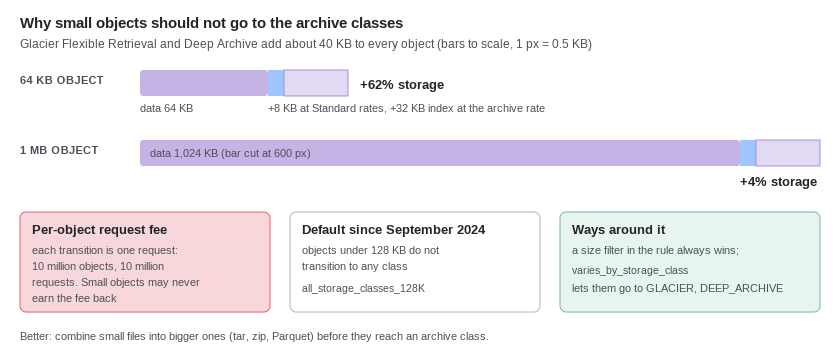
Archive overhead makes small objects worse still: each object sent to Glacier Flexible Retrieval or Deep Archive carries about 40 KB of overhead. About 8 KB (name and metadata) is charged at Standard rates and about 32 KB (index) at the archive rate. Millions of tiny files can cost more in an archive class. The AWS advice is to aggregate small objects into larger ones (zip, tar, Parquet) before archiving.
5. Minimum Storage Duration and Transition Costs
| Class | Minimum storage duration |
|---|---|
| Standard-IA, One Zone-IA | 30 days |
| Glacier Instant Retrieval, Glacier Flexible Retrieval | 90 days |
| Glacier Deep Archive | 180 days |
If an object leaves one of these classes early (deleted, overwritten, expired or transitioned), you are charged for the remaining days. That includes an expiration rule: expiring an object that spent 10 days in Standard-IA costs the 30 days. Plan the ages so each tier is kept long enough.
Every transition is one request, billed per object at a rate that depends on the destination class (see the S3 pricing page for current numbers). The break-even point depends on the average object size. The AWS Storage Blog works an example of 64 KB objects moved to Deep Archive that take years to recoup the request fees, and 1 MB objects that pay back in months. Do the arithmetic with the AWS Pricing Calculator before you move hundreds of millions of objects.
Restore and retrieval charges apply later: Glacier Flexible Retrieval and Deep Archive objects are not readable until you restore a temporary copy (section 3 for the times).
6. Expiration
Expiration deletes the current version of objects at an age (Days) or on a date (Date). What it does depends on the bucket’s versioning state:
| Bucket state | Result of Expiration |
|---|---|
| Unversioned | The object is queued for removal and permanently deleted |
| Versioning enabled | A delete marker is added and the version becomes noncurrent. Nothing is freed yet |
| Versioning suspended | A delete marker with version ID null is created, replacing any null version |
Warning: in an unversioned bucket, expiration is permanent and irreversible. A new rule also applies to existing objects: a rule that expires everything older than 30 days queues all the old objects at once. Test the filter on a small prefix first, and keep a backup or versioning if you may need the data.
Other facts:
- Expiration does nothing to noncurrent versions. Use the noncurrent actions below.
- If a delete marker is the current version and older versions exist, expiration does nothing.
- Expired objects are not billed for the time between expiry and the actual removal.
- A bucket policy cannot block a lifecycle action. Even a policy that denies everything does not stop it. The protection is Object Lock (section 10) or not having the rule.
- Lifecycle is not supported on buckets with MFA delete enabled.
7. Versioned Buckets: Noncurrent Versions and Delete Markers
With versioning, every overwrite or delete leaves an old noncurrent version behind, and you pay for each. Two actions deal with them:
| Action | What it does |
|---|---|
NoncurrentVersionTransitions |
Moves noncurrent versions to a cheaper class NoncurrentDays after they became noncurrent |
NoncurrentVersionExpiration |
Permanently deletes noncurrent versions after NoncurrentDays. They cannot be recovered |
NewerNoncurrentVersions |
On both actions: keep this many newer noncurrent versions (1 to 100) in place, and act only on versions beyond it |
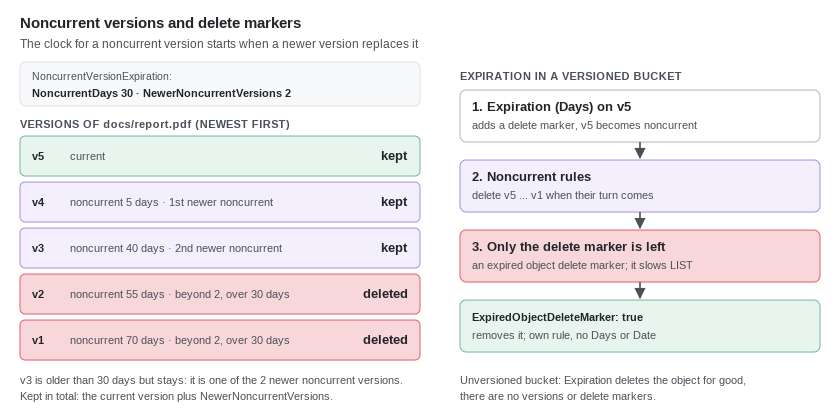
How the clock works: a version becomes noncurrent when a newer version replaces it, and NoncurrentDays counts from that moment, not from when the old version was created.
Two rules to remember:
NewerNoncurrentVersionsrequires aFilterin the rule. Without one, S3 returns anInvalidRequesterror. An empty filter{}counts.- The total kept is the newer noncurrent versions you named plus the current version.
Expired object delete markers. Once every older version has been deleted, a lone delete marker remains. It costs nothing to store, but thousands of them slow LIST calls. A rule with
Expiration: { "ExpiredObjectDeleteMarker": true } removes them. This element cannot be combined with Days or Date in the same Expiration block, so it goes in its own rule.
The empty-a-bucket recipe from the Knowledge Center combines four settings: expire current objects after 1 day, expire noncurrent versions after 1 day, abort multipart uploads after 1 day, and remove expired delete markers (the JSON is in section 12.1). Treat it as a deliberate, irreversible cleanup.
8. Incomplete Multipart Uploads
Parts of an upload that never finished are invisible in a normal listing but still billed. A single rule fixes it:
{
  "ID": "abort-mpu",
  "Status": "Enabled",
  "Filter": {},
  "AbortIncompleteMultipartUpload": { "DaysAfterInitiation": 7 }
}
S3 then deletes the parts of any upload still open after 7 days. Put this rule on almost every bucket. List the open uploads with aws s3api list-multipart-uploads --bucket <bucket>.
9. When Several Rules Match: Conflicts and Overlaps
An object is eligible for only one lifecycle action per day, and when several rules match, S3 picks the least costly one. The tie-break rules from the User Guide:
- Permanent deletion beats transition.
- Transition beats creating a delete marker.
- If an object is eligible for both Glacier Flexible Retrieval and Standard-IA (or One Zone-IA), S3 picks Glacier Flexible Retrieval.
Keep rules non-overlapping where you can: one rule per prefix or tag, with all of that prefix’s actions inside it. It is easier to reason about than a bucket-wide rule plus several prefix rules.
10. Interactions with Other Features
| Feature | Behavior |
|---|---|
| Replication | Lifecycle rules are not replicated. Define them on source and destination. Objects with PENDING or FAILED replication are not expired or transitioned and keep costing storage. FAILED objects do not retry by themselves: replicate them with S3 Batch Replication (or delete them), and lifecycle then resumes. Delete markers can be replicated, so a destination can pile up delete markers |
| Object Lock | Lifecycle still runs on locked objects and can add a delete marker, but never permanently deletes a locked version. A noncurrent version is deleted only after both NoncurrentDays and the retention period have passed. The lock stays in force through storage class transitions |
| MFA delete | Lifecycle configuration is not supported on buckets with MFA delete |
| Intelligent-Tiering | A lifecycle rule moves objects into the class. Moves between its access tiers are done by the class itself |
| CloudTrail | A trail that logs AWS::S3::Object data events also records lifecycle actions, as AwsServiceEvent events from s3lifecycle.amazonaws.com (ExpireObject, CreateDeleteMarker, DeleteUpload, TransitionSIAObject, TransitionGDAObject and the others), billed as data events. Older S3 User Guide pages still say lifecycle actions are not in CloudTrail; the CloudTrail User Guide describes the events |
| Server access logs | Record lifecycle actions on a best-effort basis: S3.EXPIRE.OBJECT, S3.CREATE.DELETEMARKER, S3.DELETE.UPLOAD, S3.TRANSITION.OBJECT (Flexible Retrieval), S3.TRANSITION_SIA.OBJECT, S3.TRANSITION_ZIA.OBJECT, S3.TRANSITION_INT.OBJECT, S3.TRANSITION_GIR.OBJECT and S3.TRANSITION_GDA.OBJECT |
| Event notifications | s3:LifecycleTransition, s3:LifecycleExpiration:Delete and s3:LifecycleExpiration:DeleteMarkerCreated go to SNS, SQS or Lambda |
To tell whether a person or a lifecycle rule deleted an object, look at the CloudTrail event: a person’s delete is an AwsApiCall DeleteObject, a rule’s is an AwsServiceEvent from s3lifecycle.amazonaws.com.
10.1 Getting Notified of Lifecycle Actions
notification.json sends every lifecycle expiration and transition to an SQS queue:
{
  "QueueConfigurations": [
    {
      "Id": "lifecycle-events",
      "QueueArn": "arn:aws:sqs:eu-central-1:123456789012:s3-lifecycle-events",
      "Events": ["s3:LifecycleExpiration:*", "s3:LifecycleTransition"]
    }
  ]
}
aws s3api put-bucket-notification-configuration --bucket <bucket> --notification-configuration file://notification.json
aws s3api get-bucket-notification-configuration --bucket <bucket>
s3:LifecycleExpiration:*coversDelete(an object in an unversioned bucket, or a version deleted for good) andDeleteMarkerCreated(a current version expired in a versioned bucket). Lifecycle sets that delete marker’s creation time to 00:00 UTC of the day, which can differ from the event time.- The queue’s access policy must allow
s3.amazonaws.comto send messages for this bucket, or the put fails. - Like the lifecycle call,
put-bucket-notification-configurationreplaces all notification settings of the bucket. Read them first and merge.
10.2 A Trail for Lifecycle Events Only
A dedicated trail that records only lifecycle actions, for example in a separate bucket that auditors can read (from the CloudTrail User Guide):
aws cloudtrail put-event-selectors --trail-name s3-lifecycle-audit \
  --advanced-event-selectors '[{"Name":"Log only S3 lifecycle events","FieldSelectors":[
    {"Field":"eventCategory","Equals":["Data"]},
    {"Field":"resources.type","Equals":["AWS::S3::Object"]},
    {"Field":"eventSource","Equals":["s3lifecycle.amazonaws.com"]}]}]'
These are data events and billed as such. Advanced selectors replace the trail’s basic selectors. To drop lifecycle events from an existing data-event trail instead, add an
eventSource NotEquals s3lifecycle.amazonaws.com condition; eventType NotEquals AwsServiceEvent would also drop replication and checksum events.
11. Timing: Why Nothing Happened Yet
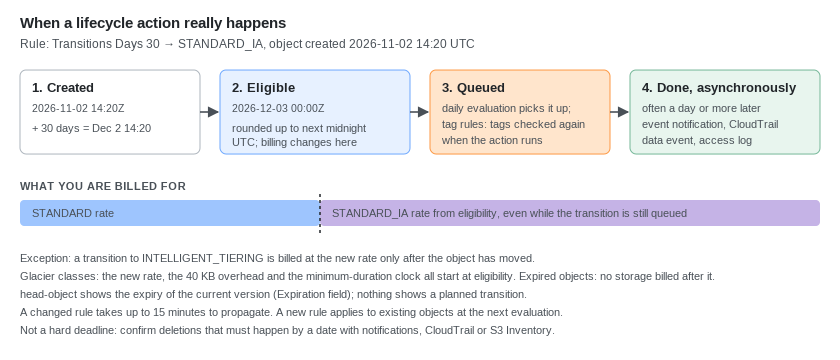
- S3 evaluates rules once a day, then performs the actions asynchronously. A delay of a day or more between eligibility and the actual change is normal.
- The transition or expiry time is rounded up to midnight UTC of the next day.
- Billing changes at the eligibility time, even if the action is still running. You are not billed for storage time after expiry. For Glacier Flexible Retrieval and Deep Archive, the new rate, the 40 KB overhead and the minimum-duration clock all start then. The exception is a transition to Intelligent-Tiering, which is billed at the new rate only after the object has moved.
- Rule changes can take up to 15 minutes to propagate.
- Tag filters are checked daily, the action is queued, and the tags are checked again when it runs. Removing the tag does not guarantee the action is cancelled, because it may already be running. If you need to stop a tag-based action, remove the tag rather than disabling the rule, and confirm with a Lifecycle event notification.
- To see when the current version expires, use
aws s3api head-object(theExpirationfield, from thex-amz-expirationheader). It exists only for current versions, and there is no equivalent for transitions. - Do not rely on lifecycle for a hard deletion deadline (a legal “delete within 30 days” rule). Use a Lifecycle event notification, CloudTrail or S3 Inventory to confirm.
11.1 Checking What a Rule Did
# Objects per storage class under a prefix
aws s3api list-objects-v2 --bucket <bucket> --prefix logs/ --query 'Contents[].StorageClass' --output text \
  | tr '\t' '\n' | sort | uniq -c

# One object: class, size, expiry and replication status
aws s3api head-object --bucket <bucket> --key logs/2026/app.log \
  --query '{Class:StorageClass,Bytes:ContentLength,Expiration:Expiration,Replication:ReplicationStatus}'
For a small prefix the count looks like this:
      1 STANDARD
      2 STANDARD_IA
For millions of objects, listing is slow and costs requests. A weekly S3 Inventory report gives the same data for the whole bucket, including what lifecycle cares about:
{
  "Id": "weekly-inventory",
  "IsEnabled": true,
  "IncludedObjectVersions": "All",
  "Schedule": { "Frequency": "Weekly" },
  "Destination": { "S3BucketDestination": { "Bucket": "arn:aws:s3:::corp-inventory-reports", "Format": "CSV", "Prefix": "lifecycle-demo" } },
  "OptionalFields": ["Size", "LastModifiedDate", "StorageClass", "ReplicationStatus", "IntelligentTieringAccessTier"]
}
aws s3api put-bucket-inventory-configuration --bucket <bucket> --id weekly-inventory \
  --inventory-configuration file://inventory.json
aws s3api list-bucket-inventory-configurations --bucket <bucket> \
  --query 'InventoryConfigurationList[].{Id:Id,Fields:OptionalFields}'
Query the CSV with Athena: objects still in STANDARD past the rule’s age, objects under 128 KB, and ReplicationStatus FAILED are the usual answers to “why didn’t it move”.
If a rule seems idle, work through this list:
- Is the rule
Enabled, and is the prefix right (no leading slash, a trailing slash)? - Is the object at least 128 KB, or does the filter allow smaller ones?
- Is the object old enough, and for IA classes at least 30 days?
- Does the object have
PENDINGorFAILEDreplication status? - Is the object Object Lock-protected or does the bucket have MFA delete?
- Has a full day gone by since the rule was saved?
12. Setting the Configuration with the CLI
The JSON below combines the rules in this article: tiering for logs (large objects only), cleanup of old document versions, delete marker removal and multipart abort.
{
  "Rules": [
    {
      "ID": "logs-tiering",
      "Status": "Enabled",
      "Filter": { "And": { "Prefix": "logs/", "ObjectSizeGreaterThan": 131072 } },
      "Transitions": [
        { "Days": 30, "StorageClass": "STANDARD_IA" },
        { "Days": 90, "StorageClass": "GLACIER" },
        { "Days": 365, "StorageClass": "DEEP_ARCHIVE" }
      ],
      "Expiration": { "Days": 2555 }
    },
    {
      "ID": "versions-cleanup",
      "Status": "Enabled",
      "Filter": { "Prefix": "docs/" },
      "NoncurrentVersionTransitions": [
        { "NoncurrentDays": 30, "StorageClass": "GLACIER_IR" }
      ],
      "NoncurrentVersionExpiration": { "NoncurrentDays": 120, "NewerNoncurrentVersions": 5 }
    },
    {
      "ID": "delete-markers",
      "Status": "Enabled",
      "Filter": {},
      "Expiration": { "ExpiredObjectDeleteMarker": true }
    },
    {
      "ID": "abort-mpu",
      "Status": "Enabled",
      "Filter": {},
      "AbortIncompleteMultipartUpload": { "DaysAfterInitiation": 7 }
    }
  ]
}
Notes on this example: the logs-tiering rule spends 275 days between the Glacier and Deep Archive steps, which satisfies the 90-day minimum. ObjectSizeGreaterThan is 131072 bytes (128 KB), and because the boundary is
excluded, an object of exactly 128 KB does not match. The 2,555-day expiration is seven years.
# Add --transition-default-minimum-object-size varies_by_storage_class to keep the older small-object behavior (section 4)
aws s3api put-bucket-lifecycle-configuration --bucket <bucket> --lifecycle-configuration file://lifecycle.json

aws s3api get-bucket-lifecycle-configuration --bucket <bucket> --query 'Rules[].ID'
aws s3api delete-bucket-lifecycle --bucket <bucket>        # removes ALL rules
The expiry date of a single object is in the head-object query of section 11.1.
The rule IDs read back after the put:
[
    "logs-tiering",
    "versions-cleanup",
    "delete-markers",
    "abort-mpu"
]
Warning:
put-bucket-lifecycle-configurationreplaces the entire configuration. Putting a file with only theabort-mpurule afterwards leaves onlyabort-mpu; the other three rules are gone. Runget-bucket-lifecycle-configurationfirst and merge your change into the existing rules. This applies at once to existing objects.
After delete-bucket-lifecycle, reading the configuration fails with
An error occurred (NoSuchLifecycleConfiguration) when calling the GetBucketLifecycleConfiguration operation: The lifecycle configuration does not exist, which is also what a bucket without rules returns.
The CLI checks types before sending anything. A string where a number belongs is rejected:
aws: [ERROR]: An error occurred (ParamValidation): Parameter validation failed:
Invalid type for parameter LifecycleConfiguration.Rules[0].Transitions[0].Days, value: thirty, type: <class 'str'>, valid types: <class 'int'>
Storage class names and the day limits (30 days for the IA classes, the minimum durations) are checked by S3, not by the CLI. In the console, use Management, Lifecycle rules to create the same rules.
12.1 More Example Rules
Each rule below goes into the Rules list of one configuration (remember that a put replaces all rules):
{
  "Rules": [
    {
      "ID": "temp-files",
      "Status": "Enabled",
      "Filter": { "Tag": { "Key": "retention", "Value": "temp" } },
      "Expiration": { "Days": 7 }
    },
    {
      "ID": "exports-archive",
      "Status": "Enabled",
      "Filter": { "And": { "Prefix": "exports/", "ObjectSizeGreaterThan": 1048576, "ObjectSizeLessThan": 5368709120,
                           "Tags": [ { "Key": "archive", "Value": "yes" } ] } },
      "Transitions": [ { "Days": 30, "StorageClass": "GLACIER_IR" } ]
    },
    {
      "ID": "spring-campaign",
      "Status": "Enabled",
      "Filter": { "Prefix": "campaigns/2026-spring/" },
      "Expiration": { "Date": "2027-01-01T00:00:00Z" }
    }
  ]
}
temp-files: anything taggedretention=tempis deleted 7 days after creation, wherever it is in the bucket.exports-archive: objects underexports/between 1 MiB and 5 GiB and taggedarchive=yesgo to Glacier Instant Retrieval after 30 days. AnAndtakes one prefix, a size range and any number of tags.spring-campaign: everything under the prefix expires on 1 January 2027. ADatemust be midnight UTC in ISO 8601, and once that date has passed, every object that matches is eligible right away, new ones included.
The empty-a-bucket recipe needs two rules, because ExpiredObjectDeleteMarker cannot share an Expiration with Days:
{
  "Rules": [
    {
      "ID": "empty-bucket",
      "Status": "Enabled",
      "Filter": {},
      "Expiration": { "Days": 1 },
      "NoncurrentVersionExpiration": { "NoncurrentDays": 1 },
      "AbortIncompleteMultipartUpload": { "DaysAfterInitiation": 1 }
    },
    {
      "ID": "empty-bucket-markers",
      "Status": "Enabled",
      "Filter": {},
      "Expiration": { "ExpiredObjectDeleteMarker": true }
    }
  ]
}
Warning: this deletes every object and every version in the bucket within a few days, and nothing can bring them back (unless Object Lock holds them). Use it only on a bucket you are about to delete.
To find what to transition, use S3 Storage Lens (bytes by age, noncurrent version counts), S3 Inventory (object lists with size, class and replication status) and Storage Class Analysis (access patterns of Standard objects, to pick the Standard-IA age). For unknown patterns, Intelligent-Tiering avoids the guessing.
13. Tips and Gotchas
- Start with a narrow prefix and a long age, check with S3 Inventory, then widen it.
- Put a multipart abort rule on every bucket, and a noncurrent version rule on every versioned bucket.
- Always send the whole configuration, because the put call overwrites it.
- Do not move small or short-lived objects. The per-object request fee and the minimum durations erase the saving.
- Count the transitions: ten million objects moved to Deep Archive is ten million requests.
- Use Intelligent-Tiering instead of manual ages when you cannot predict access.
- Rules in the source bucket do not appear in the destination. After replication, copy the configuration.
- For an audit trail of lifecycle deletions, log S3 object data events in CloudTrail, or enable server access logging or Lifecycle event notifications.
- Archive-class objects need a restore before they can be read, and the restore is billed.
- Combine lifecycle with versioning and Object Lock if the data must survive an accidental or malicious rule.