fssh: Pick an SSH Host from ~/.ssh/config with fzf
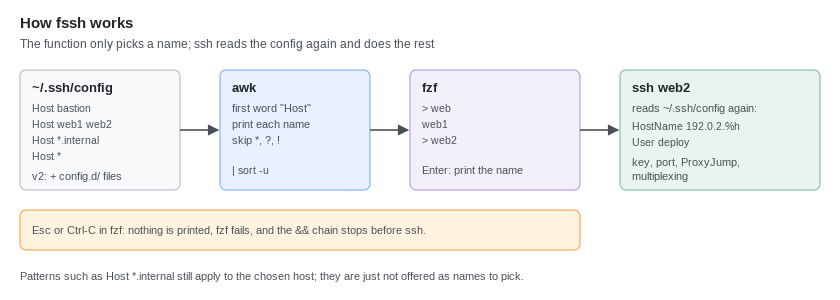
fssh is a shell function that reads the host names from ~/.ssh/config, shows them in fzf and connects to the one you
pick. It does a small part of what lssh does (pick a host from a list, then SSH to it) with nothing to install but
fzf, and it reads the same ~/.ssh/config that ssh, scp, rsync, Ansible and VS Code already use.
The function was tested with fzf 0.74.5, bash 3.2.57 (the macOS /bin/bash), zsh 5.9 and OpenSSH 10.5p1 on macOS; the connections
below ran from a client with OpenSSH 10.0p2 to an SSH bastion and a private host behind it, in containers.
1. The Function
fssh ()
{
    local h;
    h=$(awk 'tolower($1)=="host" { for (i=2; i<=NF; i++) if ($i !~ /[*?!]/) print $i }' ~/.ssh/config 2>/dev/null | sort -u | fzf --header 'ssh host') && [ -n "$h" ] && ssh "$h"
}
Put it in ~/.bashrc or ~/.zshrc, open a new shell, type fssh, type a few letters of the host, press Enter. To start it with one key:
# zsh: Ctrl-G runs fssh from the prompt
bindkey -s '^G' 'fssh\n'

# bash: the same
bind '"\C-g": "fssh\n"'
| Part | What it does |
|---|---|
local h |
The chosen host stays inside the function |
awk 'tolower($1)=="host" …' |
Reads every line whose first word is Host, in any case (Host, host, HOST) |
for (i=2; i<=NF; i++) |
A Host line can name several hosts (Host web1 web2); prints each one |
if ($i !~ /[*?!]/) |
Skips patterns: *, *.internal, dev-?, !dev-x are rules, not hosts you can connect to |
2>/dev/null |
No error if ~/.ssh/config does not exist |
sort -u |
Sorted, without duplicates (a name can appear in several Host lines) |
fzf --header 'ssh host' |
Interactive filter; Enter prints the choice, Esc or Ctrl-C prints nothing and fails |
&& [ -n "$h" ] && ssh "$h" |
Connect only if fzf succeeded and returned a name |
ssh "$h" passes the alias, not an address: ssh reads ~/.ssh/config again and applies everything configured for it (real host name, user, port,
key, jump host). That is why the function can stay this small.
2. With ~/.ssh/config.d/
The function reads only ~/.ssh/config. Many configs are split into ~/.ssh/config.d/ (one file per project, client or cloud account) with
Include config.d/* at the top of ~/.ssh/config, and none of those hosts appear. This version reads the directory too:
fssh ()
{
    local h;
    h=$({ cat ~/.ssh/config; find ~/.ssh/config.d -type f -exec cat {} +; } 2>/dev/null | awk 'tolower($1)=="host" { for (i=2; i<=NF; i++) if ($i !~ /[*?!]/) print $i }' | sort -u | fzf --header 'ssh host') && [ -n "$h" ] && ssh "$h"
}
| Part | What it does |
|---|---|
{ cat ~/.ssh/config; find ~/.ssh/config.d -type f -exec cat {} +; } |
One stream: the main config, then every file in ~/.ssh/config.d/ |
2>/dev/null |
No error when either of them does not exist |
awk … (no file name) |
The same awk, now reading that stream |
Why find and not ~/.ssh/config.d/*: a glob behaves differently in the two shells when the directory does not exist. Bash passes the pattern on
and awk silently skips it; zsh stops the whole command with no matches found, and the list comes up empty, without even the hosts from
~/.ssh/config:
home-empty  bash       solo (exit 0)
home-empty  zsh        zsh:1: no matches found: …/home-empty/.ssh/config.d/*
With find, both shells give the same list whether the directory exists or not. Two differences from what ssh itself reads remain:
- It reads every file in
~/.ssh/config.d/, even one that noIncludeline names;sshreads only what is included. - Includes from other places are not read: a host in a file included as
Include ~/work/ssh_config, for example, is not listed by either version.
3. What Each Version Lists
A test ~/.ssh/config with the cases that real configs have:
# Personal hosts
Include config.d/*.conf

Host web1 web2
    HostName 192.0.2.%h
    User deploy

Host bastion
    HostName 203.0.113.10
    User ec2-user

host db-prod
    HostName 10.0.1.20
    ProxyJump bastion

Host=legacy
    HostName 198.51.100.7

Host dev-? !dev-x
    User dev

Host *.internal
    ProxyJump bastion

Match host db-* exec "test -n \"$VPN\""
    User dba

Host *
    ServerAliveInterval 30
~/.ssh/config.d/k8s.conf contains Host k8s-node1 k8s-node2; ~/.ssh/config.d/nested.inc contains Host deep. The lists each version gives fzf,
the same in bash 3.2 and zsh 5.9:
version 1 (~/.ssh/config):              bastion db-prod web1 web2
version 2 (+ ~/.ssh/config.d/):         bastion db-prod deep k8s-node1 k8s-node2 web1 web2
| Line | Version 1 | Version 2 | Why |
|---|---|---|---|
Host web1 web2 |
Both | Both | Loop over all names |
host db-prod |
Yes | Yes | tolower |
Host dev-? !dev-x, Host *.internal, Host * |
No | No | Patterns, correctly skipped |
Match host db-* … |
No | No | Match blocks have no host names to list, correctly skipped |
Host=legacy |
No | No | ssh_config also accepts Keyword=value; awk sees one field, Host=legacy |
config.d/k8s.conf, config.d/nested.inc |
No | Yes | Version 1 never reads the directory |
Include of a file elsewhere |
No | No | Neither reads the paths in Include lines |
On a real ~/.ssh/config with 20 hosts and no config.d/, both versions list the same 20 hosts in both shells.
4. Similar: lssh
lssh (Go, v0.10.0 from April 2026) is the full-size version of this idea: an SSH client with a terminal UI where you choose hosts from a list built from its configuration, then connect or run commands on them. Its own one-line summary is “TUI list select and parallel ssh client command”. It has since grown into a suite of tools.
fssh |
lssh | |
|---|---|---|
| Install | A shell function; needs fzf and awk |
brew install blacknon/lssh/lssh or go install github.com/blacknon/lssh/cmd/lssh@latest |
| Host list from | ~/.ssh/config (version 2: also the files in ~/.ssh/config.d/) |
Its own TOML config, ~/.ssh/config ([sshconfig.default] path = "~/.ssh/config"), or cloud inventories |
| Pick | One host, fuzzy filter | One or several hosts from a TUI list |
| Connect with | Your ssh binary, all your options |
Its own SSH client (plus connectors: AWS SSM, EC2 Instance Connect Endpoint, WinRM, Telnet) |
| Several hosts at once | No | lssh -p <command> runs it in parallel; -P opens panes |
| Also | Anything you pass to ssh |
lscp, lsftp, lsshell, lsmux, lsmon, lssync, lsdiff, lspipe, lsshfs |
lssh can write its config from an existing SSH config: lssh --generate-lssh-conf > ~/.lssh.toml.
Use fssh when you want a faster way to type the host name and nothing else changes: same ssh, same keys, same agent, same ~/.ssh/config. Reach for
lssh when you regularly run one command on many hosts, copy between hosts, or reach machines through cloud connectors.
5. The ~/.ssh/config That Makes It Useful
fssh is only as good as the aliases in your config. The rules that decide what an alias does:
The First Value Wins
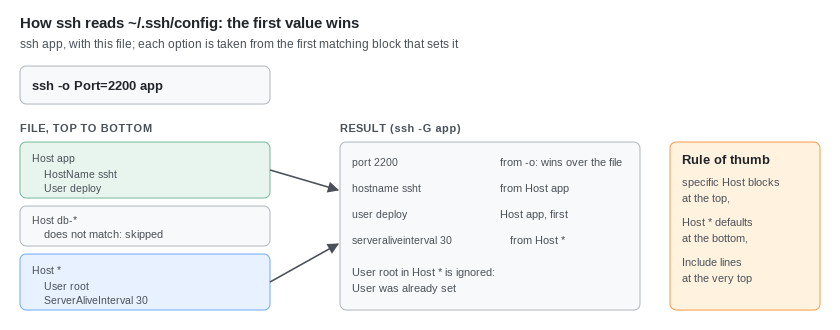
ssh reads the file top to bottom and, for each block that matches, takes every option not set yet. The first value for an option wins:
Host *
    User root

Host app
    User deploy
    Port 2222
$ ssh -G -F order.conf app | grep -E "^(user|port) "
user root
port 2222
User came from Host * because it was first; Port came from Host app because Host * did not set it. Put specific hosts at the top and
Host * with the defaults at the bottom. Options given with -o on the command line win over the file.
Patterns, Tokens and Match
Host web-*
    HostName %h.example.com
    User deploy

Match host *.example.com user deploy
    Port 2200

Host *
    Port 22
$ ssh -G -F tokens.conf web-1 | grep -E "^(hostname|user|port) "
user deploy
hostname web-1.example.com
port 2200
$ ssh -G -F tokens.conf other | grep -E "^(hostname|user|port) "
user root
hostname other
port 22
*and?are wildcards,!negates (Host dev-* !dev-x). Pattern blocks are rules;fsshdoes not list them.- Tokens:
%hhost name,%nthe name you typed,%rremote user,%pport,%Ca hash of host, user and port (for socket paths). Matchtests more than the name:host,user,localuser,exec "command"(true when the command succeeds),tagged.Match hostsees the host name afterHostNamewas applied, which is whyweb-1matched*.example.com.othergotrootbecause nothing setUser, sosshused the local user name.
Include, and Where It Goes
# ~/.ssh/config: Include first
Include config.d/*.conf

Host bastion
    ...
An Include after a Host line belongs to that block and only applies when the block matches. The same included Host bar file, in two places:
Include after Host foo:
user root
Include at the top:
user from-include
Keep Include lines at the top of the file.
A Practical Config
The config the client used in the tests: a bastion, a private host that is only reachable through it, and defaults for everything.
Host bastion
    HostName sshb
    User deploy

Host app
    HostName ssht
    User deploy
    ProxyJump bastion

Host *
    IdentityFile ~/.ssh/id_ed25519
    IdentitiesOnly yes
    StrictHostKeyChecking accept-new
    ServerAliveInterval 30
    ControlMaster auto
    ControlPath ~/.ssh/cm-%C
    ControlPersist 10m
$ ssh app hostname
Warning: Permanently added 'ssht' (ED25519) to the list of known hosts.
ssht
$ ssh -O check app
Master running (pid=524)
The private host has no route from the client at all (ssh deploy@ssht gives Could not resolve hostname ssht); ProxyJump bastion makes ssh
connect to the bastion first and open a TCP tunnel to ssht from there. The key stays on the client: the bastion never sees it.
| Option | Why |
|---|---|
HostName |
The real address behind the alias; the alias is what you type and what fssh lists |
User, Port |
No more user@host -p 2222 |
ProxyJump |
Through a bastion, several hops with commas (ProxyJump a,b) |
IdentityFile + IdentitiesOnly yes |
Offer only this key; without it the agent offers every key and servers with MaxAuthTries 6 reject you with Too many authentication failures |
StrictHostKeyChecking accept-new |
Trust a new host key the first time, still refuse a changed one |
ServerAliveInterval 30 |
Keeps idle sessions through NAT and firewalls; the session ends after 3 missed replies |
ControlMaster, ControlPath, ControlPersist |
Reuse one connection for every later ssh, scp, rsync and git to the same host |
ForwardAgent yes |
Only for hosts you trust: root there can use your agent. ProxyJump does not need it |
LocalForward 5432 db.internal:5432 |
A tunnel every time you connect to that alias |
Connection multiplexing is the most visible gain. The second command to the same host reuses the first connection:
$ time ssh app true  (reuses the connection)
3 ms
$ time ssh app true  (new connection)
129 ms
That is in containers on one machine; over the internet, with a jump host, a new connection takes seconds. ssh -O exit app closes the shared
connection, ssh -O check app shows whether one is open.
6. Troubleshooting
| Problem | Cause | Fix |
|---|---|---|
A host is not in the fssh list |
It is in an Included file (version 1), included from outside ~/.ssh/config.d/ (version 2), written as Host=name, or only matched by a pattern |
Use version 2, or add a plain Host name line in ~/.ssh/config |
fzf: command not found |
fzf not installed | brew install fzf, apt install fzf, dnf install fzf |
| The alias connects somewhere unexpected | An earlier block set the option first | ssh -G <alias> shows the final values; move specific blocks up |
Bad owner or permissions on ~/.ssh/config |
The file is writable by others | chmod 600 ~/.ssh/config |
Too many authentication failures |
The agent offered too many keys | IdentitiesOnly yes with the right IdentityFile |
Could not resolve hostname |
The alias has no HostName, or the host is only reachable through a bastion |
Add HostName, or ProxyJump |
| An included host gets none of its settings | Include is below a Host line |
Move Include to the top of the file |
ssh -O check says Control socket connect(...): No such file or directory |
No shared connection open | Normal: the next ssh opens one |
The permission error, for reference:
$ chmod 666 ~/.ssh/config; ssh app true
Bad owner or permissions on /root/.ssh/config
See Also
ssh_config(5)for every option, token andMatchcriterion- lssh
- fzf Cheatsheet (the original
fsshand other fzf functions) - Connecting to EC2: SSH vs EC2 Instance Connect vs Session Manager