terraform get -update vs terraform init -upgrade
Overview
Both commands refresh module sources, but they operate at different scopes and serve different purposes. Confusing them — or using one when you need the other — leads to stale modules, unexpected provider changes, or wasted time re-downloading things you didn’t intend to touch.
Quick Comparison
| Aspect | terraform get -update |
terraform init -upgrade |
|---|---|---|
| Scope | Modules only | Modules + Providers + Backend |
| Updates providers | No | Yes |
| Updates modules | Yes | Yes |
Updates .terraform.lock.hcl |
No | Yes (provider entries) |
| Initializes backend | No | Yes |
| Works with a broken or misconfigured backend | Yes | No (fails while initializing the backend) |
| Typical use case | Refresh module source code | Full dependency upgrade |
terraform get
terraform get downloads and updates module source code into .terraform/modules/. That’s all it does — nothing else.
# Download modules (only if not already cached)
terraform get

# Force re-download even if already cached
terraform get -update
What it touches
.terraform/
├── modules/           ← terraform get operates HERE
│   ├── modules.json   ← manifest mapping module calls to local paths
│   └── vpc/           ← downloaded module source
└── providers/         ← NOT touched by terraform get
When -update matters
Without -update, terraform get only downloads modules that are missing from the cache. If the module source already exists in .terraform/modules/, it’s skipped — even if a newer version is available.
With -update, Terraform re-fetches all modules regardless of what’s cached:
- Registry modules: resolves the latest version matching the constraint
- Git modules: re-clones at the specified
ref - HTTP/S3 archives: re-downloads the archive
- Local modules: no effect (always read from disk)
What it does NOT do
- Does not touch providers
- Does not update
.terraform.lock.hcl - Does not initialize or reconfigure the backend
- Does not validate provider requirements
terraform init -upgrade
terraform init -upgrade is a superset that covers everything terraform get -update does plus providers and backend initialization.
terraform init -upgrade
What it touches
.terraform/
├── modules/           ← re-fetched (same as get -update)
│   ├── modules.json
│   └── vpc/
├── providers/         ← re-resolved and re-downloaded
│   └── registry.terraform.io/
│       └── hashicorp/aws/5.50.0/linux_amd64/
├── terraform.tfstate  ← backend cache (only with a backend block)
└── environment        ← selected workspace (only after selecting a non-default one)

.terraform.lock.hcl    ← UPDATED with new provider versions/hashes
The full sequence
- Initialize/verify backend configuration
- Re-resolve provider versions within declared constraints
- Download new provider binaries
- Update
.terraform.lock.hclwith new versions and hashes - Re-fetch all modules (same behavior as
get -update)
When to Use Which
Use terraform get -update when:
- You updated a module’s source code (pushed a new commit to a git ref you’re tracking)
- You want to refresh modules without risking provider version changes
- You’re iterating on a module locally referenced via git and want the latest
- Your backend is broken/misconfigured and you just need fresh modules to work on
- You want a fast operation that doesn’t re-resolve providers (faster in large projects)
Use terraform init -upgrade when:
- You want to upgrade both providers and modules
- You changed provider version constraints and need to re-resolve
- You need a full re-initialization (backend + providers + modules)
- You’re doing a scheduled dependency update
- A new provider version has a fix you need
Use plain terraform init when:
- You cloned the repo and need to set up the working directory
- You want to install exactly what’s locked (deterministic)
- Normal day-to-day workflow before
plan/apply
Behavior with Different Module Sources
| Module Source | get -update |
init -upgrade |
|---|---|---|
Registry (terraform-aws-modules/vpc/aws) |
Re-resolves version constraint | Same |
Git with tag (?ref=v2.1.0) |
Re-clones at same tag | Same |
Git with branch (?ref=main) |
Re-clones latest commit on branch | Same |
| Git without ref | Re-clones default branch HEAD | Same |
Local path (./modules/foo) |
No effect (always fresh) | No effect |
| HTTP archive | Re-downloads | Same |
For module handling, the two commands are identical. The difference is everything else init -upgrade does on top.
Provider Handling: The Key Difference
This is where the two commands diverge completely.
terraform get -update
terraform get -update
# Providers: untouched
# .terraform.lock.hcl: untouched
# Backend: untouched
# Modules: re-fetched
Your provider versions stay exactly where they were. The lock file doesn’t change. If you had aws = 5.40.0 locked, you still have aws = 5.40.0 after running this.
terraform init -upgrade
terraform init -upgrade
# Providers: re-resolved (may change versions!)
# .terraform.lock.hcl: updated
# Backend: re-initialized
# Modules: re-fetched
If your constraint says ~> 5.40 and 5.50.0 was released since your last lock, you’ll now have 5.50.0. The lock file is rewritten.
Performance Differences
In large projects with many providers the distinction matters: the AWS provider alone is about 170 MB to download and over 600 MB unpacked (5.100.0 on darwin_arm64: 664 MB).
| Command | Time (rough estimate, depends on network) | Network | Disk writes |
|---|---|---|---|
terraform get -update |
5–30 seconds | Module sources only | .terraform/modules/ |
terraform init -upgrade |
30–120+ seconds | Modules + provider binaries | .terraform/modules/ + .terraform/providers/ + lock file |
terraform init (no upgrade) |
5–15 seconds | Only missing items | Minimal |
If you only need fresh modules, get -update avoids downloading hundreds of megabytes of provider binaries.
Common Scenarios
Scenario 1: You pushed a fix to a shared module
Your config references a git module:
module "networking" {
  source = "git::https://github.com/org/terraform-networking.git?ref=main"
}
You pushed a fix to main. You want to pick it up:
# Fast, targeted — only refreshes modules
terraform get -update

# Then plan/apply as normal
terraform plan
No need for init -upgrade here — providers haven’t changed.
Scenario 2: New provider version fixes a bug
The AWS provider 5.50.0 fixed a bug you’re hitting. Your constraint is ~> 5.40:
# You need init -upgrade because you want a new provider version
terraform init -upgrade

# Verify the version changed
grep "aws" .terraform.lock.hcl

# Plan to ensure nothing unexpected
terraform plan

# Commit the lock file
git add .terraform.lock.hcl && git commit -m "chore: upgrade AWS provider"
terraform get -update would not help here — it doesn’t touch providers.
Scenario 3: Both module and provider need updating
You bumped a module version constraint AND a provider constraint:
# init -upgrade handles both in one command
terraform init -upgrade
There’s no advantage to running get -update separately in this case.
Scenario 4: CI pipeline — module changed but providers must stay pinned
# Refresh modules without risking provider drift
terraform get -update

# Then normal init (installs locked providers, doesn't re-resolve)
terraform init

# Plan and apply
terraform plan -out=tfplan
terraform apply tfplan
This pattern ensures modules are fresh while providers remain at their locked versions. It only adds something when .terraform/ is cached between runs: on a fresh checkout, plain terraform init already downloads the newest module versions your constraints allow.
Edge Cases and Gotchas
1. terraform get doesn’t validate provider requirements
If a new module version requires a provider you haven’t declared (or a newer version than you have locked), terraform get -update won’t warn you. You’ll only discover the problem at plan time:
Error: Inconsistent dependency lock file

The following dependency selections recorded in the lock file are
inconsistent with the current configuration:
  - provider registry.terraform.io/hashicorp/random: required by this configuration but no version is selected

To make the initial dependency selections that will initialize the dependency
lock file, run:
  terraform init
terraform init -upgrade catches this because it re-resolves the full dependency tree.
2. terraform get after init -upgrade is redundant
Since init -upgrade already re-fetches modules, running get -update afterward does nothing useful.
3. terraform get works without a configured backend
This is actually useful when you’re working on module development and don’t have (or need) a backend:
# Backend is misconfigured or you're in a module-only workspace
terraform get -update  # Works fine
terraform init         # Would fail due to backend issues
4. Neither command updates local modules
Local path modules (source = "./modules/foo") are always read directly from disk. Neither get -update nor init -upgrade copies or caches them — they’re used in place.
5. Module versions aren’t in the lock file
Even after init -upgrade, module versions are not recorded in .terraform.lock.hcl. Only providers are locked. This means:
terraform get -updateandterraform init -upgradecan both silently pick up new module versions- For deterministic module versions, use exact version constraints or git refs with specific tags/commits
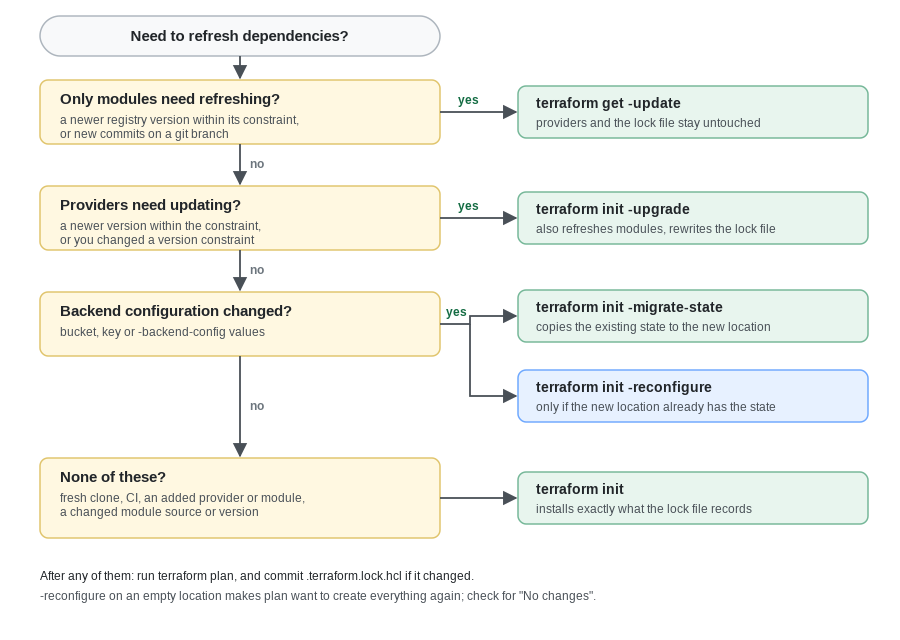
Decision Flowchart
Key Takeaways
terraform get -update= refresh module source code only (fast, safe, no provider/lock changes)terraform init -upgrade= refresh everything — modules, providers, lock file, backend (slower, changes versions)- Use
get -updatewhen you only care about modules and want to leave providers untouched - Use
init -upgradewhen you want to pull newer provider versions within your constraints init -upgradeis a superset ofget -update— it does everythingget -updatedoes plus more- Neither command locks module versions — only providers are locked in
.terraform.lock.hcl - In CI, prefer
get -update+initoverinit -upgradeto keep provider versions deterministic