Argo CD Cheatsheet
Day-to-day Argo CD commands in two flavours: plain kubectl against the Argo CD custom resources (no extra tool, works wherever you have cluster access) and the argocd CLI. All examples assume Argo CD is installed in the argocd namespace. Everything was checked on Argo CD v3.6.1 on a single-node k3s 1.35 cluster.
1. Installing Argo CD
Every method below was installed on a kind cluster (Kubernetes 1.37, one control plane and three workers), checked until all pods were ready, and removed again. Use --server-side with the plain manifests: a client-side kubectl apply failed with The CustomResourceDefinition "applicationsets.argoproj.io" is invalid: metadata.annotations: Too long: may not be more than 262144 bytes, because the CRD doesn’t fit in the last-applied-configuration annotation.
| Method | What you get | Objects | Ready after |
|---|---|---|---|
manifests/install.yaml |
Everything: UI, API, SSO (Dex), notifications, CRDs, cluster-wide RBAC | 60 | 33 s |
manifests/ha/install.yaml |
The same with Redis HA (3 Redis + 3 HAProxy), 2 API servers, 2 repo-servers | 71 | 235 s |
manifests/core-install.yaml |
Controller, repo-server, ApplicationSets, Redis only: no UI, no API server, no Dex, no notifications | 35 | under 15 s |
manifests/namespace-install.yaml |
Full Argo CD without CRDs and without cluster-wide RBAC: manages only what you grant it | 51 | about 60 s (CRDs first) |
Helm chart argo/argo-cd |
Full install, configured through values | n/a | all ready within the 5-minute wait |
Kustomize over install.yaml |
Full install plus your patches, ready for GitOps | 60 | all ready within the 5-minute wait |
Plain Manifests
VERSION=v3.6.1
kubectl create namespace argocd
kubectl apply -n argocd --server-side --force-conflicts \
  -f https://raw.githubusercontent.com/argoproj/argo-cd/$VERSION/manifests/install.yaml
kubectl -n argocd wait --for=condition=Available deploy --all --timeout=300s
kubectl -n argocd rollout status statefulset/argocd-application-controller
Swap install.yaml for ha/install.yaml for production: in the test its 14 pods spread over all three workers. A full install creates argocd-initial-admin-secret (a 16-character password); the core install doesn’t, because there is no API server to log in to: use argocd ... --core with your kubeconfig instead.
Namespace-scoped install. namespace-install.yaml contains no CRDs, and there is no crds.yaml file in the release (that URL returns 404); the CRDs come from the manifests/crds directory. Install them first: without them argocd-server went into CrashLoopBackOff and the controller logged the server could not find the requested resource (get applications.argoproj.io).
kubectl apply --server-side --force-conflicts -k "https://github.com/argoproj/argo-cd/manifests/crds?ref=$VERSION"
kubectl apply -n argocd --server-side --force-conflicts \
  -f https://raw.githubusercontent.com/argoproj/argo-cd/$VERSION/manifests/namespace-install.yaml
That install creates no ClusterRoles, so it can deploy only where you give it RBAC, and it registers no cluster automatically (no argocd.argoproj.io/secret-type=cluster Secret); add the target cluster or namespace yourself.
Helm Chart
helm repo add argo https://argoproj.github.io/argo-helm
helm repo update argo
helm search repo argo/argo-cd --versions | head          # CHART VERSION vs APP VERSION
helm install argocd argo/argo-cd --version 10.18.1 -n argocd --create-namespace -f values.yaml
# values.yaml
configs:
  params:
    server.insecure: true        # TLS ends at the ingress or load balancer
server:
  service:
    type: NodePort
dex:
  enabled: false                 # no SSO bridge
The chart version isn’t the Argo CD version: chart 10.18.1 (and 10.17.x) installs v3.6.1, chart 10.18.2 installs v3.6.2. Pin the chart version. helm show values argo/argo-cd --version <chart> lists everything you can set (configs, controller, server, repoServer, redis-ha, dex…). The CRDs carry helm.sh/resource-policy: keep: helm uninstall reported These resources were kept due to the resource policy and left all three CRDs, with every Application in them.
Kustomize
Keep the upstream manifest as a remote base and patch it; the kustomization belongs in Git, so Argo CD can later manage itself:
# kustomization.yaml
apiVersion: kustomize.config.k8s.io/v1beta1
kind: Kustomization
namespace: argocd
resources:
- https://raw.githubusercontent.com/argoproj/argo-cd/v3.6.1/manifests/install.yaml
patches:
- target: {kind: ConfigMap, name: argocd-cmd-params-cm}
  patch: |-
    - op: add
      path: /data
      value:
        server.insecure: "true"
- target: {kind: Service, name: argocd-server}
  patch: |-
    - op: replace
      path: /spec/type
      value: NodePort
kubectl create namespace argocd
kubectl apply -k . --server-side --force-conflicts
Both patches were applied (NodePort, server.insecure: "true") and all pods came up.
Reaching the UI and API
# Port-forward, no exposure
kubectl -n argocd port-forward svc/argocd-server 8080:443
curl -sk https://localhost:8080/api/version

# NodePort
kubectl -n argocd patch svc argocd-server -p '{"spec":{"type":"NodePort"}}'

# Plain HTTP behind an ingress or load balancer that terminates TLS
kubectl -n argocd patch cm argocd-cmd-params-cm --type merge -p '{"data":{"server.insecure":"true"}}'
kubectl -n argocd rollout restart deploy/argocd-server
Port-forward and NodePort both answered /healthz with 200, and /api/version returned {"Version":"v3.6.1"}. On plain HTTP the server answered 307 (a redirect to HTTPS) until server.insecure was set and the server restarted; then it answered 200. Settings in argocd-cmd-params-cm are only read at startup.
Upgrade and Uninstall
# Upgrade: apply the new version's manifest over the old one
kubectl apply -n argocd --server-side --force-conflicts \
  -f https://raw.githubusercontent.com/argoproj/argo-cd/v3.6.1/manifests/install.yaml

# Helm
helm upgrade argocd argo/argo-cd --version <new-chart> -n argocd -f values.yaml

# Uninstall
kubectl delete -n argocd -f https://raw.githubusercontent.com/argoproj/argo-cd/v3.6.1/manifests/install.yaml
helm uninstall argocd -n argocd
Applying the v3.6.1 manifest over v3.6.0 switched every component’s image to quay.io/argoproj/argocd:v3.6.1. Read the release notes before jumping minor versions, and upgrade one minor at a time.
Warning:
kubectl delete -f install.yamldeletes the CRDs, and with them every Application, ApplicationSet and AppProject in the cluster. It left theargocdnamespace itself. Delete the Applications you want to keep deployed with--cascade=false(or remove their finalizer) first.helm uninstallkeeps the CRDs instead.
2. The Custom Resources
| Kind | Short names | What it is |
|---|---|---|
Application |
app, apps |
One source (Git path, Helm chart, OCI) deployed to one destination |
ApplicationSet |
appset, appsets |
A template that generates many Applications (per cluster, per directory, per PR) |
AppProject |
appproj, appprojs |
Guard rails: allowed repos, destinations, resource kinds, roles |
kubectl api-resources --api-group=argoproj.io
Applications live in the Argo CD namespace (argocd), not in the namespace they deploy to. kubectl get applications -A finds them wherever they are, including apps-in-any-namespace setups.
3. How Argo CD Is Built
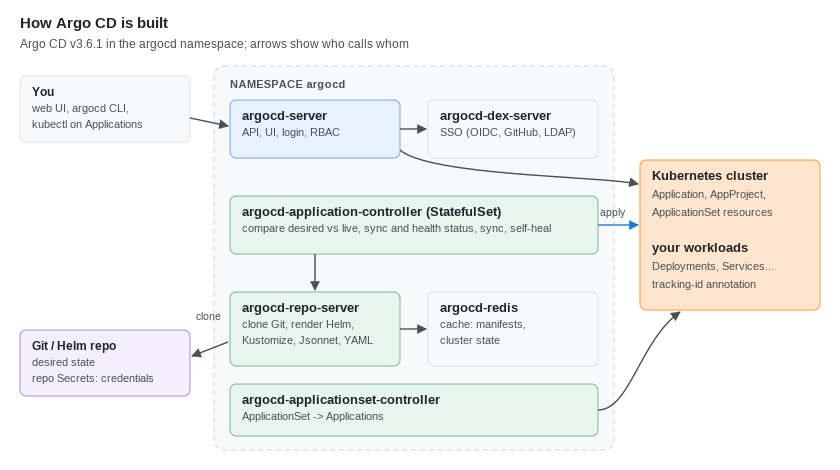
| Component | Kind | Job |
|---|---|---|
argocd-server |
Deployment | API, web UI and the endpoint the argocd CLI logs in to |
argocd-repo-server |
Deployment | Clones Git, renders Helm, Kustomize, Jsonnet or plain YAML into manifests |
argocd-application-controller |
StatefulSet | Compares rendered manifests with the cluster, sets sync and health status, runs syncs and self-heal |
argocd-applicationset-controller |
Deployment | Turns ApplicationSets into Applications |
argocd-redis |
Deployment | Cache for rendered manifests and the cluster state (no persistent data) |
argocd-dex-server |
Deployment | SSO bridge (OIDC, GitHub, LDAP…) |
argocd-notifications-controller |
Deployment | Slack, email, webhook notifications on app events |
The Helm and Kustomize versions bundled in the server image decide how your apps are rendered (v3.6.1 ships Helm 4.3.1 and Kustomize 5.8.3); argocd version shows them.
Argo CD marks every resource it deploys with a tracking annotation, argocd.argoproj.io/tracking-id: <app>:<group>/<kind>:<namespace>/<name>, which is how it knows what it owns (and what an app delete removes):
kubectl -n <namespace> get deploy <name> -o jsonpath='{.metadata.annotations.argocd\.argoproj\.io/tracking-id}{"\n"}'
4. Listing Applications With kubectl
kubectl -n argocd get applications              # NAME, SYNC STATUS, HEALTH STATUS
kubectl -n argocd get apps -o wide              # adds REVISION and PROJECT
kubectl get applications -A                     # every namespace
kubectl -n argocd get applicationsets
kubectl -n argocd get appprojects
A freshly created app shows empty SYNC STATUS and HEALTH STATUS for a second or two, until the controller has compared it.
Custom Columns
kubectl -n argocd get applications -o custom-columns=\
NAME:.metadata.name,\
SYNC:.status.sync.status,\
HEALTH:.status.health.status,\
REPO:.spec.source.repoURL,\
PATH:.spec.source.path,\
DEST:.spec.destination.namespace,\
SELFHEAL:.spec.syncPolicy.automated.selfHeal
Find What Needs Attention
# Apps that are not Synced or not Healthy (needs jq)
kubectl -n argocd get applications -o json \
  | jq -r '.items[] | select(.status.sync.status!="Synced" or .status.health.status!="Healthy")
           | [.metadata.name, .status.sync.status, .status.health.status] | @tsv'

# Apps with error conditions (ComparisonError, SyncError, InvalidSpecError...)
kubectl -n argocd get applications -o json \
  | jq -r '.items[] | select(.status.conditions) | .metadata.name as $n | .status.conditions[] | "\($n)\t\(.type)\t\(.message)"'

# Apps with automated sync turned off
kubectl -n argocd get applications -o json \
  | jq -r '.items[] | select(.spec.syncPolicy.automated == null) | .metadata.name'
The conditions filter is the quickest way to find an app whose manifests don’t render, such as a broken YAML file in Git (ComparisonError).
5. Inspecting One Application
kubectl -n argocd get app <app> -o yaml
kubectl -n argocd describe app <app>                       # events at the bottom

# Sync and health in one line
kubectl -n argocd get app <app> -o jsonpath='{.status.sync.status} {.status.health.status}{"\n"}'

# Git commit currently deployed
kubectl -n argocd get app <app> -o jsonpath='{.status.sync.revision}{"\n"}'

# Every managed resource with its sync and health status
kubectl -n argocd get app <app> -o jsonpath='{range .status.resources[*]}{.kind}{"\t"}{.namespace}/{.name}{"\t"}{.status}{"\t"}{.health.status}{"\n"}{end}'

# Only the resources that drifted
kubectl -n argocd get app <app> -o jsonpath='{range .status.resources[?(@.status=="OutOfSync")]}{.kind}/{.name}{"\n"}{end}'

# Result of the last sync
kubectl -n argocd get app <app> -o jsonpath='{.status.operationState.phase} {.status.operationState.message}{"\n"}'

# Deployment history (ID, revision, time)
kubectl -n argocd get app <app> -o jsonpath='{range .status.history[*]}{.id}{"\t"}{.revision}{"\t"}{.deployedAt}{"\n"}{end}'
A Service often shows an empty health column: Argo CD only assesses health for kinds it knows (Deployments, StatefulSets, Ingresses, PVCs, LoadBalancer Services and so on).
6. Acting on Applications With kubectl
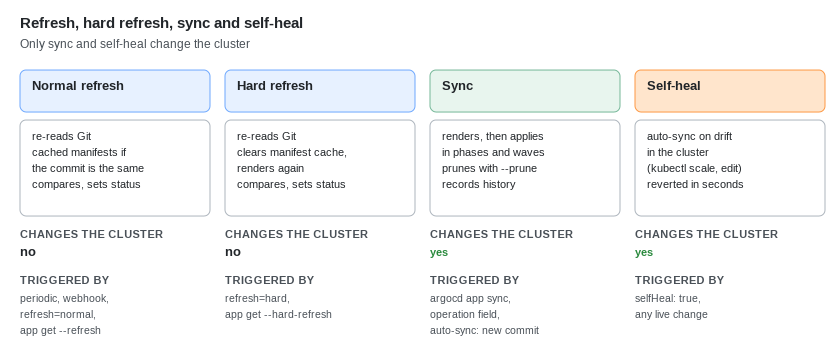
Refresh (Re-Read Git and Compare)
kubectl -n argocd annotate app <app> argocd.argoproj.io/refresh=normal --overwrite
kubectl -n argocd annotate app <app> argocd.argoproj.io/refresh=hard --overwrite   # also clears the manifest cache
The controller removes the annotation once the refresh is done (it was gone and status.reconciledAt updated within 5 seconds). A refresh only compares; it does not deploy anything.
Sync (Deploy)
kubectl has no sync command. Writing an operation field into the Application asks the controller to run one:
kubectl -n argocd patch app <app> --type merge -p \
  '{"operation":{"initiatedBy":{"username":"<your-name>"},"sync":{"syncOptions":["CreateNamespace=true"]}}}'
Sync options in spec.syncPolicy.syncOptions are not applied to an operation written this way. On an app with CreateNamespace=true in its spec, a patch with an empty sync: {} failed because the namespace didn’t exist; with the option copied into the patch, the same sync succeeded. Copy the options you need, or use argocd app sync, which reads them from the spec.
Turn Automated Sync On or Off
# On, with pruning and self-heal (reverts manual changes in the cluster)
kubectl -n argocd patch app <app> --type merge -p '{"spec":{"syncPolicy":{"automated":{"prune":true,"selfHeal":true}}}}'

# Off
kubectl -n argocd patch app <app> --type json -p '[{"op":"remove","path":"/spec/syncPolicy/automated"}]'
With selfHeal on, kubectl scale deploy guestbook-ui --replicas=3 was back to 1 replica within 8 seconds. prune: true deletes resources that were removed from Git: those deletions are irreversible.
Point the App at Another Revision
kubectl -n argocd patch app <app> --type merge -p '{"spec":{"source":{"targetRevision":"<branch-tag-or-commit>"}}}'
Delete an Application
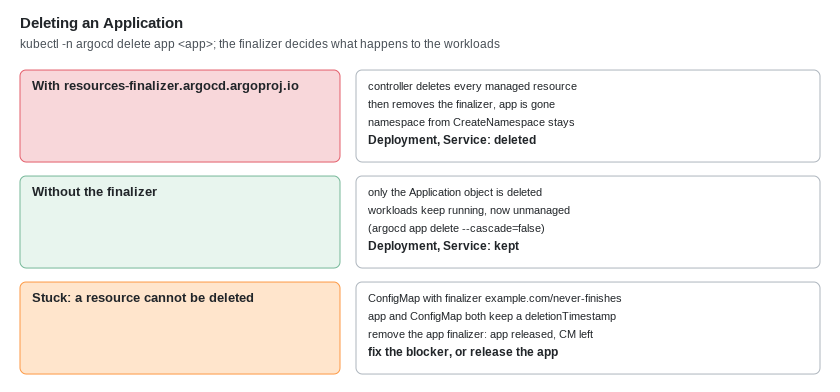
# Delete the app AND everything it deployed (cascade)
kubectl -n argocd patch app <app> --type merge -p '{"metadata":{"finalizers":["resources-finalizer.argocd.argoproj.io"]}}'
kubectl -n argocd delete app <app>

# Delete only the Application object, leave the workloads running
kubectl -n argocd patch app <app> --type json -p '[{"op":"remove","path":"/metadata/finalizers"}]'
kubectl -n argocd delete app <app>
Warning: a cascade delete removes every resource the app manages, including PVCs and therefore their data under a
Deletereclaim policy. It cannot be undone. Check.status.resourcesbefore deleting.
After the cascade delete the Deployment and Service were gone, but the namespace created through CreateNamespace=true stayed (Active): Argo CD doesn’t track it as an app resource.
An app stuck in deletion has a finalizer that can’t finish. In the test, the app managed a ConfigMap with its own finalizer (example.com/never-finishes) that nothing removes. After kubectl delete app, both stayed with a deletionTimestamp set. To see what is holding a deletion:
kubectl -n argocd get app <app> -o jsonpath='{.metadata.deletionTimestamp} {.metadata.finalizers}{"\n"}'
kubectl -n <namespace> get <kind> <name> -o jsonpath='{.metadata.deletionTimestamp} {.metadata.finalizers}{"\n"}'
Removing the app’s finalizer (the second patch above) released the Application immediately, and left the ConfigMap behind, still in deletion. Fix the resource that blocks first (here, its finalizer) when you want the cleanup to complete; remove the app’s finalizer when the destination is gone for good.
7. The argocd CLI
Install
# macOS
brew install argocd
# Linux (any distribution): pick the release that matches your server
VERSION=v3.6.1
curl -sSL -o argocd "https://github.com/argoproj/argo-cd/releases/download/${VERSION}/argocd-linux-amd64"
sudo install -m 555 argocd /usr/local/bin/argocd && rm argocd
Keep the CLI version close to the server version (argocd version shows both).
Log In
# Initial admin password (delete this secret once you have changed it)
kubectl -n argocd get secret argocd-initial-admin-secret -o jsonpath='{.data.password}' | base64 -d; echo
argocd admin initial-password -n argocd          # same, through the CLI

# Reach the API server without an Ingress
kubectl -n argocd port-forward svc/argocd-server 8080:443

argocd login localhost:8080 --insecure --username admin
argocd account update-password
argocd context                    # list saved servers, switch with: argocd context <name>
argocd logout localhost:8080
--core mode talks to the Kubernetes API with your kubeconfig instead of logging in to argocd-server, and needs RBAC on the Argo CD resources:
argocd app list --core
Without Installing the CLI
The argocd-server image ships the same CLI. That is handy on a jump host or in an incident:
kubectl -n argocd exec deploy/argocd-server -- argocd version --client
kubectl -n argocd exec deploy/argocd-server -- argocd login localhost:8080 --insecure --username admin --password '<password>'
kubectl -n argocd exec deploy/argocd-server -- argocd app list
The login token is stored inside the pod and disappears when the pod restarts. The password ends up in your shell history, so prefer the port-forward and a local CLI for regular use. --core doesn’t work this way: the argocd-server service account may not list Services (services is forbidden: User "system:serviceaccount:argocd:argocd-server" cannot list resource "services").
Applications
| Command | Description |
|---|---|
argocd app list |
All apps with cluster, namespace, project, status, health, sync policy, repo |
argocd app list -o name |
Names only, as <namespace>/<app> |
argocd app list -l <key>=<value> |
Filter by label |
argocd app list -p <project> |
Filter by project |
argocd app get <app> |
Summary plus every resource |
argocd app get <app> --refresh |
Re-read Git first (--hard-refresh also clears the cache) |
argocd app get <app> --show-params |
Also show Helm parameter overrides |
argocd app diff <app> |
Diff between Git and the cluster. Exit code 1 when they differ |
argocd app resources <app> |
Managed resources, with an ORPHANED column |
argocd app manifests <app> |
Rendered manifests from Git (--source live for the cluster copy) |
argocd app history <app> |
Deployment history with IDs |
argocd app logs <app> --kind Deployment --name <name> --tail 50 |
Pod logs through Argo CD |
argocd app sync <app> |
Deploy now |
argocd app sync <app> --prune |
Deploy and delete resources removed from Git (irreversible) |
argocd app sync <app> --resource apps:Deployment:<name> |
Sync one resource only (GROUP:KIND:NAME, core group empty: :Service:<name>) |
argocd app sync <app> --dry-run |
Show what would happen, change nothing |
argocd app sync <app> --async |
Start the sync and return immediately |
argocd app sync <app> --retry-limit 5 |
Retry a failing sync (--retry-backoff-duration sets the delay) |
argocd app wait <app> --sync --health --timeout 300 |
Block until synced and healthy, for CI pipelines |
argocd app rollback <app> <history-id> |
Redeploy an earlier revision. Needs automated sync off |
argocd app terminate-op <app> |
Stop a running sync |
argocd app set <app> --sync-policy automated --auto-prune --self-heal |
Turn on auto-sync |
argocd app set <app> --sync-policy none |
Turn off auto-sync |
argocd app set <app> --revision <branch-tag-or-commit> |
Change the target revision |
argocd app set <app> -p image.tag=<tag> |
Override a Helm parameter |
argocd app delete <app> |
Delete with cascade (asks for confirmation; --yes skips it) |
argocd app delete <app> --cascade=false |
Delete the app, keep the workloads |
--dry-run before the first sync lists every resource as created (dry run) and creates nothing, not even the namespace. rollback with auto-sync on is refused (rollback cannot be initiated when auto-sync is enabled).
The overrides from -p are stored in the Application (spec.source.helm.parameters), not in Git. The next person who applies the Application manifest from Git removes them.
--resource only matches resources the app already knows about: right after app create, before the controller had compared the app, it failed with No matching app resources found for resource filter. The namespaced form apps:Deployment:guestbook/guestbook-ui works too.
terminate-op only works while an operation is running. On a sync that had already failed it returned Unable to terminate operation. No operation is in progress; on a sync that was retrying (--retry-limit 10) it stopped the retries, and the operation ended as Failed: Operation terminated.
Create an Application
argocd app create <app> \
  --repo https://github.com/<org>/<repo>.git \
  --path <path-in-repo> \
  --revision main \
  --dest-server https://kubernetes.default.svc \
  --dest-namespace <namespace> \
  --sync-option CreateNamespace=true \
  --sync-policy automated --auto-prune --self-heal
The same as a manifest, which belongs in Git:
apiVersion: argoproj.io/v1alpha1
kind: Application
metadata:
  name: <app>
  namespace: argocd
  finalizers:
    - resources-finalizer.argocd.argoproj.io    # cascade delete
spec:
  project: default
  source:
    repoURL: https://github.com/<org>/<repo>.git
    targetRevision: main
    path: <path-in-repo>
  destination:
    server: https://kubernetes.default.svc
    namespace: <namespace>
  syncPolicy:
    automated:
      prune: true
      selfHeal: true
    syncOptions:
      - CreateNamespace=true
app create validates the spec against the repo: a path that doesn’t exist or a repo that can’t be reached is refused right away (see Troubleshooting), and no Application is created.
Projects, Clusters, Repositories, Accounts
| Command | Description |
|---|---|
argocd proj list |
Projects with allowed destinations and sources |
argocd proj get <project> |
One project in detail |
argocd proj role create-token <project> <role> --expires-in 24h |
Token for a project role (CI) |
argocd cluster list |
Registered clusters and connection status |
argocd cluster add <kube-context> |
Register a cluster from your kubeconfig |
argocd repo list |
Registered repositories |
argocd repo add <url> --username <user> --password <token> |
Add a private HTTPS repo |
argocd repo add git@<host>:<org>/<repo>.git --ssh-private-key-path ~/.ssh/<key> |
Add a private SSH repo |
argocd account list |
Local accounts |
argocd account get-user-info |
Who you are logged in as, and your groups |
argocd account can-i sync applications '<project>/*' |
Check your RBAC (yes / no) |
argocd version |
Client and server versions |
repo add tests the connection before saving anything. What it stores is a Secret with the argocd.argoproj.io/secret-type=repository label (kubectl -n argocd get secret -l argocd.argoproj.io/secret-type=repository).
8. ApplicationSets
An ApplicationSet generates Applications from a template and a generator. The list generator, one app per environment:
apiVersion: argoproj.io/v1alpha1
kind: ApplicationSet
metadata:
  name: web-envs
  namespace: argocd
spec:
  goTemplate: true
  generators:
  - list:
      elements:
      - env: dev
      - env: staging
  template:
    metadata:
      name: 'web-{{.env}}'
    spec:
      project: default
      source:
        repoURL: https://github.com/<org>/<repo>.git
        targetRevision: main
        path: apps/web
      destination:
        server: https://kubernetes.default.svc
        namespace: 'web-{{.env}}'
      syncPolicy:
        automated: {prune: true, selfHeal: true}
        syncOptions: [CreateNamespace=true]
The git directory generator, one app per directory under apps/:
  generators:
  - git:
      repoURL: https://github.com/<org>/<repo>.git
      revision: main
      directories:
      - path: apps/*
  template:
    metadata:
      name: '{{.path.basename}}'
    spec:
      source:
        path: '{{.path.path}}'
      destination:
        namespace: '{{.path.basename}}'
      # ...
kubectl -n argocd get applicationsets
kubectl -n argocd get appset <appset> -o jsonpath='{range .status.conditions[*]}{.type}={.status} {.message}{"\n"}{end}'
# Which apps an ApplicationSet owns
kubectl -n argocd get apps -o custom-columns=NAME:.metadata.name,SYNC:.status.sync.status,HEALTH:.status.health.status,OWNER:.metadata.ownerReferences[0].kind
Generated apps get the resources-finalizer.argocd.argoproj.io finalizer. So when an element disappears (an entry removed from the list, a directory deleted from Git), the ApplicationSet deletes that Application and its workloads. Removing staging from the list deleted web-staging and its Deployment within 20 seconds; only the namespace stayed. Removing apps/api from Git did the same to the api app.
To keep workloads when apps disappear, set a sync policy on the ApplicationSet:
spec:
  syncPolicy:
    preserveResourcesOnDeletion: true      # delete the Applications, keep their resources
With it set, replacing dev in the list deleted the web-dev Application, and its Deployment kept running.
Edits made directly on a generated Application are overwritten by the ApplicationSet controller: removing automated from web-dev with kubectl patch was undone before the next kubectl get. Change the ApplicationSet instead.
9. Sync Waves and Hooks
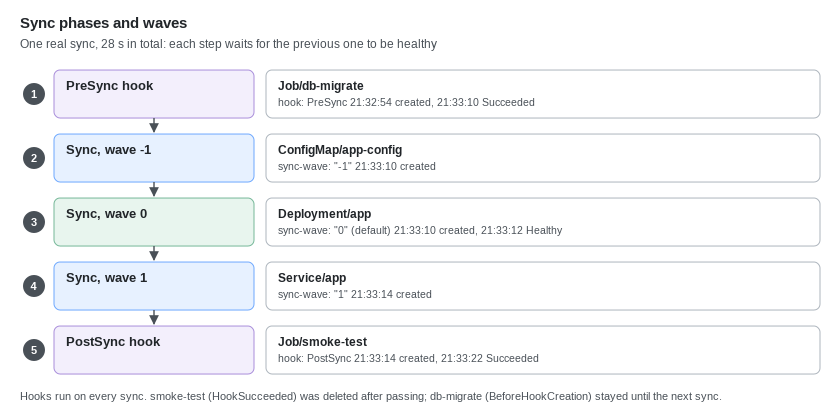
Within a sync, Argo CD applies resources in phases (PreSync, Sync, PostSync) and, inside each phase, in waves (lowest first, default 0). It waits for each wave to be healthy before starting the next.
metadata:
  annotations:
    argocd.argoproj.io/sync-wave: "-1"              # ConfigMap, before the Deployment (wave 0)
---
metadata:
  annotations:
    argocd.argoproj.io/hook: PreSync                # a Job that runs before anything is applied
    argocd.argoproj.io/hook-delete-policy: BeforeHookCreation
| Hook | Runs |
|---|---|
PreSync |
Before any resource is applied (migrations, backups) |
Sync |
With the normal resources |
PostSync |
After all waves are healthy (smoke tests, notifications) |
SyncFail |
When the sync fails (cleanup, alerts) |
Skip |
Never: Argo CD doesn’t apply this resource |
hook-delete-policy |
The hook resource is deleted |
|---|---|
BeforeHookCreation (default) |
Before the next run creates it again |
HookSucceeded |
After it succeeds |
HookFailed |
After it fails |
The order Argo CD recorded for a sync, phase by phase:
kubectl -n argocd get app <app> -o jsonpath='{range .status.operationState.syncResult.resources[*]}{.syncPhase}{"\t"}{.kind}/{.name}{"\t"}{.hookPhase}{"\t"}{.message}{"\n"}{end}'
A sync with a PreSync migration Job, a ConfigMap in wave -1, the Deployment in wave 0, a Service in wave 1 and a PostSync smoke test took 28 seconds, most of it waiting for the Jobs. A hook runs on every sync, not only the first one: the second sync recreated db-migrate, so migrations must be safe to run twice. The smoke-test Job (HookSucceeded) was gone after it passed; db-migrate (BeforeHookCreation) stayed until the next sync.
10. Sync Options
Set per app in spec.syncPolicy.syncOptions (or --sync-option), or per resource with the argocd.argoproj.io/sync-options annotation.
| Option | Effect | Use it when |
|---|---|---|
CreateNamespace=true |
Creates the destination namespace | The namespace isn’t managed elsewhere |
ServerSideApply=true |
Applies with server-side apply | Large CRDs (annotation size limit), fields owned by other controllers |
Prune=false (annotation) |
Never prunes this resource | PVCs, Secrets you don’t want deleted with the file |
PruneLast=true |
Prunes after all other waves are healthy | Removing things other resources still need |
ApplyOutOfSyncOnly=true |
Applies only resources that drifted | Apps with thousands of resources |
Replace=true |
kubectl replace / create instead of apply |
Resources apply can’t update; deletes and recreates, use with care |
RespectIgnoreDifferences=true |
Sync keeps the fields listed in ignoreDifferences |
Together with ignoreDifferences (next section) |
Validate=false |
Skips kubectl schema validation | Resources with fields the schema doesn’t know |
Prune=false in practice: two ConfigMaps, one annotated, both deleted from Git. A sync without --prune marked both ignored (requires pruning) and exited with code 1. With --prune, the plain one was pruned and the annotated one stayed (ignored (no prune)).
The app stays OutOfSync afterwards, because keep-me is in the cluster but no longer in Git.
11. ignoreDifferences
Some fields are changed in the cluster by something other than Argo CD, and the app is then OutOfSync forever. The classic case: an HPA (minReplicas: 2) scaling a Deployment that has replicas: 1 in Git. The app stays OutOfSync and argocd app diff shows only the replicas line. With self-heal on, Argo CD and the HPA keep resetting the replica count. Tell Argo CD to ignore the field, and to leave it alone when syncing:
spec:
  ignoreDifferences:
  - group: apps
    kind: Deployment
    jsonPointers:
    - /spec/replicas
  syncPolicy:
    syncOptions:
    - RespectIgnoreDifferences=true
The app then turned Synced and Healthy, the Deployment kept the 2 replicas the HPA wanted, and argocd app diff exited 0. The simpler fix for this case is to drop replicas from the Deployment in Git when an HPA manages it. jqPathExpressions and managedFieldsManagers (ignore whatever a given controller owns) cover cases a JSON pointer can’t. To ignore a field in every app, put it in argocd-cm under resource.customizations.ignoreDifferences.<group>_<kind>.
12. AppProjects
The default project allows everything. A project for one team, limited to one repo, its own namespaces and no cluster-scoped resources:
apiVersion: argoproj.io/v1alpha1
kind: AppProject
metadata:
  name: team-a
  namespace: argocd
spec:
  description: Team A, demo repo only, team-a-* namespaces
  sourceRepos:
  - https://github.com/<org>/<repo>.git
  destinations:
  - server: https://kubernetes.default.svc
    namespace: 'team-a-*'
  clusterResourceWhitelist: []            # no cluster-scoped kinds (Namespace, ClusterRole...)
  namespaceResourceBlacklist:
  - group: ''
    kind: ResourceQuota
  roles:
  - name: ci
    description: CI pipeline may sync team-a apps
    policies:
    - p, proj:team-a:ci, applications, get, team-a/*, allow
    - p, proj:team-a:ci, applications, sync, team-a/*, allow
What the project refuses, with the exact messages:
| Attempt | Result |
|---|---|
App in namespace default |
application destination server 'https://kubernetes.default.svc' and namespace 'default' do not match any of the allowed destinations in project 'team-a' |
| App from another repo | application repo https://github.com/argoproj/argocd-example-apps.git is not permitted in project 'team-a' |
Sync with CreateNamespace=true |
resource :Namespace is not permitted in project team-a (a Namespace is cluster-scoped) |
app delete with the ci token |
permission denied: applications, delete, team-a/t-ok, sub: proj:team-a:ci |
The first two are refused at app create; the third only at sync time, so create the namespaces outside the project (or allow Namespace in clusterResourceWhitelist).
A token for the role, for a CI pipeline:
argocd proj role create-token team-a ci --expires-in 24h --token-only   # prints the JWT once
argocd proj role get team-a ci                                          # lists issued tokens
argocd app sync <app> --auth-token "$ARGOCD_AUTH_TOKEN"                 # or export ARGOCD_AUTH_TOKEN
With that token, app list showed only the team-a apps, app sync was allowed and app delete was denied. Deleting the token entry (argocd proj role delete-token team-a ci <iat>) revokes it.
13. argocd admin
argocd admin commands work on the Kubernetes resources directly, without the API server.
argocd admin initial-password -n argocd

# Test an RBAC policy before you deploy it
argocd admin settings rbac can role:readonly get applications '*/*' --namespace argocd
argocd admin settings rbac can role:readonly sync applications '*/*' --namespace argocd
argocd admin settings rbac can <user-or-role> sync applications '<project>/<app>' --policy-file policy.csv

# Back up all Argo CD configuration and objects (ConfigMaps, Secrets, AppProjects, Applications, ApplicationSets)
argocd admin export -n argocd > argocd-backup.yaml
argocd admin import -n argocd - < argocd-backup.yaml
rbac can prints Yes or No and exits with 1 on No, so it works in a CI check. The export contains argocd-secret (admin password hash, server key, TLS key) and the repository Secrets with their credentials: store it like a secret.
14. Argo CD Components and Config With kubectl
kubectl -n argocd get pods
kubectl -n argocd get deploy,statefulset,svc

# Logs
kubectl -n argocd logs statefulset/argocd-application-controller --tail=200 | grep <app>
kubectl -n argocd logs deploy/argocd-repo-server --tail=200          # Git, Helm, Kustomize errors
kubectl -n argocd logs deploy/argocd-server --tail=200               # UI, API, login
kubectl -n argocd logs deploy/argocd-applicationset-controller --tail=200

# Restart a component (for example after changing a ConfigMap)
kubectl -n argocd rollout restart deploy/argocd-repo-server
kubectl -n argocd rollout restart statefulset/argocd-application-controller

# Configuration
kubectl -n argocd get cm argocd-cm -o yaml              # URL, SSO, resource customisations
kubectl -n argocd get cm argocd-rbac-cm -o yaml         # RBAC policy
kubectl -n argocd get cm argocd-cmd-params-cm -o yaml   # component flags (insecure mode, reconcile timeout)

# Registered repositories and clusters are Secrets with a type label
kubectl -n argocd get secret -l argocd.argoproj.io/secret-type=repository
kubectl -n argocd get secret -l argocd.argoproj.io/secret-type=cluster
The controller logs are JSON, one line per step, with the app name in the application field.
15. Status Values
| Sync status | Meaning |
|---|---|
Synced |
The cluster matches Git |
OutOfSync |
At least one resource differs from Git, or is missing |
Unknown |
Argo CD couldn’t compare. Look at .status.conditions |
| Health status | Meaning |
|---|---|
Healthy |
Everything is running as expected |
Progressing |
Rolling out, not ready yet |
Degraded |
Failed: crash loops, failed rollout, failing probes |
Missing |
Defined in Git, not in the cluster (typical before the first sync) |
Suspended |
Paused, for example a suspended CronJob or a paused rollout |
Unknown |
Health can’t be determined |
16. Troubleshooting
| Symptom | Message | Fix |
|---|---|---|
app create / repo add refused |
unable to ls-remote HEAD on repository: ... dial tcp: lookup git.example.invalid on 10.43.0.10:53: no such host |
Check the URL and DNS from the repo-server pod; for private repos add credentials (argocd repo add) |
app create refused |
Unable to generate manifests in does-not-exist: ... app path does not exist |
Wrong --path or --revision; paths are relative to the repo root |
SYNC STATUS Unknown, condition ComparisonError |
Failed to unmarshal "configmap.yaml": ... error converting YAML to JSON: yaml: line 6: ... |
Fix the YAML in Git; render locally with kubectl apply --dry-run=client -f or helm template |
Sync Failed |
one or more objects failed to apply, reason: namespaces "stuck-ns" not found |
Add CreateNamespace=true or create the namespace; with the kubectl patch, put the option in the patch |
Sync Failed |
resource :Namespace is not permitted in project team-a |
The project blocks that kind; allow it or create it outside the app |
| Sync exits 1, nothing applied | ignored (requires pruning) |
Resources were removed from Git; sync with --prune |
App Synced but Progressing for minutes |
Pod in ImagePullBackOff |
Health waits for the rollout; check kubectl get pods, the image tag; it turns Degraded after the Deployment’s progressDeadlineSeconds (600 s) |
| OutOfSync right after every sync | argocd app diff shows a field like replicas |
Another controller owns the field: ignoreDifferences (section 11) |
| App stuck in deletion | deletionTimestamp set, finalizer resources-finalizer.argocd.argoproj.io |
A managed resource can’t be deleted; fix it, or remove the app’s finalizer (section 6) |
argocd app get / delete says permission denied |
rpc error: code = PermissionDenied desc = permission denied |
Also what you get for an app that doesn’t exist; check the name and project with argocd app list before RBAC |
rollback refused |
rollback cannot be initiated when auto-sync is enabled |
argocd app set <app> --sync-policy none first |
terminate-op refused |
Unable to terminate operation. No operation is in progress |
The sync already finished or failed; check .status.operationState |
17. Gotchas
kubectl -n <app-namespace> get applicationsreturns nothing: Applications live inargocd, not in the namespace they deploy to.- A sync started with
kubectl patch ... operationignoresspec.syncPolicy.syncOptions. Put the options in the patch or useargocd app sync. - Changes made with
kubectl editorkubectl scaleon a self-healed app are reverted within seconds. Change Git instead, or turn off self-heal while debugging. argocd app rollbackrefuses to run while automated sync is on, because auto-sync would immediately roll forward again. After a rollback the app is OutOfSync by design: see Argo CD Rollback: How It Works and Why the App Shows OutOfSync.argocd app diffexits with 1 when there are differences, andargocd app syncexits with 1 when something needs pruning and--prunewasn’t given. In a script withset -ethat ends the script.- An app without the
resources-finalizer.argocd.argoproj.iofinalizer leaves its workloads behind when deleted with kubectl. The CLI’sargocd app deletecascades by default. - ApplicationSet-generated apps do have the finalizer: removing a list entry or a Git directory deletes the workloads.
CreateNamespace=truecreates the namespace but doesn’t delete it on a cascade delete.- Hooks run on every sync. A
PreSyncmigration must be safe to run again. argocd app set -poverrides live in the Application, not in Git.- A missing
HEALTHvalue for a Service or ConfigMap is normal: not every kind has a health check. argocd-initial-admin-secretkeeps the first password in plain base64. Delete it after changing the admin password, or disable the admin account once SSO works.