Docker Compose 2.x vs 5.x
Docker Compose went from v2.40.3 straight to v5.0.0. There is no 3.x or 4.x. This guide explains why, what changed between the two lines, and what did not change. The same Compose project was run with the last 2.x release (v2.40.3), v5.2.0 and the latest release, v5.6.1, on one Docker 29.5.2 daemon. Release dates and change lists come from the GitHub release notes of docker/compose.
1. Short Answer
| 2.x (last: v2.40.3) | 5.x (v5.2.0, v5.6.1) | |
|---|---|---|
| Command | docker compose |
docker compose (same) |
| Compose file format | The Compose Specification | The same file, no new required keys |
| Subcommands | 34 | The same 34 |
| Flags | Baseline | Only start --wait and start --wait-timeout are new |
| Image builds | Bake by default, internal builder still selectable (deprecated) | Bake only, the internal builder is gone |
| Use as a library | Not an official feature | Officially supported SDK |
For day-to-day use there is nothing to relearn. The major version change reflects internal work (SDK, builder removal, a new reconciliation engine), not a new command line. A few output details did change (section 5).
2. Version History
| Release | Date | Note |
|---|---|---|
| v2.40.2 | 2025-10-22 | |
| v2.40.3 | 2025-10-30 | The last 2.x release |
| v5.0.0-rc.1 | 2025-11-12 | |
| v5.0.0 “Mont Blanc” | 2025-12-02 | First 5.x release |
| v5.0.1 | 2025-12-18 | |
| v5.0.2 | 2026-01-21 | |
| v5.1.0 | 2026-02-24 | Followed by 5.1.1 to 5.1.4 (2026-03-20 to 2026-05-20) |
| v5.2.0 | 2026-06-23 | New reconciliation algorithm |
| v5.3.0 | 2026-07-02 | v5.3.1 on 2026-07-07 |
| v5.4.0 | 2026-08-03 | Reconciliation for volumes and networks; recreates running containers once on upgrade (section 6) |
| v5.5.0 | 2026-08-17 | New image digest reconciliation; v5.5.1 on 2026-09-03 |
| v5.6.0 | 2026-10-02 | Partial support for jobs; provider services |
| v5.6.1 | 2026-10-21 | Latest release |
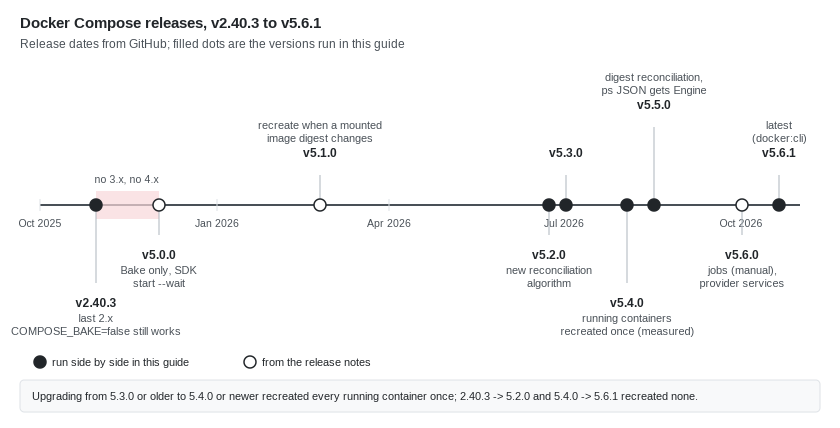
There are no v3.0.0 and v4.0.0 releases on GitHub. The 5.0.0 release notes explain why: the project skipped 3.0.0 to avoid more confusion with the obsolete Compose file format versions 2.x and 3.x that came from Compose V1, and skipped 4.0.0 to keep a clear separation from that legacy. So “Compose 2” (the tool) and “file format 2.x/3.x” (the old version: key) are different things.
3. What Changed (From the Release Notes)
| Release | Change |
|---|---|
| 5.0.0 | Compose can officially be used as an SDK inside other software |
| 5.0.0 | The internal builder was removed: builds are delegated to Docker Bake, the same engine as docker build |
| 5.0.0 | docker compose start --wait (and --wait-timeout) added |
| 5.0.0 | Lifecycle hooks run on restart; build.no_cache_filter supported |
| 5.1.0 | A container is recreated when the mounted image digest changes; post_start hooks also run for docker compose run |
| 5.2.0 | A new reconciliation algorithm between the observed and the expected state. The notes ask to open an issue if a previously working workload misbehaves |
| 5.4.0 | Reconciliation also plans volume recreation and network lifecycle; the image label records the platform image-manifest digest instead of the attested index |
| 5.5.0 | Image digest reconciliation overhauled. The notes warn: “Existing containers may be recreated the first time you run compose up after upgrading” |
| 5.5.0 | An Engine field driven by a label (in ps --format json, section 5) |
| 5.5.1 | Lifecycle hook output is captured and shown, also in the error when a hook fails |
| 5.6.0 | Partial support for jobs (only manually-triggered jobs, scheduled jobs are not available yet) and provider services |
| 5.6.1 | A crypto/x509 security mitigation |
4. What Did Not Change
v2.40.3, v5.2.0 and v5.6.1 ran the same project (a build: service and an nginx service, both with a healthcheck) on the same daemon, each under its own project name.
| Check | Result |
|---|---|
Subcommands (docker compose --help) |
The same 34 in all three |
| Global flags | The same 11 |
| Flags of every subcommand | Identical except start --wait and start --wait-timeout (5.x only); 5.3.0 renamed the help entry run --no-TTY to --no-tty |
up -d without a build, a second up -d, down |
Same lines (only column spacing differs) |
Changing a service (adding an environment variable) and up -d |
All three: Recreate, Recreated, Starting, Started for that service only, and Running for the unchanged one |
up -d --wait |
Same: Waiting, then Healthy for both services |
build --print |
The same Bake definition; only the com.docker.compose.version label differs |
COMPOSE_BAKE unset or true |
Bake in all three |
The obsolete version: key |
The same warning in all three: the attribute `version` is obsolete, it will be ignored, please remove it to avoid potential confusion |
config --quiet, version --short |
Same behavior |
So an existing Compose file and your habits keep working. The Compose file format is the same specification in both lines.
5. Differences You Can See
COMPOSE_BAKE=false
Bake was already the default in 2.40.3 (the first build line is [internal] load local bake definitions). What differs is the opt-out:
COMPOSE_BAKE |
2.40.3 | 5.2.0 and 5.6.1 |
|---|---|---|
| unset | Bake | Bake |
true |
Bake | Bake |
false |
Warning: COMPOSE_BAKE=false is deprecated, support for internal compose builder will be removed in next release, and the internal builder runs |
Ignored: Bake runs, no warning |
If a pipeline sets COMPOSE_BAKE=false to keep the old builder, it only works on 2.x, and 5.x ignores it silently. Remove it and make sure the build works with Bake.
Build lines
5.x prints the image as its own resource, in up as well as in build:
# 2.40.3 (up -d)
 cmp2403-app Built

# 5.2.0 and 5.6.1 (up -d)
 Image cmp520-app Building
 Image cmp520-app Built
With --progress plain, 5.x starts with ` Image
–dry-run Has No Marker in 5.x
The plan is the same, but 2.40.3 marks every line and 5.x does not:
# 2.40.3: docker compose --dry-run up -d
 DRY-RUN MODE - Container cmp2403-app-1 Running
 DRY-RUN MODE - Container cmp2403-web-1 Recreate
 DRY-RUN MODE - Container cmp2403-web-1 Recreated
 DRY-RUN MODE - Container a340664284a4_cmp2403-web-1 Starting

# 5.2.0 and 5.6.1: the same command
 Container cmp520-app-1 Running
 Container cmp520-web-1 Recreate
 Container cmp520-web-1 Recreated
 Container ca9c5a960e99_cmp520-web-1 Starting
In 5.x a dry run reads like a real one; only the temporary name (<id>_<container>) gives it away. Nothing was changed by it in any version.
ps –format json
2.40.3 and 5.2.0 print the same 20 keys per container, one JSON object per line. 5.6.1 adds a 21st key, Engine (an empty string here), from 5.5.0’s label-driven engine field. A script that compares the JSON field by field sees a difference; one that reads keys by name does not. The table output of docker compose ps has the same columns in all three.
start –wait
docker compose start --wait
On 2.40.3 this fails with unknown flag: --wait. On 5.2.0 and 5.6.1 it started the stopped services and waited (Waiting, then Healthy).
6. Upgrading a Running Project
Does a new Compose version replace containers that are already running? Each chain below started a project (two image services, nginx and redis, and one build: service) with the first version, then ran up -d with the next one on the same containers, comparing container IDs before and after:
| Upgrade | Containers recreated |
|---|---|
| 2.40.3 → 5.2.0 | 0 of 3 |
| 5.2.0 → 5.3.0 | 0 of 3 |
| 5.3.0 → 5.4.0 | 3 of 3 |
| 5.2.0 → 5.4.0 | 3 of 3 |
| 2.40.3 → 5.4.0 | 3 of 3 |
| 2.40.3 → 5.6.1 | 3 of 3 |
| 5.2.0 → 5.6.1 | 3 of 3, then a second up -d: 0 |
| 5.4.0 → 5.5.0 → 5.6.1 | 0 of 3 |
So the one-time recreation comes with 5.4.0, not with 5.5.0 as its release note suggests. The run printed Recreate, Recreated, Starting, Started for every service. The com.docker.compose.config-hash label stayed the same; what changed is the image digest Compose stores in com.docker.compose.image:
# container created by 5.3.0
com.docker.compose.image = sha256:65645c7bb6a0661892a8b03b89d0743208a18dd2f3f17a54ef4b76fb8e2f2a1...
# after up -d with 5.4.0
com.docker.compose.image = sha256:63ffc0d1f14e4082b832c6a42e606e9a0384a526f16ddd720af7c1f018f2f7c...
com.docker.compose.replace = web-1
On Docker 29 with the containerd image store, the image ID of nginx:1.27-alpine is the multi-platform index digest (65645c7b..., media type application/vnd.oci.image.index.v1+json). Up to 5.3.0 Compose stored that; 5.4.0 stores the platform manifest digest, sees a different value and recreates. After that one recreation, later versions leave the containers alone.
Plan the first up after moving from 5.3.0 or older to 5.4.0 or newer like a restart of every service: a short interruption, and containers lose anything not kept in a volume.
7. Which Version Do I Have?
docker compose version            # e.g. Docker Compose version v5.2.0
docker compose version --short    # 5.2.0
docker-compose version            # the standalone binary, if installed: see below

# Which plugin file answers (section 8)
docker info --format '{{range .ClientInfo.Plugins}}{{if eq .Name "compose"}}{{.Path}}{{end}}{{end}}'
docker-compose with a hyphen is not necessarily the legacy V1 Python tool. On the test Mac it is a link to the same plugin binary (/usr/local/bin/docker-compose -> .../cli-plugins/docker-compose) and printed Docker Compose version v5.2.0; Homebrew’s docker-compose formula installs 5.6.1. The release binaries are themselves called docker-compose-<os>-<arch>. Check the version instead of guessing from the name.
The version follows what your Docker installation bundles, or what you install separately:
| Image or install | Docker CLI | Compose |
|---|---|---|
| Docker Desktop on the test Mac | 29.6.1 | v5.2.0 |
docker:28-cli image |
28.5.2 | v2.40.3 |
docker:29-cli image |
29.9.2 | v5.6.1 |
docker:cli image (floating) |
29.9.2 | v5.6.1 |
To run an older Compose next to a newer one without installing it, use a CLI image and the host’s Docker socket:
docker run --rm \
  -v /var/run/docker.sock:/var/run/docker.sock \
  -v "$PWD":"$PWD" -w "$PWD" \
  docker:28-cli docker compose version
# Docker Compose version v2.40.3
Or download a release binary (docker-compose-darwin-aarch64, docker-compose-linux-x86_64, …) with its .sha256 file from the GitHub release and run it directly; that is how v2.40.3, v5.2.0 and v5.6.1 ran side by side here.
Bind-mounted paths must be visible to the Docker daemon. With Colima on macOS, the project under the home folder worked (docker compose config --services listed app and web), while the same project under /tmp showed up empty in the container: no configuration file provided: not found. Container names and networks are shared with the host daemon, so use a different project name (-p) or down between runs.
8. Install or Pin a Compose Version
Compose is a Docker CLI plugin: an executable named docker-compose in a plugin directory. Install a specific release next to (or instead of) the bundled one:
VERSION=5.4.0
ARCH=$(uname -m)                       # x86_64 or aarch64
BIN=docker-compose-linux-$ARCH
curl -fsSLO https://github.com/docker/compose/releases/download/v$VERSION/$BIN
curl -fsSL https://github.com/docker/compose/releases/download/v$VERSION/$BIN.sha256 | sha256sum -c -

# Only for this user
mkdir -p ~/.docker/cli-plugins
install -m 755 $BIN ~/.docker/cli-plugins/docker-compose

# Or for every user
sudo mkdir -p /usr/local/lib/docker/cli-plugins
sudo install -m 755 $BIN /usr/local/lib/docker/cli-plugins/docker-compose
Then check the version and the file in use with the commands in section 7.
In a docker:29-cli container (bundled v5.6.1 in /usr/local/libexec/docker/cli-plugins/), the checksum line printed docker-compose-linux-aarch64: OK, and the plugin directories won in this order:
| Installed | docker compose version |
Path in use |
|---|---|---|
| only the bundled plugin | v5.6.1 | /usr/local/libexec/docker/cli-plugins/docker-compose |
+ v5.4.0 in ~/.docker/cli-plugins |
v5.4.0 | /root/.docker/cli-plugins/docker-compose |
+ v2.40.3 in /usr/local/lib/docker/cli-plugins |
still v5.4.0 | the user’s plugin wins |
| user plugin removed | v2.40.3 | /usr/local/lib/docker/cli-plugins/docker-compose |
So a per-user plugin overrides a system-wide one, which overrides the one the Docker package ships. That is also a classic source of “it works on my machine”: run docker info to see which file answers. In CI, install a fixed version this way or use a fixed CLI image tag (docker:28-cli for 2.40.3), never a floating tag.
9. Upgrade Checklist
- Find the version on laptops and CI (
docker compose version --short). - Search for
COMPOSE_BAKE=falsein scripts,.envfiles and CI settings, and remove it (section 5). - Remove the obsolete
version:key from Compose files. All three versions warn that it is ignored. - Run
docker compose config --quieton every project, thendocker compose up -din a test environment. Don’t rely on--dry-runoutput looking different from a real run: in 5.x it has no marker. - Expect every container to be recreated once on the first
upafter moving from 5.3.0 or older to 5.4.0 or newer (section 6). The 5.5.0 notes warn about it too, but here it happened at 5.4.0. Plan it like a restart. - Watch the first deployments on 5.2.0 or later: the release notes describe a new reconciliation algorithm and ask to report regressions.
- Check scripts that parse
ps --format jsonstrictly: 5.5.0 and later add anEnginekey. - Pin in CI if you need identical behavior: a fixed CLI image tag such as
docker:28-cli(2.40.3) or a specific Compose release installed as a plugin (section 8), not a floating tag.
Gotchas
- “Compose v2” means the Go program
docker compose, not the fileversion: "2"or"3". The old file versions are obsolete in both lines. - A floating tag such as
docker:climoves to whatever Compose the newest image bundles: it already gives v5.6.1, so a CI job can change from 2.x to 5.x without any change in your repository. - The command-line surface is almost identical, so a script that works on 2.40.3 will usually work on 5.x. The exceptions are build behavior and output lines (section 5) and anything relying on the internal builder.
Scope
- Run side by side (v2.40.3, v5.2.0 and v5.6.1 release binaries, checksums verified, against Docker 29.5.2): subcommand and flag lists,
up, a secondup, a service change,--dry-run,psandps --format json,up --wait,start --wait,build,build --print,COMPOSE_BAKEunset,trueandfalse, theversion:key,config --quiet,down. The Compose versions indocker:28-cli,docker:29-clianddocker:cli. Upgrades of a running project across 2.40.3, 5.2.0, 5.3.0, 5.4.0, 5.5.0 and 5.6.1, and plugin installation and precedence indocker:29-cli. Docker uses the containerd image store (Docker 29 default); with the classicoverlay2store the image IDs, and so the 5.4.0 recreation, may differ. - From the release notes only: the SDK, hooks on restart,
no_cache_filter, recreate on image digest change,post_startinrun, the volume/network and image digest reconciliation, hook output, jobs and provider services. - Not covered: Windows, large projects with many dependencies (where the reconciliation changes would matter most), and the SDK.