AWS Global Accelerator: Static Anycast IPs and Multi-Region Failover
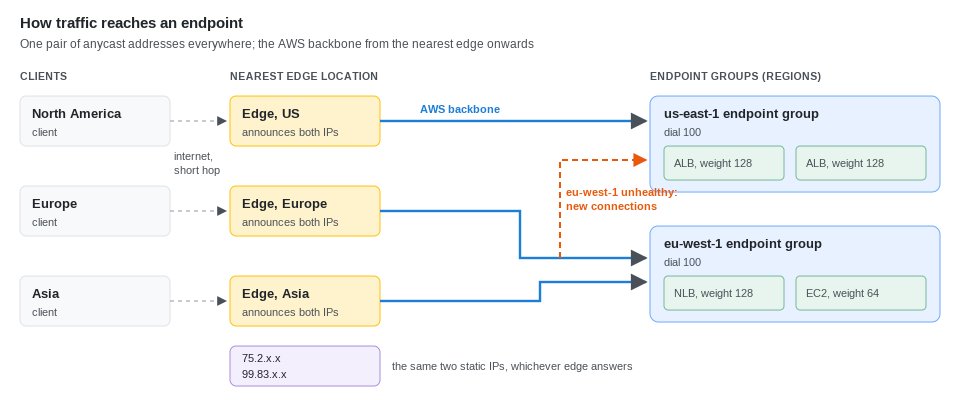
AWS Global Accelerator gives your application two static IP addresses that are announced from the AWS edge network all over the world. A user’s traffic enters the AWS network at the nearest edge location and travels over the AWS backbone to a healthy endpoint, such as a load balancer, in the best Region. You get a fixed entry point, steadier routes, and failover between Regions that doesn’t wait for DNS caches to expire.
This article covers the parts, how it differs from CloudFront and Route 53, traffic dials and weights, health checks and failover, client IP preservation, custom routing, the address ranges it uses, the CLI and Terraform setup, quotas and cost. Behaviour, defaults, quotas and prices are from the AWS documentation and pricing page in November 2026. The commands were checked with AWS CLI 2.39.3 and the Terraform with Terraform 1.17.1 and the AWS provider v6.72.0.
1. What It Is For
| Problem | How Global Accelerator helps |
|---|---|
| Clients or firewalls need fixed IP addresses to allow-list | The static IPs stay the same for the life of the accelerator, whatever sits behind them |
| Users far from your Region have slow or uneven connections | Traffic joins the AWS backbone at the nearest edge instead of crossing the public internet all the way |
| Regional failover is slow because clients cache DNS answers | The IPs never change; Global Accelerator moves the traffic when health changes |
| Blue/green or Region-by-Region releases | A traffic dial per Region and a weight per endpoint shift traffic gradually |
| Non-HTTP traffic (games, IoT, VoIP, custom TCP and UDP) | It works at layer 4, for TCP and UDP |
It doesn’t cache and doesn’t change your content. It improves the path and controls where traffic lands.
2. Components
| Part | Meaning |
|---|---|
| Accelerator | The top-level resource. It owns the static IP addresses and a DNS name |
| Static IP addresses | Two IPv4 addresses, or four for dual-stack (two IPv4, two IPv6), anycast from the edge. For IPv4 you can bring your own ranges (BYOIP) instead |
| Listener | Accepts connections on one or more port ranges (up to 10) with TCP, UDP or both |
| Endpoint group | The endpoints in one Region, with a traffic dial and health check settings |
| Endpoint | A Network Load Balancer, Application Load Balancer, EC2 instance or Elastic IP address, each with a weight |
The hierarchy is accelerator → listener → one endpoint group per Region → endpoints.
| Type | Use | Endpoints |
|---|---|---|
| Standard | Send users to the best healthy endpoint by location, health and your settings | NLB, ALB, EC2 instance, Elastic IP |
| Custom routing | Send a specific user to a specific server, decided by your application | VPC subnets, routed to private IP addresses and ports of EC2 instances |
The static IPs stay assigned while the accelerator exists, even when it is disabled. Deleting it releases them for good.
3. How a Request Flows
- The client resolves the accelerator’s DNS name (or uses a static IP) and reaches the nearest edge location, because the same addresses are announced from many places (anycast).
- Global Accelerator picks an endpoint group, normally the closest healthy Region, after applying the traffic dials.
- In that Region it picks an endpoint by the endpoint weights and forwards the traffic over the AWS network.
Global Accelerator also respects zonal shifts from Application Recovery Controller and VPC Block Public Access: an impaired Availability Zone or a blocked VPC receives no traffic.
4. Global Accelerator vs CloudFront vs Route 53
| Global Accelerator | CloudFront | Route 53 | |
|---|---|---|---|
| Layer | 4: TCP and UDP | 7: HTTP and HTTPS | DNS |
| Caches content | No | Yes | No |
| Fixed IP addresses | Yes, two static IPs | Only with an Anycast static IP list, otherwise IPs change | n/a |
| Failover | Health checks, no DNS caching involved | Origin failover on errors | Limited by record TTL and client DNS caching |
| Best for | Dynamic apps, non-HTTP protocols, IP allow-lists, multi-Region failover | Cacheable web content, APIs with caching, WAF at the edge | Names and routing policies, without acceleration |
They combine well: a Route 53 alias record gives the accelerator a friendly name, CloudFront handles what can be cached, and Global Accelerator handles what can’t.
5. Traffic Control
Traffic Dials and Endpoint Weights
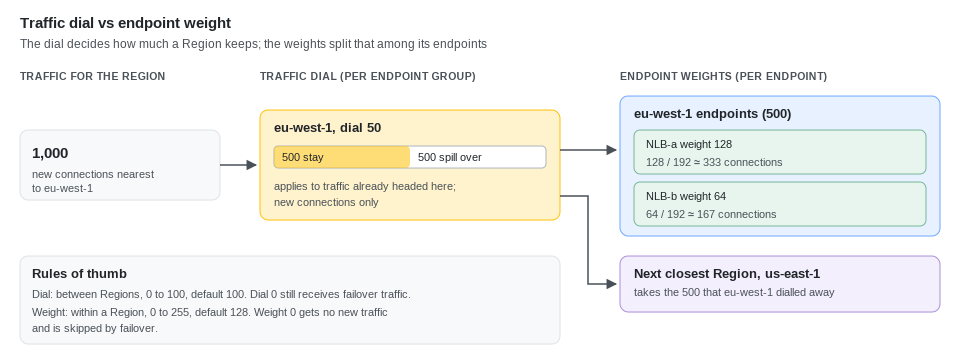
The traffic dial (0 to 100, default 100) is set per endpoint group, so per Region:
- It applies to the traffic already directed to that Region, not to all listener traffic; the rest spills to other Regions.
- A change affects new connections only. Existing connections aren’t cut.
- Health checks continue whatever the dial.
- AWS’s example:
us-west-2andus-east-1at 50 each, with 50 requests from each coast. The first 25 from each coast stay local, the next 25 go to the opposite Region, so each Region serves half, as a mix of both coasts.
Endpoint weights (0 to 255, default 128) divide a Region’s traffic among its endpoints in proportion to the weights: weights 1 and 255 give 1/256 and 255/256. A weight of 0 stops new traffic to an endpoint, which makes weights the tool for moving traffic between endpoints in one Region. Global Accelerator can override weights in limited cases to keep traffic available, for example to avoid connection collisions with client IP preservation.
Dials work between Regions, weights within one: dial a Region to 0 for maintenance, or move from an old load balancer to a new one by weights 128/0 → 64/64 → 0/128.
Health Checks: Whose Settings Apply
The health check settings on an endpoint group apply only to EC2 instance and Elastic IP address endpoints. Load balancer endpoints use their own Elastic Load Balancing health checks:
| Endpoint | How Global Accelerator decides it is healthy |
|---|---|
| Application Load Balancer | Every target group has at least one healthy target (ELB health checks) |
| Network Load Balancer | At least one healthy Availability Zone: a zone with a healthy target in all the load balancer’s target groups, and never fewer than the NLB’s minimum_healthy_targets |
| EC2 instance, Elastic IP | The endpoint group’s health check settings below |
| Setting (EC2 and Elastic IP only) | Values and default |
|---|---|
| Protocol | TCP, HTTP or HTTPS; default TCP. With a UDP listener, the check is TCP on the listener port, so the endpoint needs a TCP server there |
| Port | 1 to 65535; default the listener port (the first one if there are several). Port overrides don’t apply to it |
| Path | HTTP and HTTPS only; default / |
| Interval | 10 or 30 seconds; default 30 |
| Threshold count | 1 to 10 consecutive checks to change state; default 3 |
For EC2 and Elastic IP endpoints the checks come from the Route 53 health checker addresses, so security groups and firewalls must allow those ranges on the health check port. If the health check port differs from the listener port, allow it only from those ranges.
Failover
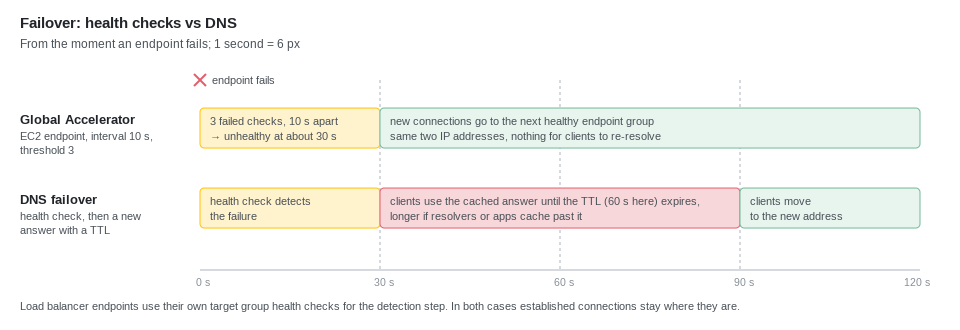
From the AWS documentation:
- If an endpoint group has no healthy endpoint with a weight above 0, Global Accelerator fails over to a healthy endpoint in another endpoint group. This failover ignores traffic dials: a Region dialled to 0 can receive failover traffic.
- If none of the three closest endpoint groups has a healthy endpoint with weight above 0, it fails open: traffic goes to a random endpoint in the group closest to the client.
- When Regions recover, normal routing resumes in about 30 seconds. Established connections aren’t moved; they stay where they are until the client or server resets them or the client reconnects.
The client keeps using the same IP addresses throughout, so nothing depends on DNS TTLs or caches. Detection time is the health check: interval × threshold for EC2 and Elastic IP endpoints (10 s × 3 = 30 s with a 10-second interval and the default threshold), or the target group’s own health check timing for load balancers.
Client IP Address Preservation
With preservation on, packets reach the endpoint with the original client’s source address:
| Endpoint | Client IP preservation |
|---|---|
| Application Load Balancer | Supported; always on for a new accelerator with an internal ALB |
| EC2 instance | Supported; always on for a new accelerator |
| Network Load Balancer with security groups | Supported, if enabled. Not with a TLS listener or IPv4-to-IPv6 NAT to targets, and targets must be in the NLB’s VPC |
| Network Load Balancer without security groups | Not supported |
| Elastic IP address | Not supported |
| Custom routing endpoints | Always preserved |
What follows from it:
- Global Accelerator creates elastic network interfaces in your account, one per subnet with an endpoint. Their security groups must allow the client addresses.
- Endpoints in private subnets work with preservation.
- To switch an existing endpoint to preservation, add a new endpoint with it and move traffic over with weights.
- Don’t send internet traffic directly to the same endpoints while they are behind an accelerator: it can cause connection collisions.
- Without preservation, the backend sees Global Accelerator’s addresses (section 6); use the proxy protocol on an NLB to learn the client.
Client affinity is a listener setting: SOURCE_IP keeps a client on the same endpoint, NONE (the default) spreads connections by their 5-tuple.
Flow Logs and DDoS Protection
- Flow logs go to an S3 bucket: set
FlowLogsEnabled, a bucket and a prefix withupdate-accelerator-attributes. The bucket needs a policy that lets Global Accelerator write; a prefix of/produces a double slash in the object keys. - Shield Standard covers every AWS customer at no extra cost. Shield Advanced can protect a standard accelerator, and Firewall Manager can enrol accelerators across an organization.
Custom Routing Accelerators
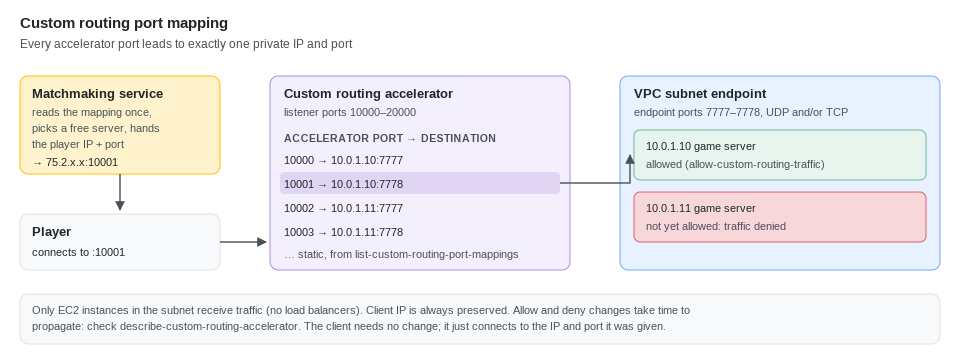
Use one when your application decides which server a user lands on, for example a game session or a VoIP media server:
- Endpoints are VPC subnets, and traffic goes only to EC2 instances in them. Some old instance types (C1, CC1, CC2, CG1, CG2, CR1, CS1, G1, G2, HI1, HS1, M1, M2, M3, T1) aren’t allowed.
- You set a listener port range and an endpoint port range. Global Accelerator builds a static mapping from each accelerator port to one private IP and port;
list-custom-routing-port-mappingsreturns it, so your matchmaking service can hand each player the right public IP and port. The client needs no change. - Denied by default: traffic to a subnet is blocked until you allow the whole subnet or specific destinations (
allow-custom-routing-traffic,deny-custom-routing-traffic). Changes take time to propagate; watchdescribe-custom-routing-accelerator. - Each destination port range can be UDP, TCP or both.
6. The Address Ranges Global Accelerator Uses
AWS publishes its address ranges in ip-ranges.json, with Global Accelerator under the service name GLOBALACCELERATOR. These are the addresses your backend sees when client IP preservation is off, so they are what you allow in security groups and firewalls:
curl -s https://ip-ranges.amazonaws.com/ip-ranges.json -o ip-ranges.json
jq -r '.createDate' ip-ranges.json
# 2026-11-09-07-17-05
jq '[.prefixes[] | select(.service=="GLOBALACCELERATOR")] | length' ip-ranges.json
# 133
jq '[.ipv6_prefixes[] | select(.service=="GLOBALACCELERATOR")] | length' ip-ranges.json
# 47
jq -r '.prefixes[] | select(.service=="GLOBALACCELERATOR") | .region' ip-ranges.json | sort | uniq -c | sort -rn | head -4
#   46 GLOBAL
#   17 us-east-1
#    9 eu-west-1
#    6 us-west-1
The 133 IPv4 prefixes range from one /16 to 93 /24s; 46 are marked GLOBAL and the rest carry a Region. The file changes often (each version has a new createDate and syncToken), so build allow-lists from it automatically rather than copying addresses by hand.
For EC2 and Elastic IP endpoints, also allow the Route 53 health checkers on the health check port (section 5); they are the 31 ROUTE53_HEALTHCHECKS IPv4 prefixes in the same file.
7. Commands
Global Accelerator is a global service, but all its API calls go to US West (Oregon): pass --region us-west-2 on every command. Its service quotas are managed in us-east-1. The API endpoint exists only there: globalaccelerator.us-west-2.amazonaws.com resolves, while the eu-west-1 and us-east-1 names don’t, so a call with another Region fails before reaching AWS:
aws globalaccelerator list-accelerators --region eu-west-1
# aws: [ERROR]: Could not connect to the endpoint URL: "https://globalaccelerator.eu-west-1.amazonaws.com/"
# 1. The accelerator (two static IPv4 addresses are allocated)
aws globalaccelerator create-accelerator --name my-app --ip-address-type IPV4 --enabled \
  --region us-west-2
# note the AcceleratorArn and the DnsName in the output

# 2. A listener
aws globalaccelerator create-listener --accelerator-arn <accelerator-arn> \
  --protocol TCP --port-ranges FromPort=443,ToPort=443 --region us-west-2

# 3. An endpoint group per Region with an ALB (its own ELB health checks apply)
aws globalaccelerator create-endpoint-group --listener-arn <listener-arn> \
  --endpoint-group-region eu-west-1 --traffic-dial-percentage 100 \
  --endpoint-configurations EndpointId=<alb-arn>,Weight=128,ClientIPPreservationEnabled=true \
  --region us-west-2
Add an endpoint group for each further Region the same way. For EC2 instance endpoints, the health check options matter:
aws globalaccelerator create-endpoint-group --listener-arn <listener-arn> \
  --endpoint-group-region eu-west-1 \
  --health-check-protocol TCP --health-check-port 443 --health-check-interval-seconds 10 --threshold-count 3 \
  --endpoint-configurations EndpointId=<instance-id>,Weight=128 --region us-west-2
Day-to-day operations:
aws globalaccelerator list-accelerators --region us-west-2
aws globalaccelerator describe-accelerator --accelerator-arn <accelerator-arn> --region us-west-2
aws globalaccelerator describe-endpoint-group --endpoint-group-arn <endpoint-group-arn> --region us-west-2   # HealthState per endpoint

# Drain a Region for maintenance, then bring it back
aws globalaccelerator update-endpoint-group --endpoint-group-arn <endpoint-group-arn> \
  --traffic-dial-percentage 0 --region us-west-2
aws globalaccelerator update-endpoint-group --endpoint-group-arn <endpoint-group-arn> \
  --traffic-dial-percentage 100 --region us-west-2

# Keep each client on the same endpoint
aws globalaccelerator create-listener --accelerator-arn <accelerator-arn> --protocol TCP \
  --port-ranges FromPort=443,ToPort=443 --client-affinity SOURCE_IP --region us-west-2

# Flow logs to S3 (the bucket policy must allow Global Accelerator to write)
aws globalaccelerator update-accelerator-attributes --accelerator-arn <accelerator-arn> \
  --flow-logs-enabled --flow-logs-s3-bucket <bucket-name> --flow-logs-s3-prefix ga/ --region us-west-2

# Custom routing: create, allow a destination, read the port mappings
aws globalaccelerator create-custom-routing-accelerator --name <name> --ip-address-type IPV4 --region us-west-2
aws globalaccelerator allow-custom-routing-traffic --endpoint-group-arn <endpoint-group-arn> \
  --endpoint-id <subnet-id> --destination-addresses <private-ip> --destination-ports <port> --region us-west-2
aws globalaccelerator list-custom-routing-port-mappings --accelerator-arn <accelerator-arn> --region us-west-2
aws globalaccelerator list-custom-routing-port-mappings-by-destination \
  --endpoint-id <subnet-id> --destination-address <private-ip> --region us-west-2
update-endpoint-group --endpoint-configurations replaces the whole endpoint list, so pass every endpoint with its weight, not only the one you change.
To remove everything, delete in order: endpoint groups, listeners, then disable and delete the accelerator:
aws globalaccelerator delete-endpoint-group --endpoint-group-arn <endpoint-group-arn> --region us-west-2
aws globalaccelerator delete-listener --listener-arn <listener-arn> --region us-west-2
aws globalaccelerator update-accelerator --accelerator-arn <accelerator-arn> --no-enabled --region us-west-2
aws globalaccelerator delete-accelerator --accelerator-arn <accelerator-arn> --region us-west-2
Warning: deleting an accelerator releases its static IP addresses for good, and anyone who allow-listed them keeps a rule that points at nothing. Disabling keeps them. Use IAM policies (for example tag-based conditions) to limit who can delete accelerators.
The Same in Terraform
# All Global Accelerator API calls go to us-west-2
provider "aws" {
  region = "us-west-2"
}

variable "alb_arns" {
  description = "ALB ARN per Region, e.g. { eu-west-1 = \"arn:...\", us-east-1 = \"arn:...\" }"
  type        = map(string)
}

resource "aws_globalaccelerator_accelerator" "this" {
  name            = "my-app"
  ip_address_type = "IPV4"
  enabled         = true

  attributes {
    flow_logs_enabled   = true
    flow_logs_s3_bucket = "my-ga-flow-logs"
    flow_logs_s3_prefix = "ga/"
  }
}

resource "aws_globalaccelerator_listener" "https" {
  accelerator_arn = aws_globalaccelerator_accelerator.this.id
  protocol        = "TCP"
  client_affinity = "NONE"

  port_range {
    from_port = 443
    to_port   = 443
  }
}

resource "aws_globalaccelerator_endpoint_group" "region" {
  for_each = var.alb_arns

  listener_arn            = aws_globalaccelerator_listener.https.id
  endpoint_group_region   = each.key
  traffic_dial_percentage = 100

  endpoint_configuration {
    endpoint_id                    = each.value
    weight                         = 128
    client_ip_preservation_enabled = true
  }
}

output "static_ips" {
  value = aws_globalaccelerator_accelerator.this.ip_sets[0].ip_addresses
}

output "dns_name" {
  value = aws_globalaccelerator_accelerator.this.dns_name
}
terraform validate (Terraform 1.17.1, AWS provider v6.72.0) printed Success! The configuration is valid. The provider for these resources must be us-west-2, whatever Region the load balancers are in; for_each over a map of Region to ALB ARN gives one endpoint group per Region.
8. Quotas
| Entity | Default |
|---|---|
| Standard accelerators per account | 20 (adjustable) |
| Custom routing accelerators per account | 10 (adjustable) |
| Listeners per accelerator | 10 (adjustable) |
| Port ranges per listener | 10 |
| Endpoint groups per accelerator, across listeners | 42 |
| Endpoints per endpoint group | 10 of each kind: ALBs only, NLBs only, EC2 only, Elastic IPs only, subnets only, or mixed (adjustable except ALB-only and mixed) |
| Port overrides per endpoint group | 10 (adjustable) |
| Principals per cross-account attachment | 10 (adjustable) |
| Resources per cross-account attachment | 500 |
Listeners × endpoint groups per listener must not exceed 42, so each extra listener reduces the number of Regions you can reference.
9. Cost
| Part | Charge |
|---|---|
| Fixed fee | $0.025 per full or partial hour per accelerator (about $18 for a 30-day month), until it is deleted; a disabled accelerator is still charged |
| Data Transfer-Premium (DT-Premium) | A per-GB charge on top of normal data transfer, by the source Region and the destination edge location: from North America or Europe $0.015 to $0.105 per GB, from Asia Pacific $0.010 to $0.080 per GB |
| Dominant direction | DT-Premium applies each hour only to the larger of inbound and outbound traffic |
| Other | Normal EC2 and load balancer data transfer charges still apply, and so do public IPv4 address charges |
The pricing page’s example: one accelerator, 10,000 GB in a month of which 6,000 GB is the dominant direction, billed at $110 of DT-Premium plus the $18 fixed fee, $128 a month.
Delete test accelerators, since a disabled one keeps billing, and estimate DT-Premium for your traffic before moving a high-volume workload behind one.
10. Troubleshooting
| Symptom | Likely cause | Check |
|---|---|---|
Endpoint UNHEALTHY (EC2 or Elastic IP) |
Route 53 health checker ranges blocked on the health check port, or a UDP listener without a TCP server on that port | Security group and NACL; describe-endpoint-group HealthReason |
ALB or NLB endpoint UNHEALTHY while the app works |
Its target groups lack healthy targets, or the NLB has no zone with healthy targets in all groups | The load balancer’s target health, not the endpoint group’s health check settings |
| Changed the endpoint group health check, nothing changed | The endpoint is a load balancer: those settings only apply to EC2 and Elastic IP endpoints | Edit the target group health check instead |
| Backend logs show AWS addresses, not clients | Client IP preservation off or unsupported (Elastic IP, NLB without security groups) | ClientIPPreservationEnabled; proxy protocol on the NLB |
| Clients refused after enabling preservation | Security groups allow Global Accelerator’s ranges but not the clients’ | Rules on the endpoint’s security group |
| Dial set to 0, yet traffic still arrives | Existing connections stay, and failover ignores dials | Long-lived connections; health of the other Regions |
| Traffic goes to an unhealthy endpoint | Fail open: no healthy endpoint with weight above 0 in the three closest groups | Health of all groups, weights not all 0 |
Could not connect to the endpoint URL |
API call sent to a Region other than us-west-2 |
--region us-west-2, provider Region in Terraform |
| Bill keeps running after “turning it off” | The accelerator is disabled, not deleted | list-accelerators |
11. Tips and Gotchas
- Use
--region us-west-2on every API call, and aus-west-2provider in Terraform. - Static IPs live as long as the accelerator. Deleting and recreating gives new addresses; protect accelerators whose IPs partners allow-list.
- Load balancer health comes from the load balancer. The endpoint group’s health check settings only apply to EC2 and Elastic IP endpoints.
- Dial 0 isn’t “off”. Failover can still send traffic there, and existing connections stay. Failover only looks for endpoints with a weight above 0, so set the Region’s endpoint weights to 0 too to keep it out of failover (fail open aside).
- Dials and weights affect new connections only. Long-lived connections stay put until they end.
- Plan security groups for client IP preservation: allow the clients, not only Global Accelerator.
- Allow-list from
ip-ranges.json, not from copied addresses. - Cacheable HTTP content is usually better and cheaper on CloudFront.
- It doesn’t replace load balancers. The endpoints are still your ALBs and NLBs.