How to Create Kubernetes YAML Manifests Quickly
Writing manifests from memory is slow and error-prone: one wrong indent or field name and the apply fails, or worse, silently ignores the field. kubectl can generate almost every common object for you, fill in resources, environment variables and probes, document every field, and validate the result against the real API. This guide shows the fast workflow, which generators work without a cluster, and the traps found while testing them with kubectl 1.37.2, against a k3s 1.35 cluster and against no cluster at all.
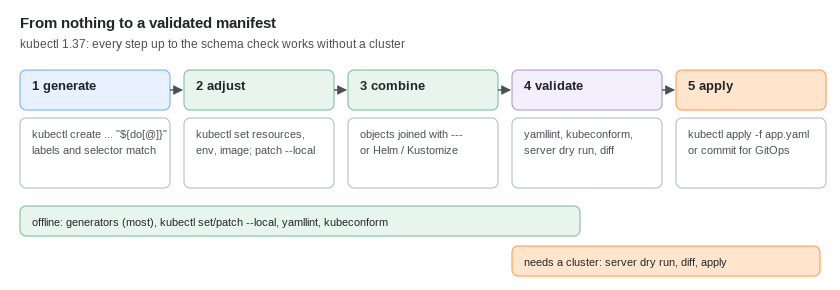
1. The Core Trick: Generate, Don’t Type
Every kubectl create and kubectl run command can print the object instead of creating it:
kubectl create deployment web --image=nginx:1.29-alpine --replicas=3 --port=80 --dry-run=client -o yaml > deploy.yaml
The result is a complete Deployment where the labels, the selector and the template labels already match, which is the part people most often get wrong by hand. It also contains empty strategy: {}, resources: {} and status: {} lines: delete them or leave them, the API ignores them.
A Shortcut That Works in bash and zsh
The popular shortcut is a plain variable:
export do="--dry-run=client -o yaml"
kubectl create deployment web --image=nginx:1.29-alpine $do
That works in bash only. zsh doesn’t split an unquoted variable into words, so kubectl receives --dry-run=client -o yaml as one argument and fails with Invalid dry-run value (client -o yaml). zsh is the default shell on macOS.
An alias works in both shells, because kubectl accepts these flags before the subcommand too:
alias k=kubectl                                  # in ~/.bashrc or ~/.zshrc
alias kdr='kubectl --dry-run=client -o yaml'

kdr create deployment web --image=nginx:1.29-alpine > deploy.yaml
kdr run debug --image=busybox:1.37 -- sleep 3600 > pod.yaml
Aliases aren’t expanded in bash scripts (only after shopt -s expand_aliases). In scripts, or to add the flags to a command you’ve already typed, use an array, which also works in both shells:
do=(--dry-run=client -o yaml)                 # in ~/.bashrc or ~/.zshrc
kubectl create deployment web --image=nginx:1.29-alpine "${do[@]}"
In zsh only, ${=do} forces the split of the plain variable. The examples below use the array.
Most generators also have short names: create deploy, cm, sa, ns, cj, pdb, pc, quota, svc and ing all worked. rb and crb don’t exist (unknown flag: --role): spell out rolebinding and clusterrolebinding.
2. Generators for Common Objects
Offline means the command worked with a kubeconfig whose server didn’t exist. The others ask the API server for its resource list first, so they need a reachable cluster even with --dry-run=client (they fail with Couldn't get current server API group list).
| Object | Command | Offline |
|---|---|---|
| Deployment | kubectl create deployment web --image=nginx:1.29-alpine --replicas=3 --port=80 "${do[@]}" |
Yes |
| Service (ClusterIP) | kubectl create service clusterip web --tcp=80:8080 "${do[@]}" |
Yes |
| Service (NodePort) | kubectl create service nodeport web --tcp=80:8080 --node-port=30080 "${do[@]}" |
Yes |
| Service (LoadBalancer) | kubectl create service loadbalancer web --tcp=80:8080 "${do[@]}" |
Yes |
| Headless Service | kubectl create service clusterip db --clusterip=None --tcp=5432:5432 "${do[@]}" |
Yes |
| Service from a Deployment file | kubectl expose -f deploy.yaml --port=80 --target-port=8080 --name=web "${do[@]}" |
No |
| Service from a running Deployment | kubectl expose deployment web --type=NodePort --port=8080 --target-port=80 "${do[@]}" |
No |
| Service from a running Pod | kubectl expose pod mypod --type=NodePort --port=80 --name=mypod-service "${do[@]}" |
No |
| Pod | kubectl run debug --image=busybox:1.37 --restart=Never "${do[@]}" -- sleep 3600 |
No |
| Pod with labels | kubectl run web --image=nginx:1.29-alpine --labels=type=web,tier=front "${do[@]}" |
No |
| ConfigMap | kubectl create configmap app-config --from-literal=LOG_LEVEL=info --from-file=app.properties "${do[@]}" |
Yes |
| Secret | kubectl create secret generic db --from-literal=password=<password> "${do[@]}" |
Yes |
| TLS Secret | kubectl create secret tls web-tls --cert=tls.crt --key=tls.key "${do[@]}" |
Yes |
| Docker registry Secret | kubectl create secret docker-registry regcred --docker-server=<registry> --docker-username=<user> --docker-password=<token> "${do[@]}" |
Yes |
| Job | kubectl create job once --image=busybox:1.37 "${do[@]}" -- echo hi |
Yes |
| CronJob | kubectl create cronjob nightly --image=busybox:1.37 --schedule="0 2 * * *" "${do[@]}" -- echo hi |
Yes |
| Ingress | kubectl create ingress web --class=nginx --rule="app.example.com/*=web:80" "${do[@]}" |
Yes |
| Namespace | kubectl create namespace demo "${do[@]}" |
Yes |
| ServiceAccount | kubectl create serviceaccount app "${do[@]}" |
Yes |
| Role | kubectl create role pod-reader --verb=get,list,watch --resource=pods "${do[@]}" |
No |
| ClusterRole | kubectl create clusterrole node-reader --verb=get,list --resource=nodes "${do[@]}" |
No |
| RoleBinding | kubectl create rolebinding pod-reader --role=pod-reader --serviceaccount=<namespace>:app "${do[@]}" |
Yes |
| ClusterRoleBinding | kubectl create clusterrolebinding node-reader --clusterrole=node-reader --serviceaccount=<namespace>:app "${do[@]}" |
Yes |
| ResourceQuota | kubectl create quota team --hard=pods=20,requests.cpu=4,limits.memory=8Gi "${do[@]}" |
Yes |
| PodDisruptionBudget | kubectl create poddisruptionbudget web --selector=app=web --min-available=2 "${do[@]}" |
Yes |
| PriorityClass | kubectl create priorityclass high --value=1000 --description="critical apps" "${do[@]}" |
Yes |
| HorizontalPodAutoscaler | kubectl autoscale -f deploy.yaml --min=2 --max=5 --cpu=70% "${do[@]}" |
No |
Notes:
- Add
-n <namespace>to putmetadata.namespacein the output. kubectl runandkubectl create jobtake the command after--.kubectl runputs it inargs, so the image’s entrypoint still runs. Use--command --to setcommandinstead.kubectl expose deployment weborexpose pod mypodcopies the selector from the live object: the Deployment’s selector, or the Pod’s labels. The object must exist (deployments.apps "nothere" not foundotherwise).expose -freads the file instead, so the object doesn’t need to exist yet.kubectl runlabels the Podrun=<name>.--labelsreplaces that label with yours, so a Service you generate withexpose podselects on your labels instead.kubectl autoscale --cpu-percent=70still works but prints a deprecation warning. Use--cpu=70%.--from-file=app.propertiesuses the file name as the key (app.properties: |followed by the content).--from-file=settings=app.propertiessets the key tosettings.create secret tlsproduces akubernetes.io/tlsSecret withtls.crtandtls.key;create secret docker-registryproduces akubernetes.io/dockerconfigjsonSecret with one.dockerconfigjsonkey. Reference that one from a pod withimagePullSecrets(section 3).- Secrets come out base64-encoded, which is not encryption. Don’t commit them to Git. Use Sealed Secrets, SOPS or an external secret store.
kubectl create --helplists every generator. Objects with no generator (StatefulSet, DaemonSet, PersistentVolumeClaim, NetworkPolicy, StorageClass) need a starting point from section 6.
3. Add Resources, Env Vars, Images and Probes Without Editing
kubectl set with --local edits a manifest file (or stdin) and prints the result, without touching a cluster:
# Requests and limits
kubectl set resources -f deploy.yaml --local \
  --requests=cpu=100m,memory=128Mi --limits=memory=256Mi -o yaml > tmp.yaml && mv tmp.yaml deploy.yaml

# Environment variables
kubectl set env -f deploy.yaml --local LOG_LEVEL=info -o yaml > tmp.yaml && mv tmp.yaml deploy.yaml

# Image (the container is named after the image: nginx)
kubectl set image -f deploy.yaml --local nginx=nginx:1.30-alpine -o yaml > tmp.yaml && mv tmp.yaml deploy.yaml
Never redirect into the file you’re reading (-f deploy.yaml ... > deploy.yaml): the shell empties the file before kubectl reads it, kubectl finds nothing to do, and the command still exits with 0. You’re left with an empty file and no error.
They also chain, so one line builds a finished Deployment:
kubectl create deployment web --image=nginx:1.29-alpine --replicas=2 --port=80 "${do[@]}" \
  | kubectl set resources -f - --local --requests=cpu=50m,memory=64Mi --limits=memory=128Mi -o yaml \
  | kubectl set env -f - --local LOG_LEVEL=info -o yaml > deploy.yaml
Anything Else: kubectl patch –local
kubectl set has no option for probes, a securityContext or imagePullSecrets. kubectl patch --local adds any field, also offline:
# Readiness probe on the nginx container (strategic merge: containers are matched by name)
kubectl patch -f deploy.yaml --local --type strategic -o yaml -p \
  '{"spec":{"template":{"spec":{"containers":[{"name":"nginx","readinessProbe":{"httpGet":{"path":"/","port":80}}}]}}}}'

# Pod securityContext
kubectl patch -f deploy.yaml --local --type merge -o yaml -p \
  '{"spec":{"template":{"spec":{"securityContext":{"runAsNonRoot":true}}}}}'

# imagePullSecrets for a private registry
kubectl patch -f deploy.yaml --local --type json -o yaml -p \
  '[{"op":"add","path":"/spec/template/spec/imagePullSecrets","value":[{"name":"regcred"}]}]'
Use --type strategic (the default) for anything inside containers. A --type merge patch replaces the whole list: the same probe patch with merge produced a container with a probe and no image.
4. One File for the Whole App
Join the generated objects with --- lines:
NS=shop
{
  kubectl create namespace $NS "${do[@]}"
  echo ---
  kubectl create configmap web-config -n $NS --from-literal=LOG_LEVEL=info "${do[@]}"
  echo ---
  kubectl create deployment web -n $NS --image=nginx:1.29-alpine --replicas=2 --port=80 "${do[@]}" \
    | kubectl set resources -f - --local --requests=cpu=50m,memory=64Mi --limits=memory=128Mi -o yaml
  echo ---
  kubectl create service clusterip web -n $NS --tcp=80:80 "${do[@]}"
} > app.yaml

kubectl apply -f app.yaml
The result held four objects and deployed cleanly.
5. Update a Secret or ConfigMap From Files
kubectl create only creates: run it again and it fails with secrets "app-creds" already exists. To create or update from files, generate and pipe into apply:
kubectl -n shop create secret generic app-creds --from-file=creds.txt "${do[@]}" | kubectl apply -f -
kubectl -n shop create configmap web-config --from-literal=LOG_LEVEL=debug "${do[@]}" | kubectl apply -f -
The new values were live after one command. If the object was first made with plain kubectl create, the first apply warns that the kubectl.kubernetes.io/last-applied-configuration annotation is missing (and adds it). Create with --save-config, or use apply from the start, to avoid that.
6. Starting Points for Objects Without a Generator
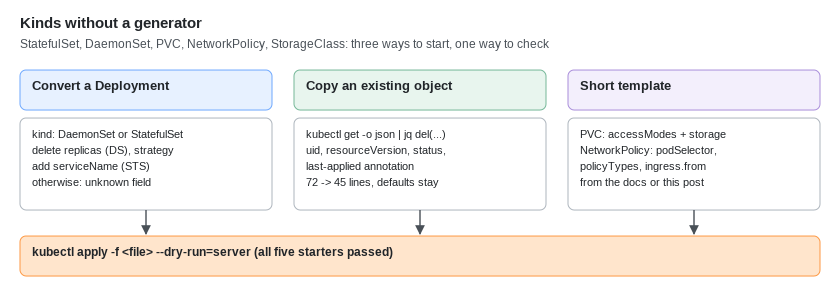
Convert a Deployment Into a DaemonSet or StatefulSet
Generate a Deployment, then change the kind and drop what the new kind doesn’t have:
# DaemonSet: no replicas, no strategy
kubectl create deployment agent --image=busybox:1.37 "${do[@]}" -- sleep 3600 \
  | sed -e 's/^kind: Deployment/kind: DaemonSet/' -e '/^  replicas:/d' -e '/^  strategy:/d' > ds.yaml

# StatefulSet: no strategy, plus serviceName pointing at a headless Service
kubectl create deployment db --image=postgres:18-alpine "${do[@]}" \
  | sed -e 's/^kind: Deployment/kind: StatefulSet/' -e '/^  strategy:/d' -e 's/^spec:/spec:\n  serviceName: db/' > sts.yaml
kubectl create service clusterip db --clusterip=None --tcp=5432:5432 "${do[@]}" > db-svc.yaml
Both passed the server-side dry run. Changing only the kind fails it: strict decoding error: unknown field "spec.replicas", unknown field "spec.strategy". Add volumeClaimTemplates to the StatefulSet when each pod needs its own volume.
Short Templates: PVC and NetworkPolicy
apiVersion: v1
kind: PersistentVolumeClaim
metadata:
  name: data
spec:
  accessModes: [ReadWriteOnce]
  resources:
    requests:
      storage: 1Gi
---
apiVersion: networking.k8s.io/v1
kind: NetworkPolicy
metadata:
  name: web-allow-frontend
spec:
  podSelector:
    matchLabels:
      app: web
  policyTypes: [Ingress]
  ingress:
  - from:
    - podSelector:
        matchLabels:
          role: frontend
    ports:
    - port: 80
Both passed kubectl apply --dry-run=server. Leaving out storageClassName uses the cluster’s default StorageClass.
Copy an Existing Object
kubectl get deploy <name> -n <namespace> -o yaml > copy.yaml
The copy carries server-side fields you must remove before reusing it: uid, resourceVersion, generation, creationTimestamp, status, and annotations such as kubectl.kubernetes.io/last-applied-configuration and deployment.kubernetes.io/revision. (managedFields is hidden by default.) jq removes them, and kubectl create --dry-run=client -o yaml turns the JSON back into YAML:
kubectl get deploy <name> -n <namespace> -o json \
  | jq 'del(.metadata.uid, .metadata.resourceVersion, .metadata.generation,
            .metadata.creationTimestamp, .metadata.managedFields, .status,
            .metadata.annotations."kubectl.kubernetes.io/last-applied-configuration",
            .metadata.annotations."deployment.kubernetes.io/revision")' \
  | kubectl create -f - --dry-run=client -o yaml > clean.yaml
For a small Deployment that cut the file from 72 to 45 lines. What’s left still includes every default the API server filled in (progressDeadlineSeconds, revisionHistoryLimit, terminationMessagePath, dnsPolicy…). That’s harmless, but it makes the file long. The kubectl neat plugin (installed with Krew) removes the defaults as well.
Copy From the Documentation
The Kubernetes documentation (kubernetes.io/docs) has a complete example for every kind. In VS Code, the Kubernetes and Red Hat YAML extensions offer snippets and autocomplete from the API schema.
7. See the Defaults Before You Apply
A server-side dry run returns the object exactly as the API server would store it, with every default filled in, and creates nothing:
kubectl apply -f deploy.yaml --dry-run=server -o yaml
For the generated Deployment that added, among others, progressDeadlineSeconds: 600, revisionHistoryLimit: 10, maxSurge: 25%, imagePullPolicy: IfNotPresent, dnsPolicy: ClusterFirst, restartPolicy: Always and schedulerName: default-scheduler. It also runs admission webhooks, so you see what a mutating webhook (a sidecar injector, a policy engine) would change.
8. Look Up Fields With kubectl explain
kubectl explain prints the documentation of any field, from the cluster’s own API (so it also covers CRDs):
kubectl explain deployment.spec.strategy.rollingUpdate
kubectl explain pod.spec.containers.resources --recursive     # the whole subtree, field names only
kubectl explain networkpolicy.spec --recursive
kubectl explain application.spec --api-version=argoproj.io/v1alpha1   # a CRD
It needs a reachable cluster.
9. Helm and Kustomize Skeletons
For an app with several environments, start from a tool’s skeleton instead of loose files:
# Helm: a chart with a Deployment, Service, ServiceAccount, Ingress, HTTPRoute and HPA template
helm create <chart>
helm template <release> ./<chart> --set replicaCount=2 > rendered.yaml

# Kustomize: one base, patched per environment
kubectl kustomize <dir>          # render
kubectl apply -k <dir>           # apply
With the default values (Helm 4.3.1), helm template renders a ServiceAccount, a Service, a Deployment and a test Pod; Ingress, HTTPRoute and HPA are off until you enable them in values.yaml.
A minimal kustomization.yaml around the app.yaml from section 4:
resources:
  - app.yaml
namePrefix: dev-
labels:
  - pairs:
      env: dev
images:
  - name: nginx
    newTag: "1.30-alpine"
It renamed the ConfigMap, Deployment and Service to dev-*, added the env: dev label everywhere and changed the image tag. The Namespace kept its name: namePrefix doesn’t rename Namespace objects.
10. Validate Before You Apply
| Check | Command | Needs a cluster | Catches |
|---|---|---|---|
| YAML style and syntax | yamllint app.yaml |
No | Tabs, duplicate keys, trailing spaces, indentation |
| Client-side dry run | kubectl apply -f app.yaml --dry-run=client |
No | Almost nothing: broken YAML only |
| Schema | kubeconform -strict -summary app.yaml |
No | Unknown fields, wrong types, duplicate keys |
| Server-side dry run | kubectl apply -f app.yaml --dry-run=server |
Yes | Unknown fields, wrong types, admission webhooks, quotas, missing namespaces |
| Diff against the cluster | kubectl diff -f app.yaml |
Yes | What would change. Exit code 1 means there are changes |
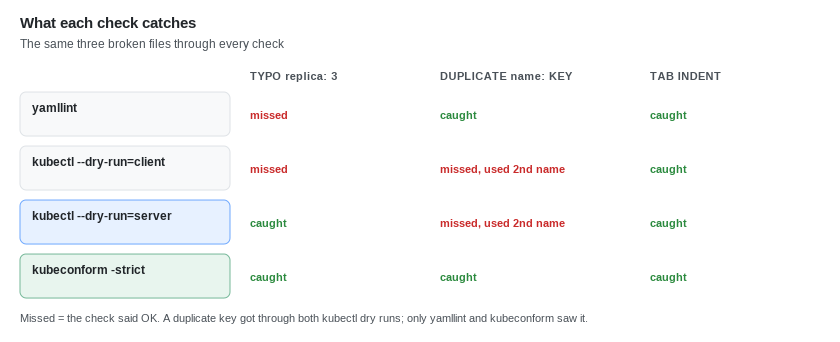
What each one did with three broken files:
replica: 3 (typo) |
Duplicate name: key |
Tab indentation | |
|---|---|---|---|
yamllint |
Passed | duplication of key "name" in mapping |
found character '\t' that cannot start any token |
--dry-run=client |
Passed (created (dry run)) |
Passed, silently used the second name | Failed (YAML error) |
--dry-run=server |
strict decoding error: unknown field "spec.replica" |
Passed, silently used the second name | Failed (YAML error) |
kubeconform -strict |
additional properties 'replica' not allowed |
key "name" already set in map |
Failed (YAML error) |
The client-side dry run is not a validation. A duplicate key got through both kubectl dry runs: the object would have been created under the second name. Use yamllint or kubeconform to catch that one, and a server dry run (or kubeconform -strict) for typos.
Without -strict, kubeconform also passed the replica typo. Pin the schema version with -kubernetes-version 1.35.0 to match your cluster. Both tools run without installing anything:
docker run --rm -i ghcr.io/yannh/kubeconform:v0.7.0 -strict -summary - < app.yaml
docker run --rm -i pipelinecomponents/yamllint:0.35.1 yamllint - < app.yaml
yamllint’s default rules reject YAML that kubectl itself generates: it wants --- at the top and list items indented under their key, so the generated app.yaml got four errors. A config that accepts kubectl’s style and still catches the real problems:
# .yamllint
extends: default
rules:
  document-start: disable
  indentation:
    indent-sequences: whatever
11. Gotchas
$dodoesn’t work in zsh. zsh passes the unquoted variable as one argument (Invalid dry-run value (client -o yaml)). Use thekdralias or the array from section 1, or${=do}.:latestor no tag meansimagePullPolicy: Always. The server-side dry run setAlwaysfornginx:latestand for plainnginx, andIfNotPresentfornginx:1.29-alpine.latestalso changes under you between deploys. Pin a tag (or a digest) in everything you generate.- Redirecting into the input file empties it, and kubectl still exits 0.
--type mergereplaces lists. Patching one container field with a merge patch drops the rest of the container. Use the strategic patch.- Duplicate keys pass kubectl. Both dry runs accepted a manifest with
name:twice and used the last one. - Server dry run and new namespaces. A file that creates a namespace and objects inside it fails
--dry-run=serverwithnamespaces "shop" not found, because the dry run never really creates the namespace. Create the namespace first, or validate it separately.kubectl applywithout the dry run worked on the same file. - Some generators need a cluster even with
--dry-run=client:run,expose,autoscale,create roleandcreate clusterrole. Run them against a local cluster (kind, k3s, colima, minikube) when your real cluster is out of reach. - Don’t run generators against production by accident.
--dry-run=clientdoesn’t change anything, but a forgotten"${do[@]}"does. Keep a local context as the current one, or always pass--context. - A kubeconfig user with no credentials makes kubectl prompt for a username, which hangs scripts. Use a real local context.
- The container name comes from the image (
nginxfornginx:1.29-alpine).kubectl set image,kubectl set resources -cand strategic patches need that name. kubectl createfails on objects that exist (already exists). Pipe the generator intokubectl apply -f -to update.--portoncreate deploymentonly setscontainerPort. It doesn’t create a Service. Usecreate serviceorexpose.- Version skew. kubectl 1.37 against a 1.35 server printed
version difference between client (1.37) and server (1.35) exceeds the supported minor version skew of +/-1. Generators still worked, but keep kubectl within one minor version of the cluster.