Kubernetes Cluster Autoscaler: Scale-Up, Scale-Down, Expanders and EKS Setup
The Cluster Autoscaler (CA) changes the number of nodes in a Kubernetes cluster. It adds nodes when pods cannot be scheduled for lack of resources, and removes nodes that have been unneeded for a while. It does not look at CPU usage: it works from pod requests and the scheduler’s decisions. It is a Kubernetes SIG Autoscaling project with providers for AWS, Azure, GCE, Cluster API, OCI, Hetzner and many others.
This article explains the scale-up and scale-down logic, the flags and annotations that change it, and an EKS setup with Auto Scaling group auto-discovery. The facts come from the
Cluster Autoscaler FAQ and the AWS provider README
at release 1.36.1, and from Helm chart 9.59.0. The manifests and kubectl commands were checked against a Kubernetes 1.35 API server with a server-side dry run, the chart was rendered and installed in dry-run mode with Helm 4.3.1, and the alert rules pass promtool check rules from Prometheus 3.15.1.
Kubernetes has three autoscalers, one for each cell of this table (the vertical node cell is empty: no standard component picks the instance size of an existing group):
| Nodes | Pods | |
|---|---|---|
| Horizontal (how many) | Cluster Autoscaler: the number of nodes in each node group | Horizontal Pod Autoscaler (HPA): the number of replicas |
| Vertical (how big) | No standard autoscaler; you choose the node group’s instance type | Vertical Pod Autoscaler (VPA): the CPU and memory requests of each container |
They depend on each other: CA adds nodes for the pods HPA creates, and decides from the requests that VPA can keep accurate. Section 8 covers how they fit together.
1. The Short Version
| Question | Answer |
|---|---|
| What triggers a scale-up? | Pods the scheduler marked unschedulable (PodScheduled=False, reason Unschedulable) that would fit on a new node of some node group |
| What triggers a scale-down? | A node whose pods’ requests are below 50% of its allocatable CPU and memory, whose pods can all move elsewhere, unneeded for 10 minutes |
| How often? | Every 10 seconds (--scan-interval) |
| What does it change? | The desired size of a node group (an AWS Auto Scaling group, a GCE MIG, an Azure scale set …) within its min and max |
| Which group grows? | The expander decides: least-waste by default, or random, most-pods, least-nodes, price, priority, grpc |
| What blocks scale-down? | Restrictive PDBs, pods without a controller, pods with local storage, kube-system pods, safe-to-evict: "false", pods that fit nowhere else |
| Version | Use the CA minor version that matches the Kubernetes minor version |
| End-to-end time | HPA + CA + node boot is usually about 5 minutes; CA itself aims for under 30 seconds for scale-up |
| Biggest traps | Pods without requests, a cloud autoscaler fighting CA, unbalanced zones, nodes that never scale down because of one pod, scale-from-zero without template tags |
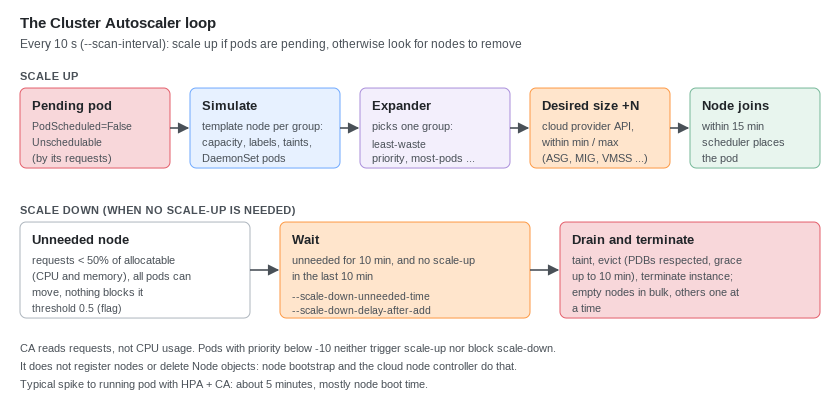
2. How Scale-Up Works
- The scheduler fails to place a pod and sets its condition
PodScheduled=Falsewith reasonUnschedulable. - Every scan, CA lists those pods. Pods younger than
--new-pod-scale-up-delay(default0s, or the pod annotationcluster-autoscaler.kubernetes.io/pod-scale-up-delay) are ignored for now. - For each node group, CA builds a template node: the capacity, labels and taints of the group’s machines, plus the DaemonSet pods every node runs. It simulates the scheduler on those templates.
- If more than one group would help, the expander picks one, and CA raises that group’s desired size by as many nodes as the pending pods need (never past the group’s max or
--max-nodes-total). - The cloud provider starts the machines; your provisioning makes them join the cluster. CA expects them within 15 minutes (
--max-node-provision-time), after which it stops counting them and may try another group.
Things that follow from this:
- Requests are everything. CA only knows a pod does not fit from its requests. A pod without requests fits anywhere and never triggers a scale-up, and a node full of request-less pods looks empty.
- Node groups must be uniform. All machines in one group need the same capacity, labels and taints; CA cannot reason about a group mixing 4-vCPU and 16-vCPU instances. On AWS, a mixed instances group should use types of the
same size (for example
m5.xlarge,m5a.xlarge,m6i.xlarge), and CA uses the first type in the overrides as the template. - Hard constraints are respected (
nodeSelector, required node affinity, taints and tolerations); soft ones (preferredDuringScheduling...) do not influence which group is chosen. - Priority cutoff. Pods with priority below -10 (
--expendable-pods-priority-cutoff) never trigger a scale-up and never block a scale-down. - CA does not register nodes. If a new instance fails to join (bad user data, AMI, IAM), CA sees it as not provisioned and eventually removes it.
Choosing the Node Group: Expanders
| Expander | Picks |
|---|---|
least-waste (default) |
The group that leaves the least idle CPU (then memory) after the scale-up |
random |
Any group that helps |
most-pods |
The group that can schedule the most pending pods |
least-nodes |
The group that needs the fewest nodes |
price |
The cheapest group (GCE, GKE and Equinix Metal only) |
priority |
The group with the highest user priority, from a ConfigMap |
grpc |
Your own gRPC service |
Several expanders can be chained since 1.23: --expander=priority,least-waste uses least-waste to break ties among the groups that priority chose. The priority ConfigMap must be called
cluster-autoscaler-priority-expander in CA’s namespace; the highest number wins, values are regular expressions on the group name, and a group that matches no expression is never expanded:
apiVersion: v1
kind: ConfigMap
metadata:
  name: cluster-autoscaler-priority-expander
  namespace: kube-system
data:
  priorities: |-
    10:
      - .*
    50:
      - .*-ondemand-.*
    100:
      - .*-spot-.*
Here Spot groups are tried first, On-Demand next, and the .* catch-all keeps every other group usable. CA reloads the ConfigMap without a restart.
3. How Scale-Down Works
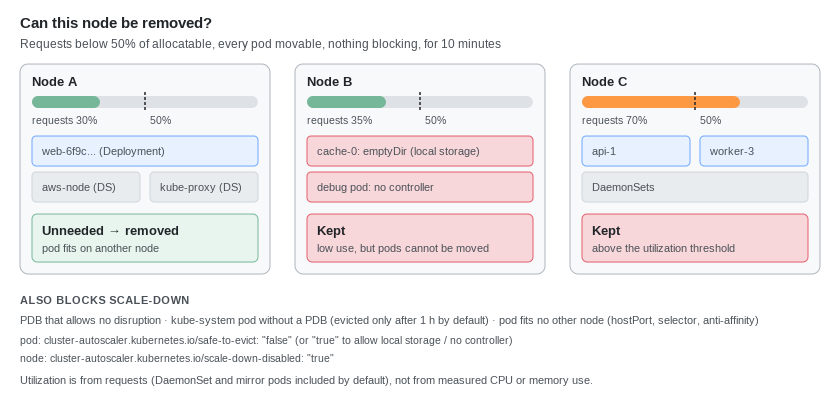
When no scale-up is needed, every scan CA checks each node. A node is unneeded when all of these hold:
- The sum of requests of its pods, for CPU and for memory separately, is below 50% of the node’s allocatable (
--scale-down-utilization-threshold). DaemonSet and mirror pods count unless--ignore-daemonsets-utilization/--ignore-mirror-pods-utilizationis set. - Every pod on it (except DaemonSet and mirror pods) can be moved to another node in the simulation.
- The node does not have
cluster-autoscaler.kubernetes.io/scale-down-disabled: "true".
A node that stays unneeded for 10 minutes (--scale-down-unneeded-time) is removed: CA taints it so nothing new lands there, evicts the pods through the eviction API (so PDBs apply, with retries for up to 2 minutes), gives each pod up to
10 minutes of graceful termination (--max-graceful-termination-sec), and terminates the instance through the cloud provider. Empty nodes go in bulk; non-empty nodes go one at a time.
CA does not delete the Node object; the cloud node controller does.
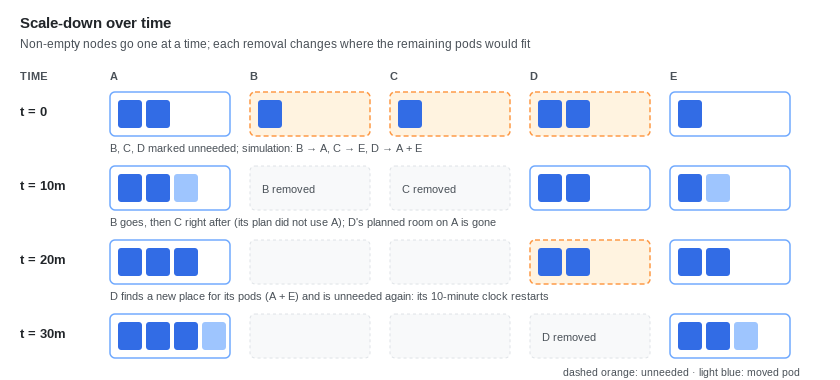
Why emptying several nodes takes longer than 10 minutes. Removing a non-empty node moves its pods onto other nodes, which changes the picture for the next candidate. CA removes non-empty nodes one at a
time (--max-drain-parallelism, default 1); the next one goes right away only if it is still unneeded and its pods still fit, otherwise its 10-minute clock may effectively start again. So shrinking from five
half-used nodes to two can take 30 minutes or more; empty nodes go together (up to --max-scale-down-parallelism, default 10).
Make the evictions harmless. Every scale-down of a non-empty node evicts pods, so the workloads must shut down cleanly:
- Handle SIGTERM: stop taking new work, finish in-flight requests, then exit, within
terminationGracePeriodSeconds(CA honours up to 10 minutes). - Use a readiness probe, and if needed a short
preStopsleep, so the Service stops sending traffic before the process exits. - Run at least two replicas with a PodDisruptionBudget, so a drain never takes the last copy.
What Keeps a Node Alive
| Pod | Why it blocks | How to let CA move it |
|---|---|---|
| Covered by a PodDisruptionBudget that allows no disruption | Eviction would break the budget | Loosen the PDB (maxUnavailable: 1, or minAvailable below the replica count) |
| No controller (a bare pod, not from a Deployment, ReplicaSet, Job, StatefulSet …) | It would not come back | Run it under a controller, or annotate safe-to-evict: "true" |
Local storage: hostPath, or emptyDir not backed by memory |
Its data would be lost | cluster-autoscaler.kubernetes.io/safe-to-evict-local-volumes: "vol1,vol2" listing all of them, or safe-to-evict: "true" |
| In kube-system, not a DaemonSet, without a PDB | System pods are protected by default; with the default flags CA evicts them only after --blocking-system-pod-distruption-timeout (1 hour) |
Give them a PDB (see below), or --skip-nodes-with-system-pods=false |
Annotated cluster-autoscaler.kubernetes.io/safe-to-evict: "false" |
You asked for it | Remove the annotation |
Fits nowhere else (resources, hostPort, node selector, anti-affinity) |
The simulation finds no place | Make room, or relax the constraint |
To let CA move a system component such as CoreDNS, give it a PDB:
apiVersion: policy/v1
kind: PodDisruptionBudget
metadata:
  name: coredns-pdb
  namespace: kube-system
spec:
  maxUnavailable: 1
  selector:
    matchLabels:
      k8s-app: kube-dns
Protecting one node, and marking a pod as safe or unsafe to evict:
kubectl annotate node ip-10-0-12-34.eu-central-1.compute.internal cluster-autoscaler.kubernetes.io/scale-down-disabled=true
kubectl annotate node ip-10-0-12-34.eu-central-1.compute.internal cluster-autoscaler.kubernetes.io/scale-down-disabled-

kubectl annotate pod batch-runner-7d9f cluster-autoscaler.kubernetes.io/safe-to-evict=false
Put the pod annotation in the pod template of the Deployment or Job, not on a running pod, so it survives restarts.
4. Timings and the Flags That Change Them
| Flag | Default | Effect |
|---|---|---|
--scan-interval |
10s |
How often CA re-evaluates the cluster |
--new-pod-scale-up-delay |
0s |
Ignore unschedulable pods younger than this |
--max-node-provision-time |
15m0s |
How long a new node may take to register |
--scale-down-utilization-threshold |
0.5 |
Requests / allocatable below which a node may be removed |
--scale-down-unneeded-time |
10m0s |
How long a node must be unneeded |
--scale-down-unready-time |
20m0s |
The same for unready nodes |
--scale-down-delay-after-add |
10m0s |
Pause in scale-down after any scale-up |
--scale-down-delay-after-delete |
0s |
Pause after a node deletion |
--scale-down-delay-after-failure |
3m0s |
Pause after a failed scale-down |
--max-graceful-termination-sec |
600 |
Longest grace period CA gives an evicted pod |
--skip-nodes-with-local-storage |
true |
Protect nodes running pods with local storage |
--skip-nodes-with-system-pods |
true |
Wait --blocking-system-pod-distruption-timeout (1h) before removing nodes with kube-system pods |
--expendable-pods-priority-cutoff |
-10 |
Pods below this priority do not count |
--balance-similar-node-groups |
off | Keep similar groups (one per zone) the same size on scale-up |
--expander |
least-waste |
How to choose the group |
--max-nodes-total |
none | Cluster-wide node cap |
--max-nodes-per-scaleup |
1000 |
Most nodes added in one scale-up; a latency safeguard for the algorithm, not a way to rate-limit scale-up |
--max-nodegroup-binpacking-duration |
10s |
Time limit of the bin-packing simulation per node group |
--estimator |
binpacking |
How the number of new nodes is estimated; binpacking is the only value, so there is nothing to choose |
--write-status-configmap |
true |
Write the cluster-autoscaler-status ConfigMap |
--max-scale-down-parallelism |
10 |
Nodes (empty or not) deleted in parallel |
--max-drain-parallelism |
1 |
Non-empty nodes drained and deleted in parallel |
--unremovable-node-recheck-timeout |
5m0s |
How long before a node that could not be removed is checked again |
--enforce-node-group-min-size |
off | Scale a group up to its minimum even without pending pods |
--initial-node-group-backoff-duration |
5m0s |
First pause on a node group after its new nodes failed to start |
--max-node-group-backoff-duration |
30m0s |
Longest pause; the backoff resets 3 hours after the last failure (--node-group-backoff-reset-timeout) |
--max-total-unready-percentage / --ok-total-unready-count |
45 / 3 |
CA halts all operations when more unready nodes than this exist |
Scale-down is the slow part on purpose: nodes go at least 10 minutes after they became unneeded, and not within 10 minutes of a scale-up. The defaults are reasonable; tune them by what you want faster:
| To make faster … | Lower (or raise) | Trade-off |
|---|---|---|
| The first removal | --scale-down-unneeded-time, --scale-down-unready-time; raise --scale-down-utilization-threshold |
Lower times remove nodes that would be needed again soon; a higher threshold packs pods tighter, so less headroom |
| The following removals | --scale-down-delay-after-add, --scale-down-delay-after-delete, --scale-down-delay-after-failure, --unremovable-node-recheck-timeout, --scan-interval; raise the parallelism flags |
More node churn and more evictions at once |
For spiky batch clusters, --scale-down-unneeded-time=5m and --scale-down-delay-after-add=5m are common; for stable services, keep the defaults. On AWS, many of these can also be set per node group with ASG tags
(k8s.io/cluster-autoscaler/node-template/autoscaling-options/scaledownunneededtime: 5m0s, .../scaledownutilizationthreshold: 0.6).
5. Setting It Up on EKS
On GKE and AKS the Cluster Autoscaler is built into the managed service: you turn it on per node pool with a minimum and maximum and tune it through the provider’s settings (GKE autoscaling profiles,
the AKS cluster-autoscaler-profile), not by running the Helm chart. What can be tuned differs; GKE, for example, does not let you pick the expander. On EKS you run CA yourself, as below.
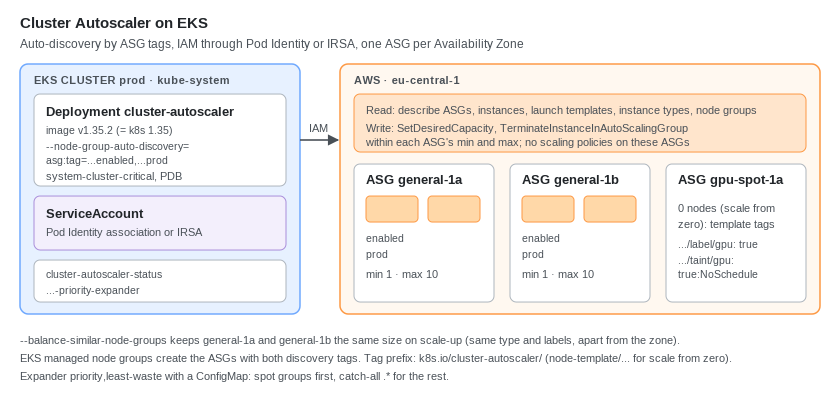
Node Groups
- One Auto Scaling group per Availability Zone for each kind of node, plus
--balance-similar-node-groups, so zones stay even and pods with zonal EBS volumes can get a node in their zone. A single multi-AZ ASG cannot be told which zone to grow. - Tag every ASG CA should manage. With EKS managed node groups, the two tags are added for you:
k8s.io/cluster-autoscaler/enabledk8s.io/cluster-autoscaler/<cluster-name>(keeps clusters that share an account apart)
- CA only changes the ASG’s desired capacity, always within its min and max. Do not attach target tracking or other scaling policies to the same ASGs: two autoscalers fight.
- Change min and max on the ASG (or the managed node group), not in CA. With auto-discovery CA reads the limits from the ASG on every refresh, so a change there takes effect without a restart; a limit
written into CA’s own configuration (for example
--nodes=1:10:<asg>) does not change the ASG. - Scale from zero works if CA can build the template without a running node: for node selectors and taints, add
k8s.io/cluster-autoscaler/node-template/label/<label>: <value>andk8s.io/cluster-autoscaler/node-template/taint/<key>: <value>:<effect>tags (managed node groups get their labels and taints from the EKS API, which needseks:DescribeNodegroup). CA does not apply these labels or taints; your node bootstrap must.
Spot Node Groups
Spot instances fit CA well as long as each node group stays uniform:
- Separate Spot and On-Demand groups. CA builds one template per group, so it cannot reason about a group whose capacity type changes from node to node. Keep a small On-Demand group for system components and anything that must not be interrupted.
- Diversify inside a group with same-size types. A mixed instances policy (or a managed node group with several instance types) such as
m5.xlarge,m5a.xlarge,m5d.xlarge,m6i.xlargetaps more Spot capacity pools while keeping 4 vCPU and 16 GiB per node; CA sizes the group from the first type. Add more groups of other sizes (the same family at2xlarge) for even more pools. - Allocation strategy. Managed node groups use
price-capacity-optimized(for clusters on Kubernetes 1.28 and later) and turn on Capacity Rebalancing; for self-managed ASGs, chooseprice-capacity-optimizedorcapacity-optimizedyourself. - Steer the workloads. Managed node groups label Spot nodes
eks.amazonaws.com/capacityType: SPOT; taint the Spot groups and give interruption-tolerant workloads the toleration and a node selector or affinity on that label. For CA to scale such a group from zero, the label and taint must also be in the template (managed node groups provide them, self-managed ASGs need thenode-templatetags). - Prefer Spot with the priority expander (section 2): a higher priority for the Spot groups, a catch-all for On-Demand. If Spot capacity is short, the ASG fails to launch, CA notices the missing
node after
--max-node-provision-time(15 minutes; a lower value makes the fallback quicker) and may then scale up another group. - Handle interruptions. Managed node groups replace and drain a Spot node when it gets a rebalance recommendation, on a best-effort basis. Self-managed groups need the AWS Node Termination Handler (or Capacity Rebalancing plus your own drain). Either way, pods get at most the two-minute interruption notice, so keep their shutdown short.
- Selecting instance types with mixed groups: a node selector on
node.kubernetes.io/instance-typepins one type and defeats the diversification; use a label of your own on the group, or node affinity with anInlist of all the group’s types.
Zonal Volumes
An EBS volume lives in one Availability Zone, and a pod that uses it can only run on a node in that zone. Two settings make that work with CA:
- One ASG per zone (above), so CA can grow exactly the zone the pending pod needs. With one multi-zone ASG, the new node may come up in the wrong zone and the pod stays pending.
volumeBindingMode: WaitForFirstConsumeron the StorageClass, so a new volume is created only after the scheduler has picked a node, in that node’s zone, instead of in a random zone first:
apiVersion: storage.k8s.io/v1
kind: StorageClass
metadata:
  name: gp3
provisioner: ebs.csi.aws.com
volumeBindingMode: WaitForFirstConsumer
allowVolumeExpansion: true
parameters:
  type: gp3
  encrypted: "true"
CA reads the zone constraint of an existing volume from the PersistentVolume’s node affinity and only considers groups in that zone; if that zone’s group is at its maximum, the pod stays pending (the
NotTriggerScaleUp event says so). StatefulSets with one volume per replica in different zones need groups in every zone they use.
IAM
The policy from the AWS provider README for auto-discovery (restrict the second statement to your ASGs by ARN or tag condition in production):
{
  "Version": "2012-10-17",
  "Statement": [
    {
      "Effect": "Allow",
      "Action": [
        "autoscaling:DescribeAutoScalingGroups",
        "autoscaling:DescribeAutoScalingInstances",
        "autoscaling:DescribeLaunchConfigurations",
        "autoscaling:DescribeScalingActivities",
        "ec2:DescribeImages",
        "ec2:DescribeInstanceTypes",
        "ec2:DescribeLaunchTemplateVersions",
        "ec2:GetInstanceTypesFromInstanceRequirements",
        "eks:DescribeNodegroup"
      ],
      "Resource": ["*"]
    },
    {
      "Effect": "Allow",
      "Action": ["autoscaling:SetDesiredCapacity", "autoscaling:TerminateInstanceInAutoScalingGroup"],
      "Resource": ["*"],
      "Condition": { "StringEquals": { "aws:ResourceTag/k8s.io/cluster-autoscaler/prod": "owned" } }
    }
  ]
}
Give it to the cluster-autoscaler service account in kube-system with EKS Pod Identity (a pod identity association) or IRSA (the eks.amazonaws.com/role-arn annotation on the service account),
not to the node role, where every pod on the node would get it. The condition above assumes the tag has the value owned; match the value your ASGs really carry.
Installing with Helm
# values.yaml for chart 9.59.0
cloudProvider: aws
awsRegion: eu-central-1
fullnameOverride: cluster-autoscaler   # names the Deployment, Service and RBAC objects
autoDiscovery:
  clusterName: prod            # finds ASGs tagged k8s.io/cluster-autoscaler/enabled and k8s.io/cluster-autoscaler/prod
image:
  tag: v1.35.2                 # match the cluster's Kubernetes minor version (the chart defaults to v1.35.0)
rbac:
  serviceAccount:
    name: cluster-autoscaler
    annotations:
      eks.amazonaws.com/role-arn: arn:aws:iam::123456789012:role/prod-cluster-autoscaler   # IRSA; omit with Pod Identity
extraArgs:
  balance-similar-node-groups: true
  expander: priority,least-waste
  skip-nodes-with-system-pods: false
  scale-down-unneeded-time: 10m
expanderPriorities:
  10:
    - .*
  100:
    - .*-spot-.*
helm repo add autoscaler https://kubernetes.github.io/autoscaler
helm upgrade --install cluster-autoscaler autoscaler/cluster-autoscaler --version 9.59.0 \
  --namespace kube-system -f values.yaml
Rendering the chart with these values (helm template) gives a Deployment running registry.k8s.io/autoscaling/cluster-autoscaler:v1.35.2 with, among others:
- --cloud-provider=aws
- --namespace=kube-system
- --node-group-auto-discovery=asg:tag=k8s.io/cluster-autoscaler/enabled,k8s.io/cluster-autoscaler/prod
- --balance-similar-node-groups=true
- --expander=priority,least-waste
plus the cluster-autoscaler-priority-expander ConfigMap from expanderPriorities, the RBAC objects, a PDB and priorityClassName: system-cluster-critical.
Version matching. CA is built against the Kubernetes scheduler code of its minor version: use CA 1.35.x on Kubernetes 1.35, 1.36.x on 1.36, and upgrade CA together with the cluster. In July 2026 the current releases were 1.36.1, 1.35.2, 1.34.5 and 1.33.6.
6. Keeping Spare Capacity: Overprovisioning
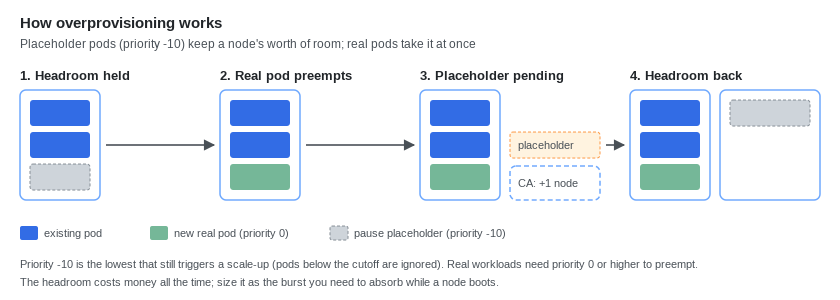
A new node takes minutes to boot. To make room instantly, run low-priority placeholder pods: real pods preempt them, the placeholders become unschedulable, and CA adds a node in the background.
apiVersion: scheduling.k8s.io/v1
kind: PriorityClass
metadata:
  name: overprovisioning
value: -10
globalDefault: false
description: "Placeholder pods that real workloads preempt"
---
apiVersion: apps/v1
kind: Deployment
metadata:
  name: overprovisioning
  namespace: default
spec:
  replicas: 2
  selector:
    matchLabels:
      app: overprovisioning
  template:
    metadata:
      labels:
        app: overprovisioning
    spec:
      priorityClassName: overprovisioning
      terminationGracePeriodSeconds: 0
      containers:
        - name: reserve-resources
          image: registry.k8s.io/pause:3.10
          resources:
            requests:
              cpu: "1"
              memory: 2Gi
- -10 is the lowest priority that still triggers a scale-up (the cutoff is “below -10”). Your normal workloads need a priority of 0 or more (the default) to preempt the placeholders.
- Size it as the headroom you want: here 2 CPU and 4 GiB. To scale the headroom with the cluster, let the cluster-proportional-autoscaler change the replica count.
- You pay for that headroom: it is a node’s worth of capacity that runs nothing useful most of the time.
7. Watching It Work
# CA's own log: why it did or did not scale
kubectl -n kube-system logs deploy/cluster-autoscaler --tail=100

# Check health: cluster-wide and per node group, with min/max/ready/unready counts, last scale-up and scale-down
kubectl -n kube-system get configmap cluster-autoscaler-status -o yaml

# Just the status text, and when CA last wrote it
kubectl -n kube-system get cm cluster-autoscaler-status -o jsonpath='{.data.status}'
kubectl -n kube-system get cm cluster-autoscaler-status \
  -o jsonpath='{.metadata.annotations.cluster-autoscaler\.kubernetes\.io/last-updated}{"\n"}'

# Scale-ups and scale-downs CA recorded on the ConfigMap (ScaledUpGroup, ScaleDownEmpty, ScaleDown)
kubectl -n kube-system get events --field-selector involvedObject.name=cluster-autoscaler-status --sort-by=.lastTimestamp

# Events from CA: TriggeredScaleUp / NotTriggerScaleUp on pods, ScaleDown / ScaleDownFailed on nodes
kubectl get events -A --field-selector source=cluster-autoscaler --sort-by=.lastTimestamp
kubectl describe pod web-6f9c8d7b5-x2k4p | sed -n '/Events:/,$p'
- The status ConfigMap is written to CA’s own namespace:
kube-systemwith the install above, but a chart installed with--namespace cluster-autoscalerputs it there (kubectl get cm cluster-autoscaler-status -n cluster-autoscaler -o yaml).--status-config-map-namerenames it, and--write-status-configmap=falseturns it off. - Is CA alive? The
last-updatedannotation changes on every loop, usually every 10 seconds. If it is more than about 3 minutes old, CA is stuck or not running: check the pod and its log. - Is it healthy? The status shows
HealthyorUnhealthyfor the cluster and for each node group, with the ready, unready, not-started and (CA 1.24 and later)resourceUnreadynode counts. Nodes that areReadyin Kubernetes but counted asresourceUnreadyusually wait for a device driver (GPU) that failed to install. TriggeredScaleUpon a pending pod names the group and the sizes (current/new).NotTriggerScaleUpsays no group could help, usually with the reason (max size reached, a node selector no group satisfies, a taint not tolerated, insufficient resources even on an empty node).- CA deduplicates similar events in a 5-minute window;
--record-duplicated-eventsshows them all. - Prometheus metrics and the liveness check are on port 8085 (
/metrics,/health-check); the chart can create aServiceMonitor.
When a node will not go away, read the log lines about it: CA says which pod blocks it (not enough resources, no controller, local storage, kube-system, pdb). When nothing scales up, check
that the pod has requests, that the pending reason is really insufficient resources, that some group’s max is not reached and that its template matches the pod’s selectors and tolerations.
Three behaviours explain most “it stopped working” reports:
- Backoff after failed scale-ups. When new nodes of a group fail to come up (no quota, no Spot capacity, a broken launch template, nodes that never join), CA stops using that group for 5 minutes,
then longer after each further failure, up to 30 minutes; the backoff resets after 3 hours without failures. In the meantime it tries other groups, or leaves the pods pending. The log and the status
ConfigMap name the group in backoff; the ASG’s activity history (
aws autoscaling describe-scaling-activities) says why the launch failed. - Too many unready nodes. If more than 45% of the nodes, or more than 3 nodes, whichever is higher, are unready, CA assumes the cluster is broken and stops all scaling until enough nodes
recover. The
Healthline ofcluster-autoscaler-statusshows it. Fewer unready nodes concentrated in one group can get just that group excluded from scale-ups. - Below the minimum, nothing happens. CA does not enforce a group’s size by default: a group whose nodes were deleted by hand or by the cloud stays below its minimum until pending pods need it, and a
group grown above its maximum outside CA only shrinks through normal scale-down.
--enforce-node-group-min-size=true(CA 1.26 and later) makes it scale groups back up to their minimum.
Troubleshooting at a Glance
| Symptom | Likely cause | Where to look | Fix |
|---|---|---|---|
| Pod pending, no scale-up | No requests, or no group whose template fits (selector, taint, zone, size); all fitting groups at max; priority below -10 | NotTriggerScaleUp event on the pod, CA log |
Add requests; label or tag the group (scale from zero); raise max; check the priority |
| Pod pending, scale-up started but no node | Instance launch fails (quota, Spot capacity, launch template, IAM) or the node never joins | ASG activity history, failed_scale_ups_total, node bootstrap logs |
Fix the launch; more instance types or zones; wait for the backoff |
| Node with little load never removed | PDB, bare pod, local storage, kube-system pod, safe-to-evict: "false", pod fits nowhere else, above 50% of requests |
CA log (unremovable), unremovable_nodes_count by reason |
Loosen the PDB, run under a controller, annotate, add PDBs for system pods |
| Nothing scales any more | Too many unready nodes; CA crashed or lost its IAM permissions; scale-down cooldown | cluster-autoscaler-status Health, cluster_safe_to_autoscale, pod restarts |
Fix the unready nodes; check the role and the CA pod |
| Group below its minimum | Nodes deleted outside CA | ASG desired vs running | --enforce-node-group-min-size=true |
| Spot groups never chosen | Priority ConfigMap missing a match, wrong group names, Spot groups in backoff | CA log for the priority expander, node_group_backoff_status |
Fix the regexes (keep a .* catch-all); more Spot types |
| Pods with volumes stuck pending | Volume in a zone with no group, or that group at max | NotTriggerScaleUp event, PV node affinity |
One group per zone; WaitForFirstConsumer |
Metrics and Alerts
CA exposes Prometheus metrics on port 8085 (/metrics), all named cluster_autoscaler_.... The useful ones:
| Metric | Shows |
|---|---|
cluster_autoscaler_unschedulable_pods_count |
Pending pods CA is looking at |
cluster_autoscaler_cluster_safe_to_autoscale |
0 when CA has stopped (too many unready nodes) |
cluster_autoscaler_node_group_target_count, ..._min_count, ..._max_count |
Each group’s target size and limits |
cluster_autoscaler_node_group_backoff_status |
1 while a group is in backoff, with the reason |
cluster_autoscaler_failed_scale_ups_total |
Scale-ups that failed, by reason |
cluster_autoscaler_scaled_up_nodes_total, ..._scaled_down_nodes_total |
Nodes added and removed |
cluster_autoscaler_unneeded_nodes_count, ..._unremovable_nodes_count |
Scale-down candidates, and nodes that cannot go, by reason |
cluster_autoscaler_errors_total |
Loops that failed with an error |
Alert rules to start with (Prometheus rule file format):
groups:
  - name: cluster-autoscaler
    rules:
      - alert: ClusterAutoscalerPodsPendingTooLong
        expr: max(cluster_autoscaler_unschedulable_pods_count{type="unschedulable"}) > 0
        for: 15m
        annotations:
          summary: "Pods have been unschedulable for 15 minutes and CA has not placed them"
      - alert: ClusterAutoscalerScaleUpsFailing
        expr: sum(increase(cluster_autoscaler_failed_scale_ups_total[30m])) > 0
        annotations:
          summary: "Cluster Autoscaler scale-ups failed in the last 30 minutes"
      - alert: ClusterAutoscalerNodeGroupInBackoff
        expr: max by (node_group) (cluster_autoscaler_node_group_backoff_status) == 1
        for: 10m
        annotations:
          summary: "Node group {{ $labels.node_group }} has been in backoff for 10 minutes"
      - alert: ClusterAutoscalerNotSafeToAutoscale
        expr: cluster_autoscaler_cluster_safe_to_autoscale == 0
        for: 5m
        annotations:
          summary: "Cluster Autoscaler stopped scaling: too many unready nodes"
With the Prometheus Operator, the chart can create both the ServiceMonitor (serviceMonitor.enabled: true) and a PrometheusRule with these rules (prometheusRule.enabled: true and the rules under prometheusRule.rules). The chart renders those rules as a Helm template, so {{ $labels.node_group }} fails with
undefined variable "$labels"; write it as {{`{{ $labels.node_group }}`}} in the values file.
8. With the Horizontal and Vertical Pod Autoscalers
Horizontal Pod Autoscaler
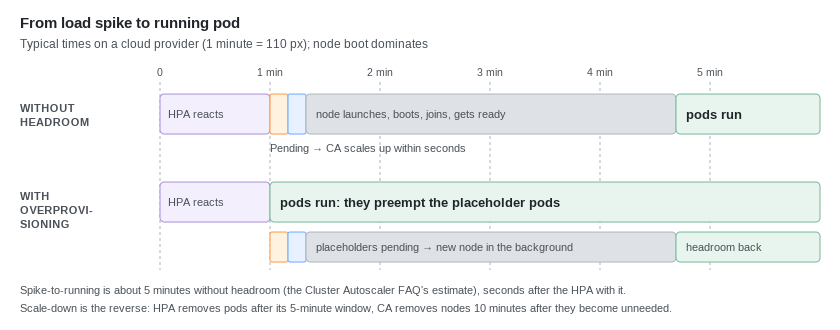
HPA changes the number of pods, CA the number of nodes; they work together without configuration. HPA computes desiredReplicas = ceil(currentReplicas × currentMetric / target). With CPU, the metric is usage
divided by the pod’s request: two pods at 70% and 80% against a 50% target give ceil(2 × 75 / 50) = 3 replicas. The controller checks every 15 seconds (--horizontal-pod-autoscaler-sync-period)
and, by default, waits for a 5-minute stabilization window before scaling down (behavior.scaleDown.stabilizationWindowSeconds per HPA). Choose the target with headroom: too close to 100% and a
spike overloads the replicas before new ones start, too low and you pay for idle pods (and idle nodes, through CA). The total reaction time to a load spike is HPA’s reaction (usually about a minute, up to 3), CA’s reaction (seconds), and node provisioning, which dominates: the FAQ puts the sum at about 5 minutes. Overprovisioning (section 6) hides most of that for the first
burst. For scale-down CA is the slow part, by design.
Do not combine CA with a node autoscaler that looks at CPU usage (for example an ASG target-tracking policy): they disagree on what “needed” means and undo each other.
KEDA (a CNCF graduated project) extends this to events: it scales Deployments and Jobs from queue lengths, stream lag, cron schedules and many other sources, including down to zero replicas, by driving an HPA under the hood. It never touches nodes, so it is paired with CA (or Karpenter): KEDA creates the pods, CA makes room for them, and when KEDA scales to zero, CA removes the emptied nodes.
Vertical Pod Autoscaler
CA and HPA both trust the requests in your manifests. Requests written once and never revisited drift from reality: too high and CA keeps half-empty nodes alive, too low and pods are packed onto nodes they then overload. The Vertical Pod Autoscaler (release 1.8.1) watches actual usage and OOM events and recommends, or sets, the requests. It has three parts: the recommender (computes recommendations from metrics-server data and stores them in the VPA object), the updater (decides which pods to update, respecting PDBs) and the admission controller (writes the recommended requests into new pods).
updateMode |
What VPA does |
|---|---|
Off |
Only publishes recommendations (kubectl get vpa web -o yaml, under status.recommendation) |
Initial |
Sets requests when pods are created, never changes running pods |
Recreate |
Also updates running pods by evicting them |
InPlaceOrRecreate |
Resizes running pods in place where it can, otherwise evicts them (GA since VPA 1.6; needs Kubernetes in-place pod resize) |
Auto |
Deprecated; currently the same as Recreate |
apiVersion: autoscaling.k8s.io/v1
kind: VerticalPodAutoscaler
metadata:
  name: web
  namespace: default
spec:
  targetRef:
    apiVersion: apps/v1
    kind: Deployment
    name: web
  updatePolicy:
    updateMode: "Off"
  resourcePolicy:
    containerPolicies:
      - containerName: "*"
        minAllowed:
          cpu: 100m
          memory: 128Mi
        maxAllowed:
          cpu: "2"
          memory: 4Gi
- Start with
Off, compare the recommendations with your requests for a while, then copy them into the manifests or move toInitialorInPlaceOrRecreate. - Set
maxAllowedbelow your largest node’s allocatable. A recommendation larger than any node leaves pods pending, and CA cannot help, because no node group has a node that big. - Do not let VPA and HPA act on the same metric (CPU or memory). VPA on memory with HPA on CPU, or HPA on custom metrics, is fine.
- VPA only handles pods under a controller, and with eviction-based modes it needs PDBs and several replicas, like CA scale-down.
9. Cluster Autoscaler or Karpenter?
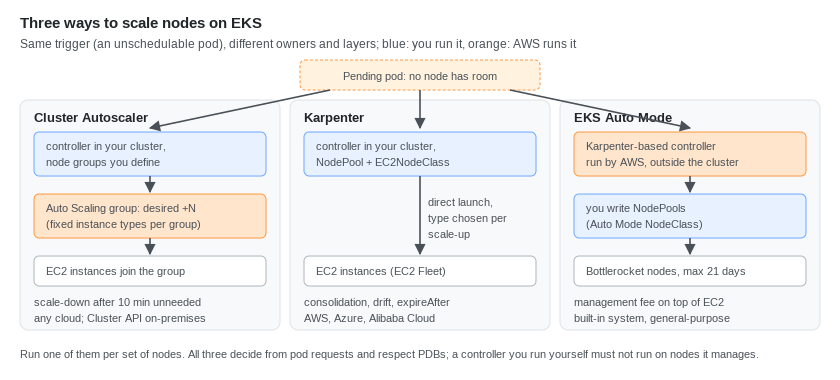
Karpenter is the other node autoscaler for Kubernetes. It started at AWS, is now a Kubernetes SIG Autoscaling project, and has providers for AWS (release 1.15.1 in October 2026), Azure and Alibaba Cloud. It also reacts to unschedulable pods, but it does not resize node groups:
- A NodePool says which nodes Karpenter may create: requirements on instance category, family, size, architecture, zone and capacity type (Spot or On-Demand), taints, limits and disruption rules. On AWS an EC2NodeClass holds the AMI, subnets, security groups and IAM role.
- For each batch of pending pods it picks an instance type that fits them from everything the NodePool allows and launches it directly through the cloud API (EC2 Fleet on AWS). There is no ASG in between, which is why scale-up is usually faster and why it can choose a better-fitting, cheaper instance each time.
| Cluster Autoscaler | Karpenter | |
|---|---|---|
| Works with | Node groups you define (ASGs, managed node groups, MIGs, scale sets …) | NodePools and NodeClasses; launches instances directly |
| Instance choice | Fixed per node group; the expander picks a group | Chosen per scale-up from every instance type the NodePool allows |
| Scale-up speed | Node group API, then instance launch | Direct instance launch, retried quickly when a type has no capacity |
| Removing nodes | Underutilized nodes after 10 minutes | Consolidation: removes empty or underutilized nodes, or replaces them with cheaper ones (consolidationPolicy: WhenEmpty, Balanced, WhenEmptyOrUnderutilized (default)) |
| Keeping nodes up to date | Not its job (use node group updates or ASG instance refresh) | Drift: replaces nodes that no longer match their NodePool or NodeClass (a new AMI, for example); expiration (expireAfter, default 720h) recycles old nodes |
| Spot interruptions | Node group’s job (managed node groups, or the Node Termination Handler) | Built in once the interruption queue (SQS) is configured: taints, drains and replaces the node on the 2-minute warning |
| Rate of change | Flags like --max-drain-parallelism |
Disruption budgets per NodePool, including time windows (no changes during business hours, for example) |
| Clouds | Many providers, plus Cluster API for on-premises | AWS, Azure, Alibaba Cloud |
| Good fit | A few well-defined node groups, any cloud, on-premises | Varied workloads and Spot, where instance flexibility saves money |
EKS Auto Mode is a third option on EKS: AWS runs Karpenter-based node autoscaling for you. You use standard NodePool objects (with an Auto Mode NodeClass instead of EC2NodeClass), get two built-in
NodePools (system, tainted CriticalAddonsOnly, and general-purpose), Bottlerocket nodes, Spot interruption handling and node repair included, and a node lifetime of at most 21 days; in return there is
an Auto Mode management fee on top of the EC2 cost, and less control over AMIs and the operating system.
Whichever you run:
- Run one autoscaler for a given set of nodes, never two.
- Do not run the autoscaler on the nodes it manages: it could remove its own node, or fail to come back when nothing is left to schedule it on. Run Cluster Autoscaler on a small fixed node group it does not scale down, and Karpenter on a managed node group or on Fargate.
- Both depend on accurate requests, PDBs and topology spread to make safe decisions.
10. Tips and Gotchas
- Set requests on every pod. CA decides from requests; pods without them are invisible to it.
- One ASG per zone and
--balance-similar-node-groups, especially with EBS volumes. - No other autoscaler on the same node groups, and keep the ASG min and max as the hard limits.
- Give system pods PDBs or set
--skip-nodes-with-system-pods=false, or a single CoreDNS replica can keep a node alive for an hour. - Annotate long-running batch pods with
safe-to-evict: "false"if an eviction would waste hours of work. - Check the cloud quota (vCPU limits, Spot capacity) before raising a group’s max: a scale-up that the cloud refuses only shows up in CA’s log and the ASG’s activity history.
- Match the CA version to the Kubernetes minor version, and run it with
system-cluster-criticalpriority on nodes it will not remove (a small fixed node group, or the chart’s PDB). - Scale-from-zero groups need template tags for labels and taints, or pods with selectors never trigger them.
- Do not edit nodes by hand in autoscaled groups: every node of a group must look the same.