Helm Cheatsheet
Helm reference: repositories, installing and upgrading releases, values, chart development, OCI registries, plugins, hooks and troubleshooting. Examples use the metrics-server chart.
Installation
| Platform | Package Manager | Command |
|---|---|---|
| Linux | Script (Helm 4) | curl -fsSL https://raw.githubusercontent.com/helm/helm/main/scripts/get-helm-4 \| bash |
| Linux | Script (Helm 3) | curl -fsSL https://raw.githubusercontent.com/helm/helm/main/scripts/get-helm-3 \| bash |
| macOS | Homebrew | brew install helm |
| Windows | Chocolatey | choco install kubernetes-helm |
| Windows | Scoop | scoop install helm |
Verify Installation
helm version
Shell Completion
| Shell | Command |
|---|---|
| Bash | helm completion bash \| sudo tee /etc/bash_completion.d/helm > /dev/null |
| Zsh | helm completion zsh > "${fpath[1]}/_helm" |
Chart Structure
Directory Layout
my-chart/
├── Chart.yaml              # Chart metadata (name, version, description)
├── values.yaml             # Default configuration values
├── values.schema.json      # JSON schema that validates values
├── templates/              # Kubernetes manifest templates
│   ├── deployment.yaml
│   ├── service.yaml
│   ├── configmap.yaml
│   └── _helpers.tpl        # Template helpers (prefixed with _)
├── charts/                 # Dependency charts (optional)
├── crds/                   # CRDs, installed before the templates (never upgraded by Helm)
├── templates/NOTES.txt     # Text printed after install/upgrade (a template too)
├── .helmignore             # Files left out of the package
└── README.md               # Documentation
Chart Download Behavior
When you run helm repo update, Helm downloads only the index (metadata about available charts), not the actual chart packages. Charts are downloaded when you:
| Command | Behavior |
|---|---|
helm pull |
Download chart to local directory |
helm install |
Download and install; the package stays in the cache |
helm upgrade |
Download the new version; also cached |
Helm 3 keeps downloaded packages next to the indexes in $HELM_CACHE_HOME/repository; Helm 4 puts them in $HELM_CACHE_HOME/content.
Repository Management
Basic Commands
| Command | Details |
|---|---|
helm repo add metrics-server https://kubernetes-sigs.github.io/metrics-server/ |
Add a repository |
helm repo add myrepo https://charts.example.com --username user --password pass |
Add private repo with credentials |
helm repo add secure https://charts.secure.com --ca-file ./ca.crt --cert-file ./client.crt --key-file ./client.key |
Add repo with certificate auth |
helm repo update |
Update repository indexes |
helm repo update bitnami |
Update a specific repository |
helm repo update --debug |
Update with verbose/debug output |
helm repo update --fail-on-repo-update-fail |
Fail if any repository can’t be updated (Helm 3 only) |
helm repo list |
List configured repositories |
helm repo list -o yaml |
List repositories in YAML format |
helm repo remove <repo-name> |
Remove a repository |
helm repo index <DIR> |
Generate an index file from charts found in a directory |
helm repo index <DIR> --merge <DIR>/index.yaml |
Merge generated index with an existing index file |
Search Commands
| Command | Details |
|---|---|
helm search repo metrics-server |
Search for charts in repositories |
helm search repo metrics-server/metrics-server --versions |
List all versions with default column width |
helm search repo metrics-server/metrics-server --versions --max-col-width 0 |
List all versions with full width output (recommended) |
helm search repo metrics-server/metrics-server --output json |
Search with JSON output (useful for scripting) |
helm search repo metrics-server/metrics-server --output yaml |
Search with YAML output |
helm search hub metrics-server |
Search Artifact Hub |
Chart Information
| Command | Details |
|---|---|
helm show chart metrics-server/metrics-server |
Show chart metadata |
helm show chart metrics-server/metrics-server --version 3.12.2 |
Show chart metadata for specific version |
helm show values metrics-server/metrics-server |
Show default values |
helm show values metrics-server/metrics-server --version 3.12.2 |
Show default values for specific version |
helm show readme metrics-server/metrics-server |
Show README |
helm show readme metrics-server/metrics-server --version 3.12.2 |
Show README for specific version |
helm show all metrics-server/metrics-server |
Show all info |
helm show crds ./my-chart |
Show the CRDs in the chart’s crds/ directory |
Install Charts
Basic Installation
| Command | Details |
|---|---|
helm install metrics-server metrics-server/metrics-server |
Basic installation (default namespace) |
helm install metrics-server metrics-server/metrics-server --set args={--kubelet-insecure-tls} |
Install without certificate validation |
helm install metrics-server metrics-server/metrics-server --namespace kube-system |
Install in specific namespace |
helm install metrics-server metrics-server/metrics-server -n kube-system --create-namespace |
Install and create the namespace |
helm install metrics-server metrics-server/metrics-server -n kube-system --create-namespace --set service.type=LoadBalancer |
Install with inline values |
helm install metrics-server metrics-server/metrics-server --set-string podLabels.version=1.0 |
Keep the value a string (1.0, not the number 1) |
helm install metrics-server metrics-server/metrics-server -f values.yaml |
Install with values file |
helm install metrics-server ./metrics-server |
Install from local chart (after helm pull --untar) |
helm install metrics-server ./metrics-server-3.12.2.tgz |
Install from packaged chart |
helm install metrics-server metrics-server/metrics-server --version 3.12.2 |
Install with specific version |
helm install metrics-server/metrics-server --generate-name |
Auto-generate a release name |
helm install mychart myrepo/mychart --verify |
Verify the package signature first (fails for unsigned charts such as metrics-server) |
helm install metrics-server metrics-server/metrics-server --dependency-update |
Update missing dependencies before installing |
Advanced Installation
| Command | Details |
|---|---|
helm install metrics-server metrics-server/metrics-server --wait --timeout 5m |
Wait for deployment to complete |
helm install metrics-server metrics-server/metrics-server --dry-run |
Dry run (client side; Helm 3 default) |
helm install metrics-server metrics-server/metrics-server --dry-run=server |
Dry run checked by the API server (needs a cluster) |
helm install metrics-server metrics-server/metrics-server --dry-run --debug |
Dry run with debug output |
helm install metrics-server metrics-server/metrics-server --post-renderer ./kustomize-post-render.sh |
Pipe the manifests through a program (Helm 3; Helm 4 takes a post-renderer plugin name) |
helm install metrics-server metrics-server/metrics-server --skip-crds |
Skip CRD installation |
helm install metrics-server metrics-server/metrics-server --disable-openapi-validation |
Disable OpenAPI validation |
Upgrade Releases
Basic Upgrade
| Command | Details |
|---|---|
helm upgrade metrics-server metrics-server/metrics-server -n kube-system |
Upgrade release |
helm upgrade metrics-server metrics-server/metrics-server -n kube-system --version 3.12.2 |
Upgrade to specific version |
helm upgrade metrics-server metrics-server/metrics-server -n kube-system --set replicas=2 |
Upgrade with inline values |
helm upgrade metrics-server metrics-server/metrics-server -n kube-system --values values.yaml |
Upgrade release with new values |
Advanced Upgrade
| Command | Details |
|---|---|
helm upgrade metrics-server metrics-server/metrics-server -n kube-system --atomic |
Upgrade and roll back on failure (Helm 4: --rollback-on-failure) |
helm upgrade metrics-server metrics-server/metrics-server -n kube-system --wait --timeout 5m |
Upgrade and wait for completion |
helm upgrade metrics-server metrics-server/metrics-server -n kube-system --dry-run |
Dry run upgrade |
helm upgrade metrics-server metrics-server/metrics-server -n kube-system --force |
Replace resources (delete and recreate) instead of patching them (Helm 4: --force-replace --server-side=false) |
helm upgrade --install metrics-server metrics-server/metrics-server -n kube-system |
Upgrade and install if not exists |
helm upgrade metrics-server metrics-server/metrics-server -n kube-system --dependency-update |
Update missing dependencies before upgrading |
helm upgrade metrics-server metrics-server/metrics-server -n kube-system --history-max=5 |
Keep at most 5 revisions (default 10, 0 = no limit) |
helm upgrade metrics-server metrics-server/metrics-server --kube-context my-cluster-context -n production |
Target a specific kube context |
helm upgrade metrics-server metrics-server/metrics-server -n kube-system --description "bump to 3.14" |
Text shown in the DESCRIPTION column of helm history instead of “Upgrade complete” |
helm upgrade metrics-server metrics-server/metrics-server -n kube-system --labels team=platform,tier=web |
Labels on the release (Helm 3.13+); find releases with helm list --selector team=platform |
helm upgrade --install metrics-server ./metrics-server -n kube-system -f <(helm get values metrics-server -n kube-system) --atomic |
Re-apply a local chart with the release’s current values |
Rollback
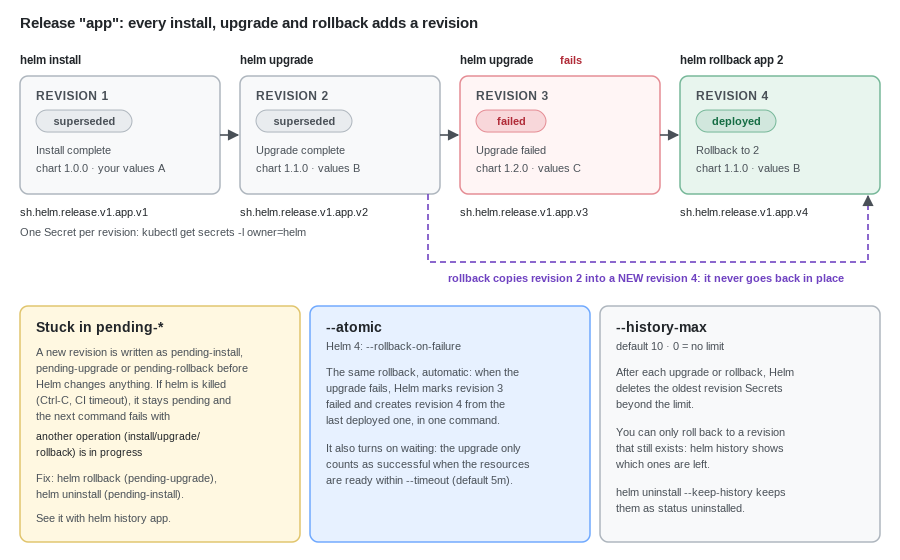
Rolling back to a revision that --history-max already deleted fails with Error: release has no 1 version: check helm history first.
| Command | Details |
|---|---|
helm history metrics-server -n kube-system |
Check upgrade history |
helm history metrics-server -n kube-system --max 10 |
Show last 10 revisions |
helm rollback metrics-server -n kube-system |
Roll back to the previous revision |
helm rollback metrics-server -n kube-system 1 |
Roll back to a specific revision |
helm rollback metrics-server -n kube-system 1 --cleanup-on-fail |
Delete resources created by this rollback if it fails |
helm rollback metrics-server -n kube-system 1 --wait --timeout 5m |
Rollback and wait for completion |
Uninstall
| Command | Details |
|---|---|
helm uninstall metrics-server |
Uninstall release |
helm uninstall metrics-server -n kube-system |
Uninstall from specific namespace |
helm uninstall metrics-server -n kube-system --keep-history |
Keep release history (soft delete) |
helm uninstall metrics-server -n kube-system --no-hooks |
Skip hook execution during uninstall |
helm uninstall metrics-server --dry-run |
Dry run uninstall |
helm uninstall metrics-server --timeout 300s |
Uninstall with timeout |
Download Charts
Download to Current Directory
| Command | Details |
|---|---|
helm pull metrics-server/metrics-server |
Download chart package (tgz) to current directory |
helm pull metrics-server/metrics-server --verify |
Download and verify package signature |
helm pull metrics-server/metrics-server --untar |
Download and extract |
helm pull metrics-server/metrics-server --destination ~/helm-charts |
Download to specific location |
helm pull metrics-server/metrics-server --destination ~/helm-charts --untar |
Download and extract to specific location |
helm pull metrics-server/metrics-server --version 3.12.2 --destination ~/helm-charts |
Download specific version |
Download Multiple Charts
mkdir -p ~/helm-charts/{metrics-server,nginx,postgres}
helm pull metrics-server/metrics-server --destination ~/helm-charts/metrics-server --untar
helm pull bitnami/nginx --destination ~/helm-charts/nginx --untar
helm pull bitnami/postgresql --destination ~/helm-charts/postgres --untar
Create & Develop Charts
Chart Development
| Command | Details |
|---|---|
helm create my-chart |
Create a new chart |
helm package my-chart |
Package chart into tarball |
helm package my-chart --version 1.2.0 |
Package with a specific version |
helm package my-chart --version 1.2.0 --app-version 2.0.0 |
Package with specific chart and app versions |
helm package my-chart -d dist |
Package to specific directory |
helm package my-chart --sign --key 'My Name' --keyring ~/.gnupg/secring.gpg |
Create a signed package |
helm lint my-chart |
Validate chart syntax |
helm lint my-chart --values values.yaml |
Validate chart values |
helm lint my-chart --strict |
Lint with strict mode (warnings are errors) |
helm lint my-chart --strict --with-subcharts |
Lint including subcharts |
Template Rendering
| Command | Details |
|---|---|
helm template metrics-server metrics-server/metrics-server |
Template rendering (dry run) |
helm template metrics-server metrics-server/metrics-server --set replicas=2 |
Template with inline values |
helm template metrics-server metrics-server/metrics-server --set-string key=value |
Template with string value override |
helm template metrics-server metrics-server/metrics-server --values values.yaml |
Template with values file |
helm template metrics-server metrics-server/metrics-server --debug |
Template with debug values |
helm template metrics-server metrics-server/metrics-server > metrics-server-rendered.yaml |
Template to file |
Release Management
Release information is stored in Kubernetes, not on your local machine.
List Releases
| Command | Details |
|---|---|
helm list -n kube-system |
List releases in specific namespace |
helm list --all |
Show releases in every state (Helm 3 only) |
helm list -A |
List all releases across all namespaces (table format) |
helm list -A --output yaml |
List all releases in YAML format |
helm list -A --output json |
List all releases in JSON format |
helm list -A --output json \| jq '.[] \| .name' |
Get specific field |
helm list -l key1=value1,key2=value2 |
Filter releases by label selector |
helm list --date |
Sort releases by date |
helm list --deployed |
Show only deployed releases |
helm list --failed |
Show only failed releases |
helm list --pending |
Show pending releases |
helm list --short |
Show only release names (useful for scripting) |
helm list --uninstalled |
Show uninstalled releases (requires --keep-history on uninstall) |
helm list --superseded |
Show superseded releases |
Release Information
| Command | Details |
|---|---|
helm status metrics-server -n kube-system |
Show release details |
helm status metrics-server -n kube-system --revision 2 |
Show release status at a specific revision |
helm status metrics-server -o json \| jq -r .info.status |
Scriptable release status (clean for CI gates vs. parsing human output) |
helm get values metrics-server -n kube-system |
Get user-supplied values |
helm get values metrics-server -n kube-system --all |
Get all values used by release (including defaults) |
helm get values metrics-server -n kube-system --output json |
Get user-supplied values as JSON |
helm get values metrics-server -n kube-system --revision 2 |
Get values from a specific revision |
helm get manifest metrics-server -n kube-system |
Get release manifest (rendered YAML) |
helm get manifest metrics-server -n kube-system --revision 2 |
Get manifest at specific revision |
diff <(helm get manifest r -n ns --revision 3) <(helm get manifest r -n ns --revision 4) |
What changed between two revisions, without a plugin |
helm get notes metrics-server -n kube-system |
Get release notes (the rendered NOTES.txt) |
helm get metadata metrics-server -n kube-system |
Chart, version, revision, status and deploy time in one block; Helm 4 also prints the release labels |
helm get hooks metrics-server -n kube-system |
Show the release’s hook manifests |
helm get all metrics-server -n kube-system |
Get all information about a named release |
helm history metrics-server -n kube-system |
Show release history |
helm history metrics-server -n kube-system --output json |
Show release history in JSON format |
Kubernetes Storage
| Command | Details |
|---|---|
kubectl get secrets -n <namespace> -l owner=helm |
Release data: one Secret (type helm.sh/release.v1) per revision |
HELM_DRIVER=configmap helm install ... |
Store releases in ConfigMaps instead (secret is the default; sql for PostgreSQL) |
Every command must use the same driver: a release installed with HELM_DRIVER=configmap was stored as ConfigMap sh.helm.release.v1.cmrel.v1, and a plain helm list (Secret driver) didn’t show it. Set HELM_DRIVER in the environment, not per command.
| helm diff revision metrics-server -n kube-system 1 2 | Compare releases (requires helm-diff plugin) |
Backup Releases
# Backup a single release
helm get all metrics-server -n kube-system > backup-metrics-server.yaml

# Backup all releases across all namespaces (helm get needs each release's namespace)
helm list -A -o json | jq -r '.[] | "\(.name) \(.namespace)"' | while read -r name ns; do
  helm get all "$name" -n "$ns" > "backup-$ns-$name.yaml"
done
Environment Configuration
View Helm Environment Variables
| Command | Details |
|---|---|
helm env |
Show all Helm environment variables |
helm env \| grep CACHE |
Check cache location |
helm env \| grep -E "(CACHE\|CONFIG\|DATA)" |
Common Helm paths |
Set Custom Cache Location
# Set custom cache directory
export HELM_CACHE_HOME=~/my-custom-helm-cache

# Set custom config directory
export HELM_CONFIG_HOME=~/.config/helm

# Set custom data directory
export HELM_DATA_HOME=~/.local/share/helm

# Enable debug logging
export HELM_DEBUG=true

# Set default namespace for all Helm commands
export HELM_NAMESPACE=production

# Set OCI registry config path
export HELM_REGISTRY_CONFIG="${HOME}/.docker/config.json"

# Make permanent (add to ~/.bash_profile or ~/.zshrc)
echo 'export HELM_CACHE_HOME=~/my-custom-helm-cache' >> ~/.bash_profile
Cache Management (macOS)
Cache Locations
| Path | Description |
|---|---|
~/Library/Preferences/helm/ |
Helm configuration directory |
~/Library/Caches/helm/repository/ |
Repository cache |
~/Library/Preferences/helm/repositories.yaml |
Repository configuration |
~/Library/helm/plugins/ |
Plugin directory |
Cache Commands
| Command | Details |
|---|---|
ls -la ~/Library/Caches/helm/repository/ |
List all files in repository cache |
ls -lh ~/Library/Caches/helm/repository/ |
View with human-readable sizes |
ls -la ~/Library/Caches/helm/repository/*.yaml |
Show only YAML index files |
ls -la ~/Library/Caches/helm/repository/*.tgz |
Show only chart archives |
du -sh ~/Library/Caches/helm/ |
Check cache directory size |
du -sh ~/Library/Caches/helm/repository/ |
Check repository cache size |
du -h ~/Library/Caches/helm/repository/* \| sort -h |
List files by size |
Cache Cleanup
| Command | Details |
|---|---|
rm -f ~/Library/Caches/helm/repository/*.tgz |
Remove all cached charts (keeps repository indexes) |
rm -f ~/Library/Caches/helm/repository/metrics-server-*.tgz |
Remove specific cached chart |
rm -rf ~/Library/Caches/helm/content/ |
Remove charts cached by Helm 4 |
rm -rf ~/Library/Caches/helm/ |
Clear the entire cache |
helm repo update |
After clearing, update repositories |
Examples
Extract and Modify Chart
# Download and extract chart (pin the version: without it you get the latest, 3.14.0 in October 2026)
helm pull metrics-server/metrics-server --version 3.12.2 --untar --destination ~/my-custom-charts

# Navigate to chart
cd ~/my-custom-charts/metrics-server

# Modify values or templates
vim values.yaml
vim templates/deployment.yaml

# Create custom chart package
cd ..
helm package metrics-server
# Creates: metrics-server-3.12.2.tgz

# Install custom chart
helm install metrics-server ./metrics-server-3.12.2.tgz
Plugins
| Command | Details |
|---|---|
helm plugin install https://github.com/databus23/helm-diff |
Install helm-diff plugin |
helm plugin install https://github.com/jkroepke/helm-secrets |
Install helm-secrets plugin |
helm plugin install https://github.com/chartmuseum/helm-push |
Install helm-push plugin (helm cm-push to ChartMuseum) |
helm plugin install https://github.com/hypnoglow/helm-s3 |
Install helm-s3 plugin (use AWS S3 as chart repo) |
helm plugin install https://github.com/helm/helm-mapkubeapis |
Install mapkubeapis plugin — rewrites release metadata referencing removed Kubernetes APIs |
helm mapkubeapis metrics-server --namespace kube-system |
Fix upgrades failing with “unable to build kubernetes objects” after a cluster API removal |
helm plugin list |
List installed plugins |
helm plugin update diff |
Update a plugin |
helm plugin uninstall diff |
Uninstall a plugin |
helm diff upgrade metrics-server metrics-server/metrics-server --values values.yaml |
Preview what would change in an upgrade |
helm secrets encrypt -i secrets.yaml |
Encrypt a secrets file in place (helm-secrets 4; enc was the old name) |
helm secrets upgrade metrics-server ./charts/metrics-server -f values/prod.yaml -f secrets/values.enc.yaml --atomic |
Upgrade with encrypted secrets |
helm install metrics-server ./metrics-server -f secrets://secrets.yaml |
Install with encrypted secrets |
Installing a plugin from a Git URL needs git on the machine; without it Helm fails with git is not installed.
Dependencies
| Command | Details |
|---|---|
helm dependency list my-chart |
List chart dependencies |
helm dependency update my-chart |
Download/update chart dependencies |
helm dependency build my-chart |
Rebuild the charts/ directory from Chart.lock |
Declare Dependencies (Chart.yaml)
apiVersion: v2
name: app
version: 0.1.0
dependencies:
  - name: redis
    version: 18.0.0
    repository: https://charts.bitnami.com/bitnami
    condition: redis.enabled
Values Management
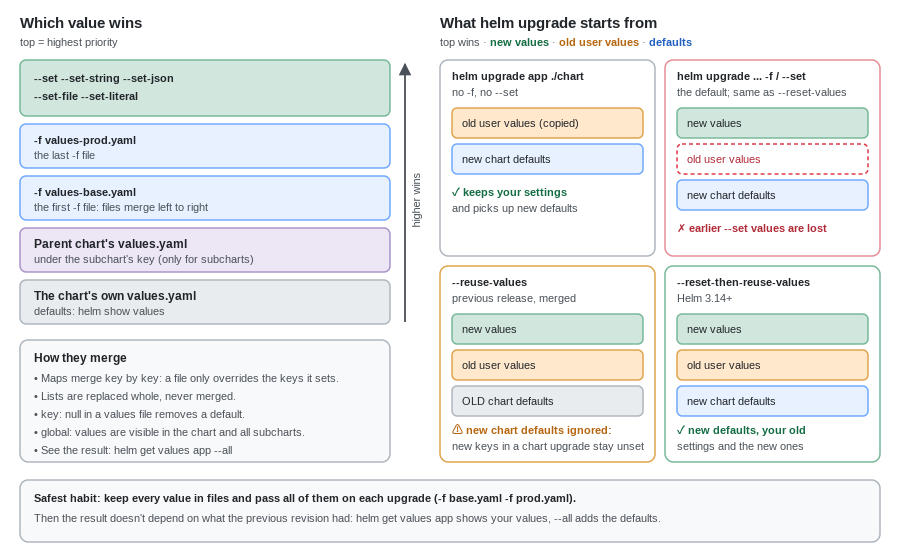
helm show values vs helm get values
| Command | Details |
|---|---|
helm show values metrics-server/metrics-server |
Show default values from a chart (before installation) |
helm get values metrics-server |
Show actual values used for an installed release |
helm get values metrics-server --all |
Show all values including defaults for an installed release |
Upgrade Values Flags
| Flag | Details |
|---|---|
--reuse-values |
Reuse last release values, merge new overrides |
--reset-values |
Reset values to chart defaults, ignore previous values |
--reset-then-reuse-values |
Reset to chart defaults, then merge old values back (Helm 3.14.0+) |
# Reuse previous values, add a tweak
helm upgrade metrics-server metrics-server/metrics-server --reuse-values --set newEnv=production

# Override entirely — no old values retained
helm upgrade metrics-server metrics-server/metrics-server --reset-values --set newKey=newValue

# Reset to defaults then merge old values back
helm upgrade metrics-server metrics-server/metrics-server --reset-then-reuse-values --set version=2.0
Important caveats:
--reuse-valuesdisregards any changes in the new chart version’s default values- If you run
helm upgradewithout--set/-f, Helm copies the previous user values onto the new chart’s defaults (not the same as--reuse-values, which also keeps the old defaults) - If you run
helm upgradewith--set/-f,--reset-valuesis used by default
Workaround for new chart version + preserve values + pick up new defaults:
# Save current values
helm get values my-release -o yaml > prev-values.yaml

# Upgrade with saved values as base (gets new chart defaults + your overrides)
helm upgrade my-release my-chart -f prev-values.yaml --set newKey=newValue
This is what --reset-then-reuse-values was designed to simplify (Helm 3.14+).
Multiple Values Files
helm install metrics-server ./metrics-server \
  --values values-base.yaml \
  --values values-prod.yaml \
  --values values-secrets.yaml

# Inject sensitive values from files (avoid inline secrets)
helm upgrade metrics-server ./metrics-server --set-file db.password=./secrets/db_password.txt
–set Syntax
Tested with Helm 3.22.0 and 4.3.0 (identical results); the right column is the value the templates received.
| Command | Result |
|---|---|
--set image.tag=1.27 |
image: {tag: "1.27"}: dots create nested keys |
--set a.b=1,c=2 |
a: {b: 1}, c: 2: a comma separates several values |
--set 'args={a,b}' |
args: ["a", "b"]: a list (quote it: {} is special in shells) |
--set servers[0].port=80 |
servers: [{port: 80}]: list index |
--set ingress.annotations."kubernetes\.io/ingress\.class"=nginx |
key kubernetes.io/ingress.class: escape dots that belong to the key |
--set 'hosts=a\,b' |
hosts: "a,b": escape a comma inside a value |
--set enabled=false --set count=007 |
enabled: false (a boolean), count: "007" (a string: leading zero) |
--set tag=null |
removes tag, so the chart default no longer applies either |
--set-string tag=1.10 |
tag: "1.10": always a string |
--set-json 'resources={"limits":{"cpu":"1"}}' |
a whole object or list in JSON |
--set-literal 'pw=a,b{c}=d' |
pw: "a,b{c}=d": no parsing at all, for passwords and odd values |
--set-file key=./file.txt |
the file’s content as the value |
Numbers look like a trap but --set tag=1.10 stayed "1.10" on both versions. The trap is a values file: an unquoted tag: 1.10 in YAML became the number 1.1, so a version-like value must be quoted there (tag: "1.10").
Values Schema (values.schema.json)
A JSON Schema next to values.yaml is checked on install, upgrade, template and lint, before anything is rendered:
{
  "$schema": "https://json-schema.org/draft-07/schema#",
  "type": "object",
  "required": ["image"],
  "properties": {
    "replicaCount": { "type": "integer", "minimum": 1 },
    "image": {
      "type": "object",
      "required": ["repository"],
      "properties": {
        "repository": { "type": "string" },
        "pullPolicy": { "type": "string", "enum": ["Always", "IfNotPresent", "Never"] }
      }
    }
  }
}
What it caught (Helm 3.22.0 and 4.3.0 printed the same):
| Values | Error |
|---|---|
--set replicaCount=abc |
at '/replicaCount': got string, want integer |
--set replicaCount=0 |
at '/replicaCount': minimum: got 0, want 1 |
--set image.pullPolicy=Sometimes |
at '/image/pullPolicy': value must be one of 'Always', 'IfNotPresent', 'Never' |
--set image=null |
at '': missing property 'image' |
Each error starts with Error: values don't meet the specifications of the schema(s) in the following chart(s):, and helm lint reports the same as [ERROR] values.yaml: ....
OCI Registries
| Command | Details |
|---|---|
echo "$GITHUB_TOKEN" \| helm registry login ghcr.io -u <user> --password-stdin |
Log in to an OCI registry |
helm registry logout ghcr.io |
Logout from OCI registry |
helm push metrics-server-3.12.2.tgz oci://ghcr.io/acme/charts |
Push chart to OCI registry |
helm install metrics-server oci://ghcr.io/acme/charts/metrics-server --version 3.12.2 |
Install from OCI registry |
Chart Signing & Security
| Command | Details |
|---|---|
helm package my-chart --sign --key 'My Name' --keyring ~/.gnupg/secring.gpg |
Create a signed package (.tgz + .prov) |
helm verify my-chart-0.1.0.tgz --keyring ~/.gnupg/pubring.gpg |
Verify a chart signature |
helm install my-chart ./my-chart-0.1.0.tgz --verify |
Install only if the signature is valid |
Helm reads the old GnuPG keyring format: with GnuPG 2, export it first with gpg --export-secret-keys > ~/.gnupg/secring.gpg (and gpg --export > ~/.gnupg/pubring.gpg).
CI Directory
The ci/ directory in a Helm chart contains values files used for CI/CD testing:
# chart-testing tool automatically tests all ci/*.yaml files
ct lint --charts ./my-chart
ct install --charts ./my-chart

# Or manually test with specific values files
helm lint ./my-chart -f ./my-chart/ci/default-values.yaml
helm install test-release ./my-chart -f ./my-chart/ci/minimal-values.yaml --dry-run
Hooks
Hook Annotations
apiVersion: batch/v1
kind: Job
metadata:
  name: "{{ include "app.fullname" . }}-migrate"
  annotations:
    "helm.sh/hook": pre-install,pre-upgrade
    "helm.sh/hook-weight": "-5"
    "helm.sh/hook-delete-policy": before-hook-creation,hook-succeeded
spec:
  template:
    spec:
      restartPolicy: Never
      containers:
      - name: migrate
        image: "{{ .Values.image.repository }}:{{ .Values.image.tag }}"
        command: ["./migrate.sh"]
Available Hook Types
pre-install, post-install, pre-delete, post-delete, pre-upgrade, post-upgrade, pre-rollback, post-rollback, test
Chart Tests
# templates/tests/test-conn.yaml
apiVersion: v1
kind: Pod
metadata:
  name: "{{ include "app.fullname" . }}-test"
  annotations:
    "helm.sh/hook": test
spec:
  containers:
    - name: curl
      image: curlimages/curl
      args: ["-fsS", "http://{{ include "app.fullname" . }}"]
  restartPolicy: Never
helm test metrics-server --logs
Templating
Common Template Patterns
# Conditionals
{{- if .Values.hpa.enabled }}
apiVersion: autoscaling/v2
kind: HorizontalPodAutoscaler
...
{{- end }}

# Loops and defaults
{{- range $k, $v := .Values.extraEnv }}
- name: {{ $k }}
  value: {{ $v | quote }}
{{- end }}

# Default values
{{- $replicas := default 2 .Values.replicaCount -}}

# Helper templates (_helpers.tpl)
{{- define "app.fullname" -}}
{{- printf "%s-%s" .Release.Name .Chart.Name | trunc 63 | trimSuffix "-" -}}
{{- end -}}
More Template Patterns
# Fail early with a clear message when a value is missing
image: "{{ .Values.image.repository }}:{{ required "image.tag is required" .Values.image.tag }}"
#   Error: execution error at (p/templates/deploy.yaml:15:52): image.tag is required

# A map or list from values, indented to fit (nindent adds the newline first)
resources:
  {{- toYaml .Values.resources | nindent 12 }}

# Render a template stored in a value: greeting: "Hello from {{ .Release.Name }}"
greeting: {{ tpl .Values.greeting . | quote }}            # "Hello from r"

# Files from the chart (files/app.properties, files/*.conf) into a ConfigMap
data:
  app.properties: |-
{{ .Files.Get "files/app.properties" | indent 4 }}
{{ (.Files.Glob "files/*.conf").AsConfig | indent 2 }}

# Restart the pods when the ConfigMap changes (a Deployment doesn't do that by itself)
spec:
  template:
    metadata:
      annotations:
        checksum/config: {{ include (print $.Template.BasePath "/cm.yaml") . | sha256sum }}
Tested: changing one ConfigMap value changed the checksum/config hash, so the pod template changed and the Deployment rolled.
Two traps:
defaulttreatsfalseand0as empty.{{ default true .Values.debug }}rendered"true"with--set debug=false: a boolean that defaults to true can’t be switched off that way. Check whether the key is set instead:{{ ternary .Values.debug true (hasKey .Values "debug") }}renderedfalse, andtruewhendebugwas unset.lookupreturns nothing outside a real install. It reads the live cluster: onhelm installthe Namespace lookup returnedkube-system, with--dry-run=servertoo, buthelm templateand a plain--dry-rungot an empty result. Reading a field of that empty result fails:(lookup "v1" "Namespace" "" "kube-system").metadata.namegavenil pointer evaluating interface {}.name. Guard it:
{{- $ns := lookup "v1" "Namespace" "" "kube-system" }}
existing: {{ if $ns }}{{ $ns.metadata.name | quote }}{{ else }}"not-found"{{ end }}
templates/NOTES.txt is a template too: Thanks for installing {{ .Chart.Name }} as {{ .Release.Name }} in {{ .Release.Namespace }}. printed Thanks for installing s as s in own. after helm install, and helm get notes shows it again later.
Selective Render (debug a single file)
| Command | Details |
|---|---|
helm template metrics-server ./metrics-server --show-only templates/deployment.yaml |
Render a single template file |
helm template metrics-server ./metrics-server --kube-version=1.28.0 |
Render against a specific Kubernetes version |
helm template metrics-server ./metrics-server \| kubectl diff -f - |
Preview rendered manifests diff |
Check for Chart Updates
# 1. Update repos
helm repo update

# 2. Check installed
helm list -A

# 3. Check available versions
helm search repo metrics-server/metrics-server --versions

# 4. Compare values between versions
helm show values metrics-server/metrics-server --version 3.12.0 > old-values.yaml
helm show values metrics-server/metrics-server --version 3.12.2 > new-values.yaml
diff old-values.yaml new-values.yaml
Real-World Workflows
Blue-Green Deployment
# Deploy blue (v1)
helm install my-app-blue ./my-app \
  --set image.tag=v1 \
  --namespace production

# Deploy green (v2)
helm install my-app-green ./my-app \
  --set image.tag=v2 \
  --namespace production

# Switch traffic (via service selector or ingress)
kubectl patch service my-app -p '{"spec":{"selector":{"version":"green"}}}'

# Cleanup blue when stable
helm uninstall my-app-blue --namespace production
Canary Deployment
# Deploy stable version
helm install my-app ./my-app \
  --set replicaCount=3 \
  --set image.tag=stable

# Deploy canary with 1 replica
helm install my-app-canary ./my-app \
  --set replicaCount=1 \
  --set image.tag=canary

# Monitor canary metrics
kubectl top pods -l app=my-app

# Promote canary to stable
helm upgrade my-app ./my-app \
  --set image.tag=canary \
  --reuse-values

# Remove canary
helm uninstall my-app-canary
Upgrade with Downtime Prevention
# Key names are chart-specific: these are the metrics-server chart's (check with helm show values)
helm upgrade metrics-server metrics-server/metrics-server -n kube-system \
  --set replicas=2 \
  --set podDisruptionBudget.enabled=true \
  --set podDisruptionBudget.minAvailable=1 \
  --set updateStrategy.type=RollingUpdate \
  --set updateStrategy.rollingUpdate.maxUnavailable=0 \
  --wait --timeout 10m
Production Deployment
helm upgrade --install metrics-server metrics-server/metrics-server \
  --namespace kube-system \
  --create-namespace \
  --values values-prod.yaml \
  --wait \
  --timeout 10m \
  --atomic          # Helm 4: --rollback-on-failure
Multi-Environment Management
# Development
helm upgrade --install metrics-server metrics-server/metrics-server -n dev --values values-dev.yaml

# Staging
helm upgrade --install metrics-server metrics-server/metrics-server -n staging --values values-staging.yaml

# Production
helm upgrade --install metrics-server metrics-server/metrics-server -n production --values values-prod.yaml
Helm Install Lifecycle
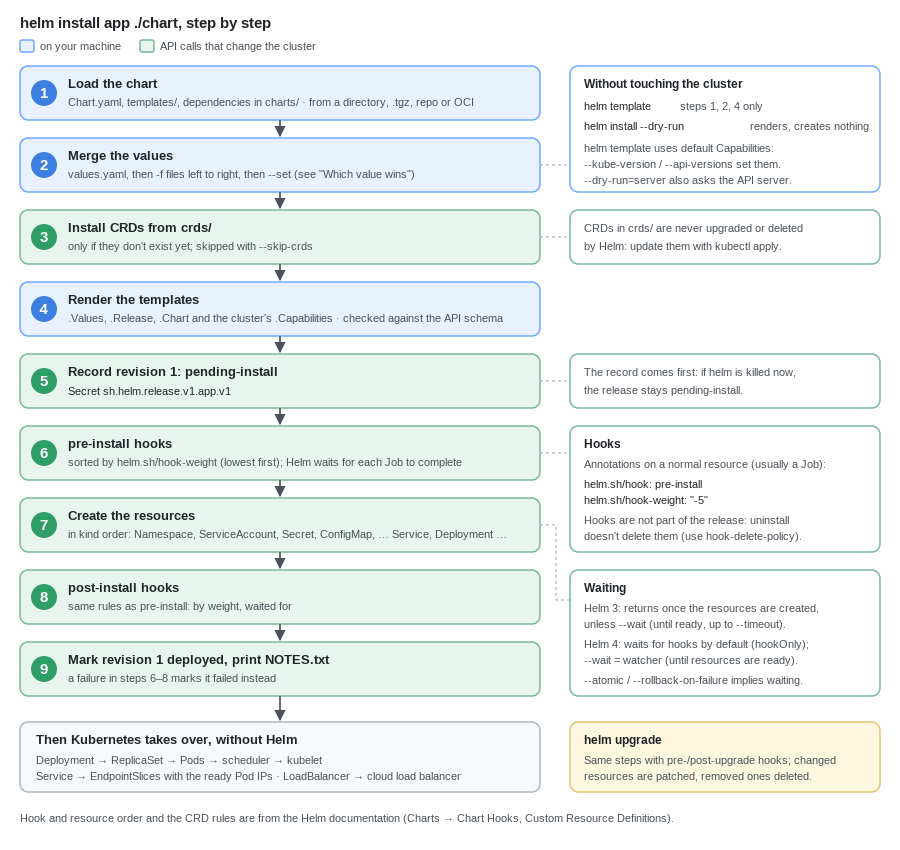
What happens when you run helm install (Helm talks to the API server directly with your kubeconfig; there is no Tiller since Helm 3):
- Load the chart —
Chart.yaml,templates/, dependencies incharts/ - Merge the values —
values.yaml,-ffiles,--set - Install CRDs from
crds/— first install only; Helm never upgrades or deletes them - Render the templates —
.Values,.Release,.Chart,.Capabilities - Record the release — revision 1 as a Secret (type
helm.sh/release.v1), statuspending-install - pre-install hooks — by
helm.sh/hook-weight, waited for - Create the resources — in kind order (Namespace, ServiceAccount, Secret, ConfigMap, … Service, Deployment …)
- post-install hooks — then the release is marked
deployed(orfailed) andNOTES.txtis printed - Kubernetes takes over — controllers create ReplicaSets and Pods, EndpointSlices get the ready Pod IPs, a
LoadBalancerService gets a cloud load balancer
EKS-Specific Repositories
| Command | Details |
|---|---|
helm repo add eks https://aws.github.io/eks-charts |
AWS Load Balancer Controller |
helm repo add aws-ebs-csi-driver https://kubernetes-sigs.github.io/aws-ebs-csi-driver |
AWS EBS CSI Driver |
helm repo add aws-efs-csi-driver https://kubernetes-sigs.github.io/aws-efs-csi-driver |
AWS EFS CSI Driver |
helm repo add autoscaler https://kubernetes.github.io/autoscaler |
Cluster Autoscaler |
Troubleshooting
| Command | Details |
|---|---|
helm install metrics-server metrics-server/metrics-server --debug --dry-run |
Verbose dry run output |
helm template metrics-server ./metrics-server --debug --validate |
Validate against the cluster (Helm 3; Helm 4: --dry-run=server) |
helm status metrics-server --show-resources |
Show release resources (Helm 3) |
helm lint ./my-chart --strict --with-subcharts |
Strict lint with subcharts |
helm list --failed |
List failed releases |
helm list -n <ns> --failed -q \| xargs -I {} helm uninstall {} -n <ns> |
Remove all failed releases in a namespace |
helm template metrics-server ./metrics-server \| kubeconform -strict -kubernetes-version 1.28 - |
Validate rendered resources |
invalid ownership metadata: a chart with cluster-wide objects (ClusterRole, APIService, CRDs) can only be installed once per cluster. Installing metrics-server in kube-system while another release of it existed in default failed with:
Error: INSTALLATION FAILED: Unable to continue with install: ClusterRole "system:metrics-server-aggregated-reader" in namespace "" exists and cannot be imported into the current release: invalid ownership metadata; annotation validation error: key "meta.helm.sh/release-namespace" must equal "kube-system": current value is "default"
Uninstall the other release (helm list -A finds it), or give the second one different resource names if the chart allows it.
Adopting Existing Resources
The same error appears when a chart creates an object that already exists, for example a ConfigMap made with kubectl create:
Error: INSTALLATION FAILED: Unable to continue with install: ConfigMap "app-config" in namespace "own" exists and cannot be imported into the current release: invalid ownership metadata; label validation error: missing key "app.kubernetes.io/managed-by": must be set to "Helm"; annotation validation error: missing key "meta.helm.sh/release-name": must be set to "own"; annotation validation error: missing key "meta.helm.sh/release-namespace": must be set to "own"
To let the release take it over, add the three keys Helm checks, then install:
kubectl annotate configmap app-config -n own meta.helm.sh/release-name=own meta.helm.sh/release-namespace=own
kubectl label configmap app-config -n own app.kubernetes.io/managed-by=Helm
helm install own ./own -n own
Or let Helm do it (Helm 3.17+):
helm install own ./own -n own --take-ownership                       # Helm 3
helm install own ./own -n own --take-ownership --force-conflicts     # Helm 4
Tested: both ways replaced the object’s data with the chart’s. On Helm 4, --take-ownership alone failed because of server-side apply: conflict with "kubectl-create" using v1: .data.k; adding --force-conflicts worked. An adopted object belongs to the release from then on: helm uninstall deleted the ConfigMap that had been created by hand.
Release Too Large
The release (chart files, values and rendered manifests, compressed) is stored in one Secret, and a Secret holds at most 1 MB. A chart with a 2 MB file in files/ failed on Helm 3 and 4 with:
Error: INSTALLATION FAILED: create: failed to create: Secret "sh.helm.release.v1.big.v1" is invalid: data: Too long: may not be more than 1048576 bytes
Adding files/ to .helmignore fixed it. Keep test data, docs and binaries out of the chart, or load big content from elsewhere (an image, a PVC, an init container).
Common Issues
# "another operation (install/upgrade/rollback) is in progress"
helm history metrics-server -n kube-system           # last revision: pending-install / pending-upgrade
helm rollback metrics-server -n kube-system          # pending-upgrade or pending-rollback: back to the last good revision
helm uninstall metrics-server -n kube-system         # pending-install: there is nothing to roll back to

# Resource conflicts
kubectl get all -l app.kubernetes.io/managed-by=Helm

# Uninstall without running hooks (e.g. a pre-delete hook that hangs)
helm uninstall metrics-server -n kube-system --no-hooks

# Last resort: forget the release (removes Helm's records, not the Kubernetes resources)
kubectl delete secret -n kube-system -l owner=helm,name=metrics-server
Useful Aliases
# Add to ~/.bashrc or ~/.zshrc
alias h='helm'
alias hls='helm list'
alias hlsa='helm list --all-namespaces'
alias hs='helm status'
alias hi='helm install'
alias hu='helm upgrade'
alias hr='helm rollback'
alias hd='helm delete'
alias ht='helm template'
alias hg='helm get'
Useful Environment Variables
export HELM_NAMESPACE=production    # Set default namespace
export HELM_CACHE_HOME=~/my-cache  # Set cache directory
export KUBECONFIG=~/.kube/config   # Set kubeconfig
Handy Flags Reference
| Flag | Details |
|---|---|
--atomic |
Roll back automatically on failure (Helm 4: --rollback-on-failure; --atomic is deprecated) |
--force |
Force resource update via delete/recreate (Helm 4: --force-replace --server-side=false) |
--wait / --timeout |
Block until resources are ready |
--history-max |
Cap stored revisions |
--set / --set-file / --set-string |
Control value types precisely |
--show-only |
Render a single template file for debugging |
--kube-version |
Render as if targeting a specific cluster version |
--kube-context |
Target a specific kube context |
--skip-crds |
Skip CRD installation |
--no-hooks |
Skip hook execution |
--reuse-values |
Reuse values from previous release |
--reset-values |
Reset values to chart defaults |
--reset-then-reuse-values |
Reset to defaults, then merge old values back (Helm 3.14+) |
--post-renderer |
Pipe rendered manifests through an external command |
--disable-openapi-validation |
Disable OpenAPI schema validation |
--dependency-update |
Update dependencies before install/upgrade |
--generate-name |
Auto-generate a release name |
Helm 3 vs Helm 4
Helm 4 (November 2025) renamed or removed a few flags and changed some defaults. Both versions are maintained; on Helm 4, use the right-hand column.
| Helm 3 | Helm 4 |
|---|---|
--atomic |
--rollback-on-failure; --atomic still works but warns Flag --atomic has been deprecated |
--force |
--force-replace, and only with --server-side=false (see below) |
helm template --validate |
helm template --dry-run=server (needs a cluster); --validate still works but is deprecated |
helm list --all (every status) |
Removed in Helm 4. helm list -A (--all-namespaces) is a different flag and still works |
helm status --show-resources |
Removed in Helm 4 |
helm repo update --fail-on-repo-update-fail |
Removed in Helm 4 |
--post-renderer ./script.sh |
--post-renderer <plugin-name>: a script fails with plugin: {Name:./script.sh Type:postrenderer/v1} not found |
helm plugin install <url> |
Verifies signatures by default: add --verify=false for unsigned plugins |
| Changes applied client-side | Server-side apply by default (--server-side=auto) |
--wait waits for resources |
Default is hookOnly: without --wait, an upgrade is deployed even if its Pods never start |
Two Helm 4 changes that bite:
--force-replace(and the old--force) fails with the default server-side apply:Error: UPGRADE FAILED: invalid operation: cannot use server-side apply and force replace together. Add--server-side=falseto replace resources.- No waiting by default. An upgrade to an image tag that doesn’t exist ended as
deployed(Upgrade complete) on Helm 4, with the Pods stuck pulling. Use--wait(or--rollback-on-failure, which waits) when the result matters, e.g. in CI.