AWS Route 53 Cheatsheet
Amazon Route 53: hosted zones, record types, routing policies, health checks, failover, domain registration, DNSSEC, hybrid DNS and DNS Firewall. The commands were
checked with AWS CLI 2.39.3; zone IDs, health check IDs and addresses are placeholders (192.0.2.0/24 and 198.51.100.0/24 are documentation ranges).
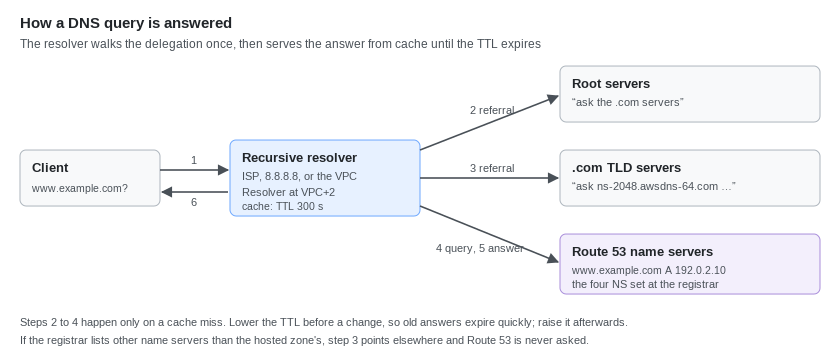
Hosted Zones
# Create public hosted zone
aws route53 create-hosted-zone --name example.com --caller-reference "$(date +%s)"

# Create private hosted zone (VPC-only): the --vpc makes it private
aws route53 create-hosted-zone \
  --name internal.example.com \
  --caller-reference "$(date +%s)" \
  --vpc VPCRegion=eu-west-1,VPCId=vpc-0123456789abcdef0

# Let more VPCs (also in other Regions or accounts) resolve the private zone
aws route53 associate-vpc-with-hosted-zone --hosted-zone-id Z0123456789ABCDEFGHIJ \
  --vpc VPCRegion=eu-central-1,VPCId=vpc-0fedcba9876543210

# List hosted zones
aws route53 list-hosted-zones
aws route53 list-hosted-zones --query 'HostedZones[].{Name:Name,ID:Id,Records:ResourceRecordSetCount,Private:Config.PrivateZone}' --output table

# Find a zone ID by name
aws route53 list-hosted-zones-by-name --dns-name example.com --query 'HostedZones[0].Id' --output text

# Get hosted zone details, and the four name servers to set at the registrar
aws route53 get-hosted-zone --id Z0123456789ABCDEFGHIJ
aws route53 get-hosted-zone --id Z0123456789ABCDEFGHIJ --query 'DelegationSet.NameServers' --output text

# Delete hosted zone (must delete all records except the default NS and SOA first)
aws route53 delete-hosted-zone --id Z0123456789ABCDEFGHIJ
create-hosted-zone returns the zone ID and its four name servers, one each in .com, .net, .org and .co.uk:
[
    "/hostedzone/GJBLHR2WH3QGOH7EVD6162",
    [
        "ns-2048.awsdns-64.com",
        "ns-2049.awsdns-65.net",
        "ns-2050.awsdns-66.org",
        "ns-2051.awsdns-67.co.uk"
    ]
]
Private hosted zones answer only inside the associated VPCs, and only if the VPC has both enableDnsSupport and enableDnsHostnames turned on:
aws ec2 modify-vpc-attribute --vpc-id vpc-0123456789abcdef0 --enable-dns-support '{"Value":true}'
aws ec2 modify-vpc-attribute --vpc-id vpc-0123456789abcdef0 --enable-dns-hostnames '{"Value":true}'
A VPC cannot be associated with a public zone: PublicZoneVPCAssociation: You're trying to associate a VPC with a public hosted zone.
A VPC in another account needs an authorization from the zone owner first, then the association is made from the VPC’s account:
# Account A (owns the private zone): allow the other account's VPC
aws route53 create-vpc-association-authorization --hosted-zone-id Z0123456789ABCDEFGHIJ \
  --vpc VPCRegion=eu-west-1,VPCId=vpc-0fedcba9876543210

# Account B (owns the VPC): associate it
aws route53 associate-vpc-with-hosted-zone --hosted-zone-id Z0123456789ABCDEFGHIJ \
  --vpc VPCRegion=eu-west-1,VPCId=vpc-0fedcba9876543210

# Account A: remove the authorization (the association stays; this stops it being made again)
aws route53 delete-vpc-association-authorization --hosted-zone-id Z0123456789ABCDEFGHIJ \
  --vpc VPCRegion=eu-west-1,VPCId=vpc-0fedcba9876543210
Account B has to use the CLI or API for the association: the console only lists the zones of its own account. A zone can be associated with 300 VPCs; beyond that, use Route 53 Profiles (below).
DNS Records
Create/Update Records
# Create A record
aws route53 change-resource-record-sets --hosted-zone-id Z0123456789ABCDEFGHIJ --change-batch '{
  "Changes": [{
    "Action": "UPSERT",
    "ResourceRecordSet": {
      "Name": "www.example.com",
      "Type": "A",
      "TTL": 300,
      "ResourceRecords": [{"Value": "192.0.2.10"}]
    }
  }]
}'

# Create CNAME record
aws route53 change-resource-record-sets --hosted-zone-id Z0123456789ABCDEFGHIJ --change-batch '{
  "Changes": [{
    "Action": "UPSERT",
    "ResourceRecordSet": {
      "Name": "app.example.com",
      "Type": "CNAME",
      "TTL": 300,
      "ResourceRecords": [{"Value": "my-alb-123.eu-west-1.elb.amazonaws.com"}]
    }
  }]
}'

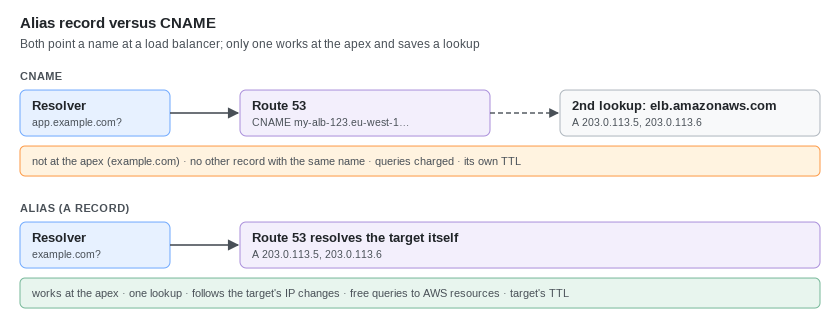
# Create Alias record to an ALB in eu-west-1 (no TTL, no charge for queries to AWS resources)
aws route53 change-resource-record-sets --hosted-zone-id Z0123456789ABCDEFGHIJ --change-batch '{
  "Changes": [{
    "Action": "UPSERT",
    "ResourceRecordSet": {
      "Name": "example.com",
      "Type": "A",
      "AliasTarget": {
        "HostedZoneId": "Z32O12XQLNTSW2",
        "DNSName": "my-alb-123.eu-west-1.elb.amazonaws.com",
        "EvaluateTargetHealth": true
      }
    }
  }]
}'

# Alias to a CloudFront distribution (the zone ID is always Z2FDTNDATAQYW2; public zones only)
aws route53 change-resource-record-sets --hosted-zone-id Z0123456789ABCDEFGHIJ --change-batch '{
  "Changes": [{
    "Action": "UPSERT",
    "ResourceRecordSet": {
      "Name": "cdn.example.com",
      "Type": "A",
      "AliasTarget": {
        "HostedZoneId": "Z2FDTNDATAQYW2",
        "DNSName": "d111111abcdef8.cloudfront.net",
        "EvaluateTargetHealth": false
      }
    }
  }]
}'

# Alias to an S3 website endpoint in eu-west-1 (bucket name must equal the record name)
aws route53 change-resource-record-sets --hosted-zone-id Z0123456789ABCDEFGHIJ --change-batch '{
  "Changes": [{
    "Action": "UPSERT",
    "ResourceRecordSet": {
      "Name": "static.example.com",
      "Type": "A",
      "AliasTarget": {
        "HostedZoneId": "Z1BKCTXD74EZPE",
        "DNSName": "s3-website-eu-west-1.amazonaws.com",
        "EvaluateTargetHealth": false
      }
    }
  }]
}'

# Create MX record
aws route53 change-resource-record-sets --hosted-zone-id Z0123456789ABCDEFGHIJ --change-batch '{
  "Changes": [{
    "Action": "UPSERT",
    "ResourceRecordSet": {
      "Name": "example.com",
      "Type": "MX",
      "TTL": 3600,
      "ResourceRecords": [
        {"Value": "10 mail1.example.com"},
        {"Value": "20 mail2.example.com"}
      ]
    }
  }]
}'

# Create TXT record (the value keeps its own double quotes)
aws route53 change-resource-record-sets --hosted-zone-id Z0123456789ABCDEFGHIJ --change-batch '{
  "Changes": [{
    "Action": "UPSERT",
    "ResourceRecordSet": {
      "Name": "example.com",
      "Type": "TXT",
      "TTL": 300,
      "ResourceRecords": [{"Value": "\"v=spf1 include:_spf.google.com ~all\""}]
    }
  }]
}'

# Create CAA record: only Amazon's CA may issue certificates, report problems by email
aws route53 change-resource-record-sets --hosted-zone-id Z0123456789ABCDEFGHIJ --change-batch '{
  "Changes": [{
    "Action": "UPSERT",
    "ResourceRecordSet": {
      "Name": "example.com",
      "Type": "CAA",
      "TTL": 3600,
      "ResourceRecords": [
        {"Value": "0 issue \"amazon.com\""},
        {"Value": "0 issuewild \"amazon.com\""},
        {"Value": "0 iodef \"mailto:security@example.com\""}
      ]
    }
  }]
}'
Alias target hosted zone IDs you will need most:
| Target | AliasTarget.HostedZoneId |
|---|---|
| CloudFront distribution | Z2FDTNDATAQYW2 (every Region) |
| ALB or Classic Load Balancer in eu-west-1 | Z32O12XQLNTSW2 (others: aws elbv2 describe-load-balancers --query 'LoadBalancers[].CanonicalHostedZoneId') |
| S3 website endpoint in eu-west-1 | Z1BKCTXD74EZPE (us-east-1: Z3AQBSTGFYJSTF) |
| API Gateway, VPC interface endpoint | From get-domain-names / describe-vpc-endpoints |
| Another record in the same zone | The zone’s own ID |
Change Batches, Waiting and Paging
# Several changes from a file, applied together or not at all
aws route53 change-resource-record-sets --hosted-zone-id Z0123456789ABCDEFGHIJ --change-batch file://batch.json

# Has the change reached all Route 53 name servers? PENDING, then INSYNC
aws route53 get-change --id /change/C2682N5HXP0BZ4 --query 'ChangeInfo.[Id,Status,SubmittedAt]' --output text

# Or block until it is INSYNC (checks every 30 seconds)
aws route53 wait resource-record-sets-changed --id /change/C2682N5HXP0BZ4
batch.json, a CNAME and an IPv6 alias in one change:
{
  "Comment": "Two records in one atomic change",
  "Changes": [
    {
      "Action": "UPSERT",
      "ResourceRecordSet": {
        "Name": "blog.example.com",
        "Type": "CNAME",
        "TTL": 300,
        "ResourceRecords": [{"Value": "example.github.io"}]
      }
    },
    {
      "Action": "UPSERT",
      "ResourceRecordSet": {
        "Name": "example.com",
        "Type": "AAAA",
        "AliasTarget": {
          "HostedZoneId": "Z32O12XQLNTSW2",
          "DNSName": "dualstack.my-alb-123.eu-west-1.elb.amazonaws.com",
          "EvaluateTargetHealth": true
        }
      }
    }
  ]
}
CREATE fails if the record exists, DELETE fails if it does not (or the values differ), and UPSERT creates or replaces. With CREATE and DELETE a
script finds out when its idea of the zone is wrong; with UPSERT it never does.
List and Delete Records
# List all records in a zone (the CLI pages through all of them)
aws route53 list-resource-record-sets --hosted-zone-id Z0123456789ABCDEFGHIJ

# List with filter
aws route53 list-resource-record-sets --hosted-zone-id Z0123456789ABCDEFGHIJ \
  --query "ResourceRecordSets[?Type=='A'].[Name,Type,ResourceRecords[0].Value,AliasTarget.DNSName]" --output table

# Start at a name (records are sorted by name, then type)
aws route53 list-resource-record-sets --hosted-zone-id Z0123456789ABCDEFGHIJ \
  --start-record-name app.example.com --start-record-type CNAME --max-items 1

# Delete record (the whole record set must match exactly, TTL and values included)
aws route53 change-resource-record-sets --hosted-zone-id Z0123456789ABCDEFGHIJ --change-batch '{
  "Changes": [{
    "Action": "DELETE",
    "ResourceRecordSet": {
      "Name": "old.example.com",
      "Type": "A",
      "TTL": 300,
      "ResourceRecords": [{"Value": "192.0.2.10"}]
    }
  }]
}'
----------------------------------------------------------------------------------------
|                                ListResourceRecordSets                                |
+----------------------+----+-------------+------------------------------------------+
|  example.com.        |  A |  None       |  my-alb-123.eu-west-1.elb.amazonaws.com  |
|  cdn.example.com.    |  A |  None       |  d111111abcdef8.cloudfront.net           |
|  static.example.com. |  A |  None       |  s3-website-eu-west-1.amazonaws.com      |
|  www.example.com.    |  A |  192.0.2.10 |  None                                    |
+----------------------+----+-------------+------------------------------------------+
With --max-items the CLI returns a NextToken; pass it as --starting-token to continue.
Delegate a Subdomain
To run dev.example.com in its own hosted zone (another team or account), create the zone, then put its four name servers in an NS record in the
parent zone:
aws route53 create-hosted-zone --name dev.example.com --caller-reference "$(date +%s)" \
  --query 'DelegationSet.NameServers' --output text

aws route53 change-resource-record-sets --hosted-zone-id Z0123456789ABCDEFGHIJ --change-batch '{
  "Changes": [{
    "Action": "UPSERT",
    "ResourceRecordSet": {
      "Name": "dev.example.com",
      "Type": "NS",
      "TTL": 172800,
      "ResourceRecords": [
        {"Value": "ns-111.awsdns-13.com."},
        {"Value": "ns-999.awsdns-60.net."},
        {"Value": "ns-1500.awsdns-59.org."},
        {"Value": "ns-2001.awsdns-58.co.uk."}
      ]
    }
  }]
}'
Export a Zone to a Zone File
Route 53 has no export command, but the record list converts to BIND format with jq. Alias records have no zone-file equivalent and are left out, as are the apex SOA and NS records, which the new zone creates itself:
aws route53 list-resource-record-sets --hosted-zone-id Z0123456789ABCDEFGHIJ --output json \
  | jq -r --arg z example.com. '.ResourceRecordSets[]
      | select(.ResourceRecords and .Type != "SOA" and (.Type != "NS" or .Name != $z))
      | .Name as $n | .TTL as $t | .Type as $ty | .ResourceRecords[] | "\($n)\t\($t)\tIN\t\($ty)\t\(.Value)"' > example.com.zone
example.com.	3600	IN	MX	10 mail1.example.com
example.com.	3600	IN	MX	20 mail2.example.com
example.com.	300	IN	TXT	"v=spf1 include:_spf.google.com ~all"
app.example.com.	300	IN	CNAME	my-alb-123.eu-west-1.elb.amazonaws.com
www.example.com.	300	IN	A	192.0.2.10
List the aliases separately and recreate them by hand (jq -r '.ResourceRecordSets[] | select(.AliasTarget) | "\(.Name) \(.Type) -> \(.AliasTarget.DNSName)"').
The other way, the console’s Import zone file on a hosted zone takes a BIND file like this one.
Record Types
| Type | Use |
|---|---|
| A | IPv4 address |
| AAAA | IPv6 address |
| CNAME | Alias to another domain (cannot be used at zone apex) |
| Alias | Route 53 extension: an A or AAAA (or other type) that points to an AWS resource or another record in the zone. Works at the apex, no TTL of its own, free queries to AWS resources |
| MX | Mail server |
| TXT | Text (SPF, DKIM, domain verification) |
| NS | Name servers (the zone’s own, or a delegation to a subdomain zone) |
| SOA | Start of authority |
| SRV | Service locator |
| CAA | Which certificate authorities may issue certificates for the domain |
Routing Policies
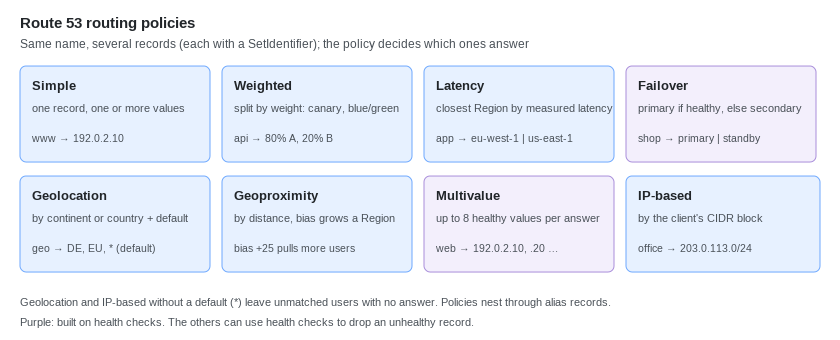
| Policy | Use Case |
|---|---|
| Simple | Single resource, no health check logic |
| Weighted | Split traffic by percentage (canary, blue/green) |
| Latency | Route to lowest-latency region |
| Failover | Active/passive: switch to standby on failure |
| Geolocation | Route based on user’s geographic location |
| Geoproximity | Route based on distance (with bias); needs Traffic Flow or the new geoproximity records |
| IP-based | Route by the CIDR block of the client (or its resolver): an office, an ISP, a known network |
| Multivalue Answer | Up to 8 healthy records per answer (simple load balancing) |
Every record in a set that shares a name and type needs its own SetIdentifier.
Weighted Routing
# 80% to primary, 20% to canary
aws route53 change-resource-record-sets --hosted-zone-id Z0123456789ABCDEFGHIJ --change-batch '{
  "Changes": [
    {
      "Action": "UPSERT",
      "ResourceRecordSet": {
        "Name": "api.example.com",
        "Type": "A",
        "SetIdentifier": "primary",
        "Weight": 80,
        "TTL": 60,
        "ResourceRecords": [{"Value": "192.0.2.10"}]
      }
    },
    {
      "Action": "UPSERT",
      "ResourceRecordSet": {
        "Name": "api.example.com",
        "Type": "A",
        "SetIdentifier": "canary",
        "Weight": 20,
        "TTL": 60,
        "ResourceRecords": [{"Value": "192.0.2.20"}]
      }
    }
  ]
}'
Failover Routing
aws route53 change-resource-record-sets --hosted-zone-id Z0123456789ABCDEFGHIJ --change-batch '{
  "Changes": [
    {
      "Action": "UPSERT",
      "ResourceRecordSet": {
        "Name": "shop.example.com",
        "Type": "A",
        "SetIdentifier": "primary",
        "Failover": "PRIMARY",
        "TTL": 60,
        "ResourceRecords": [{"Value": "192.0.2.10"}],
        "HealthCheckId": "0600677f-c74d-4f94-933d-2404654e8250"
      }
    },
    {
      "Action": "UPSERT",
      "ResourceRecordSet": {
        "Name": "shop.example.com",
        "Type": "A",
        "SetIdentifier": "secondary",
        "Failover": "SECONDARY",
        "TTL": 60,
        "ResourceRecords": [{"Value": "198.51.100.10"}]
      }
    }
  ]
}'
Latency Routing
# One record per Region; Route 53 answers with the Region closest (in latency) to the resolver
aws route53 change-resource-record-sets --hosted-zone-id Z0123456789ABCDEFGHIJ --change-batch '{
  "Changes": [
    {"Action": "UPSERT", "ResourceRecordSet": {"Name": "global.example.com", "Type": "A", "SetIdentifier": "ireland",
      "Region": "eu-west-1", "TTL": 60, "ResourceRecords": [{"Value": "192.0.2.10"}]}},
    {"Action": "UPSERT", "ResourceRecordSet": {"Name": "global.example.com", "Type": "A", "SetIdentifier": "virginia",
      "Region": "us-east-1", "TTL": 60, "ResourceRecords": [{"Value": "198.51.100.10"}]}}
  ]
}'
Geolocation Routing
# The most specific match wins: Germany, then Europe, then the default (CountryCode "*") for everyone else
aws route53 change-resource-record-sets --hosted-zone-id Z0123456789ABCDEFGHIJ --change-batch '{
  "Changes": [
    {"Action": "UPSERT", "ResourceRecordSet": {"Name": "geo.example.com", "Type": "A", "SetIdentifier": "europe",
      "GeoLocation": {"ContinentCode": "EU"}, "TTL": 60, "ResourceRecords": [{"Value": "192.0.2.10"}]}},
    {"Action": "UPSERT", "ResourceRecordSet": {"Name": "geo.example.com", "Type": "A", "SetIdentifier": "germany",
      "GeoLocation": {"CountryCode": "DE"}, "TTL": 60, "ResourceRecords": [{"Value": "192.0.2.30"}]}},
    {"Action": "UPSERT", "ResourceRecordSet": {"Name": "geo.example.com", "Type": "A", "SetIdentifier": "default",
      "GeoLocation": {"CountryCode": "*"}, "TTL": 60, "ResourceRecords": [{"Value": "198.51.100.10"}]}}
  ]
}'
Without the default record, users whose location does not match any record (or cannot be determined) get no answer.
Multivalue Answer Routing
# Up to 8 healthy records per answer; a record with a failing health check is left out
aws route53 change-resource-record-sets --hosted-zone-id Z0123456789ABCDEFGHIJ --change-batch '{
  "Changes": [
    {"Action": "UPSERT", "ResourceRecordSet": {"Name": "web.example.com", "Type": "A", "SetIdentifier": "web-1",
      "MultiValueAnswer": true, "TTL": 60, "ResourceRecords": [{"Value": "192.0.2.10"}],
      "HealthCheckId": "0600677f-c74d-4f94-933d-2404654e8250"}},
    {"Action": "UPSERT", "ResourceRecordSet": {"Name": "web.example.com", "Type": "A", "SetIdentifier": "web-2",
      "MultiValueAnswer": true, "TTL": 60, "ResourceRecords": [{"Value": "192.0.2.20"}],
      "HealthCheckId": "ae2afd67-e9ff-4e56-9ab9-facf48d95da8"}}
  ]
}'
If every record is unhealthy, Route 53 answers with up to eight unhealthy ones rather than nothing. A record without a health check always counts as healthy.
Geoproximity Routing
# Each record names a Region (or coordinates, or a Local Zone group); Bias from -99 to 99 grows or shrinks its area
aws route53 change-resource-record-sets --hosted-zone-id Z0123456789ABCDEFGHIJ --change-batch '{
  "Changes": [
    {"Action": "UPSERT", "ResourceRecordSet": {"Name": "near.example.com", "Type": "A", "SetIdentifier": "ireland",
      "GeoProximityLocation": {"AWSRegion": "eu-west-1", "Bias": 25}, "TTL": 60, "ResourceRecords": [{"Value": "192.0.2.10"}]}},
    {"Action": "UPSERT", "ResourceRecordSet": {"Name": "near.example.com", "Type": "A", "SetIdentifier": "frankfurt",
      "GeoProximityLocation": {"AWSRegion": "eu-central-1", "Bias": 0}, "TTL": 60, "ResourceRecords": [{"Value": "192.0.2.30"}]}}
  ]
}'
A positive bias pulls users from the neighbouring area to that Region: here Ireland also gets some users who are closer to Frankfurt.
Non-AWS locations use "Coordinates": {"Latitude": "52.37", "Longitude": "4.90"} instead of AWSRegion.
IP-based Routing
Answers depend on the source network: the EDNS0 client subnet when the resolver sends one, otherwise the resolver’s own address. The networks live in a CIDR collection, grouped into named locations:
# 1. A collection, then locations with their CIDR blocks
aws route53 create-cidr-collection --name office-ranges --caller-reference "$(date +%s)"
aws route53 change-cidr-collection --id 6c3d8a4e-1b2f-4d5e-9a7b-0c1d2e3f4a5b --changes '[
  {"LocationName": "eu-office", "Action": "PUT", "CidrList": ["203.0.113.0/24"]},
  {"LocationName": "us-office", "Action": "PUT", "CidrList": ["198.51.100.0/24", "2001:db8:1::/48"]}
]'
aws route53 list-cidr-blocks --collection-id 6c3d8a4e-1b2f-4d5e-9a7b-0c1d2e3f4a5b --output text

# 2. One record per location, plus the default location "*" for everyone else
aws route53 change-resource-record-sets --hosted-zone-id Z0123456789ABCDEFGHIJ --change-batch '{
  "Changes": [
    {"Action": "UPSERT", "ResourceRecordSet": {"Name": "intranet.example.com", "Type": "A", "SetIdentifier": "eu",
      "CidrRoutingConfig": {"CollectionId": "6c3d8a4e-1b2f-4d5e-9a7b-0c1d2e3f4a5b", "LocationName": "eu-office"},
      "TTL": 60, "ResourceRecords": [{"Value": "192.0.2.10"}]}},
    {"Action": "UPSERT", "ResourceRecordSet": {"Name": "intranet.example.com", "Type": "A", "SetIdentifier": "us",
      "CidrRoutingConfig": {"CollectionId": "6c3d8a4e-1b2f-4d5e-9a7b-0c1d2e3f4a5b", "LocationName": "us-office"},
      "TTL": 60, "ResourceRecords": [{"Value": "198.51.100.10"}]}},
    {"Action": "UPSERT", "ResourceRecordSet": {"Name": "intranet.example.com", "Type": "A", "SetIdentifier": "default",
      "CidrRoutingConfig": {"CollectionId": "6c3d8a4e-1b2f-4d5e-9a7b-0c1d2e3f4a5b", "LocationName": "*"},
      "TTL": 60, "ResourceRecords": [{"Value": "192.0.2.50"}]}}
  ]
}'
- Without the
*record, a source that matches no block gets NODATA, as with geolocation. - A longer source prefix matches a shorter block: a query from
2001:db8:1:5::/64matches2001:db8:1::/48, not the other way round. - Public hosted zones only. 5 collections per account and 1,000 blocks per collection by default.
The weighted, failover, latency, geolocation and multivalue records above, side by side:
aws route53 list-resource-record-sets --hosted-zone-id Z0123456789ABCDEFGHIJ \
  --query "ResourceRecordSets[?SetIdentifier].[Name,SetIdentifier,Weight,Failover,Region,GeoLocation.CountryCode||GeoLocation.ContinentCode,MultiValueAnswer]" \
  --output table
----------------------------------------------------------------------------------------
|                                ListResourceRecordSets                                |
+----------------------+------------+-------+------------+------------+-------+--------+
|  api.example.com.    |  primary   |  80   |  None      |  None      |  None |  None  |
|  api.example.com.    |  canary    |  20   |  None      |  None      |  None |  None  |
|  geo.example.com.    |  europe    |  None |  None      |  None      |  EU   |  None  |
|  geo.example.com.    |  germany   |  None |  None      |  None      |  DE   |  None  |
|  geo.example.com.    |  default   |  None |  None      |  None      |  *    |  None  |
|  global.example.com. |  ireland   |  None |  None      |  eu-west-1 |  None |  None  |
|  global.example.com. |  virginia  |  None |  None      |  us-east-1 |  None |  None  |
|  shop.example.com.   |  primary   |  None |  PRIMARY   |  None      |  None |  None  |
|  shop.example.com.   |  secondary |  None |  SECONDARY |  None      |  None |  None  |
|  web.example.com.    |  web-1     |  None |  None      |  None      |  None |  True  |
|  web.example.com.    |  web-2     |  None |  None      |  None      |  None |  True  |
+----------------------+------------+-------+------------+------------+-------+--------+
To see what Route 53 would answer a given resolver or client subnet, use aws route53 test-dns-answer --hosted-zone-id <id> --record-name geo.example.com
--record-type A --resolver-ip 192.0.2.1 --edns0-client-subnet-ip 85.214.0.1.
Health Checks
# Create HTTP health check
aws route53 create-health-check --caller-reference "$(date +%s)" --health-check-config '{
  "IPAddress": "192.0.2.10",
  "Port": 80,
  "Type": "HTTP",
  "ResourcePath": "/health",
  "RequestInterval": 30,
  "FailureThreshold": 3
}'

# Create HTTPS health check (10-second interval costs extra and cannot be changed later)
aws route53 create-health-check --caller-reference "$(date +%s)" --health-check-config '{
  "FullyQualifiedDomainName": "app.example.com",
  "Port": 443,
  "Type": "HTTPS",
  "ResourcePath": "/health",
  "RequestInterval": 10,
  "FailureThreshold": 2,
  "EnableSNI": true
}'

# Create TCP health check
aws route53 create-health-check --caller-reference "$(date +%s)" --health-check-config '{
  "IPAddress": "192.0.2.20",
  "Port": 3306,
  "Type": "TCP",
  "RequestInterval": 30,
  "FailureThreshold": 3
}'

# Calculated: healthy when at least 1 of the child checks is healthy
aws route53 create-health-check --caller-reference "$(date +%s)" --health-check-config '{
  "Type": "CALCULATED",
  "ChildHealthChecks": ["0600677f-c74d-4f94-933d-2404654e8250", "ae2afd67-e9ff-4e56-9ab9-facf48d95da8"],
  "HealthThreshold": 1
}'

# Based on a CloudWatch alarm: the way to check private resources that health checkers cannot reach
aws route53 create-health-check --caller-reference "$(date +%s)" --health-check-config '{
  "Type": "CLOUDWATCH_METRIC",
  "AlarmIdentifier": {"Region": "eu-west-1", "Name": "app-private-unhealthy"},
  "InsufficientDataHealthStatus": "LastKnownStatus"
}'

# List health checks
aws route53 list-health-checks --query 'HealthChecks[].[Id,HealthCheckConfig.Type]' --output text

# Get health check status (one line per checker location)
aws route53 get-health-check-status --health-check-id 0600677f-c74d-4f94-933d-2404654e8250

# Delete health check
aws route53 delete-health-check --health-check-id 0600677f-c74d-4f94-933d-2404654e8250
0600677f-c74d-4f94-933d-2404654e8250	HTTP
c3f10c35-a88c-4339-ada1-0ef9b5b6e998	HTTPS
ae2afd67-e9ff-4e56-9ab9-facf48d95da8	TCP
2b76c297-ef9d-4a16-a4ce-f6803ab4ce6b	CALCULATED
25144067-6b9b-495a-b398-f4a4ad6cf3ea	CLOUDWATCH_METRIC
- Health checkers live on the internet. They cannot reach private IPs; for those, alarm on a CloudWatch metric and use a
CLOUDWATCH_METRICcheck. -
Let the checkers in. The firewall or security group must allow their address ranges, published in
ip-ranges.jsonasROUTE53_HEALTHCHECKS:curl -s https://ip-ranges.amazonaws.com/ip-ranges.json \ | jq -r '.prefixes[] | select(.service=="ROUTE53_HEALTHCHECKS") | "\(.ip_prefix)\t\(.region)"'51.0.252.0/24 eusc-de-east-1 15.177.0.0/18 GLOBAL 15.177.108.0/24 us-south-1 52.80.197.0/25 cn-north-1 ...On 4 November 2026 that was 31 IPv4 and 26 IPv6 prefixes; the list changes, so generate rules from it rather than copying it.
- The interval cannot be changed after creation, and 10 seconds (fast) is an optional feature with its own charge.
- A health check on a record only matters if the routing policy uses it (failover, multivalue, weighted, latency, geolocation). For an alias to an AWS
resource,
EvaluateTargetHealth: trueuses the resource’s own health instead. - 200 active health checks per account by default; a calculated check can watch up to 255 children.
Get told when a check fails. Health checks publish HealthCheckStatus (1 healthy, 0 unhealthy) to CloudWatch in us-east-1 only, so the alarm
and its SNS topic must be there too, whatever Region the endpoint is in:
aws cloudwatch put-metric-alarm --region us-east-1 --alarm-name shop-primary-unhealthy \
  --namespace AWS/Route53 --metric-name HealthCheckStatus \
  --dimensions Name=HealthCheckId,Value=0600677f-c74d-4f94-933d-2404654e8250 \
  --statistic Minimum --period 60 --evaluation-periods 1 \
  --threshold 1 --comparison-operator LessThanThreshold \
  --alarm-actions arn:aws:sns:us-east-1:123456789012:dns-alerts
HealthCheckPercentageHealthy (the share of checker locations that see the endpoint as healthy) helps tell a real outage from a few checkers with a bad path.
Domain Registration
The domains API exists only in us-east-1. From any other Region the CLI cannot even find an endpoint:
$ aws route53domains list-domains --region eu-west-1
aws: [ERROR]: Could not connect to the endpoint URL: "https://route53domains.eu-west-1.amazonaws.com/"
# Check domain availability
aws route53domains check-domain-availability --domain-name example.com --region us-east-1

# Register domain (charges the yearly price immediately)
aws route53domains register-domain --region us-east-1 \
  --domain-name example.com \
  --duration-in-years 1 \
  --admin-contact file://contact.json \
  --registrant-contact file://contact.json \
  --tech-contact file://contact.json

# List registered domains
aws route53domains list-domains --region us-east-1

# Get domain details
aws route53domains get-domain-detail --domain-name example.com --region us-east-1

# Enable auto-renew
aws route53domains enable-domain-auto-renew --domain-name example.com --region us-east-1

# Transfer lock
aws route53domains enable-domain-transfer-lock --domain-name example.com --region us-east-1

# Point the domain at a hosted zone's name servers
aws route53domains update-domain-nameservers --domain-name example.com --region us-east-1 \
  --nameservers Name=ns-2048.awsdns-64.com Name=ns-2049.awsdns-65.net Name=ns-2050.awsdns-66.org Name=ns-2051.awsdns-67.co.uk
contact.json:
{
  "FirstName": "Jane",
  "LastName": "Doe",
  "ContactType": "PERSON",
  "AddressLine1": "1 Main Street",
  "City": "Bucharest",
  "CountryCode": "RO",
  "ZipCode": "010011",
  "PhoneNumber": "+40.211234567",
  "Email": "jane@example.com"
}
DNSSEC
Signing needs a key-signing key (KSK) backed by a KMS key, and the domain’s parent must get a DS record; without both, enable-hosted-zone-dnssec
fails or validating resolvers stop answering for the domain. The KMS key must be in us-east-1, asymmetric ECC_NIST_P256, usage SIGN_VERIFY,
and its policy must let dnssec-route53.amazonaws.com use it:
# 1. The KMS key (policy below)
aws kms create-key --region us-east-1 --key-spec ECC_NIST_P256 --key-usage SIGN_VERIFY \
  --policy file://kms-dnssec-policy.json --query 'KeyMetadata.[KeyId,KeySpec,KeyUsage]' --output text

# 2. The KSK, then signing
aws route53 create-key-signing-key --region us-east-1 --hosted-zone-id Z0123456789ABCDEFGHIJ \
  --key-management-service-arn arn:aws:kms:us-east-1:123456789012:key/<key-id> \
  --name example_com_ksk --status ACTIVE --caller-reference "$(date +%s)"
aws route53 enable-hosted-zone-dnssec --region us-east-1 --hosted-zone-id Z0123456789ABCDEFGHIJ

# 3. The DS record and public key to give the parent zone
aws route53 get-dnssec --hosted-zone-id Z0123456789ABCDEFGHIJ \
  --query 'KeySigningKeys[].[Name,Status,DSRecord,PublicKey]' --output text

# 4a. Domain registered with Route 53: add the key at the registrar
aws route53domains associate-delegation-signer-to-domain --region us-east-1 --domain-name example.com \
  --signing-attributes Algorithm=13,Flags=257,PublicKey=<public-key-from-get-dnssec>
# 4b. Domain registered elsewhere: paste the DSRecord into the registrar's DNSSEC settings

# Turning it off: remove the DS record at the parent first, wait for its TTL, then
aws route53 disable-hosted-zone-dnssec --hosted-zone-id Z0123456789ABCDEFGHIJ
aws route53 deactivate-key-signing-key --hosted-zone-id Z0123456789ABCDEFGHIJ --name example_com_ksk
kms-dnssec-policy.json:
{
  "Version": "2012-10-17",
  "Statement": [
    {
      "Sid": "Enable IAM User Permissions",
      "Effect": "Allow",
      "Principal": {"AWS": "arn:aws:iam::123456789012:root"},
      "Action": "kms:*",
      "Resource": "*"
    },
    {
      "Sid": "Allow Route 53 DNSSEC Service",
      "Effect": "Allow",
      "Principal": {"Service": "dnssec-route53.amazonaws.com"},
      "Action": ["kms:DescribeKey", "kms:GetPublicKey", "kms:Sign"],
      "Resource": "*",
      "Condition": {
        "StringEquals": {"aws:SourceAccount": "123456789012"},
        "ArnLike": {"aws:SourceArn": "arn:aws:route53:::hostedzone/*"}
      }
    },
    {
      "Sid": "Allow Route 53 DNSSEC to CreateGrant",
      "Effect": "Allow",
      "Principal": {"Service": "dnssec-route53.amazonaws.com"},
      "Action": "kms:CreateGrant",
      "Resource": "*",
      "Condition": {"Bool": {"kms:GrantIsForAWSResource": true}}
    }
  ]
}
AWS recommends lowering the zone’s longest TTL to about an hour before enabling signing, so a rollback only has to wait an hour. Removing the DS record is always the first step of a rollback: a DS record pointing at a key that no longer signs makes the domain unresolvable for validating resolvers.
Query Logging
Route 53 writes public query logs only to a CloudWatch Logs group in us-east-1, and only if a resource policy lets route53.amazonaws.com write to it:
# Log group and permission (both in us-east-1)
aws logs create-log-group --region us-east-1 --log-group-name /aws/route53/example.com
aws logs put-resource-policy --region us-east-1 --policy-name route53-query-logging \
  --policy-document file://logs-policy.json

# Create query log config
aws route53 create-query-logging-config \
  --hosted-zone-id Z0123456789ABCDEFGHIJ \
  --cloud-watch-logs-log-group-arn arn:aws:logs:us-east-1:123456789012:log-group:/aws/route53/example.com

# List query log configs
aws route53 list-query-logging-configs --hosted-zone-id Z0123456789ABCDEFGHIJ

# Delete query log config
aws route53 delete-query-logging-config --id <query-logging-config-id>
logs-policy.json (one policy can cover every zone’s log group under /aws/route53/; an account has at most 10 resource policies):
{
  "Version": "2012-10-17",
  "Statement": [
    {
      "Sid": "Route53LogsToCloudWatchLogs",
      "Effect": "Allow",
      "Principal": {"Service": ["route53.amazonaws.com"]},
      "Action": ["logs:CreateLogStream", "logs:PutLogEvents"],
      "Resource": "arn:aws:logs:us-east-1:123456789012:log-group:/aws/route53/*",
      "Condition": {
        "StringEquals": {"aws:SourceAccount": "123456789012"},
        "ArnLike": {"aws:SourceArn": "arn:aws:route53:::hostedzone/*"}
      }
    }
  ]
}
Logs only show queries that reach Route 53: answers cached by resolvers never appear. Route 53 charges nothing for logging; CloudWatch Logs charges for storage, so set a retention period.
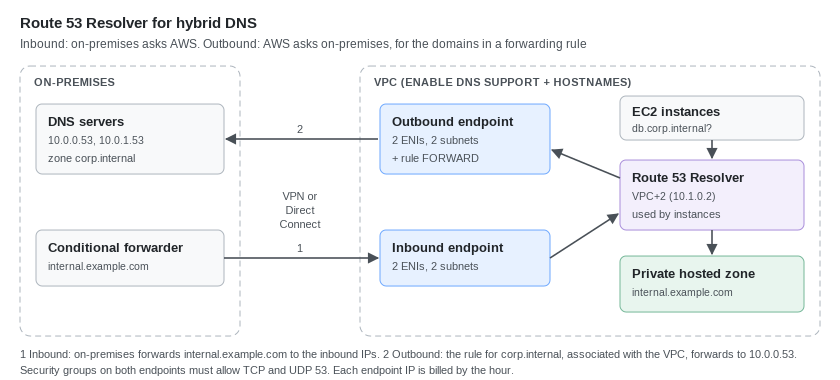
Resolver (Hybrid DNS)
# Create inbound endpoint (on-prem → AWS)
aws route53resolver create-resolver-endpoint \
  --creator-request-id "$(date +%s)" \
  --name "inbound" \
  --security-group-ids sg-0123456789abcdef0 \
  --direction INBOUND \
  --ip-addresses SubnetId=subnet-0aaa1111111111111 SubnetId=subnet-0bbb2222222222222

# Create outbound endpoint (AWS → on-prem)
aws route53resolver create-resolver-endpoint \
  --creator-request-id "$(date +%s)" \
  --name "outbound" \
  --security-group-ids sg-0123456789abcdef0 \
  --direction OUTBOUND \
  --ip-addresses SubnetId=subnet-0aaa1111111111111 SubnetId=subnet-0bbb2222222222222

# Create forwarding rule
aws route53resolver create-resolver-rule \
  --creator-request-id "$(date +%s)" \
  --name "forward-onprem" \
  --rule-type FORWARD \
  --domain-name "corp.internal" \
  --target-ips Ip=10.0.0.53,Port=53 Ip=10.0.1.53,Port=53 \
  --resolver-endpoint-id rslvr-out-d2dacf547da42b012

# A rule does nothing until it is associated with a VPC
aws route53resolver associate-resolver-rule --resolver-rule-id rslvr-rr-9e2a1335b0b78c950 --vpc-id vpc-0123456789abcdef0

aws route53resolver list-resolver-endpoints --query 'ResolverEndpoints[].[Name,Direction,IpAddressCount]' --output text
inbound	INBOUND	2
outbound	OUTBOUND	2
- Each endpoint needs at least two IP addresses, ideally in two AZs; each is an elastic network interface billed by the hour.
- The endpoint security group must allow TCP and UDP 53: inbound from on-premises for the inbound endpoint, outbound to the DNS servers for the outbound one.
- On-premises DNS servers forward the AWS zone (for example
internal.example.com) to the inbound endpoint’s IP addresses.
Share Rules With Other Accounts
One outbound endpoint can serve a whole organization: share the forwarding rule with AWS RAM, and each account associates it with its own VPCs. Queries still leave through the owner’s endpoint.
# Owner account: share the rule with an account (or an organization or OU ARN)
aws ram create-resource-share --name onprem-dns-rules \
  --resource-arns arn:aws:route53resolver:eu-west-1:123456789012:resolver-rule/rslvr-rr-9e2a1335b0b78c950 \
  --principals 111122223333

# Other account: accept the share (not needed inside an organization with RAM sharing on), then associate
aws ram get-resource-share-invitations --query 'resourceShareInvitations[].[resourceShareInvitationArn,status]' --output text
aws ram accept-resource-share-invitation --resource-share-invitation-arn <invitation-arn>
aws route53resolver associate-resolver-rule --resolver-rule-id rslvr-rr-9e2a1335b0b78c950 --vpc-id vpc-0aaaa1111bbbb2222
Resolver Query Logging (VPC Queries)
Public query logging (above) shows queries that reach your public zones from the internet. Resolver query logging shows what your VPCs ask: every query from instances, the queries through Resolver endpoints, and DNS Firewall decisions. The destination is a CloudWatch Logs group, an S3 bucket or a Firehose stream in the same Region:
aws route53resolver create-resolver-query-log-config --name vpc-dns \
  --destination-arn arn:aws:logs:eu-west-1:123456789012:log-group:/aws/route53resolver/vpc-dns \
  --creator-request-id "$(date +%s)"
aws route53resolver associate-resolver-query-log-config \
  --resolver-query-log-config-id rslvr-qlc-c0b1194391f80f45a --resource-id vpc-0123456789abcdef0
{
    "ResolverQueryLogConfig": {
        "Id": "rslvr-qlc-c0b1194391f80f45a",
        "OwnerId": "123456789012",
        "Status": "CREATED",
        "ShareStatus": "NOT_SHARED",
        "AssociationCount": 0,
        "Arn": "arn:aws:route53resolver:eu-west-1:123456789012:resolver-query-log-config/rslvr-qlc-c0b1194391f80f45a",
        "Name": "vpc-dns",
        "DestinationArn": "arn:aws:logs:eu-west-1:123456789012:log-group:/aws/route53resolver/vpc-dns",
        "CreatorRequestId": "1793776382",
        "CreationTime": "2026-11-04T07:13:02.627215+00:00"
    }
}
Each entry has the VPC, the instance ID, the source address, the query name and type, the response code and the answers. Route 53 adds no charge; the destination bills the logs as vended logs. A Region allows 20 configurations and 100 VPC associations by default.
DNS Firewall
DNS Firewall filters the queries that VPCs send to the Resolver: a rule group of rules, each matching a domain list with an action (ALLOW,
ALERT or BLOCK), associated with VPCs:
# Your own domain list
aws route53resolver create-firewall-domain-list --name blocked-domains --creator-request-id "$(date +%s)"
aws route53resolver update-firewall-domains --firewall-domain-list-id rslvr-fdl-2c46f2ecbfec4dcc \
  --operation ADD --domains '*.bad.example' 'tracker.example.net'

# AWS managed lists (malware, botnet command and control, aggregate threat list, ...)
aws route53resolver list-firewall-domain-lists \
  --query "FirewallDomainLists[?ManagedOwnerName!=null].[Name,Id]" --output text

# Rule group, rules, then the VPC
aws route53resolver create-firewall-rule-group --name vpc-dns-firewall --creator-request-id "$(date +%s)"
aws route53resolver create-firewall-rule --name block-own-list --creator-request-id "$(date +%s)" \
  --firewall-rule-group-id rslvr-frg-0b2f1d7a9c3e4f50 --firewall-domain-list-id rslvr-fdl-2c46f2ecbfec4dcc \
  --priority 100 --action BLOCK --block-response NXDOMAIN
aws route53resolver create-firewall-rule --name alert-malware --creator-request-id "$(date +%s)" \
  --firewall-rule-group-id rslvr-frg-0b2f1d7a9c3e4f50 --firewall-domain-list-id <managed-list-id> \
  --priority 200 --action ALERT
aws route53resolver associate-firewall-rule-group --name vpc-main --creator-request-id "$(date +%s)" \
  --firewall-rule-group-id rslvr-frg-0b2f1d7a9c3e4f50 --vpc-id vpc-0123456789abcdef0 --priority 101

# What happens if DNS Firewall itself fails: closed (default) or open
aws route53resolver update-firewall-config --resource-id vpc-0123456789abcdef0 --firewall-fail-open ENABLED
- Rules run by
--priorityinside a group, groups by their association priority (100 to 9900) on the VPC; the first match decides. BLOCKanswersNODATA,NXDOMAINor anOVERRIDEwith your own record (for example a CNAME to a warning page).- Start new rules with
ALERTand read the Resolver query logs before switching them toBLOCK. - Up to 5 rule groups per VPC and 100 rules per group by default. Firewall Manager can push rule groups to every account of an organization.
Route 53 Profiles
A Profile bundles DNS settings (private hosted zones, Resolver forwarding rules, DNS Firewall rule groups, Resolver query logging and some VPC DNS settings) and applies them to every VPC it is associated with. Shared through RAM, it replaces hundreds of per-VPC associations:
aws route53profiles create-profile --name shared-dns --client-token "$(date +%s)"
aws route53profiles associate-resource-to-profile --profile-id rp-4987774726example --name internal-zone \
  --resource-arn arn:aws:route53:::hostedzone/Z0123456789ABCDEFGHIJ
aws route53profiles associate-resource-to-profile --profile-id rp-4987774726example --name onprem-rule \
  --resource-arn arn:aws:route53resolver:eu-west-1:123456789012:resolver-rule/rslvr-rr-9e2a1335b0b78c950
aws route53profiles associate-profile --profile-id rp-4987774726example --resource-id vpc-0123456789abcdef0 --name vpc-main
A VPC can have one Profile. When a query matches both a zone or rule associated directly with the VPC and one in the Profile, the more specific name wins, and for the same name the VPC’s own association wins. It costs $0.75 an hour per Profile for up to 100 VPC associations (about $548 a month), so it pays off at scale, not for three VPCs.
Terraform
A zone, an apex alias to a load balancer, and failover with a health check:
terraform {
  required_providers {
    aws = {
      source  = "hashicorp/aws"
      version = "~> 6.0"
    }
  }
}

provider "aws" {
  region = "eu-west-1"
}

variable "alb_dns_name" {
  default = "my-alb-123.eu-west-1.elb.amazonaws.com"
}

variable "alb_zone_id" {
  default = "Z32O12XQLNTSW2"
}

resource "aws_route53_zone" "main" {
  name = "example.com"
}

# Apex alias to the load balancer
resource "aws_route53_record" "apex" {
  zone_id = aws_route53_zone.main.zone_id
  name    = "example.com"
  type    = "A"

  alias {
    name                   = var.alb_dns_name
    zone_id                = var.alb_zone_id
    evaluate_target_health = true
  }
}

# Failover: primary while its health check passes, else the standby
resource "aws_route53_health_check" "primary" {
  ip_address        = "192.0.2.10"
  port              = 443
  type              = "HTTPS"
  resource_path     = "/health"
  request_interval  = 30
  failure_threshold = 3
  tags              = { Name = "shop-primary" }
}

resource "aws_route53_record" "shop_primary" {
  zone_id         = aws_route53_zone.main.zone_id
  name            = "shop.example.com"
  type            = "A"
  ttl             = 60
  records         = ["192.0.2.10"]
  set_identifier  = "primary"
  health_check_id = aws_route53_health_check.primary.id

  failover_routing_policy {
    type = "PRIMARY"
  }
}

resource "aws_route53_record" "shop_secondary" {
  zone_id        = aws_route53_zone.main.zone_id
  name           = "shop.example.com"
  type           = "A"
  ttl            = 60
  records        = ["198.51.100.10"]
  set_identifier = "secondary"

  failover_routing_policy {
    type = "SECONDARY"
  }
}

output "name_servers" {
  value = aws_route53_zone.main.name_servers
}
aws_route53_health_check.primary: Creation complete after 0s [id=1884e843-e40d-4396-b60f-31551ff12ac3]
aws_route53_zone.main: Creation complete after 15s [id=ZFYUWYPC0FVFBX7ZK2MZL2]
aws_route53_record.shop_primary: Creation complete after 15s [id=ZFYUWYPC0FVFBX7ZK2MZL2_shop.example.com_A_primary]
aws_route53_record.shop_secondary: Creation complete after 15s [id=ZFYUWYPC0FVFBX7ZK2MZL2_shop.example.com_A_secondary]
aws_route53_record.apex: Creation complete after 15s [id=ZFYUWYPC0FVFBX7ZK2MZL2_example.com_A]
Apply complete! Resources: 5 added, 0 changed, 0 destroyed.
aws_route53_zonewith avpc { vpc_id = ... }block makes a private zone;aws_route53_vpc_association_authorizationandaws_route53_zone_associationdo the cross-account association.- For an existing load balancer, take
dns_nameandzone_idfromdata "aws_lb"instead of variables.
Checked with Terraform 1.17.1 and AWS provider 6.71.0 (terraform fmt, validate and apply).
Quotas and Throttling
| What | Default |
|---|---|
| Hosted zones | 500 per account |
| Records per hosted zone | 10,000 (more costs extra) |
| Weighted, latency, geolocation, multivalue or IP-based records with the same name and type | 100 (geoproximity: 30) |
| VPCs per private hosted zone | 300 |
| Health checks | 200 active per account |
| Domains | 20 per account |
ChangeResourceRecordSets |
1,000 ResourceRecord elements and 32,000 characters of values per request; UPSERT counts twice |
| Route 53 API request rate | 10 requests per second per account (burst 50), since 30 July 2026 |
| Record change throughput | 100 changes per second (burst 1,500); CREATE and DELETE cost 1, UPSERT 2 |
| Resolver | 4 endpoints per Region, 6 IP addresses per endpoint, 1,000 rules; 5 API requests per second |
aws route53 get-account-limit --type MAX_HOSTED_ZONES_BY_OWNER and get-hosted-zone-limit --type MAX_RRSETS_BY_ZONE --hosted-zone-id <id> show your
current values. Too many calls fail with Throttling: Rate exceeded; a second change to the same zone before the first is processed fails with
PriorRequestNotComplete. Both are retried by the CLI and the SDKs; in your own loops, back off and batch changes instead of sending one per call.
Pricing
From the AWS price list (published September 2026), standard rates:
| Item | Price |
|---|---|
| Hosted zone | $0.50 per month for the first 25, $0.10 after |
| Standard queries | $0.40 per million (first billion a month), $0.20 after |
| Latency-based queries | $0.60 per million, $0.30 after a billion |
| Geo and geoproximity queries | $0.70 per million, $0.35 after a billion |
| IP-based queries | $0.80 per million, $0.40 after a billion; CIDR blocks: first 1,000 free, then $0.0015 per block per month |
| Alias queries to AWS resources | Free |
| Health check of an AWS endpoint | First 50 free, then $0.50 per month |
| Health check of a non-AWS endpoint | $0.75 per month |
| Optional health check feature (fast interval, HTTPS, string match, latency graphs) | $1.00 per month each (AWS endpoint), $2.00 (non-AWS) |
| Resolver endpoint | $0.125 per hour per IP address (network interface) |
| Resolver queries through endpoints | $0.40 per million (first billion), $0.20 after |
| DNS Firewall | $0.60 per million queries inspected ($0.40 after a billion), $0.0005 per domain in your lists per month |
| Route 53 Profile (eu-west-1) | $0.75 per hour for up to 100 VPC associations, $0.0014 per hour for each one after |
| Resolver query logging | No Route 53 charge; the destination bills it as vended logs |
| Traffic Flow policy record | $50.00 per month |
Two endpoints of two IP addresses each are 4 × $0.125 × 730 hours, about $365 a month before queries: Resolver endpoints are the expensive part of hybrid DNS.
Troubleshooting
| Issue | Check |
|---|---|
| DNS not resolving | Verify NS records at registrar match Route 53 hosted zone NS (get-hosted-zone --query DelegationSet.NameServers) |
| Alias record not working | Check the target exists and the alias HostedZoneId is the target’s (table above), not your zone’s |
| Health check failing | Verify security group/NACL allows the ROUTE53_HEALTHCHECKS ranges; private IPs need a CloudWatch alarm check |
| Propagation delay | TTL governs cache; lower TTL before making changes. get-change shows when Route 53 itself is INSYNC |
| Private zone not resolving | VPC must be associated with the private hosted zone and have enableDnsSupport and enableDnsHostnames on |
| Private zone answers nothing for a name the public zone has | The private zone wins for its whole namespace inside the VPC; add the record there too |
RRSet of type CNAME with DNS name example.com. is not permitted at apex |
Use an alias record at the apex |
...is not permitted because a conflicting RRSet of type CNAME with the same DNS name already exists |
A CNAME cannot share its name with any other record |
Tried to create resource record set [...] but it already exists |
CREATE on an existing record: use UPSERT, or check the name |
Tried to delete resource record set [...] but it was not found |
DELETE needs the exact name, type, TTL and values |
Could not connect to the endpoint URL: "https://route53domains.eu-west-1..." |
Domains API: add --region us-east-1 |
| Geolocation users get no answer | Add a default record (CountryCode: "*") |
| IP-based record answers NODATA | No CIDR block matched and there is no * location record |
Throttling: Rate exceeded |
Too many calls or changes per second: batch changes, back off (Quotas and Throttling) |
| Instances cannot resolve a legitimate domain | A DNS Firewall rule matched it: find firewall_rule_action in the Resolver query logs |
| Other account cannot associate its VPC with your private zone | Run create-vpc-association-authorization first; the association must be made from the VPC’s account with the CLI or API |
| Domain stops resolving after DNSSEC changes | DS record at the parent does not match the active KSK; remove the DS record first |
# Test DNS resolution
dig +short example.com
dig +short example.com @ns-2048.awsdns-64.com    # ask Route 53 directly, no cache
dig +trace example.com                           # follow the delegation from the root
dig +dnssec example.com | grep -E 'RRSIG|flags'  # signed? look for RRSIG and the ad flag
nslookup example.com

# Check Route 53 name servers
aws route53 get-hosted-zone --id Z0123456789ABCDEFGHIJ --query 'DelegationSet.NameServers'
Best Practices
- Use Alias records for AWS resources (free, supports zone apex, follows the resource’s IP changes)
- Lower TTL to 60s before making changes, raise after
- Always associate health checks with failover records
- Use private hosted zones for internal service discovery
- Enable query logging for security auditing, with a retention period on the log group
- Use DNSSEC for domain integrity, and practise the rollback (DS record first)
- Register domains in Route 53 for seamless NS management, with auto-renew and the transfer lock on
- Wait for
INSYNCin scripts before depending on a change - Prefer
CREATEandDELETEoverUPSERTin automation that should notice drift - Give every geolocation and IP-based record set a default (
*) record - Run DNS Firewall rules in
ALERTmode first, and keep Resolver query logs to see what they would block