Listing Image Tags in Docker Hub and Other Container Registries
How to list the tags of a container image from the command line: the Docker Hub API, the standard Registry v2 API that other registries speak (GHCR, Gitea, Quay), and tools such as skopeo and crane that hide the differences. It covers pagination, sorting by version, filtering, the sha256-… tags that aren’t versions, getting a tag’s digest and date, and the mistakes that make jq fail.
Everything was run on 6 November 2026 against the live registries with curl 8.7.1, jq 1.7.1, skopeo 1.22.3 and crane v0.22.1, and against a local registry:3 (Distribution 3.1.2). Tag counts grow every week; the ones below are from that day.
Which Method for Which Registry
| Registry | API | Tag list path | Authentication for public images |
|---|---|---|---|
| Docker Hub | Hub API | https://hub.docker.com/v2/repositories/<namespace>/<image>/tags/ |
None |
| Docker Hub | Registry v2 | https://registry-1.docker.io/v2/<namespace>/<image>/tags/list |
Bearer token (anonymous is fine) |
GHCR (ghcr.io) |
Registry v2 | /v2/<owner>/<image>/tags/list |
Bearer token (anonymous) |
docker.gitea.com (Gitea’s images) |
Registry v2 | /v2/gitea/tags/list |
None |
| Your Gitea/Forgejo instance | Registry v2 | /v2/<owner>/<image>/tags/list |
Basic auth for private images |
Your own registry:3 |
Registry v2 | /v2/<image>/tags/list |
None unless you configure it |
Quay (quay.io) |
Quay API | /api/v1/repository/<namespace>/<image>/tag/ |
None |
| Any of them | skopeo, crane |
skopeo list-tags docker://<ref>, crane ls <ref> |
Uses your Docker login |
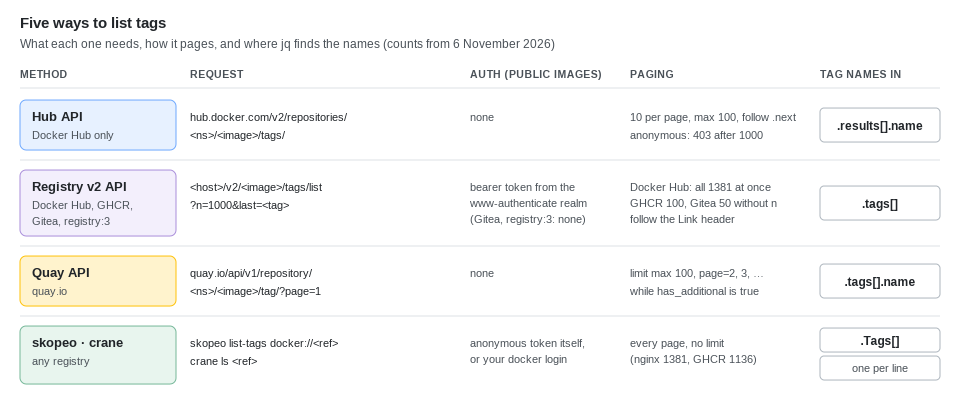
Each API pages differently and puts the tag names in a different place in its JSON:
Prerequisites
# jq (JSON) and curl
brew install jq                       # macOS
sudo apt install -y jq curl           # Debian/Ubuntu
sudo dnf install -y jq curl           # RHEL (jq from EPEL on older releases)

# Optional: skopeo and crane
brew install skopeo crane             # macOS
sudo apt install -y skopeo            # Debian/Ubuntu (1.13.3 on Ubuntu 24.04)
sudo dnf install -y skopeo            # RHEL
crane is a single binary from the go-containerregistry releases (go-containerregistry_Linux_arm64.tar.gz or ..._x86_64.tar.gz, containing crane). Both tools also run as containers, which is how the newest releases were used here:
skopeo() { docker run --rm quay.io/skopeo/stable:v1.22.3 "$@"; }
crane()  { docker run --rm gcr.io/go-containerregistry/crane:v0.22.1 "$@"; }
The container versions don’t see your docker login; mount ~/.docker/config.json for private images.
Docker Hub: the Hub API
curl -s "https://hub.docker.com/v2/repositories/library/nginx/tags/" | jq -r '.results[].name'
That prints only the first 10 tags. Ask for the maximum page size to get 100 in one request:
curl -s "https://hub.docker.com/v2/repositories/library/nginx/tags/?page_size=100" | jq -r '.results[].name'
# latest
# stable-alpine3.24-perl
# stable-alpine3.24-otel
# ...                       (100 names, newest first, down to 1.31.8)
It is still one page: the response’s count was 1381 and next pointed to ?page=2&page_size=100. To get all of them, follow next (below).
registry.hub.docker.com and hub.docker.com both answer the same API (both returned count 1381 for nginx). Rules that trip people up:
- Official images live under
library/:/repositories/library/nginx/tags/works;/repositories/nginx/tags/returns{"message":"object not found","errinfo":{}}, andjqthen fails withCannot iterate over null. - The default page has only 10 tags. For
nginxthe response saidcount1381 andresults10, with anextlink. The commonly shown one-liner therefore lists 10 of 1381 tags. page_sizeis capped at 100:page_size=1000returned 100 results.
Get Tags (Follow the next Link, Up to 1000)
hub_tags() {          # usage: hub_tags library/mediawiki
    local url="https://hub.docker.com/v2/repositories/$1/tags/?page_size=100" page
    while [ -n "$url" ] && [ "$url" != "null" ]; do
        page=$(curl -fsS "$url") || return 1
        echo "$page" | jq -r '.results[].name'
        url=$(echo "$page" | jq -r '.next')
    done
}

hub_tags library/mediawiki | sort -V
library/mediawiki has 366 tags: 4 pages, about a second, no duplicates.
Anonymous requests can’t page past 1000 results. For library/nginx (1381 tags) the loop printed 1000 tags and then curl: (56) The requested URL returned error: 403. Page 11 of 100 (and page 41 of 25, and any offset of 1000 or more) answers:
{"message":"pagination offset too large for anonymous requests; sign in to page further","errinfo":{}}
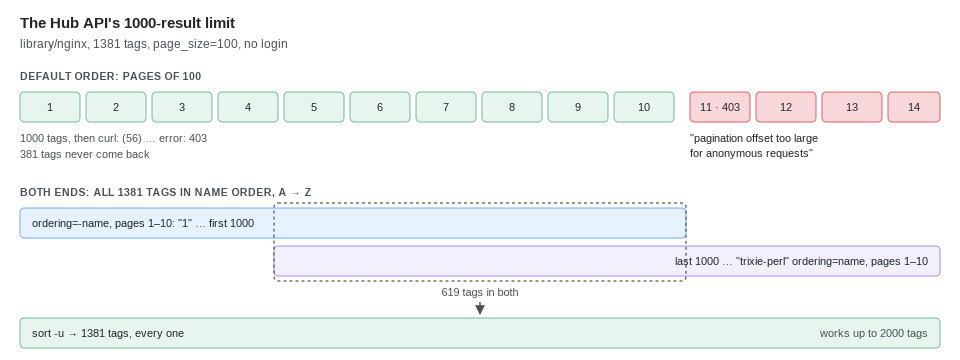
grafana/grafana (2045 tags) is cut the same way, and since the default order is newest first, the first 1000 are mostly recent tags of all kinds. Options for repositories with more than 1000 tags:
- Use the Registry v2 API,
skopeoorcrane(next sections): they return all tags (1381 fornginx, 2045 forgrafana/grafana). The v2 list had 381nginxtags that the Hub API’s first 1000 didn’t. - Narrow the query with the
name=filter so each query returns under 1000:?name=alpinegave 795 tags fornginx,?name=12.gave 491 forgrafana/grafana. -
Read from both ends: pages 1 to 10 of
ordering=nameplus pages 1 to 10 ofordering=-name, combined withsort -u, returned all 1381nginxtags. This covers up to 2000 tags.for o in name -name; do for p in $(seq 1 10); do curl -fsS "https://hub.docker.com/v2/repositories/library/nginx/tags/?page_size=100&page=$p&ordering=$o" | jq -r '.results[].name' done; done | sort -u | wc -l # 1381 - Sign in: authenticated requests aren’t subject to this limit (a login token for the Hub API wasn’t tested here).
Docker Hub also rate-limits requests per IP address, so don’t loop over many images without a pause.
Order, Filter and Details
BASE="https://hub.docker.com/v2/repositories/library/nginx/tags/"

# Order: default (and last_updated) is newest first; -last_updated, name, -name
curl -s "$BASE?page_size=3&ordering=-last_updated" | jq -r '.results[].name'     # oldest first
# 1.7.11
# 1.7
# 1.7.12
curl -s "$BASE?page_size=3&ordering=-name" | jq -r '.results[].name'             # A to Z
# 1
# 1.10
# 1.10.0
curl -s "$BASE?page_size=3&ordering=name" | jq -r '.results[].name'              # Z to A
# trixie-perl
# trixie-otel
# trixie

# Server-side substring filter on the tag name
curl -s "$BASE?page_size=100&name=alpine" | jq -r '"\(.count) tags contain alpine"'
# 795 tags contain alpine

# Date, digest and architectures
curl -s "$BASE?page_size=3&name=1.27-alpine" | jq -r '.results[] |
    "\(.name)  \(.last_updated[0:10])  \(.digest[0:19])  \([.images[]?.architecture] | unique | join(","))"'
# 1.27-alpine3.21-perl  2025-04-16  sha256:113552fa0c0c  386,amd64,arm,arm64,ppc64le,riscv64,s390x,unknown
# 1.27-alpine3.21  2025-04-16  sha256:65645c7bb6a0  386,amd64,arm,arm64,ppc64le,riscv64,s390x,unknown
# 1.27-alpine-perl  2025-04-16  sha256:113552fa0c0c  386,amd64,arm,arm64,ppc64le,riscv64,s390x,unknown

# One tag (404 if it doesn't exist)
curl -s "${BASE}1.27-alpine" | jq -r '"\(.name) \(.full_size) bytes"'
# 1.27-alpine 20960631 bytes
The name order is the opposite of what the word suggests: ordering=name runs from Z to A and -name from A to Z. The unknown architecture is the attestation manifest Docker adds next to the images.
The default order is “most recently updated first”, so ... | head -10 (“get latest 10 tags”) gives the 10 most recently pushed tags: for nginx they were stable-alpine3.24-perl, stable-alpine3.24-otel, stable-alpine3.24…, not the 10 highest versions. To find the newest version, list everything and sort by version (below).
Sort and Filter by Version
hub_tags library/nginx | grep -E '^[0-9]+\.[0-9]+\.[0-9]+$' | sort -V | tail -n 3
# curl: (56) The requested URL returned error: 403
# 1.31.6
# 1.31.7
# 1.31.8

hub_tags library/nginx | grep -E '^[0-9]+\.[0-9]+$' | sort -V | tail -n 5     # 1.27 1.28 1.29 1.30 1.31
hub_tags library/nginx | grep -E '^[0-9]+\.[0-9]+\.[0-9]+-alpine$'              # One variant
The curl: (56) … 403 line is the 1000-result limit again: nginx has 1381 tags, so hub_tags stops at page 11, prints the error on stderr and returns 1 (which fails the pipeline under set -o pipefail). The answer is still right because the newest tags are in the first 1000 (default order), but the list is incomplete. For repositories over 1000 tags use crane ls or skopeo list-tags, which gave the same 1.31.6 1.31.7 1.31.8 without an error. To keep the Hub API and only silence the message, send stderr to /dev/null:
hub_tags library/nginx 2>/dev/null | grep -E '^[0-9]+\.[0-9]+\.[0-9]+$' | sort -V | tail -n 1
# 1.31.8
That hides every error, not only the expected 403: if the output is empty, run it again without 2>/dev/null (an undefined hub_tags in a new shell, or a failed first page, prints nothing otherwise). Always use sort -V (version sort) rather than plain sort: plain sort puts 1.10 before 1.2 and 1.9 (1.10 1.2 1.27 1.9), sort -V gives 1.2 1.9 1.10 1.27. Anchor the regular expression (^...$) so variants like 1.27-alpine3.21-perl don’t match. tail takes the newest, sort -Vr | head does the same in reverse.
Pre-releases Sort After the Release
sort -V knows nothing about semantic versioning: it puts 1.0.0 before 1.0.0-rc1, so a release candidate looks newer than the release it leads to:
printf '1.0.0\n1.0.0-rc1\n1.0.0-beta.2\n1.0.1\n' | sort -V
# 1.0.0
# 1.0.0-beta.2
# 1.0.0-rc1
# 1.0.1
On a real repository (prom/prometheus had 136 tags with -rc), a regex that allows release candidates picks one as the newest:
crane ls prom/prometheus | grep -E '^v3\.1[56]\.[0-9]+(-rc\.[0-9]+)?$' | sort -V | tail -n 2
# v3.16.0
# v3.16.0-rc.4
Two fixes. Exclude pre-releases with the strict ^v[0-9]+\.[0-9]+\.[0-9]+$ (it gave v3.16.0), or, to keep them in the right place, append a character that sorts after - to every tag without one, sort, and strip it:
crane ls prom/prometheus | grep -E '^v3\.1[56]\.[0-9]+(-rc\.[0-9]+)?$' | sed '/-/!s/$/_/' | sort -V | sed 's/_$//' | tr '\n' ' '
# v3.15.0-rc.0 v3.15.0-rc.1 v3.15.0 v3.15.1 v3.16.0-rc.4 v3.16.0
The same trap catches variant suffixes: on grafana/grafana, 13.3.0-ubuntu sorts after 13.3.0, and the 13.x line had 28 or 29 tags each of -ubuntu, -ubuntu-slim, -slim, -distroless and -distroless-slim.
Which Version Is latest?
latest, stable or mainline are tags like any other, pointing to the same image as a version tag. Tags that point to the same image share a digest, so match the digest of latest against the newest tags (the first page is newest first):
BASE="https://hub.docker.com/v2/repositories/library/nginx/tags/"
curl -s "$BASE?page_size=100" | jq -r --arg d "$(curl -s "${BASE}latest" | jq -r .digest)" '.results[] | select(.digest == $d) | .name'
# latest
# trixie
# mainline-trixie
# mainline
# 1.31.8-trixie
# 1.31.8
For stable the same query printed stable-trixie stable 1.30.6-trixie 1.30.6 1.30-trixie 1.30; for prom/prometheus, latest was v3.16.0 (with v3, v3-busybox and latest-busybox), and for grafana/grafana it was 13.3.0 and 13.3. On other registries compare crane digest of the candidates:
for t in latest 1.31.8 1.31 1 1.30.3; do echo "$t $(crane digest nginx:$t)"; done
# latest sha256:165ddde8751e75a1c907d24ef10d9f6deb08b57e0fe56caf67512486aff76d82
# 1.31.8 sha256:165ddde8751e75a1c907d24ef10d9f6deb08b57e0fe56caf67512486aff76d82
# 1.31 sha256:165ddde8751e75a1c907d24ef10d9f6deb08b57e0fe56caf67512486aff76d82
# 1 sha256:165ddde8751e75a1c907d24ef10d9f6deb08b57e0fe56caf67512486aff76d82
# 1.30.3 sha256:29f8cc6c9d0072f7a79ea4647690f561c0dff83968d7f6d5684f23c6cfe6e41b
The answer is only true today: the next release moves latest, 1.31 and 1 to a new digest.
Which Tags Have My Platform
The Hub API lists each tag’s architectures in .images[]; the same tag line isn’t always built for the same set:
curl -s "$BASE?page_size=100&name=1.31" | jq -r '.results[] | select(.name|test("^1\\.31\\.[0-9]+$")) |
    "\(.name) \([.images[].architecture]|unique|join(","))"'
# 1.31.8 386,amd64,arm,arm64,ppc64le,riscv64,s390x,unknown
# 1.31.7 386,amd64,arm,arm64,ppc64le,riscv64,s390x,unknown
# 1.31.6 386,amd64,arm,arm64,ppc64le,s390x,unknown
# 1.31.5 386,amd64,arm,arm64,ppc64le,riscv64,s390x,unknown
# 1.31.4 386,amd64,arm,arm64,ppc64le,riscv64,s390x,unknown
# 1.31.3 386,amd64,arm,arm64,ppc64le,riscv64,s390x,unknown
1.31.6 has no riscv64 image. Add | select([.images[].architecture]|index("arm64")) to keep only the tags that have a platform. On other registries read the image index; crane manifest shows the variants too:
crane manifest nginx:1.31.8 | jq -r '.manifests[].platform | "\(.os)/\(.architecture)\(if .variant then "/"+.variant else "" end)"' | sort | uniq -c
#    1 linux/386
#    1 linux/amd64
#    1 linux/arm/v5
#    1 linux/arm/v7
#    1 linux/arm64/v8
#    1 linux/ppc64le
#    1 linux/riscv64
#    1 linux/s390x
#    8 unknown/unknown
The eight unknown/unknown entries are the attestation manifests, one per image. The oldest tags are different again: ordering=-last_updated starts with 1.7.11, 1.7, 1.7.12, 1.9.0, all amd64 only, and crane manifest nginx:1.9.0 returns a schemaVersion: 1 manifest that Docker 29 refuses to pull:
Error response from daemon: not implemented: media type "application/vnd.docker.distribution.manifest.v1+prettyjws" is no longer supported since containerd v2.1, please rebuild the image as "application/vnd.docker.distribution.manifest.v2+json" or "application/vnd.oci.image.manifest.v1+json"
A tag being listed doesn’t mean it can still be pulled.
User and Organization Images
hub_tags prom/prometheus | grep -E '^v[0-9]+\.[0-9]+\.[0-9]+$' | sort -V | tail -n 3     # 429 tags: under the 1000 limit
# v3.15.0
# v3.15.1
# v3.16.0
curl -s "https://hub.docker.com/v2/repositories/linuxserver/nginx/tags/?page_size=5" | jq -r '.results[].name'

# More than 1000 tags (grafana/grafana has 2045): use skopeo, or a name filter
skopeo list-tags docker://grafana/grafana | jq -r '.Tags[]' | grep -E '^[0-9]+\.[0-9]+\.[0-9]+$' | sort -V | tail -n 3
# 13.2.4
# 13.2.5
# 13.3.0
The bitnami/mediawiki example in many guides no longer works: /repositories/bitnami/mediawiki/tags/ returned {"message":"object not found","errinfo":{}} (the repository doesn’t exist on Docker Hub any more, and bitnamilegacy/mediawiki doesn’t either). Other Bitnami repositories exist but no longer carry version tags: bitnami/redis listed 594 tags, and only latest and latest-metadata were not sha256-… tags (next section). Use the official library/mediawiki, or check a repository’s tags on Docker Hub before relying on it.
Handling Errors
A wrong name returns an error object, and jq then fails with Cannot iterate over null:
curl -s "https://hub.docker.com/v2/repositories/library/doesnotexist123/tags/" | jq -r '.results[].name'
# jq: error (at <stdin>:0): Cannot iterate over null (null)          (the body was {"message":"object not found","errinfo":{}})
Make curl fail on HTTP errors (-f), keep error messages (-S), and let jq skip a missing array ([]?):
set -o pipefail
curl -fsS "$URL" | jq -r '.results[]?.name'      # curl: (56) The requested URL returned error: 404, exit status 56
The sha256- Tags Are Signatures, Not Versions
Some repositories have more sha256-… tags than real ones. They are tags that signing and attestation tools push next to an image, because a registry has no other place to hang extra data on a manifest. Of the 594 bitnami/redis tags, 592 looked like this, four per image digest:
crane ls bitnami/redis | grep "^sha256-$(crane digest bitnami/redis:latest | cut -c8-)" | sed -E 's/[0-9a-f]{64}/<digest>/'
# sha256-<digest>
# sha256-<digest>.att
# sha256-<digest>.metadata
# sha256-<digest>.sig
| Tag | What crane manifest showed |
Pushed by |
|---|---|---|
sha256-<digest>.sig |
Image manifest with a application/vnd.dev.cosign.simplesigning.v1+json layer |
cosign signature |
sha256-<digest>.att |
Image manifest with a application/vnd.dsse.envelope.v1+json layer |
cosign attestation (in-toto) |
sha256-<digest> |
Image index of application/vnd.cncf.notary.signature manifests |
Notation, through the OCI referrers tag fallback |
sha256-<digest>.metadata |
15 application/vnd.vmware.tac.* layers (SBOMs, scan results) |
Bitnami’s own build metadata |
<digest> is the image’s own digest with : replaced by -, so the four tags belong to latest above. The Hub API sorts them by push date like any tag, which is why the newest bitnami/redis tags on the first page were all sha256-…. Filter them out before sorting versions:
crane ls bitnami/redis | grep -vE '^sha256-[0-9a-f]{64}'
# latest
# latest-metadata
nginx and grafana/grafana had none: Docker’s own attestations are stored in the image index instead (the unknown architecture above), not as extra tags. The record holder here was ghcr.io/sigstore/cosign/cosign, cosign’s own image, with 32166 sha256-… tags.
The Referrers API
OCI Distribution 1.1 added a request that answers “what refers to this image?” directly, so tools no longer need the extra tags: GET /v2/<image>/referrers/<digest> returns an image index of the artifacts whose subject is that digest. On Docker Hub it found the Notation signature that the bare sha256-<digest> tag holds:
BD=$(crane digest bitnami/redis:latest)
BT=$(curl -s "https://auth.docker.io/token?service=registry.docker.io&scope=repository:bitnami/redis:pull" | jq -r .token)
curl -s -H "Authorization: Bearer $BT" "https://registry-1.docker.io/v2/bitnami/redis/referrers/$BD" | jq -r '.manifests[] | "\(.digest[0:19])  \(.artifactType)"'
# sha256:8a48028ac2ad  application/vnd.cncf.notary.signature
crane manifest bitnami/redis:sha256-${BD#sha256:} | jq -r '.manifests[] | "\(.digest[0:19])  \(.artifactType)"'
# sha256:8a48028ac2ad  application/vnd.cncf.notary.signature
?artifactType=application/vnd.cncf.notary.signature filters the list on the server. The cosign .sig and .att tags don’t show up there: they have no subject and exist only as tags. Support differed by registry:
| Registry | /v2/<image>/referrers/<digest> |
|---|---|
| Docker Hub | 200, an index (empty manifests for nginx:1.31.8) |
| Quay | 200, empty index for prometheus/prometheus:latest |
| GHCR | 404 MANIFEST_UNKNOWN: not supported, tools fall back to sha256-… tags |
registry:3 (Distribution 3.1.2) |
404 page not found: not supported |
Where the API answers 404, a signing tool that follows the OCI fallback pushes a sha256-<digest> tag instead, which is how those tags end up in tag lists.
The Registry v2 API (Docker Hub, GHCR, Gitea and Others)
All registries that implement the OCI/Docker Registry v2 API answer the same request:
curl -s "https://<registry-host>/v2/<image-path>/tags/list" | jq -r '.tags[]'
Most need a bearer token even for public images. The registry answers 401 and says where to get one:
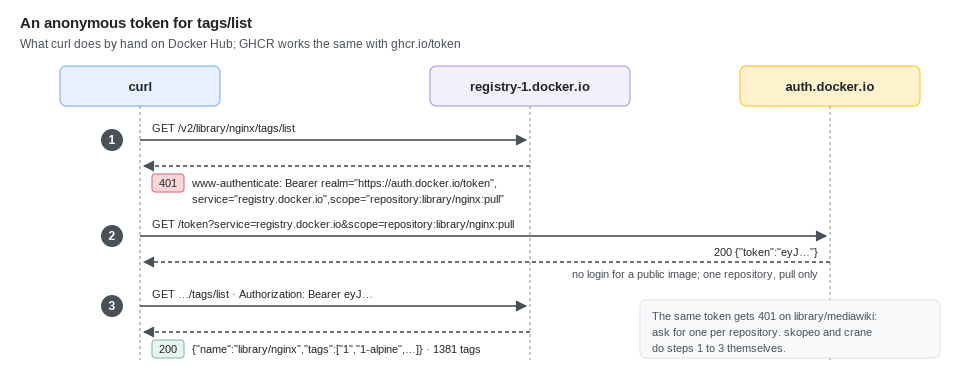
On Docker Hub:
curl -si "https://registry-1.docker.io/v2/library/nginx/tags/list" | grep -iE '^HTTP|www-authenticate'
# HTTP/2 401
# www-authenticate: Bearer realm="https://auth.docker.io/token",service="registry.docker.io",scope="repository:library/nginx:pull"

TOKEN=$(curl -s "https://auth.docker.io/token?service=registry.docker.io&scope=repository:library/nginx:pull" | jq -r .token)
curl -s -H "Authorization: Bearer $TOKEN" "https://registry-1.docker.io/v2/library/nginx/tags/list" | jq -r '.tags[]'
Behaviour of /tags/list:
- Docker Hub returns all tags in one response by default:
library/nginxreturned all 1381 tags at once, in alphabetical order (not by date or version), sosort -Vis still needed. - Other registries stop early: without
n, GHCR returned 100 tags anddocker.gitea.com50, each with aLinkheader to the next page. Pagination usesnandlast:?n=5on Docker Hub returned 5 tags pluslink: </v2/library/nginx/tags/list?last=1-alpine-slim&n=5>; rel="next". - The token is requested per repository (
scope=repository:<name>:pull): thenginxtoken got401onlibrary/mediawiki.
Get Every Tag (Follow the Link Header)
v2_tags() {   # usage: v2_tags <registry-host> <image-path> [token]
    local url="https://$1/v2/$2/tags/list?n=1000" auth=() resp
    [ -n "$3" ] && auth=(-H "Authorization: Bearer $3")
    while [ -n "$url" ]; do
        resp=$(curl -fsS -i "${auth[@]}" "$url") || return 1
        printf '%s\n' "$resp" | awk 'body; /^\r?$/ {body=1}' | jq -r '.tags[]?'
        url=$(printf '%s\n' "$resp" | sed -nE 's/^link: *<?([^>;]*)>?;.*/\1/Ip' | tr -d '\r')
        case $url in /*) url="https://$1$url" ;; esac
    done
}

v2_tags registry-1.docker.io library/nginx "$TOKEN" | wc -l     # 1381
curl -i keeps the headers in front of the body; awk prints what follows the blank line, and sed takes the next URL from the Link header. It accepts both forms seen here: the standard <path>; rel="next" (Docker Hub, GHCR, Distribution) and Gitea’s absolute URL without angle brackets (link: https://docker.gitea.com/v2/gitea/tags/list?n=50&last=1.11.0; rel=next). It ran unchanged with the BSD sed and awk of macOS; Docker Hub’s 1381 tags came back without duplicates.
GHCR
T=$(curl -s "https://ghcr.io/token?scope=repository:linuxserver/nginx:pull" | jq -r .token)
v2_tags ghcr.io linuxserver/nginx "$T" | grep -E '^[0-9]+\.[0-9]+\.[0-9]+$' | sort -V | tail -n 3
# 1.30.3
# 1.30.4
# 1.30.6
Without the token, GHCR returned 401 with www-authenticate: Bearer realm="https://ghcr.io/token",service="ghcr.io",scope="repository:linuxserver/nginx:pull". It caps a page at 1000 even with n=10000, so linuxserver/nginx (1136 tags) takes two pages.
Gitea
The Gitea project’s own image registry needs no token for reading:
v2_tags docker.gitea.com gitea | grep -E '^[0-9]+\.[0-9]+\.[0-9]+$' | sort -V | tail -n 3
# 28.1.0
# 28.2.0
# 28.3.0
The answer’s name was gitea/gitea, and it listed 914 tags (Docker Hub’s gitea/gitea had 913). A plain curl .../v2/gitea/tags/list | jq -r '.tags[]' | sort -V | tail only sees the first 50, which ended at 1.11.0. Your own Gitea or Forgejo instance has its container registry on the instance’s host name, with the owner in the path; private images need a token with the read:package scope as the password:
curl -s -u "<user>:<token>" "https://gitea.example.com/v2/<owner>/<image>/tags/list?n=1000" | jq -r '.tags[]'
(See the Docker Cheatsheet for the registry login and scopes.)
Quay
Quay has its own JSON API, pages of at most 100 and a has_additional flag:
curl -s "https://quay.io/api/v1/repository/prometheus/prometheus/tag/?limit=100&onlyActiveTags=true&page=1" | jq -c '{page, has_additional, n: (.tags|length)}'
# {"page":1,"has_additional":true,"n":100}
prometheus/prometheus took 5 pages (100, 100, 100, 100, 12): 412 tags. Each tag also carries last_modified and manifest_digest.
AWS ECR, GCR and Others
Cloud registries use their own CLIs: aws ecr list-images --repository-name <name>, gcloud artifacts docker tags list. They weren’t tested here.
Your Own Registry
A local registry:3 speaks the same API, without a token:
docker run -d --name reg -p 5000:5000 -e REGISTRY_STORAGE_DELETE_ENABLED=true registry:3
for t in 1.0 1.1 1.2; do docker tag alpine:3.20 localhost:5000/team/app:$t; done
for t in 1.10 latest; do docker tag alpine:3.21 localhost:5000/team/app:$t; done
docker tag alpine:3.21 localhost:5000/tools:1
docker push -q --all-tags localhost:5000/team/app; docker push -q localhost:5000/tools:1

R=http://localhost:5000
curl -s $R/v2/_catalog
# {"repositories":["team/app","tools"]}
curl -s $R/v2/team/app/tags/list
# {"name":"team/app","tags":["1.0","1.1","1.10","1.2","latest"]}
curl -si "$R/v2/team/app/tags/list?n=2" | grep -iE '^link|^\{'
# Link: </v2/team/app/tags/list?last=1.1&n=2>; rel="next"
# {"name":"team/app","tags":["1.0","1.1"]}
curl -s "$R/v2/team/app/tags/list?n=2&last=1.1"
# {"name":"team/app","tags":["1.10","1.2"]}
_catalog lists the repositories (paged the same way: ?n=1 gave a Link with last=team%2Fapp); the public registries don’t list theirs: Docker Hub and GHCR answered 401, Quay {"repositories":[]} and docker.gitea.com 405 (this registry is a read-only pull-through cache). The tags come back in byte order, so 1.10 sorts before 1.2 here too. On macOS, port 5000 belongs to the AirPlay receiver (ControlCenter in lsof -iTCP:5000), which answers 403; publish the registry on another port there or turn AirPlay Receiver off.
Deleting changes the list in two different ways:
curl -s -o /dev/null -w '%{http_code}\n' -X DELETE $R/v2/team/app/manifests/1.0     # 202: only the tag 1.0 is gone
curl -s $R/v2/team/app/tags/list
# {"name":"team/app","tags":["1.1","1.10","1.2","latest"]}

ACC='Accept: application/vnd.oci.image.index.v1+json,application/vnd.oci.image.manifest.v1+json,application/vnd.docker.distribution.manifest.list.v2+json,application/vnd.docker.distribution.manifest.v2+json'
D=$(curl -sI -H "$ACC" $R/v2/team/app/manifests/1.1 | grep -i '^docker-content-digest' | tr -d '\r' | cut -d' ' -f2)
curl -s -o /dev/null -w '%{http_code}\n' -X DELETE $R/v2/team/app/manifests/$D      # 202: every tag on that digest is gone
curl -s $R/v2/team/app/tags/list
# {"name":"team/app","tags":["1.10","latest"]}
Deleting the digest of 1.1 also removed 1.2, because both pointed to the same manifest. After deleting the last two tags, tags/list answered 200 with {"name":"team/app","tags":[]} and team/app stayed in _catalog; a repository that never existed answers 404 with NAME_UNKNOWN. The blobs stay on disk until a garbage collection (see How Docker Images Are Built, section 14).
skopeo and crane: One Command for Every Registry
Both talk to Docker Hub, GHCR, Quay, Gitea and private registries, get anonymous tokens themselves, follow pagination and use the credentials from docker login.
skopeo list-tags docker://nginx
skopeo list-tags docker://docker.io/library/mediawiki | jq -r '.Tags[]' | sort -V | tail -n 3
skopeo list-tags docker://ghcr.io/linuxserver/nginx
skopeo list-tags docker://docker.gitea.com/gitea
skopeo list-tags docker://quay.io/prometheus/prometheus

crane ls nginx                               # One tag per line
crane ls docker.gitea.com/gitea | tail -n 2
Counts: nginx 1381 (the same as the Hub API), ghcr.io/linuxserver/nginx 1136, docker.gitea.com/gitea 914, quay.io/prometheus/prometheus 412. skopeo prints JSON with a .Tags array (plus Repository); crane ls prints plain lines. Either replaces the pagination loops above. The mediawiki line shows why the version filter matters: sort -V | tail -n 3 printed stable, stable-fpm and stable-fpm-alpine, because letters sort after digits.
To check one tag, docker manifest inspect nginx:1.27-alpine exits 0 if it exists; for a missing tag it prints no such manifest: docker.io/library/nginx:no-such-tag-xyz and exits 1, without downloading the image.
From a Tag to Its Digest
A tag can be moved to another image at any time; the digest can’t. To pin what you found, ask the registry for the digest with a HEAD request on the manifest:
curl -sI -H "Authorization: Bearer $TOKEN" \
  -H 'Accept: application/vnd.oci.image.index.v1+json,application/vnd.docker.distribution.manifest.list.v2+json,application/vnd.oci.image.manifest.v1+json,application/vnd.docker.distribution.manifest.v2+json' \
  "https://registry-1.docker.io/v2/library/nginx/manifests/1.27.5-alpine" | grep -iE '^HTTP|^content-type|^docker-content-digest'
# HTTP/2 200
# content-type: application/vnd.oci.image.index.v1+json
# docker-content-digest: sha256:65645c7bb6a0661892a8b03b89d0743208a18dd2f3f17a54ef4b76fb8e2f2a10

crane digest nginx:1.27.5-alpine
# sha256:65645c7bb6a0661892a8b03b89d0743208a18dd2f3f17a54ef4b76fb8e2f2a10
skopeo inspect --format '{{.Digest}}' docker://nginx:1.27.5-alpine
# sha256:65645c7bb6a0661892a8b03b89d0743208a18dd2f3f17a54ef4b76fb8e2f2a10
curl -s "https://hub.docker.com/v2/repositories/library/nginx/tags/1.27.5-alpine" | jq -r .digest
# sha256:65645c7bb6a0661892a8b03b89d0743208a18dd2f3f17a54ef4b76fb8e2f2a10
All four agree: it is the digest of the multi-platform image index, the same as sha256:65645c7bb6a0 for 1.27-alpine3.21 above (both tags point to one image), and skopeo inspect --raw docker://nginx:1.27.5-alpine | sha256sum gives the same hash. Use it as nginx:1.27.5-alpine@sha256:65645c7b… or nginx@sha256:65645c7b…. The HEAD reply also carries Docker Hub’s pull limit for your address (ratelimit-limit: 100;w=3600 and ratelimit-remaining), which is a cheap way to check it.
When Was a Tag Built?
tags/list has names only. The Hub API has last_updated (when the tag was last pushed); other registries need the image config, whose created field is set at build time:
crane config nginx:1.27.5-alpine --platform linux/arm64 | jq -r .created
# 2025-04-16T14:50:31Z
skopeo inspect --override-os linux --override-arch arm64 --format '{{.Created}}' docker://nginx:1.27.5-alpine
# 2025-04-16 14:50:31 +0000 UTC
curl -s "https://hub.docker.com/v2/repositories/library/nginx/tags/1.27.5-alpine" | jq -r .last_updated
# 2025-04-16T23:51:29.052075Z
The image was built at 14:50 and the tag pushed at 23:51. It costs one or two requests per tag, so do it for the few candidates a version filter leaves, not for 1381 tags:
for t in 1.31.6 1.31.7 1.31.8; do echo "$t $(crane config nginx:$t --platform linux/arm64 | jq -r .created)"; done
# 1.31.6 2026-10-06T01:20:04.446765524Z
# 1.31.7 2026-10-21T00:19:14.348345881Z
# 1.31.8 2026-11-05T07:17:51.635752159Z
Reproducible builds set created to a fixed date, so on such images the field says nothing: gcr.io/distroless/static:latest reported 1970-01-01T00:00:00Z.
What Counts Against Docker Hub’s Limit
Docker Hub limits anonymous pulls to 100 per hour per IP address (ratelimit-limit: 100;w=3600). A manifest HEAD returns the counter for free:
TOKEN=$(curl -s "https://auth.docker.io/token?service=registry.docker.io&scope=repository:library/nginx:pull" | jq -r .token)
curl -sI -H "Authorization: Bearer $TOKEN" -H 'Accept: application/vnd.oci.image.index.v1+json' \
    "https://registry-1.docker.io/v2/library/nginx/manifests/1.31.8" | grep -iE '^ratelimit'
# ratelimit-limit: 100;w=3600
# ratelimit-remaining: 73;w=3600
Reading ratelimit-remaining between requests, with a pause because the counter lagged up to a minute behind:
| Request | Lowered the counter |
|---|---|
HEAD /v2/.../manifests/<tag> (digest check, crane digest) |
No, also after 3 in a row |
| Hub API tag pages | No |
GET /v2/.../tags/list (crane ls) |
No |
GET of a manifest (index or platform manifest) |
Yes: 3 index GETs took 72 to 70, 1 platform-manifest GET 70 to 69 |
skopeo inspect (index and platform manifest) |
Yes, by 1 |
Listing tags, sorting them and checking digests with HEAD don’t use the pull quota; inspecting configs and manifests of many tags does. The Hub API has a separate limit, shown in its own headers (x-ratelimit-limit: 180, x-ratelimit-remaining, x-ratelimit-reset as a Unix time); the 1000-result paging limit above is a different rule again.
Common Problems
| Symptom | Cause | Fix |
|---|---|---|
{"message":"object not found"}, Cannot iterate over null |
Official image without library/, a typo, or a removed repository (e.g. bitnami/mediawiki) |
/repositories/library/<image>/tags/, curl -fsS, .results[]?, check the name on the registry |
| Only 10 tags | Default page_size |
page_size=100 and follow .next |
page_size=1000 still 100 |
Hub API maximum | Follow .next |
403 with pagination offset too large for anonymous requests |
Hub API stops at 1000 results without a login | Use skopeo/crane/the v2 API, a name= filter, or both sort directions |
“Latest” tags are *-perl variants |
Default order is last updated, not version | List all, filter with a regex, sort -V |
Newest tags are all sha256-… |
Signatures and attestations stored as tags | grep -vE '^sha256-[0-9a-f]{64}' |
1.10 listed before 1.9 |
Plain sort |
sort -V |
stable listed as the newest version |
sort -V on unfiltered tags |
Filter with an anchored regex first |
v3.16.0-rc.4 listed after v3.16.0 |
sort -V sorts pre-releases after the release |
Exclude -rc, or the sed '/-/!s/$/_/' trick |
A listed tag won’t pull: manifest.v1+prettyjws is no longer supported |
Schema 1 manifest from before 2017 | Pick a newer tag |
404 on /v2/.../referrers/<digest> |
Registry without the referrers API (GHCR, registry:3) |
Look for sha256-<digest> tags instead |
401 Unauthorized on /v2/.../tags/list |
Registry needs a bearer token | Request one from the www-authenticate realm, or use skopeo/crane |
| 50 or 100 tags from a v2 registry | Server-side page size (Gitea 50, GHCR 100) | ?n=1000 and follow the Link header (v2_tags) |
403 from localhost:5000 on macOS |
AirPlay receiver on port 5000 | Publish the registry on another port |
429 or empty replies after many requests |
Rate limiting | Slow down, authenticate, check ratelimit-remaining |
| Private image on Docker Hub: not found | The Hub API needs a login token, or a Personal Access Token with skopeo/crane |
docker login, then skopeo/crane (the Hub login-token API wasn’t tested here) |
Useful Recipes
# Newest version tag of an image (strict x.y.z); crane ls has every tag, without the Hub API's 1000 limit
crane ls nginx | grep -E '^[0-9]+\.[0-9]+\.[0-9]+$' | sort -V | tail -n 1                 # 1.31.8

# The same with the Hub API, for repositories under 1000 tags
hub_tags library/mediawiki | grep -E '^[0-9]+\.[0-9]+\.[0-9]+$' | sort -V | tail -n 1    # 1.46.2

# Over 1000 tags with the Hub API: hide the expected 403 (the newest tags are in the first 1000)
hub_tags library/nginx 2>/dev/null | grep -E '^[0-9]+\.[0-9]+\.[0-9]+$' | sort -V | tail -n 1   # 1.31.8

# Newest Alpine variant of a version line
crane ls nginx | grep -E '^1\.27\.[0-9]+-alpine$' | sort -V | tail -n 1                  # 1.27.5-alpine

# Does this exact tag exist?
docker manifest inspect nginx:1.27.5-alpine >/dev/null 2>&1 && echo yes || echo no      # yes

# Newest version and its digest, ready to pin
v=$(crane ls nginx | grep -E '^[0-9]+\.[0-9]+\.[0-9]+$' | sort -V | tail -n 1); echo "nginx:$v@$(crane digest nginx:$v)"
# nginx:1.31.8@sha256:165ddde8751e75a1c907d24ef10d9f6deb08b57e0fe56caf67512486aff76d82

# Tags updated in the last pages only (cheap): the default order is newest first
curl -s "https://hub.docker.com/v2/repositories/library/nginx/tags/?page_size=20" | jq -r '.results[] | "\(.last_updated[0:10]) \(.name)"'
To see what a pull does with the digest you found, read How docker pull Works.
See Also
- How docker pull Works: Technical Details
- How Docker Images Are Built: Layers, Cache and the Container on Top
- Docker Cheatsheet
- OCI Distribution Specification:
tags/list,n,lastand the referrers tag fallback - Docker Hub usage and rate limits