How Docker Images Are Built: Layers, Cache and the Container on Top
A Docker image is a stack of read-only filesystem layers plus a small JSON config. Each Dockerfile instruction either adds a layer or only changes the config, and the order of the instructions decides both the image size and how fast rebuilds are. This article builds a few small images and looks at what comes out: docker history, the layer tarballs, the build cache the overlay mounts of a running container and, at the end, what docker push sends to a registry.
Everything was built with Docker 29.9.2 (BuildKit) in throwaway Docker-in-Docker daemons, once on the containerd image store (the default for new installs) and once on the classic overlay2 store. Sizes are from the classic store unless a table says otherwise; section 9 explains why the two report different numbers. Sections 10 to 14 use the containerd store and a local registry:3 (Distribution 3.1.2) on localhost:5000, with demo:1 rebuilt, so its random-data layers have new hashes there.
1. The Demo Image
FROM alpine:3.20
LABEL org.opencontainers.image.title="layers-demo"
ENV APP_HOME=/app
WORKDIR /app
RUN head -c 20971520 /dev/urandom > /app/random.bin
COPY data.bin /app/data.bin
COPY app.sh /app/app.sh
RUN chmod +x /app/app.sh
EXPOSE 8080
USER nobody
CMD ["/app/app.sh"]
data.bin is 10 MB of random data, app.sh a two-line script. The build, with docker build --progress=plain -t demo:1 .:
#4 [internal] load build context
#4 transferring context: 10.49MB 0.0s done
#5 [1/6] FROM docker.io/library/alpine:3.20@sha256:d9e853e87e55526f6b2917df91a2115c36dd7c696a35be12163d44e6e2a4b6bc
#6 [2/6] WORKDIR /app
#7 [3/6] RUN head -c 20971520 /dev/urandom > /app/random.bin
#8 [4/6] COPY data.bin /app/data.bin
#9 [5/6] COPY app.sh /app/app.sh
#10 [6/6] RUN chmod +x /app/app.sh
#11 exporting layers
#11 naming to docker.io/library/demo:1 done
BuildKit counts 6 steps ([1/6] to [6/6]): FROM and the five instructions that touch the filesystem. LABEL, ENV, EXPOSE, USER and CMD don’t appear as steps at all.
2. Which Instructions Create Layers
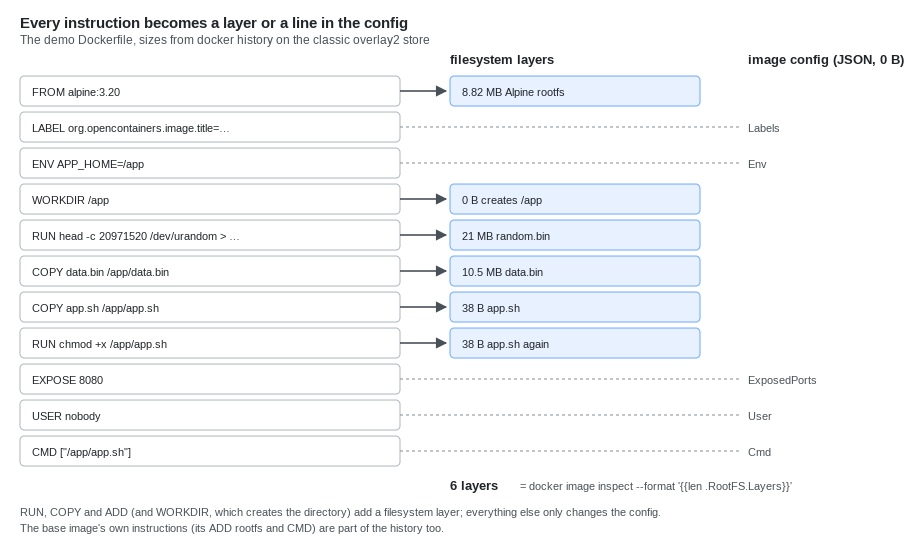
docker history lists every instruction, newest first, including those of the base image:
$ docker history demo:1
IMAGE          CREATED                  CREATED BY                                      SIZE      COMMENT
1dd84161dfcf   Less than a second ago   CMD ["/app/app.sh"]                             0B        buildkit.dockerfile.v0
<missing>      Less than a second ago   USER nobody                                     0B        buildkit.dockerfile.v0
<missing>      Less than a second ago   EXPOSE [8080/tcp]                               0B        buildkit.dockerfile.v0
<missing>      Less than a second ago   RUN /bin/sh -c chmod +x /app/app.sh # buildk…   38B       buildkit.dockerfile.v0
<missing>      Less than a second ago   COPY app.sh /app/app.sh # buildkit              38B       buildkit.dockerfile.v0
<missing>      Less than a second ago   COPY data.bin /app/data.bin # buildkit          10.5MB    buildkit.dockerfile.v0
<missing>      Less than a second ago   RUN /bin/sh -c head -c 20971520 /dev/urandom…   21MB      buildkit.dockerfile.v0
<missing>      Less than a second ago   WORKDIR /app                                    0B        buildkit.dockerfile.v0
<missing>      Less than a second ago   ENV APP_HOME=/app                               0B        buildkit.dockerfile.v0
<missing>      Less than a second ago   LABEL org.opencontainers.image.title=layers-…   0B        buildkit.dockerfile.v0
<missing>      6 months ago             CMD ["/bin/sh"]                                 0B        buildkit.dockerfile.v0
<missing>      6 months ago             ADD alpine-minirootfs-3.20.10-aarch64.tar.gz…   8.82MB    buildkit.dockerfile.v0
12 history entries, but only 6 layers:
docker image inspect --format '{{len .RootFS.Layers}} layers' demo:1 # 6 layers
| Instruction | Creates a layer | Ends up in |
|---|---|---|
FROM |
The base image’s layers | Its layers and config are the starting point |
RUN |
Yes: everything the command changed on disk | Layer |
COPY, ADD |
Yes: the copied files | Layer |
WORKDIR |
Yes, it creates the directory (0B here on the classic store, 8.19kB on the containerd store) |
Layer + WorkingDir |
ENV, LABEL, EXPOSE, USER, CMD, ENTRYPOINT, ARG, VOLUME, HEALTHCHECK, STOPSIGNAL, SHELL |
No | Config only |
<missing> in the IMAGE column is normal for BuildKit builds: intermediate steps are not stored as separate images. The metadata instructions all ended up in the config:
docker image inspect --format 'Env={{.Config.Env}} WorkingDir={{.Config.WorkingDir}} User={{.Config.User}} Cmd={{.Config.Cmd}} ExposedPorts={{.Config.ExposedPorts}} Labels={{.Config.Labels}}' demo:1
Env=[PATH=/usr/local/sbin:/usr/local/bin:/usr/sbin:/usr/bin:/sbin:/bin APP_HOME=/app] WorkingDir=/app User=nobody Cmd=[/app/app.sh] ExposedPorts=map[8080/tcp:{}] Labels=map[org.opencontainers.image.title:layers-demo]
docker history --no-trunc shows the full command of each step, useful to see how an image you didn’t build was made.
3. A Layer Is a Tarball of Changes
Each layer stores only what its instruction changed compared with the layers below: new and modified files, and deletions. A deletion can’t be stored as “nothing”, so it is a whiteout file. To see one, compare deleting a file in a later RUN with deleting it in the same RUN:
# Dockerfile.split
FROM alpine:3.20
RUN head -c 52428800 /dev/urandom > /big
RUN rm /big
# Dockerfile.joined
FROM alpine:3.20
RUN head -c 52428800 /dev/urandom > /big && rm /big
| Image | Size (classic store) | Size (containerd store) |
|---|---|---|
del:split |
61.3 MB | 118 MB |
del:joined |
8.82 MB (Alpine alone) | 13.6 MB |
In del:split the 50 MB file is still in the first RUN layer; the second layer only hides it. docker save writes the image as an OCI layout, and the two layers show exactly that:
docker save del:split -o del.tar && tar -xf del.tar
tar -tvf blobs/sha256/<layer>
== f97e4e97e3af…   (RUN head -c … > /big)
-rw-r--r-- 0/0  52428800 2026-10-25 09:16:05 big
drwxr-xr-x 0/0         0 2026-10-25 09:16:05 etc/
== 5964812779921534…   (RUN rm /big)
-rw------- 0/0         0 2026-10-25 09:16:05 .wh.big
drwxr-xr-x 0/0         0 2026-10-25 09:16:05 etc/
.wh.big is the whiteout: “big is deleted from here up”. That’s why cleanup has to happen in the same RUN that created the files, as in apt-get install … && rm -rf /var/lib/apt/lists/*, or in a different build stage (section 6).
4. Changing a File Copies It Again
Changing a file from a lower layer, even only its permissions, stores the whole file again in the new layer. Two ways to make data.bin (10.5 MB) executable:
FROM alpine:3.20
COPY data.bin /app/data.bin
RUN chmod 755 /app/data.bin
FROM alpine:3.20
COPY --chmod=755 data.bin /app/data.bin
| Variant | Size (classic store) | Layers above Alpine |
|---|---|---|
COPY + RUN chmod |
29.8 MB | COPY 10.5 MB, RUN chmod 10.5 MB |
COPY --chmod |
19.3 MB | COPY 10.5 MB |
The same applies to chown (use COPY --chown=user:group) and to any RUN that edits files a previous layer created. In the demo image, chmod +x app.sh cost only 38 bytes because the script is tiny.
5. The Build Cache and Instruction Order
BuildKit reuses a step from the cache when the step and everything before it are unchanged. For COPY and ADD, “unchanged” means the checksum of the copied files; for RUN, the command string. Once one step misses the cache, every step after it runs again.
Two Dockerfiles for the same small project, with a slow dependency step (sleep 3 stands in for pip install or npm ci):
# Dockerfile.bad
FROM alpine:3.20
WORKDIR /src
COPY . .
RUN sleep 3 && cp requirements.txt /installed-deps
# Dockerfile.good
FROM alpine:3.20
WORKDIR /src
COPY requirements.txt .
RUN sleep 3 && cp requirements.txt /installed-deps
COPY . .
Both built once, then one source file (src/main.txt) changed and both rebuilt with --progress=plain:
== Dockerfile.bad
#6 [2/4] WORKDIR /src
#6 CACHED
#7 [3/4] COPY . .
#8 [4/4] RUN sleep 3 && cp requirements.txt /installed-deps
took 3s

== Dockerfile.good
#6 [2/5] WORKDIR /src
#6 CACHED
#7 [3/5] COPY requirements.txt .
#7 CACHED
#8 [4/5] RUN sleep 3 && cp requirements.txt /installed-deps
#8 CACHED
#9 [5/5] COPY . .
took 0s
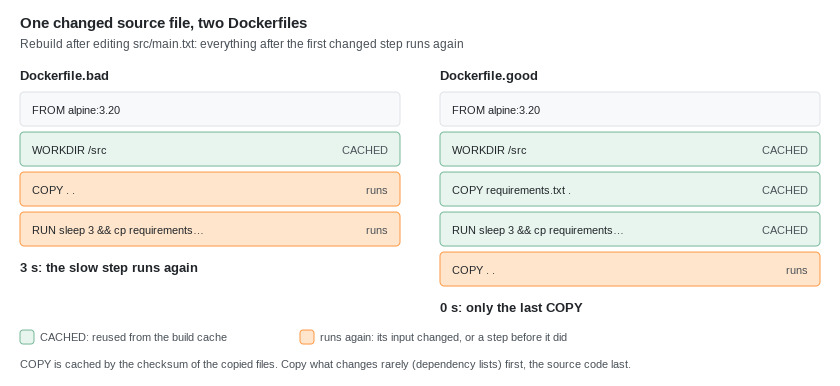
Order instructions from what changes least to what changes most: base image, system packages, dependency list and install, then the application code. A .dockerignore keeps files like .git, build output and local secrets out of COPY . ., so they neither invalidate the cache nor end up in a layer.
6. Multi-Stage Builds
Only the last stage becomes the image. Earlier stages can hold compilers, package caches and test data; the final stage copies just the result:
FROM alpine:3.20 AS build
RUN head -c 104857600 /dev/urandom > /toolchain.bin
RUN echo 'built artifact' > /artifact.txt

FROM alpine:3.20
COPY --from=build /artifact.txt /app/artifact.txt
CMD ["cat", "/app/artifact.txt"]
The same steps in one stage, for comparison:
| Image | Size (classic store) |
|---|---|
| One stage (toolchain stays) | 114 MB |
| Multi-stage | 8.82 MB |
$ docker history multi:stage
IMAGE          CREATED                  CREATED BY                                      SIZE      COMMENT
401bcfa3aac9   Less than a second ago   CMD ["cat" "/app/artifact.txt"]                 0B        buildkit.dockerfile.v0
<missing>      Less than a second ago   COPY /artifact.txt /app/artifact.txt # build…   15B       buildkit.dockerfile.v0
<missing>      6 months ago             CMD ["/bin/sh"]                                 0B        buildkit.dockerfile.v0
<missing>      6 months ago             ADD alpine-minirootfs-3.20.10-aarch64.tar.gz…   8.82MB    buildkit.dockerfile.v0
The 100 MB toolchain layer of the build stage isn’t in the final image at all, and neither is any trace of it in the history.
7. Layers Are Shared Between Images
Layers are identified by their content hash (the DiffID), so two images built on the same base use the same base layer on disk. Two images, each FROM alpine:3.20 plus one small RUN:
one: ["sha256:88b4fba61c4c714a2fc173ddf7e9324a257304696830bf41ad28ecc58c11c95f","sha256:51555de313b6…"]
two: ["sha256:88b4fba61c4c714a2fc173ddf7e9324a257304696830bf41ad28ecc58c11c95f","sha256:61bdb5ecb881…"]
docker system df -v shows how much of each image is shared (containerd store):
REPOSITORY   TAG       IMAGE ID       CREATED                  SIZE      SHARED SIZE   UNIQUE SIZE   CONTAINERS
shared       two       a9472710a6f2   Less than a second ago   13.6MB    13.58MB       11.74kB       0
shared       one       7c2b1ded2baa   Less than a second ago   13.6MB    13.58MB       11.75kB       0
alpine       3.20      d9e853e87e55   6 months ago             13.7MB    13.58MB       81.56kB       0
Three images of 13.6 MB each take about 13.6 MB plus 100 kB on disk. Standardizing on a few base images across a team saves disk and pull time on every machine, because the base layers are downloaded once.
8. The Container on Top
A container doesn’t change the image. Docker stacks one more, writable layer on top of the read-only image layers, and the container sees the merged result through overlayfs. To see it, start a container from demo:1, add a file and delete one from an image layer:
docker run -d --name c1 --user root --entrypoint sleep demo:1 600
docker exec c1 sh -c 'echo changed > /app/new.txt; rm /app/random.bin'
docker diff c1
C /app
A /app/new.txt
D /app/random.bin
A added, C changed, D deleted. On the classic store, docker inspect shows the overlay directories:
docker inspect -f '{{range $k,$v := .GraphDriver.Data}}{{$k}} {{end}}' c1      # ID LowerDir MergedDir UpperDir WorkDir
ls -la $(docker inspect -f '{{.GraphDriver.Data.UpperDir}}' c1)/app
-rw-rw-rw-    1 root     root             8 Oct 25 09:16 new.txt
c---------    2 root     root        0,   0 Oct 25 09:16 random.bin
The new file is in the upper (writable) directory. The deleted random.bin is there too, as a character device 0,0: that’s how overlayfs stores a whiteout on disk. LowerDir lists 7 directories: the 6 image layers plus an -init layer where Docker writes /etc/hostname, /etc/hosts and /etc/resolv.conf for the container.
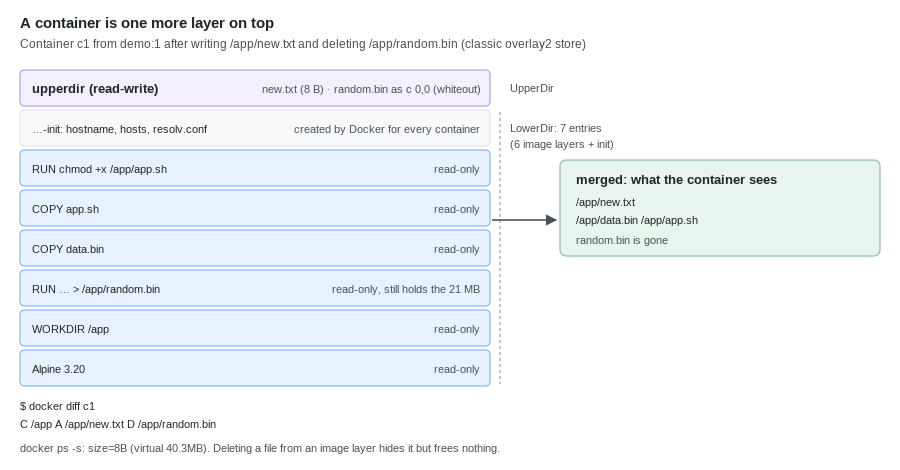
docker ps -s --format '{{.Names}} size={{.Size}}'
c1 size=8B (virtual 40.3MB)
size is the container’s own layer (the 8-byte new.txt), virtual adds the image. Deleting random.bin in the container freed nothing: the 21 MB are still in the image layer. On the containerd store docker diff gives the same result, but docker inspect has no GraphDriver section, since snapshots are managed by containerd.
9. Why the Two Image Stores Report Different Sizes
The same images, as docker images reports them:
| Image | Classic overlay2 store | containerd image store |
|---|---|---|
alpine:3.20 |
8.82 MB | 13.7 MB |
demo:1 |
40.3 MB | 76.6 MB |
del:split |
61.3 MB | 118 MB |
multi:single |
114 MB | 223 MB |
multi:stage |
8.82 MB | 13.6 MB |
The classic store keeps only the unpacked layers. The containerd store keeps the compressed layer blobs too (it needs them to push, and to serve other containerd clients), and its size counts both, so random data, which doesn’t compress, counts almost twice. The container in section 8 shows the unpacked size on both: virtual 40.3MB on the classic store, virtual 41MB on the containerd store. When comparing image sizes, compare on the same store.
10. What docker save Writes: Index, Manifest, Config
Section 3 opened layer tarballs from docker save. The other files in that directory are what turn the tarballs into an image:
$ docker save demo:1 -o demo.tar && tar -xf demo.tar && ls
blobs
index.json
manifest.json
oci-layout
oci-layout and index.json make the directory an OCI image layout, manifest.json is the older Docker format kept for docker load compatibility, and blobs/sha256/ holds everything else, each file named by the SHA-256 of its content. Following the digests from index.json down:
{
  "mediaType": "application/vnd.oci.image.index.v1+json",
  "manifests": [
    {
      "mediaType": "application/vnd.oci.image.manifest.v1+json",
      "digest": "sha256:3e42f029f7db6f1617cc45c0d3b8d551c521d517adaf215bbad65144fa481ab8",
      "size": 1430,
      "platform": { "architecture": "arm64", "os": "linux" }
    },
    {
      "mediaType": "application/vnd.oci.image.manifest.v1+json",
      "digest": "sha256:f2099f3219bf7b7c8c45009f30021d1c20a267d1a734bc46eeaeefbdbde1ba28",
      "size": 837,
      "annotations": {
        "vnd.docker.reference.digest": "sha256:3e42f029f7db6f1617cc45c0d3b8d551c521d517adaf215bbad65144fa481ab8",
        "vnd.docker.reference.type": "attestation-manifest"
      },
      "platform": { "architecture": "unknown", "os": "unknown" }
    }
  ]
}
That is the image index cc0792a79c2f…, the blob index.json points to (trimmed to the fields that matter). Even a single-platform local build is an index: one manifest for linux/arm64 and one attestation manifest with the build provenance BuildKit adds by default. Its digest is also what the containerd store uses as the image ID:
$ docker image inspect demo:1 --format '{{.Id}}'
sha256:cc0792a79c2ff29bd72c21673b4b7c07bea78455cb9c34ff63164dc43fd8cb05
One level down, the image manifest 3e42f029f7db… lists one config and the six layers, bottom first:
{
  "schemaVersion": 2,
  "mediaType": "application/vnd.oci.image.manifest.v1+json",
  "config": {
    "mediaType": "application/vnd.oci.image.config.v1+json",
    "digest": "sha256:359d13ebd14b9bb3b00742338236bd848362631991fda6520a99166520644924",
    "size": 2507
  },
  "layers": [
    { "mediaType": "application/vnd.oci.image.layer.v1.tar+gzip", "digest": "sha256:3f26bc2dec0b515f1c2818f6e13a8f1da1f88179a008445d4e587233386bff78", "size": 4092319 },
    { "mediaType": "application/vnd.oci.image.layer.v1.tar+gzip", "digest": "sha256:852e5c2c42747922bebce7cb4f490512e624dea711b31c153bfee2c8612b1bb3", "size": 91 },
    { "mediaType": "application/vnd.oci.image.layer.v1.tar+gzip", "digest": "sha256:f2598d6c363178bad934c84300a9c39419f9d4652a8fbb5043678db6c741ab86", "size": 20978104 },
    { "mediaType": "application/vnd.oci.image.layer.v1.tar+gzip", "digest": "sha256:a154432b8f6e993cb9c7bee1ef62b0aa0a03af03501db1753301a32d5c82d676", "size": 10489146 },
    { "mediaType": "application/vnd.oci.image.layer.v1.tar+gzip", "digest": "sha256:c6790288bf70d0e977a1796fee285d1c67a5e8e1b21000111ed42dbd76879cb1", "size": 171 },
    { "mediaType": "application/vnd.oci.image.layer.v1.tar+gzip", "digest": "sha256:ffa370ca117e31e63c001678588a11d8f050d96789ddceb0507051f83f6a871a", "size": 167 }
  ]
}
The config 359d13ebd14b… is the JSON from section 2 (Env, WorkingDir, User, Cmd, the 12 history entries) plus rootfs.diff_ids, one hash per layer.
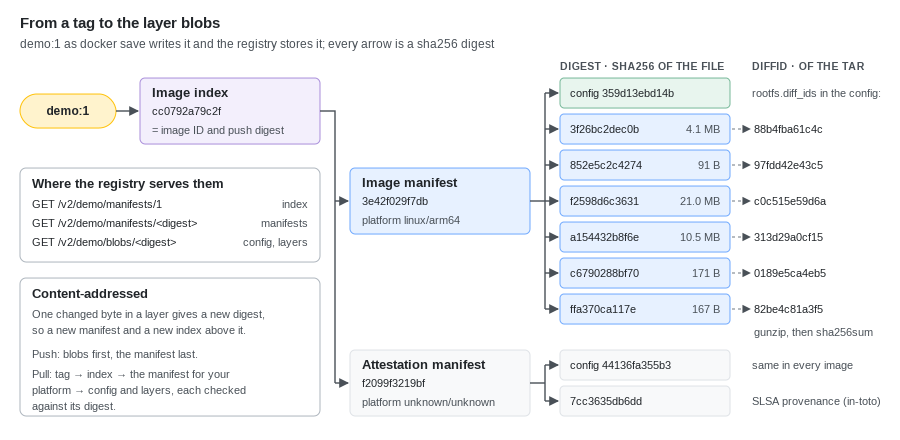
| Object | Media type | Points to |
|---|---|---|
| Image index | application/vnd.oci.image.index.v1+json |
One manifest per platform, plus attestations |
| Image manifest | application/vnd.oci.image.manifest.v1+json |
One config, the layers in order |
| Config | application/vnd.oci.image.config.v1+json |
Nothing; holds the settings and rootfs.diff_ids |
| Layer | application/vnd.oci.image.layer.v1.tar+gzip |
Nothing; a gzipped tar of changes |
Every reference is a digest, so changing one byte of a layer changes its digest, the manifest that lists it, and the index above that. A digest can’t point to different content later.
Digest vs DiffID
A layer has two hashes. The manifest’s digest is the SHA-256 of the compressed blob, the file name in blobs/sha256/. The config’s diff_ids (and RootFS.Layers in docker image inspect, the hashes in section 7) are the SHA-256 of the uncompressed tar:
cd blobs/sha256
for d in $(jq -r '.layers[].digest' 3e42f029f7db6f1617cc45c0d3b8d551c521d517adaf215bbad65144fa481ab8 | cut -c8-); do
  printf '%s  %9s  %s  %9s\n' ${d:0:12} $(wc -c < $d) $(gunzip -c $d | sha256sum | cut -c1-12) $(gunzip -c $d | wc -c)
done
| Layer | Digest (gzip) | Size gzipped | DiffID (tar) | Size unpacked |
|---|---|---|---|---|
| Alpine | 3f26bc2dec0b |
4,092,319 | 88b4fba61c4c |
9,107,968 |
WORKDIR /app |
852e5c2c4274 |
91 | 97fdd42e43c5 |
1,536 |
RUN head … random.bin |
f2598d6c3631 |
20,978,104 | c0c515e59d6a |
20,973,568 |
COPY data.bin |
a154432b8f6e |
10,489,146 | 313d29a0cf15 |
10,487,808 |
COPY app.sh |
c6790288bf70 |
171 | 0189e5ca4eb5 |
2,560 |
RUN chmod |
ffa370ca117e |
167 | 82be4c81a3f5 |
2,560 |
$ docker image inspect demo:1 --format '{{range .RootFS.Layers}}{{slice . 7 19}} {{end}}'
88b4fba61c4c 97fdd42e43c5 c0c515e59d6a 313d29a0cf15 0189e5ca4eb5 82be4c81a3f5
Alpine shrinks from 9.1 MB to 4.1 MB; the random data grows slightly, because gzip can’t compress it. The Alpine DiffID 88b4fba61c4c is the same one section 7 found in two different images: it depends only on the files, while the digest also depends on how the tar was compressed. The containerd store keeps both forms, and docker images shows them as separate columns. CONTENT SIZE is the sum of the gzipped blobs (35.6 MB), what a push or pull transfers; section 9’s 76.6 MB is the disk usage:
$ docker images
IMAGE        ID             DISK USAGE   CONTENT SIZE   EXTRA
demo:1       cc0792a79c2f       76.6MB         35.6MB
registry:3   38907510915c       82.4MB         19.4MB   U
shared:one   f2f1cff7e579       13.6MB          4.1MB
shared:two   4dbe52d830e1       13.6MB          4.1MB
11. Pushing to a Registry
A registry is a store of the same blobs, addressed by the same digests, behind a small HTTP API (the OCI Distribution Specification). A local one is a single container:
docker run -d --name registry -p 5000:5000 -e REGISTRY_STORAGE_DELETE_ENABLED=true registry:3
for t in demo:1 shared:one shared:two; do docker tag $t localhost:5000/$t; docker push localhost:5000/$t; done
The push refers to repository [localhost:5000/demo]
ffa370ca117e: Pushed
852e5c2c4274: Pushed
3f26bc2dec0b: Pushed
7cc3635db6dd: Pushed
44136fa355b3: Pushed
f2598d6c3631: Pushed
a154432b8f6e: Pushed
c6790288bf70: Pushed
1: digest: sha256:cc0792a79c2ff29bd72c21673b4b7c07bea78455cb9c34ff63164dc43fd8cb05 size: 856
The push refers to repository [localhost:5000/shared]
c3945caab1c2: Pushed
44136fa355b3: Mounted from demo
84446407b0ef: Pushed
3f26bc2dec0b: Mounted from demo
one: digest: sha256:f2f1cff7e57934079518193a5b350de0e155b564e565bf8b448a0eef5d8ea727 size: 855
The push refers to repository [localhost:5000/shared]
0f6a81045ec6: Pushed
44136fa355b3: Already exists
3f26bc2dec0b: Layer already exists
37fc2ed5a7a1: Pushed
two: digest: sha256:4dbe52d830e19fe7066d559e45a8248182801cf55e36d49ef2c1ca2f457129a0 size: 855
The IDs in a push are digests, the compressed hashes from the table above, not DiffIDs. demo:1 sends 8 blobs: the six layers plus the attestation’s config (44136fa355b3) and its SLSA provenance (7cc3635db6dd). The pushed digest is the index’s, cc0792a79c2f…, the same as the image ID.
The second and third pushes show section 7’s sharing over the network:
- Mounted from demo:
sharedis a new repository, but the registry already has the Alpine blob indemo, so the client asks for a cross-repository mount and nothing is uploaded. - Already exists / Layer already exists: the blob is already in
shared, so the client checks for it and skips the upload.
The same API answers with curl. Tags, which the docker CLI can’t list, are one GET:
$ curl -s localhost:5000/v2/_catalog
{"repositories":["demo","shared"]}
$ curl -s localhost:5000/v2/shared/tags/list
{"name":"shared","tags":["one","two"]}
A manifest is fetched by tag or digest. The Accept header says which formats the client understands; the response’s Content-Type says which one came back:
$ curl -s -o /dev/null -D - localhost:5000/v2/demo/manifests/1 \
    -H 'Accept: application/vnd.oci.image.index.v1+json,application/vnd.oci.image.manifest.v1+json' \
    | grep -iE '^HTTP|^content-type|^docker-content-digest'
HTTP/1.1 200 OK
Content-Type: application/vnd.oci.image.index.v1+json
Docker-Content-Digest: sha256:cc0792a79c2ff29bd72c21673b4b7c07bea78455cb9c34ff63164dc43fd8cb05
A pull is that walk: tag → index → the manifest for the client’s platform → config and layers, each by digest, each checked with sha256sum on arrival. Blobs come from /v2/<repo>/blobs/<digest>:
$ curl -s -L localhost:5000/v2/demo/blobs/sha256:359d13ebd14b9bb3b00742338236bd848362631991fda6520a99166520644924 | sha256sum
359d13ebd14b9bb3b00742338236bd848362631991fda6520a99166520644924  -
$ curl -s -L localhost:5000/v2/demo/blobs/sha256:359d13ebd14b9bb3b00742338236bd848362631991fda6520a99166520644924 \
    | jq -c '{User: .config.User, Cmd: .config.Cmd, layers: (.rootfs.diff_ids | length)}'
{"User":"nobody","Cmd":["/app/app.sh"],"layers":6}
Push an Image by Hand
docker push is a handful of these requests, so an image can be built and pushed with tar, gzip, sha256sum, jq and curl alone. Blobs first, the manifest last, because the registry rejects a manifest that refers to blobs it doesn’t have:
R=http://localhost:5000
# the Alpine 3.20 arm64 layer, already in the repository "demo" (see its manifest)
ALPINE_LAYER=sha256:3f26bc2dec0b515f1c2818f6e13a8f1da1f88179a008445d4e587233386bff78
ALPINE_DIFF_ID=sha256:88b4fba61c4c714a2fc173ddf7e9324a257304696830bf41ad28ecc58c11c95f

# a one-file layer: the DiffID hashes the tar, the digest hashes the gzip
echo 'hello from a hand-pushed image' > hello.txt
tar -cf layer.tar hello.txt && gzip -k layer.tar
DIFF_ID=sha256:$(sha256sum layer.tar | cut -c1-64)
DIGEST=sha256:$(sha256sum layer.tar.gz | cut -c1-64)

# POST opens an upload session, PUT sends the bytes and their digest
push_blob() {
  loc=$(curl -s -o /dev/null -w '%header{location}' -X POST $R/v2/hand/blobs/uploads/)
  curl -s -o /dev/null -w "PUT $1: %{http_code}\n" -X PUT \
    -H 'Content-Type: application/octet-stream' --data-binary @$1 "$loc&digest=$2"
}

# 1. mount the Alpine layer from "demo" instead of uploading it
curl -s -o /dev/null -w 'mount: %{http_code}\n' -X POST \
  "$R/v2/hand/blobs/uploads/?mount=$ALPINE_LAYER&from=demo"

# 2. upload the new layer
push_blob layer.tar.gz $DIGEST

# 3. the config: diff_ids are the uncompressed hashes, bottom layer first
jq -cnj --arg a $ALPINE_DIFF_ID --arg b $DIFF_ID '{architecture: "arm64", os: "linux",
  config: {Cmd: ["cat", "/hello.txt"]}, rootfs: {type: "layers", diff_ids: [$a, $b]}}' > config.json
CONFIG=sha256:$(sha256sum config.json | cut -c1-64)
push_blob config.json $CONFIG

# 4. the manifest ties them together, pushed under the tag v1
jq -cnj --arg c $CONFIG --argjson cs $(wc -c < config.json) --arg a $ALPINE_LAYER \
  --arg d $DIGEST --argjson ds $(wc -c < layer.tar.gz) '{schemaVersion: 2,
  mediaType: "application/vnd.oci.image.manifest.v1+json",
  config: {mediaType: "application/vnd.oci.image.config.v1+json", digest: $c, size: $cs},
  layers: [{mediaType: "application/vnd.oci.image.layer.v1.tar+gzip", digest: $a, size: 4092319},
           {mediaType: "application/vnd.oci.image.layer.v1.tar+gzip", digest: $d, size: $ds}]}' > manifest.json
curl -s -o /dev/null -D - -X PUT -H 'Content-Type: application/vnd.oci.image.manifest.v1+json' \
  --data-binary @manifest.json $R/v2/hand/manifests/v1 | grep -iE '^HTTP|^docker-content-digest'
mount: 201
PUT layer.tar.gz: 201
PUT config.json: 201
HTTP/1.1 201 Created
Docker-Content-Digest: sha256:98aabb6468a5676a55af72a1e595d980ec4cae609df4b4444ca779cb7d35f6d4
The Docker-Content-Digest the registry returns is exactly sha256sum manifest.json, and the image runs:
$ sha256sum manifest.json layer.tar layer.tar.gz
98aabb6468a5676a55af72a1e595d980ec4cae609df4b4444ca779cb7d35f6d4  manifest.json
576539be62f56f1571e0a3a377c0216ee0654c8a75c0fc0a62ae3fc9dcf61bd0  layer.tar
bb6e0e6f091476c350e0d982c09548a76c5bd44a221ec5cef19359a7631aee28  layer.tar.gz
$ docker pull localhost:5000/hand:v1
v1: Pulling from hand
bb6e0e6f0914: Pulling fs layer
3f26bc2dec0b: Pulling fs layer
3f26bc2dec0b: Already exists
bb6e0e6f0914: Download complete
bb6e0e6f0914: Pull complete
Digest: sha256:98aabb6468a5676a55af72a1e595d980ec4cae609df4b4444ca779cb7d35f6d4
$ docker run --rm localhost:5000/hand:v1
hello from a hand-pushed image
The Alpine layer was never uploaded to hand and never downloaded again. The script hard-codes the arm64 Alpine layer; on another platform take the first layer’s digest from your own demo manifest and the first DiffID from docker image inspect alpine:3.20, and set architecture.
What goes wrong when a step is off:
| Mistake | Result |
|---|---|
PUT with a digest that doesn’t match the bytes |
400 DIGEST_INVALID: provided digest did not match uploaded content |
curl --data-binary without -H 'Content-Type: application/octet-stream' |
Also 400 DIGEST_INVALID: curl sends it as application/x-www-form-urlencoded and the registry doesn’t get the bytes as they are |
| Manifest that lists a blob not in the repository | 400 MANIFEST_BLOB_UNKNOWN: blob unknown to registry |
Compressed digest written into diff_ids |
The push succeeds; the pull fails |
The last one is only caught when a client unpacks the layer and hashes the tar:
$ docker pull localhost:5000/hand:bad
wrong diff id "sha256:576539be62f56f1571e0a3a377c0216ee0654c8a75c0fc0a62ae3fc9dcf61bd0" calculated on extraction "sha256:bb6e0e6f091476c350e0d982c09548a76c5bd44a221ec5cef19359a7631aee28", desc "sha256:bb6e0e6f091476c350e0d982c09548a76c5bd44a221ec5cef19359a7631aee28"
12. One Tag, Many Platforms
alpine:3.20 is also an index, with one manifest per platform and an attestation for each:
$ docker buildx imagetools inspect alpine:3.20 | head -3
Name:      docker.io/library/alpine:3.20
MediaType: application/vnd.oci.image.index.v1+json
Digest:    sha256:d9e853e87e55526f6b2917df91a2115c36dd7c696a35be12163d44e6e2a4b6bc

$ docker buildx imagetools inspect alpine:3.20 --raw | jq -r '.manifests[]
    | "\(.digest[7:19])  \(.platform.os)/\(.platform.architecture)\(if .platform.variant then "/"+.platform.variant else "" end)  \(.annotations["vnd.docker.reference.type"] // "")"'
c64c687cbea9  linux/amd64
6243dec92868  unknown/unknown  attestation-manifest
37753b296504  linux/arm/v6
91f7e880a3f5  unknown/unknown  attestation-manifest
bd05c4d38cbe  linux/arm/v7
9ba6eec5a553  unknown/unknown  attestation-manifest
45e09956dc66  linux/arm64/v8
1db32a7978ca  unknown/unknown  attestation-manifest
4ec3ead63e75  linux/386
dca9fc0bda34  unknown/unknown  attestation-manifest
80529c2d621d  linux/ppc64le
53afc103e0e4  unknown/unknown  attestation-manifest
c47cbcc0d9c7  linux/riscv64
d2e511115065  unknown/unknown  attestation-manifest
856b20bf4946  linux/s390x
ba51d5564234  unknown/unknown  attestation-manifest
8 platforms, 16 entries. A pull on this arm64 machine took linux/arm64/v8, whose single layer is 3f26bc2dec0b, the base layer of every image in this article. The amd64 manifest has a different layer, so its DiffID differs too:
$ docker buildx imagetools inspect alpine:3.20@sha256:45e09956dc667c5eff3583c9d94830261fb1ca0be10a0a7db36266edf5de9e1d --raw | jq -c '[.layers[].digest[7:19]]'
["3f26bc2dec0b"]
$ docker buildx imagetools inspect alpine:3.20@sha256:c64c687cbea9300178b30c95835354e34c4e4febc4badfe27102879de0483b5e --raw | jq -c '[.layers[].digest[7:19]]'
["25f1d6b1951a"]
The registry has no special API for this. An index is pushed to /v2/<repo>/manifests/<tag> like any manifest, and the client tells the two apart by Content-Type. Section 7’s sharing needs the same platform: an amd64 and an arm64 image built from the same Dockerfile don’t share their base layer.
13. Tags Move, Digests Don’t
A tag is a name the registry maps to a manifest digest, and anyone who can push can point it somewhere else; alpine:3.20 is repointed on every 3.20.x release. The digest is fixed by the content. docker images --digests shows which one a local tag came from:
$ docker images --digests alpine
REPOSITORY   TAG       DIGEST                                                                    IMAGE ID       CREATED        SIZE
alpine       3.20      sha256:d9e853e87e55526f6b2917df91a2115c36dd7c696a35be12163d44e6e2a4b6bc   d9e853e87e55   6 months ago   13.7MB
That digest is the one in the build log of section 1: BuildKit resolves every FROM tag to a digest. Pinning it in the Dockerfile makes the build use exactly that index, whatever the tag points to later; the tag is then only for humans:
FROM alpine:3.20@sha256:d9e853e87e55526f6b2917df91a2115c36dd7c696a35be12163d44e6e2a4b6bc
RUN cat /etc/alpine-release
#4 [1/2] FROM docker.io/library/alpine:3.20@sha256:d9e853e87e55526f6b2917df91a2115c36dd7c696a35be12163d44e6e2a4b6bc
#5 [2/2] RUN cat /etc/alpine-release
#5 0.063 3.20.10
A digest that doesn’t exist fails the build instead of picking something else:
ERROR: failed to build: failed to solve: alpine:3.20@sha256:bbbbbbbbbbbbbbbbbbbbbbbbbbbbbbbbbbbbbbbbbbbbbbbbbbbbbbbbbbbbbbbb: failed to resolve source metadata for docker.io/library/alpine:3.20@sha256:bbbbbbbbbbbbbbbbbbbbbbbbbbbbbbbbbbbbbbbbbbbbbbbbbbbbbbbbbbbbbbbb: docker.io/library/alpine:3.20@sha256:bbbbbbbbbbbbbbbbbbbbbbbbbbbbbbbbbbbbbbbbbbbbbbbbbbbbbbbbbbbbbbbb: not found
Pin the index digest, as here, not one platform’s manifest, so the same line works on amd64 and arm64. Updating the base is then a reviewed change of one line, which Dependabot and Renovate can open for you.
14. Deleting From a Registry
Deleting a tag removes the name, not the image. With deletes enabled (REGISTRY_STORAGE_DELETE_ENABLED=true, off by default), on shared:two:
$ curl -s -o /dev/null -w '%{http_code}\n' -X DELETE localhost:5000/v2/shared/manifests/two
202
$ curl -s localhost:5000/v2/shared/tags/list
{"name":"shared","tags":["one"]}
$ curl -s -o /dev/null -w '%{http_code}\n' -H 'Accept: application/vnd.oci.image.index.v1+json' \
    localhost:5000/v2/shared/manifests/two
404
$ curl -s -o /dev/null -w '%{http_code}\n' -H 'Accept: application/vnd.oci.image.index.v1+json' \
    localhost:5000/v2/shared/manifests/sha256:4dbe52d830e19fe7066d559e45a8248182801cf55e36d49ef2c1ca2f457129a0
200
The tag is gone, the image is still there by digest, and anything pinned to it still pulls. Disk space comes back only through garbage collection, and the default run doesn’t even count untagged manifests as garbage:
$ docker exec registry registry garbage-collect --dry-run /etc/distribution/config.yml 2>&1 | grep 'blobs marked'
29 blobs marked, 0 blobs and 0 manifests eligible for deletion
$ docker exec registry registry garbage-collect --delete-untagged /etc/distribution/config.yml 2>&1 | grep 'blobs marked'
23 blobs marked, 6 blobs and 3 manifests eligible for deletion
The 6 blobs are shared:two’s index and its two manifests, its config, its RUN layer and its provenance: everything only that image used. The registry shrank from 34.8 MB to 34.7 MB, because the Alpine layer, 4 MB of the 4.1 MB image, is still used by shared:one, demo and hand. shared:one still pulls, and the digest of shared:two now returns 404.
Deleting a blob through the API is per repository too. It removes the repository’s link to the blob, not the shared data:
$ A=sha256:3f26bc2dec0b515f1c2818f6e13a8f1da1f88179a008445d4e587233386bff78
$ curl -s -o /dev/null -w 'DELETE hand/blobs/3f26bc2dec0b: %{http_code}\n' -X DELETE localhost:5000/v2/hand/blobs/$A
DELETE hand/blobs/3f26bc2dec0b: 202
$ for r in hand demo shared; do
    curl -s -o /dev/null -w "HEAD $r/blobs/3f26bc2dec0b: %{http_code}\n" -I localhost:5000/v2/$r/blobs/$A; done
HEAD hand/blobs/3f26bc2dec0b: 404
HEAD demo/blobs/3f26bc2dec0b: 200
HEAD shared/blobs/3f26bc2dec0b: 200
Run garbage collection with the registry read-only or stopped: a push running during the mark phase can upload a blob the sweep then deletes. Hosted registries run their own collection; for removing old images ECR has lifecycle policies and Harbor tag retention rules.
Rules of Thumb
| Do | Why |
|---|---|
Clean up in the same RUN that created the files |
A later rm only adds a whiteout (section 3) |
Use COPY --chmod / --chown instead of a later chmod / chown |
Changing a file stores it again (section 4) |
| Copy dependency lists before the source code | A code change then doesn’t rerun the install (section 5) |
Use a .dockerignore |
Keeps .git and build output out of the cache key and the layers |
| Build in one stage, ship from another | Compilers and caches stay out of the image (section 6) |
| Share base images | Their layers are stored and pulled once (section 7) |
| Don’t write data into the container layer | It’s lost with the container and slow on overlayfs; use volumes |
| Pin base images by index digest | A tag can move, a digest can’t (section 13) |
| Push images that share a base to the same registry | Shared layers are mounted or skipped, not uploaded again (section 11) |
| Untag and garbage-collect to free registry space | Deleting a tag leaves the manifest and blobs (section 14) |
See Also
- How Container Registries Work: Pushing and Pulling Images By Hand, Ivan Velichko’s hands-on tutorial on the registry API with
curl, which section 11 builds on - OCI Image Format Specification and OCI Distribution Specification