AWS S3 Cheatsheet
AWS S3 (Simple Storage Service) CLI commands for managing buckets, objects, permissions, lifecycle policies, and data
transfers. For everything about aws s3 sync, see the AWS S3 Sync guide.
Storage Classes
| Class (API name) | Best for | First byte | Min duration | Min billable size | Availability (designed / SLA) | AZs |
|---|---|---|---|---|---|---|
STANDARD |
Frequently accessed, active data | ms | – | – | 99.99% / 99.9% | ≥3 |
INTELLIGENT_TIERING |
Unknown or changing access patterns | ms (optional archive tiers: after restore) | – | – (objects < 128 KB are never moved) | 99.9% / 99% | ≥3 |
EXPRESS_ONEZONE |
Latency-sensitive apps, directory buckets only | single-digit ms | 1 hour | – | 99.95% / 99.9% | 1, chosen by you |
STANDARD_IA |
Long-lived data read about once a month | ms | 30 days | 128 KB | 99.9% / 99% | ≥3 |
ONEZONE_IA |
Re-creatable infrequent data, replica copies | ms | 30 days | 128 KB | 99.5% / 99% | 1 |
GLACIER_IR |
Archive read about once a quarter, needed at once | ms | 90 days | 128 KB | 99.9% / 99% | ≥3 |
GLACIER |
Glacier Flexible Retrieval: backups read 1–2 times a year | minutes to hours, after restore-object |
90 days | 40 KB metadata overhead | 99.99% / 99.9% (after restore) | ≥3 |
DEEP_ARCHIVE |
Compliance archives read less than once a year | 12–48 hours, after restore-object |
180 days | 40 KB metadata overhead | 99.99% / 99.9% (after restore) | ≥3 |
REDUCED_REDUNDANCY |
Legacy, do not use for new data | ms | – | – | 99.99% / – | ≥3 |
Every class except REDUCED_REDUNDANCY (99.99%) is designed for 99.999999999% durability; ONEZONE_IA and
EXPRESS_ONEZONE keep data in one AZ, so it is lost if that AZ is destroyed. Availability is whether you can read
the data when you ask for it: the design target, and the SLA below which AWS gives service credits.
EXPRESS_ONEZONE comes with the directory bucket: s3api put-object --storage-class accepts the name, but
aws s3 cp --storage-class rejects it.
Cost in us-east-1 (on-demand rates from the AWS price list of October 2026; other Regions differ, and requests and data transfer out are charged on top):
| Class | Storage per GB-month | Retrieval per GB | 1 TB for a month |
|---|---|---|---|
STANDARD |
$0.023 (first 50 TB) | – | $23.55 |
INTELLIGENT_TIERING |
$0.023, $0.0125 or $0.004 by tier, + $0.0025 per 1,000 objects monitored | none | $4.10–$23.55 + monitoring |
EXPRESS_ONEZONE |
$0.11 | $0.0006, + $0.0032 per GB uploaded | $112.64 |
STANDARD_IA |
$0.0125 | $0.01 | $12.80 |
ONEZONE_IA |
$0.01 | $0.01 | $10.24 |
GLACIER_IR |
$0.004 | $0.03 | $4.10 |
GLACIER |
$0.0036 | Expedited $0.03, Standard $0.01, Bulk free | $3.69 |
DEEP_ARCHIVE |
$0.00099 | Standard $0.02, Bulk $0.0025 | $1.01 |
REDUCED_REDUNDANCY |
$0.024 (more than STANDARD) |
– | $24.58 |
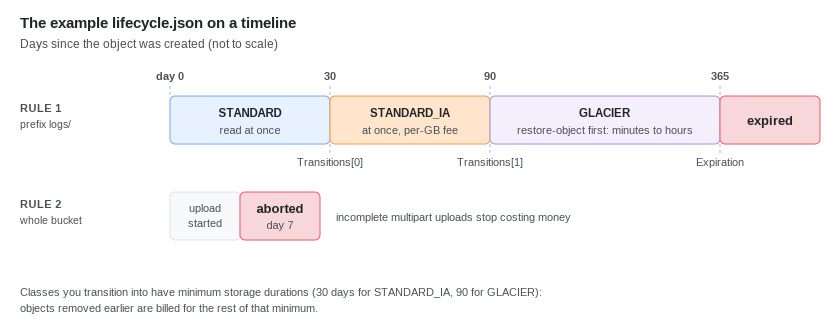
What “minimum storage duration” means. It is not a lock and not a waiting time: you can delete, overwrite or move the object whenever you like. It is a billing floor: S3 charges each object for at least that many days in the class, so leaving early costs the remaining days anyway, as a pro-rated early delete charge (it shows on the bill as
EarlyDelete-SIA,EarlyDelete-GIR,EarlyDelete-ByteHrsand so on). In us-east-1:
- 1 GB in
STANDARD_IAdeleted after 10 days: 10 days of storage + 20 days early delete = 30 days, $0.0125.- 1 GB in
GLACIERdeleted after 30 days: 90 days billed, about $0.0108 instead of $0.0036.- Overwriting counts as deleting. A file rewritten every day under the same key in
STANDARD_IApays 30 days for each daily version, about 30 times the storage you see. (With versioning on, the old versions are not deleted at all: they stay and are billed until a lifecycle rule expires them.)- A lifecycle transition is an exit too: moving an object from
STANDARD_IAtoGLACIERafter 10 days pays the other 20 days ofSTANDARD_IA.Minimum billable size works the same way for size: a 10 KB object in
STANDARD_IA,ONEZONE_IAorGLACIER_IRis billed as 128 KB. Both rules make these classes a bad fit for small or short-lived objects; keep those inSTANDARDorINTELLIGENT_TIERING(no minimum duration, no minimum size).
A GLACIER or DEEP_ARCHIVE object also pays for 40 KB of metadata (8 KB at the STANDARD rate), which outweighs the saving for
objects of a few KB. Restoring creates a temporary copy billed at the STANDARD rate for the days you ask for.
Rules of thumb from the same prices: STANDARD_IA saves $0.0105/GB-month and charges $0.01/GB read, so it only pays
when you read less than about all of the data once a month; GLACIER_IR against STANDARD breaks even at reading
roughly 60% of the data a month. When you cannot predict access, INTELLIGENT_TIERING makes that choice per object
with no retrieval fee.
Which class? Typical scenarios (and exam questions):
| Scenario | Class |
|---|---|
| Active data, read many times a month | STANDARD |
| Access you cannot predict, or that changes over time | INTELLIGENT_TIERING |
| Single-digit ms reads, storage next to the compute in one AZ | EXPRESS_ONEZONE |
| Only copy of the data, read about once a month | STANDARD_IA |
| Data you can re-create (thumbnails, transcodes), or the copy in a Cross-Region Replication destination | ONEZONE_IA |
| Read about once a quarter but needed at once (medical images, news archives) | GLACIER_IR |
| Backups read once or twice a year, minutes to hours is fine | GLACIER |
| Kept 7–10 years for compliance, retrieval within 12 hours is fine | DEEP_ARCHIVE |
Restore times for restore-object (the Tier in GlacierJobParameters):
| Class | Expedited | Standard (default) | Bulk |
|---|---|---|---|
GLACIER (Flexible Retrieval) |
1–5 minutes | 3–5 hours | 5–12 hours |
DEEP_ARCHIVE |
not available | within 12 hours | within 48 hours |
After a restore the object keeps its class: restore-object makes a temporary copy next to the archive, and
head-object shows both:
aws s3api head-object --bucket my-bucket --key file.txt --query '[StorageClass,Restore]'
[
    "GLACIER",
    "ongoing-request=\"false\", expiry-date=\"Tue, 10 Nov 2026 21:47:52 GMT\""
]
ongoing-request="true"while the restore runs; once it isfalse, a normal GET reads the copy.- The copy expires at midnight UTC after the number of days you asked for, rounded up to the next day.
- To keep it longer, send
restore-objectagain with the newDays(counted from the new request); it does not retrieve the data again. - Until it expires you pay for both: the archive at its own rate and the copy at the
STANDARDrate. - To really move the object out of the archive, copy it onto itself with a new class once the restore is done
(
aws s3 cp s3://my-bucket/file.txt s3://my-bucket/file.txt --storage-class STANDARD --force-glacier-transfer).
Intelligent-Tiering moves each object by itself: to Infrequent Access after 30 days without access, to Archive
Instant Access after 90, and back to Frequent Access on the next read. Two archive tiers are optional and need
restore-object like Glacier:
# Turn on the Archive Access (90 days) and Deep Archive Access (180 days) tiers
aws s3api put-bucket-intelligent-tiering-configuration --bucket my-bucket --id archive-all \
  --intelligent-tiering-configuration '{"Id":"archive-all","Status":"Enabled","Tierings":[{"Days":90,"AccessTier":"ARCHIVE_ACCESS"},{"Days":180,"AccessTier":"DEEP_ARCHIVE_ACCESS"}]}'

# Later archiving for one prefix: a year without access, then two years (730 days is the maximum)
aws s3api put-bucket-intelligent-tiering-configuration --bucket my-bucket --id archive-late \
  --intelligent-tiering-configuration '{"Id":"archive-late","Status":"Enabled","Filter":{"Prefix":"logs/"},"Tierings":[{"Days":365,"AccessTier":"ARCHIVE_ACCESS"},{"Days":730,"AccessTier":"DEEP_ARCHIVE_ACCESS"}]}'
Daysis at least 90 for Archive Access and 180 for Deep Archive Access, at most 730 for both.- Archive Access at 90 days takes objects there instead of Archive Instant Access, which is a little cheaper but no longer instant. Use a larger value to keep the instant tier in between.
- Restore times: Archive Access 3–5 hours (Standard) or 1–5 minutes (Expedited, paid); Deep Archive Access within 12 hours. Standard and Bulk restores are free, and a restored object goes back to the Frequent Access tier.
# Change storage class of existing object (copy in place)
aws s3 cp s3://my-bucket/file.txt s3://my-bucket/file.txt --storage-class GLACIER

# Check storage class of an object (null means STANDARD)
aws s3api head-object --bucket my-bucket --key file.txt --query 'StorageClass'
A copy onto itself must change something (storage class, metadata, encryption); otherwise S3 refuses it:
InvalidRequest ... trying to copy an object to itself without changing the object's metadata, storage class, website redirect location or encryption attributes.
Express One Zone (Directory Buckets)
EXPRESS_ONEZONE lives only in directory buckets, which sit in one Availability Zone and have names ending in
--<zone-id>--x-s3:
# Directory bucket in use1-az4 (a zone ID, not a zone name like us-east-1a)
aws s3api create-bucket --bucket my-bucket--use1-az4--x-s3 \
  --create-bucket-configuration 'Location={Type=AvailabilityZone,Name=use1-az4},Bucket={DataRedundancy=SingleAvailabilityZone,Type=Directory}'

# List directory buckets (list-buckets shows general purpose buckets only)
aws s3api list-directory-buckets --query 'Buckets[].Name'

# Append to an existing object: the offset must equal its current size
aws s3api put-object --bucket my-bucket--use1-az4--x-s3 --key app.log --body more.log --write-offset-bytes 6
- Appends are for logs or media written over time: up to 5 GB per append and 10,000 parts per object (
TooManyPartsafter that; copy the object to reset the count). - Only directory buckets support appends and
RenameObject; they do not support lifecycle transitions to other classes, so data stays inEXPRESS_ONEZONEuntil you copy it to a general purpose bucket. - Put the compute in the same zone ID to get the single-digit-ms latency; from other zones it still works, slower.
Reduced Redundancy and Outposts
-
REDUCED_REDUNDANCY(RRS) is kept for old data only: it is designed for 99.99% durability and now costs more thanSTANDARD. A lost RRS object returns 405, and S3 can tell you when it happens:aws s3api put-bucket-notification-configuration --bucket my-bucket --notification-configuration \ '{"TopicConfigurations":[{"TopicArn":"arn:aws:sns:us-east-1:123456789012:s3-alerts","Events":["s3:ReducedRedundancyLostObject"]}]}'Move such data to
STANDARD, or toONEZONE_IAif it is re-creatable and rarely read. -
OUTPOSTSis the only class on S3 on Outposts buckets, and works nowhere else: in a Region bucket it fails withInvalidStorageClass: The storage class you specified is not valid. Objects there are encrypted with SSE-S3 or SSE-C; SSE-KMS is not supported.
Cost Checks
The usual waste: incomplete multipart uploads (abort them with the rule in Lifecycle Rules), noncurrent versions that pile
up in versioned buckets, and data that sits in STANDARD long after anyone reads it.
# Expire noncurrent versions after 30 days, but always keep the 3 newest ones
aws s3api put-bucket-lifecycle-configuration --bucket my-bucket --lifecycle-configuration '{
  "Rules": [{
    "ID": "expire-noncurrent",
    "Status": "Enabled",
    "Filter": {},
    "NoncurrentVersionExpiration": {"NoncurrentDays": 30, "NewerNoncurrentVersions": 3}
  }]
}'

# Bytes per storage class from CloudWatch (free daily metric; StorageType: StandardStorage,
# StandardIAStorage, GlacierInstantRetrievalStorage, GlacierStorage, DeepArchiveStorage, ...)
aws cloudwatch get-metric-statistics --namespace AWS/S3 --metric-name BucketSizeBytes \
  --dimensions Name=BucketName,Value=my-bucket Name=StorageType,Value=StandardStorage \
  --start-time 2026-11-01T00:00:00Z --end-time 2026-11-03T00:00:00Z --period 86400 --statistics Average

# Storage Class Analysis: watches how often objects under logs/ are read, to pick the transition day
aws s3api put-bucket-analytics-configuration --bucket my-bucket --id logs \
  --analytics-configuration '{"Id":"logs","Filter":{"Prefix":"logs/"},"StorageClassAnalysis":{}}'

# S3 Storage Lens dashboards (every account has default-account-dashboard)
aws s3control list-storage-lens-configurations --account-id 123456789012

# Monthly budget for S3 with an email at 80% of the forecast
aws budgets create-budget --account-id 123456789012 \
  --budget '{"BudgetName":"s3-monthly","BudgetLimit":{"Amount":"100","Unit":"USD"},"TimeUnit":"MONTHLY","BudgetType":"COST","CostFilters":{"Service":["Amazon Simple Storage Service"]}}' \
  --notifications-with-subscribers '[{"Notification":{"NotificationType":"FORECASTED","ComparisonOperator":"GREATER_THAN","Threshold":80,"ThresholdType":"PERCENTAGE"},"Subscribers":[{"SubscriptionType":"EMAIL","Address":"ops@example.com"}]}]'
Storage Class Analysis only recommends transitions from STANDARD to STANDARD_IA, and it is a paid feature. Storage
Lens has a Cost optimization view with the bytes in incomplete multipart uploads older than 7 days and in
noncurrent versions, per bucket: the first two things to clean up.
S3 Concepts
Buckets
- Buckets are containers for objects (files), created in one Region
- Bucket names must be globally unique within a partition (
aws,aws-cn,aws-us-gov,aws-eusc) - Up to 10,000 general purpose buckets per account by default (more through Service Quotas); no limit on objects per bucket
- Naming rules:
- 3–63 characters long (a 2-character name fails with
InvalidBucketName) - Only lowercase letters, numbers, periods (
.) and hyphens (-); no uppercase, no underscores - Must begin and end with a letter or number, no two adjacent periods
- Cannot be formatted as an IP address (
192.168.5.4) - Must not start with
xn--,sthree-oramzn-s3-demo-, nor end with-s3alias,--ol-s3,.mrap,--x-s3or--table-s3 - No periods if you want Transfer Acceleration (or HTTPS with virtual-host-style URLs)
- 3–63 characters long (a 2-character name fails with
- After a bucket is deleted, its name can be taken by another account, which then receives requests meant for yours. Empty a bucket you no longer need instead of deleting it if anything may still point at it, or create buckets in your account regional namespace (below), whose names no other account can ever take.
Objects
- Objects have a key — the full path within the bucket:
s3://my-bucket/my_file.txt
s3://my-bucket/my_folder1/another_folder/my_file.txt
- The key is composed of prefix + object name — there’s no concept of directories (just keys with slashes)
- Object values are the content of the body:
- Max object size: 50 TB (multipart upload)
- Max single
PUT: 5 GB; larger objects need multipart upload (aws s3 cpdoes this automatically)
- Metadata: list of text key/value pairs (system metadata such as
Content-Type, user metadata up to 2 KB) - Tags: Unicode key/value pairs, up to 10 per object (key up to 128, value up to 255 characters) — useful for lifecycle rules and access policies
- Version ID: present if versioning is enabled
- Consistency: strong read-after-write for object PUT, DELETE and LIST; bucket configuration changes (versioning, policies) are eventually consistent
Quick Reference
| Action | Command |
|---|---|
| List buckets | aws s3 ls |
| List objects in bucket | aws s3 ls s3://bucket-name/ |
| Copy file to S3 | aws s3 cp file.txt s3://bucket-name/ |
| Copy file from S3 | aws s3 cp s3://bucket-name/file.txt . |
| Sync local to S3 | aws s3 sync . s3://bucket-name/ |
| Remove object | aws s3 rm s3://bucket-name/file.txt |
| Create bucket | aws s3 mb s3://bucket-name |
| Delete bucket | aws s3 rb s3://bucket-name |
| Move object | aws s3 mv s3://bucket/old.txt s3://bucket/new.txt |
| Presigned URL | aws s3 presign s3://bucket-name/file.txt |
Bucket Operations
Create and Delete Buckets
# Create a bucket
aws s3 mb s3://my-bucket

# Create a bucket in a specific region
aws s3 mb s3://my-bucket --region eu-west-1

# Delete an empty bucket
aws s3 rb s3://my-bucket

# Delete a bucket and all its contents
aws s3 rb s3://my-bucket --force
Account Regional Namespace
A bucket name ending in -<account-id>-<region>-an, created with --bucket-namespace account-regional, can only
ever belong to your account: another account’s CreateBucket with that suffix is rejected, even after you delete the bucket.
# Create a bucket in your account regional namespace (us-west-1, account 123456789012)
aws s3api create-bucket \
  --bucket my-bucket-123456789012-us-west-1-an \
  --bucket-namespace account-regional \
  --region us-west-1 \
  --create-bucket-configuration LocationConstraint=us-west-1
- The suffix counts toward the 63 characters: with
-123456789012-us-east-1-anthere are 37 left for the prefix. - Not available in Middle East (Bahrain) and Middle East (UAE).
- To require it, deny
s3:CreateBucketin an IAM policy or SCP when the condition keys3:x-amz-bucket-namespaceis notaccount-regional.
rb on a bucket that still has objects fails:
remove_bucket failed: s3://tmp-b An error occurred (BucketNotEmpty) when calling the DeleteBucket operation: The bucket you tried to delete is not empty
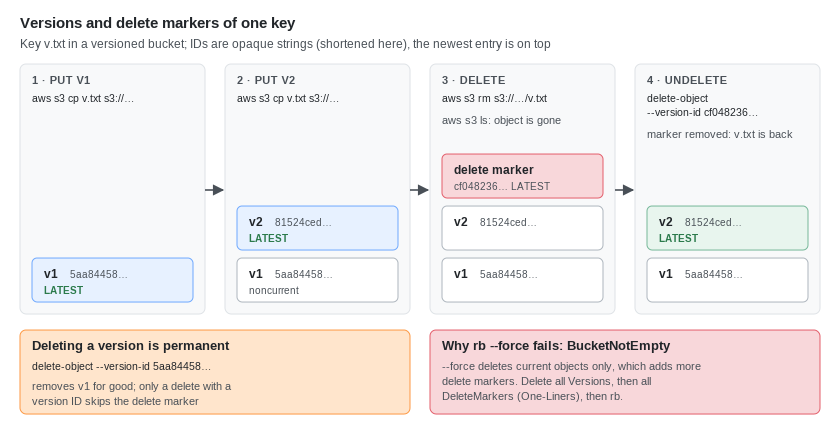
--force deletes the objects first. It does not remove old versions or delete markers of a versioned bucket; empty
those first (see One-Liners).
List Buckets
# List all buckets with their creation dates
aws s3 ls

# Names only
aws s3api list-buckets --query 'Buckets[].Name' --output text

# Names and Regions (BucketRegion is returned only when the request has a parameter;
# --page-size sends max-buckets)
aws s3api list-buckets --page-size 1000 --query 'Buckets[].[Name,BucketRegion]' --output text
Object Operations
List Objects
# List objects in a bucket (prefixes are shown as PRE)
aws s3 ls s3://my-bucket/

# List objects recursively
aws s3 ls s3://my-bucket/ --recursive

# List with human-readable sizes
aws s3 ls s3://my-bucket/ --recursive --human-readable

# List with summary (total size and count)
aws s3 ls s3://my-bucket/ --recursive --human-readable --summarize

# List objects in a prefix (folder)
aws s3 ls s3://my-bucket/logs/2024/
Output of the first and the summary listing:
# aws s3 ls (top level)
                           PRE logs/
2026-11-01 23:18:19          2 b.txt
2026-11-01 23:18:17          6 file.txt

# --recursive --human-readable --summarize
2026-11-01 23:18:19    2 Bytes b.txt
2026-11-01 23:18:17    6 Bytes file.txt
2026-11-01 23:18:19    2.9 KiB logs/2024/a.log

Total Objects: 3
   Total Size: 2.9 KiB
Copy Objects
# Upload a file to S3
aws s3 cp file.txt s3://my-bucket/

# Upload to a specific prefix (folder)
aws s3 cp file.txt s3://my-bucket/backups/

# Download a file from S3
aws s3 cp s3://my-bucket/file.txt .

# Download to a specific local path
aws s3 cp s3://my-bucket/file.txt /tmp/downloaded.txt

# Copy between buckets
aws s3 cp s3://source-bucket/file.txt s3://dest-bucket/

# Copy an entire folder recursively
aws s3 cp /local/dir/ s3://my-bucket/dir/ --recursive

# Copy with a specific storage class
aws s3 cp file.txt s3://my-bucket/ --storage-class STANDARD_IA

# Copy with server-side encryption
aws s3 cp file.txt s3://my-bucket/ --sse AES256
aws s3 cp file.txt s3://my-bucket/ --sse aws:kms --sse-kms-key-id key-id

# Copy with metadata
aws s3 cp file.txt s3://my-bucket/ --metadata '{"env":"prod","team":"ops"}'

# Copy with content type (only needed to override the type guessed from the extension)
aws s3 cp index.html s3://my-bucket/ --content-type "text/html"

# Dry run (show what would be copied)
aws s3 cp /local/dir/ s3://my-bucket/dir/ --recursive --dryrun
The CLI guesses Content-Type from the extension: in the test .html, .css and .js got text/html, text/css
and text/javascript without any option.
Move Objects
# Move (rename) an object within a bucket
aws s3 mv s3://my-bucket/old-name.txt s3://my-bucket/new-name.txt

# Move from local to S3
aws s3 mv file.txt s3://my-bucket/

# Move from S3 to local
aws s3 mv s3://my-bucket/file.txt .

# Move between buckets
aws s3 mv s3://source-bucket/file.txt s3://dest-bucket/

# Move an entire folder
aws s3 mv s3://my-bucket/old-prefix/ s3://my-bucket/new-prefix/ --recursive
A move is a copy plus a delete: the output says move:, and a “renamed” object gets a new LastModified.
Remove Objects
# Delete a single object
aws s3 rm s3://my-bucket/file.txt

# Delete all objects in a prefix (folder)
aws s3 rm s3://my-bucket/logs/ --recursive

# Delete all objects in a bucket
aws s3 rm s3://my-bucket/ --recursive

# Dry run (show what would be deleted)
aws s3 rm s3://my-bucket/logs/ --recursive --dryrun

# Delete with include/exclude filters (only .log files)
aws s3 rm s3://my-bucket/ --recursive --exclude "*" --include "*.log"
Sync
sync compares source and destination by size and modification time (never content) and transfers only new or
changed files. The details, including the same-size download trap, are in the AWS S3 Sync guide.
# Sync local directory to S3
aws s3 sync . s3://my-bucket/

# Sync S3 to local directory
aws s3 sync s3://my-bucket/ .

# Sync between buckets
aws s3 sync s3://source-bucket/ s3://dest-bucket/

# Sync and delete files that don't exist in source
aws s3 sync . s3://my-bucket/ --delete

# Sync with exclude patterns
aws s3 sync . s3://my-bucket/ --exclude "*.tmp" --exclude ".git/*"

# Sync with include patterns (exclude everything else first)
aws s3 sync . s3://my-bucket/ --exclude "*" --include "*.log"

# Dry run
aws s3 sync . s3://my-bucket/ --dryrun

# Sync with specific storage class
aws s3 sync . s3://my-bucket/ --storage-class GLACIER
There is no size filter: --exclude "*" --include "*" --size-only uploads every file (a 1-byte file was uploaded in
the test). --acl public-read fails on buckets with ACLs disabled, the default for new buckets
(AccessControlListNotSupported); use a bucket policy instead.
Sync Behavior
| Flag | Description |
|---|---|
--delete |
Delete destination files not in source (excluded files are kept) |
--exact-timestamps |
S3 to local only: download same-size files whose times differ at all |
--size-only |
Only compare file size, ignore timestamps (misses same-size edits) |
--exclude / --include |
Filters, evaluated in order: the last matching filter wins |
--dryrun |
Show what would happen without doing it |
Include/Exclude Filters
Every file is included by default. Filters are evaluated in the order given and the last one that matches wins, so to keep only some files, exclude everything first and include after:
# Upload only .log files
aws s3 cp /var/log/ s3://my-bucket/logs/ --recursive --exclude "*" --include "*.log"

# Upload only files in a specific subfolder
aws s3 sync . s3://my-bucket/ --exclude "*" --include "data/*"
--include "*.log" --exclude "*" (the other way round) transfers nothing. * also matches /, so "*.log" matches
sub/a.log too.
Presigned URLs
Generate temporary access URLs for private objects:
# Generate a presigned URL (default: 1 hour expiry)
aws s3 presign s3://my-bucket/file.txt

# Generate with custom expiry (seconds)
aws s3 presign s3://my-bucket/file.txt --expires-in 3600

# 7-day expiry (maximum)
aws s3 presign s3://my-bucket/file.txt --expires-in 604800
The default is X-Amz-Expires=3600. The CLI also signs --expires-in 604801 without an error, but more than 7 days
is not valid on S3. For Regions launched after March 20, 2019, add --region and the Regional --endpoint-url
(https://s3.<region>.amazonaws.com).
s3api Commands
Lower-level API commands for advanced operations:
Bucket Configuration
# Get bucket location (region; null means us-east-1)
aws s3api get-bucket-location --bucket my-bucket

# Get bucket versioning status (empty output = never enabled)
aws s3api get-bucket-versioning --bucket my-bucket

# Enable versioning
aws s3api put-bucket-versioning --bucket my-bucket \
  --versioning-configuration Status=Enabled

# Suspend versioning
aws s3api put-bucket-versioning --bucket my-bucket \
  --versioning-configuration Status=Suspended
Versioning notes:
- Overwriting a key creates a new version with its own opaque version ID (for example
9b9a643e-dd0a-...), not a counter 1, 2, 3 - Protects against unintended deletes: a delete adds a delete marker and the previous versions stay restorable
- Objects uploaded before versioning was enabled have the version ID
null - Suspending versioning does not delete previous versions
- A plain GET of a key whose latest version is a delete marker fails with
NoSuchKey(404); a GET with--version-idof an older version still works - AWS recommends waiting 15 minutes after enabling versioning for the first time before writing to the bucket
# Get bucket encryption
aws s3api get-bucket-encryption --bucket my-bucket

# Enable default encryption (SSE-S3)
aws s3api put-bucket-encryption --bucket my-bucket \
  --server-side-encryption-configuration '{
    "Rules": [{"ApplyServerSideEncryptionByDefault": {"SSEAlgorithm": "AES256"}}]
  }'

# Enable default encryption (SSE-KMS)
aws s3api put-bucket-encryption --bucket my-bucket \
  --server-side-encryption-configuration '{
    "Rules": [{"ApplyServerSideEncryptionByDefault": {"SSEAlgorithm": "aws:kms", "KMSMasterKeyID": "key-id"}}]
  }'
Encryption methods:
| Method | Description |
|---|---|
| SSE-S3 | Keys managed by S3 (AES-256). The default for every bucket since January 2023 |
| SSE-KMS | Keys in AWS KMS — key policies, audit trail via CloudTrail |
| DSSE-KMS | Two layers of encryption with KMS keys, for compliance rules that require it. Set with s3api ... --server-side-encryption aws:kms:dsse or as bucket default; aws s3 --sse accepts only AES256 and aws:kms |
| SSE-C | Customer-provided keys — you send the key with every request. Disabled by default for new buckets since April 2026 (AccessDenied until enabled with PutBucketEncryption) |
| Client-side | Encrypt before uploading — AWS never sees plaintext |
# Get bucket tagging (NoSuchTagSet if there are none)
aws s3api get-bucket-tagging --bucket my-bucket

# Set bucket tags (replaces all existing tags)
aws s3api put-bucket-tagging --bucket my-bucket \
  --tagging 'TagSet=[{Key=Environment,Value=prod},{Key=Team,Value=ops}]'
Object Operations
# Get object metadata (head)
aws s3api head-object --bucket my-bucket --key file.txt

# Get object with specific version
aws s3api get-object --bucket my-bucket --key file.txt --version-id version-id output.txt

# List object versions
aws s3api list-object-versions --bucket my-bucket --prefix file.txt

# Delete a specific version (permanent)
aws s3api delete-object --bucket my-bucket --key file.txt --version-id version-id

# Restore object from Glacier (Tier: Expedited, Standard or Bulk)
aws s3api restore-object --bucket my-bucket --key file.txt \
  --restore-request '{"Days":7,"GlacierJobParameters":{"Tier":"Standard"}}'

# Check restore progress (ongoing-request="true" while it runs)
aws s3api head-object --bucket my-bucket --key file.txt --query Restore

# Put object with tagging
aws s3api put-object --bucket my-bucket --key file.txt --body file.txt \
  --tagging "env=prod&team=ops"

# Get object tags
aws s3api get-object-tagging --bucket my-bucket --key file.txt
Conditional Writes
Stop two writers from overwriting each other without a lock service:
# Create the object only if the key does not exist yet
aws s3api put-object --bucket my-bucket --key once.txt --body file.txt --if-none-match '*'

# Overwrite only if nobody changed it since you read it (compare-and-swap on the ETag)
ETAG=$(aws s3api head-object --bucket my-bucket --key once.txt --query ETag --output text)
aws s3api put-object --bucket my-bucket --key once.txt --body file.txt --if-match "$ETAG"
When the condition does not hold, the write fails with exit code 254:
aws: [ERROR]: An error occurred (PreconditionFailed) when calling the PutObject operation: At least one of the pre-conditions you specified did not hold
Access Control
# Get bucket ACL
aws s3api get-bucket-acl --bucket my-bucket

# Get bucket policy (returned as a JSON string; pretty-printed here)
aws s3api get-bucket-policy --bucket my-bucket --query Policy --output text | python3 -m json.tool

# Put bucket policy from file
aws s3api put-bucket-policy --bucket my-bucket --policy file://policy.json

# Delete bucket policy
aws s3api delete-bucket-policy --bucket my-bucket

# Is the bucket public through its policy? (PolicyStatus.IsPublic)
aws s3api get-bucket-policy-status --bucket my-bucket

# Block all public access
aws s3api put-public-access-block --bucket my-bucket \
  --public-access-block-configuration \
  BlockPublicAcls=true,IgnorePublicAcls=true,BlockPublicPolicy=true,RestrictPublicBuckets=true

# Get public access block settings
aws s3api get-public-access-block --bucket my-bucket
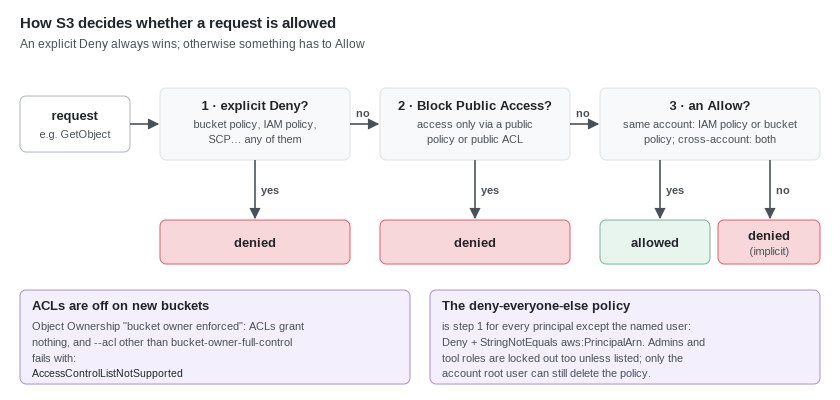
New buckets have ACLs disabled (Object Ownership “bucket owner enforced”): uploads with any ACL other than
bucket-owner-full-control fail with AccessControlListNotSupported. Control access with policies.
# Check the Object Ownership setting (BucketOwnerEnforced = ACLs disabled)
aws s3api get-bucket-ownership-controls --bucket my-bucket \
  --query 'OwnershipControls.Rules[0].ObjectOwnership'

# Re-enable ACLs for a legacy workload (BucketOwnerPreferred or ObjectWriter)
aws s3api put-bucket-ownership-controls --bucket my-bucket \
  --ownership-controls 'Rules=[{ObjectOwnership=BucketOwnerPreferred}]'

# Set it when creating a bucket
aws s3api create-bucket --bucket my-bucket --object-ownership BucketOwnerEnforced
BucketOwnerPreferred: the bucket owner owns objects uploaded with bucket-owner-full-control, ACLs work again.
ObjectWriter: the uploading account owns the object. Re-enabling ACLs brings back any old object ACLs.
ACL permissions, if ACLs are enabled (grantees are AWS accounts by canonical user ID or a predefined group such as
http://acs.amazonaws.com/groups/global/AllUsers, never an IAM user; up to 100 grants per ACL):
| Permission | On a bucket | On an object |
|---|---|---|
READ |
List the objects (s3:ListBucket) |
Read the data and metadata (s3:GetObject) |
WRITE |
Create objects (s3:PutObject) |
Not applicable |
READ_ACP |
Read the bucket ACL | Read the object ACL |
WRITE_ACP |
Change the bucket ACL | Change the object ACL |
FULL_CONTROL |
All four above | READ, READ_ACP and WRITE_ACP |
# Read an object's ACL (reading ACLs still works when ACLs are disabled)
aws s3api get-object-acl --bucket my-bucket --key file.txt
Restrict a Bucket to a Specific User
IAM roles cannot be assigned directly to S3 buckets. To restrict access, use an IAM policy on the user, a bucket policy on the bucket, or both.
IAM Policy on the User — grant access only to a specific bucket:
{
  "Version": "2012-10-17",
  "Statement": [
    {
      "Effect": "Allow",
      "Action": "s3:*",
      "Resource": [
        "arn:aws:s3:::my-private-bucket",
        "arn:aws:s3:::my-private-bucket/*"
      ]
    }
  ]
}
Bucket Policy (Deny Everyone Else) — deny all principals except a specific user:
{
  "Version": "2012-10-17",
  "Statement": [
    {
      "Effect": "Deny",
      "Principal": "*",
      "Action": "s3:*",
      "Resource": [
        "arn:aws:s3:::my-private-bucket",
        "arn:aws:s3:::my-private-bucket/*"
      ],
      "Condition": {
        "StringNotEquals": {
          "aws:PrincipalArn": "arn:aws:iam::123456789012:user/specific-user"
        }
      }
    }
  ]
}
| Approach | Controls | Use when |
|---|---|---|
| IAM policy | What the user can do | You want to grant access to the user |
| Bucket policy | Who can touch the bucket | You want to lock down the bucket itself |
Best practices:
- Replace
s3:*with specific actions (s3:GetObject,s3:PutObject) for least-privilege - An explicit
Denyoverrides any otherAllow, even from other policies - Always include both the bucket ARN and the objects ARN (
/*) in the Resource field - For strongest isolation, use both approaches together
- The Deny-everyone-else policy also locks out other admins and roles (including the ones your tools use): add their ARNs to the condition first. Only the account root user can still delete a policy that locks everyone out
Give Each User a Home Folder
Several users share one bucket; JohnDoe may list the bucket root and home/, list his own folder, and do anything
inside home/JohnDoe/, but not see other users’ folders. This is the AWS example, with s3:prefix and s3:delimiter
limiting what ListBucket may return:
{
  "Version": "2012-10-17",
  "Statement": [
    {
      "Sid": "AllowRootAndHomeListing",
      "Effect": "Allow",
      "Principal": {"AWS": "arn:aws:iam::123456789012:user/JohnDoe"},
      "Action": "s3:ListBucket",
      "Resource": "arn:aws:s3:::my-bucket",
      "Condition": {
        "StringEquals": {
          "s3:prefix": ["", "home/", "home/JohnDoe"],
          "s3:delimiter": ["/"]
        }
      }
    },
    {
      "Sid": "AllowListingOfUserFolder",
      "Effect": "Allow",
      "Principal": {"AWS": "arn:aws:iam::123456789012:user/JohnDoe"},
      "Action": "s3:ListBucket",
      "Resource": "arn:aws:s3:::my-bucket",
      "Condition": {"StringLike": {"s3:prefix": ["home/JohnDoe/*"]}}
    },
    {
      "Sid": "AllowAllS3ActionsInUserFolder",
      "Effect": "Allow",
      "Principal": {"AWS": "arn:aws:iam::123456789012:user/JohnDoe"},
      "Action": "s3:*",
      "Resource": "arn:aws:s3:::my-bucket/home/JohnDoe/*"
    }
  ]
}
ListBucketis a bucket-level action (Resource is the bucket ARN, the folder goes ins3:prefix); object actions use the/home/JohnDoe/*object ARN.- Within one account an IAM policy on the user (or a role users switch to) does the same without touching the bucket policy; across accounts both policies must allow it.
See also AWS IAM Concepts Guide.
Object Lock (WORM)
Object Lock keeps object versions from being deleted or overwritten for a retention period or under a legal hold. It
needs versioning: a bucket created with --object-lock-enabled-for-bucket gets versioning turned on automatically,
and an existing bucket can be switched on once versioning is enabled.
# New bucket with Object Lock (versioning is enabled with it)
aws s3api create-bucket --bucket locked-bucket --object-lock-enabled-for-bucket

# Or on an existing, versioned bucket
aws s3api put-object-lock-configuration --bucket my-bucket \
  --object-lock-configuration '{"ObjectLockEnabled":"Enabled"}'

# Default retention for every new object version: 30 days, governance mode
aws s3api put-object-lock-configuration --bucket locked-bucket \
  --object-lock-configuration '{"ObjectLockEnabled":"Enabled","Rule":{"DefaultRetention":{"Mode":"GOVERNANCE","Days":30}}}'
aws s3api get-object-lock-configuration --bucket locked-bucket

# Retention on one object (compliance mode, 1 year; GNU date)
aws s3api put-object-retention --bucket locked-bucket --key report.pdf \
  --retention "{\"Mode\":\"COMPLIANCE\",\"RetainUntilDate\":\"$(date -u -d '+1 year' +%Y-%m-%dT00:00:00Z)\"}"
aws s3api get-object-retention --bucket locked-bucket --key report.pdf

# Legal hold: no end date, stays until removed
aws s3api put-object-legal-hold --bucket locked-bucket --key evidence.txt --legal-hold Status=ON
aws s3api put-object-legal-hold --bucket locked-bucket --key evidence.txt --legal-hold Status=OFF
aws s3api get-object-legal-hold --bucket locked-bucket --key evidence.txt

# Delete a governance-locked version (needs s3:BypassGovernanceRetention)
aws s3api delete-object --bucket locked-bucket --key report.pdf --version-id version-id --bypass-governance-retention
| Governance | Compliance | Legal hold | |
|---|---|---|---|
| Delete or overwrite the version | Only with s3:BypassGovernanceRetention and --bypass-governance-retention |
Nobody, not even the root user | Nobody until it is removed |
| Shorten or remove | Same permission | No (only extend) | Anyone with s3:PutObjectLegalHold |
| Ends | Retain-until date | Retain-until date | When turned off |
- Deleting a locked version with
--version-idfails withAccessDenied; a plain delete without a version ID succeeds but only adds a delete marker, and the locked version stays. - A legal hold blocks the delete even with
--bypass-governance-retention. - Compliance mode is final: the only way to remove such a version early is to close the AWS account. Try the settings in governance mode first.
Lifecycle Rules
# Get lifecycle configuration
aws s3api get-bucket-lifecycle-configuration --bucket my-bucket

# Set lifecycle rules from file (replaces all existing rules)
aws s3api put-bucket-lifecycle-configuration --bucket my-bucket \
  --lifecycle-configuration file://lifecycle.json

# Delete lifecycle configuration
aws s3api delete-bucket-lifecycle --bucket my-bucket
Example lifecycle.json
{
  "Rules": [
    {
      "ID": "Move to IA after 30 days",
      "Status": "Enabled",
      "Filter": {"Prefix": "logs/"},
      "Transitions": [
        {"Days": 30, "StorageClass": "STANDARD_IA"},
        {"Days": 90, "StorageClass": "GLACIER"}
      ],
      "Expiration": {"Days": 365}
    },
    {
      "ID": "Delete incomplete multipart uploads",
      "Status": "Enabled",
      "Filter": {"Prefix": ""},
      "AbortIncompleteMultipartUpload": {"DaysAfterInitiation": 7}
    }
  ]
}
Multipart Uploads
Required above 5 GB per object, and used automatically by aws s3 cp/sync for files from 8 MB (the default
multipart_threshold). A multipart upload has up to 10,000 parts.
# Configure multipart threshold and chunk size (written to [default] in ~/.aws/config)
aws configure set s3.multipart_threshold 64MB
aws configure set s3.multipart_chunksize 16MB

# List incomplete multipart uploads
aws s3api list-multipart-uploads --bucket my-bucket

# Abort a specific multipart upload
aws s3api abort-multipart-upload --bucket my-bucket --key file.txt --upload-id upload-id

# Abort all incomplete multipart uploads (keys with spaces are kept whole; "None" = nothing to abort)
aws s3api list-multipart-uploads --bucket my-bucket \
  --query 'Uploads[].[Key,UploadId]' --output text | \
  while IFS=$'\t' read -r key upload_id; do
    [ "$key" = None ] && continue
    aws s3api abort-multipart-upload --bucket my-bucket --key "$key" --upload-id "$upload_id"
  done
Unfinished uploads are billed until aborted; the AbortIncompleteMultipartUpload lifecycle rule above cleans them up automatically.
Transfer Acceleration
# Enable transfer acceleration on a bucket
aws s3api put-bucket-accelerate-configuration --bucket my-bucket \
  --accelerate-configuration Status=Enabled

# Use accelerated endpoint
aws s3 cp file.txt s3://my-bucket/ --endpoint-url https://s3-accelerate.amazonaws.com

# Check acceleration status
aws s3api get-bucket-accelerate-configuration --bucket my-bucket
The bucket name must be DNS-compliant with no periods, and ListBuckets, CreateBucket and DeleteBucket are not
supported on the accelerate endpoint. To use it for every aws s3 command, set aws configure set default.s3.use_accelerate_endpoint true.
Once enabled it can only be Suspended; Status=Disabled fails with MalformedXML.
Details: S3 Transfer Acceleration.
Requester Pays
The requester, not the bucket owner, pays for requests and data downloaded. The owner still pays for storage.
# Turn it on (Payer=BucketOwner turns it off)
aws s3api put-bucket-request-payment --bucket my-bucket \
  --request-payment-configuration Payer=Requester
aws s3api get-bucket-request-payment --bucket my-bucket

# Requesters must acknowledge the charge on every call, or get 403
aws s3 cp s3://my-bucket/file.txt . --request-payer requester
aws s3 sync s3://my-bucket/data ./data --request-payer requester
Anonymous requests are not allowed on Requester Pays buckets, and the website endpoint returns 403 for them.
Static Website Hosting
# Enable static website hosting
aws s3 website s3://my-bucket/ --index-document index.html --error-document error.html

# Get website configuration
aws s3api get-bucket-website --bucket my-bucket

# Delete website configuration
aws s3api delete-bucket-website --bucket my-bucket

# Upload the site (Content-Type is guessed from the extension: text/html, text/css, text/javascript)
aws s3 sync ./site/ s3://my-bucket/ --delete
Website endpoint, depending on the Region: http://bucket-name.s3-website-region.amazonaws.com or
http://bucket-name.s3-website.region.amazonaws.com. It serves HTTP only and only publicly readable content;
for HTTPS put CloudFront in front (see the static-site recipe in the AWS S3 Sync guide).
To serve the website endpoint directly, the objects must be publicly readable. Block Public Access rejects a public policy, so turn it off for this bucket first:
aws s3api delete-public-access-block --bucket my-bucket
aws s3api put-bucket-policy --bucket my-bucket --policy file://public-read.json
{
  "Version": "2012-10-17",
  "Statement": [{
    "Sid": "PublicReadForWebsite",
    "Effect": "Allow",
    "Principal": "*",
    "Action": "s3:GetObject",
    "Resource": "arn:aws:s3:::my-bucket/*"
  }]
}
Bucket policies are limited to 20 KB. With CloudFront in front, keep Block Public Access on and allow only the distribution (origin access control) instead.
Bucket Notifications
# Get notification configuration
aws s3api get-bucket-notification-configuration --bucket my-bucket

# Set notification (sends to SNS on object creation)
aws s3api put-bucket-notification-configuration --bucket my-bucket \
  --notification-configuration file://notification.json
Example notification.json
{
  "TopicConfigurations": [
    {
      "TopicArn": "arn:aws:sns:us-east-1:123456789012:s3-events",
      "Events": ["s3:ObjectCreated:*"]
    }
  ]
}
The SNS topic’s access policy must allow s3.amazonaws.com to publish to it. A put-bucket-notification-configuration
replaces the whole configuration.
Other destinations: an SQS queue (QueueConfigurations, the queue policy must allow S3 to send), a Lambda function
(LambdaFunctionConfigurations, after aws lambda add-permission for s3.amazonaws.com), and EventBridge, which
receives all events once switched on. With a prefix/suffix filter, SQS and EventBridge in one configuration:
{
  "QueueConfigurations": [{
    "QueueArn": "arn:aws:sqs:us-east-1:123456789012:s3-events",
    "Events": ["s3:ObjectCreated:*"],
    "Filter": {"Key": {"FilterRules": [
      {"Name": "prefix", "Value": "uploads/"},
      {"Name": "suffix", "Value": ".jpg"}
    ]}}
  }],
  "EventBridgeConfiguration": {}
}
In the test, uploading uploads/a.jpg sent one ObjectCreated:Put record to the queue and other.txt sent none.
The key in the event is URL-encoded ("key": "uploads%2Fa.jpg"): decode it before using it.
Logging and Metrics
The target bucket must let the logging service write to it, otherwise put-bucket-logging fails with
InvalidTargetBucketForLogging. Bucket policy on my-logs-bucket:
{
  "Version": "2012-10-17",
  "Statement": [{
    "Sid": "S3ServerAccessLogsPolicy",
    "Effect": "Allow",
    "Principal": {"Service": "logging.s3.amazonaws.com"},
    "Action": "s3:PutObject",
    "Resource": "arn:aws:s3:::my-logs-bucket/s3-access-logs/*",
    "Condition": {"StringEquals": {"aws:SourceAccount": "123456789012"}}
  }]
}
# Enable server access logging
aws s3api put-bucket-logging --bucket my-bucket \
  --bucket-logging-status '{
    "LoggingEnabled": {
      "TargetBucket": "my-logs-bucket",
      "TargetPrefix": "s3-access-logs/"
    }
  }'

# Get logging configuration
aws s3api get-bucket-logging --bucket my-bucket

# List request metrics configurations (CloudWatch request metrics)
aws s3api list-bucket-metrics-configurations --bucket my-bucket
CORS Configuration
# Get CORS rules
aws s3api get-bucket-cors --bucket my-bucket

# Set CORS rules
aws s3api put-bucket-cors --bucket my-bucket --cors-configuration file://cors.json

# Delete CORS configuration
aws s3api delete-bucket-cors --bucket my-bucket
Example cors.json
{
  "CORSRules": [
    {
      "AllowedHeaders": ["*"],
      "AllowedMethods": ["GET", "PUT", "POST"],
      "AllowedOrigins": ["https://example.com"],
      "ExposeHeaders": ["ETag"],
      "MaxAgeSeconds": 3600
    }
  ]
}
Replication
# Get replication configuration
aws s3api get-bucket-replication --bucket my-bucket

# Set replication (requires versioning enabled on both buckets)
aws s3api put-bucket-replication --bucket my-bucket \
  --replication-configuration file://replication.json

# Delete replication configuration
aws s3api delete-bucket-replication --bucket my-bucket
Example replication.json
{
  "Role": "arn:aws:iam::123456789012:role/s3-replication",
  "Rules": [{
    "ID": "all-objects",
    "Status": "Enabled",
    "Priority": 1,
    "Filter": {},
    "DeleteMarkerReplication": {"Status": "Disabled"},
    "Destination": {"Bucket": "arn:aws:s3:::dest-bucket"}
  }]
}
Without versioning on the source bucket the call fails with
InvalidRequest ... Versioning must be 'Enabled' on the bucket to apply a replication configuration. Replication
copies only objects written after the rule exists; use S3 Batch Replication for existing ones.
- Replicated: new objects (unencrypted, SSE-S3, SSE-KMS once enabled in the rule, SSE-C), metadata, tags, Object Lock retention.
- Not replicated: existing objects, objects in
GLACIER/DEEP_ARCHIVE, replicas of other rules, lifecycle actions, bucket settings (lifecycle, notifications) and deletes with a version ID (a protection against malicious deletes). Delete markers only withDeleteMarkerReplicationenabled. - Replication Time Control replicates 99.9% of objects within 15 minutes; add it to the rule’s
Destination(15is the only valid value):
"Metrics": {"Status": "Enabled", "EventThreshold": {"Minutes": 15}},
"ReplicationTime": {"Status": "Enabled", "Time": {"Minutes": 15}}
Performance and Transfer Configuration
Configure in ~/.aws/config:
[default]
s3 =
  max_concurrent_requests = 20
  max_queue_size = 10000
  multipart_threshold = 64MB
  multipart_chunksize = 16MB
  max_bandwidth = 50MB/s
  use_accelerate_endpoint = false
  addressing_style = path
| Setting | Default | Description |
|---|---|---|
max_concurrent_requests |
10 | Parallel transfer requests |
multipart_threshold |
8MB | File size to trigger multipart upload |
multipart_chunksize |
8MB | Size of each multipart chunk (minimum 5MB) |
max_bandwidth |
None | Bandwidth throttle (e.g., 50MB/s) |
max_queue_size |
1000 | Maximum number of tasks in the queue |
use_accelerate_endpoint |
false | Use transfer acceleration |
preferred_transfer_client |
auto | auto, classic or crt; the CRT client ignores max_bandwidth and max_queue_size |
Useful One-Liners
# Total size of a bucket
aws s3 ls s3://my-bucket/ --recursive --summarize | tail -2

# Count objects in a bucket
aws s3 ls s3://my-bucket/ --recursive | wc -l

# Find largest objects (sort on bytes; --human-readable breaks the sort)
aws s3 ls s3://my-bucket/ --recursive | sort -k3 -rn | head -20

# Find objects older than 90 days (GNU date; macOS: date -u -v-90d +%Y-%m-%d)
aws s3api list-objects-v2 --bucket my-bucket --query \
  "Contents[?LastModified<='$(date -u -d '90 days ago' +%Y-%m-%d)'].{Key:Key,Size:Size,Modified:LastModified}"

# Empty a versioned bucket: all versions, then all delete markers (max 1,000 per call: repeat for more)
for kind in Versions DeleteMarkers; do
  aws s3api list-object-versions --bucket my-bucket --output json \
    --query "{Objects: $kind[].{Key:Key,VersionId:VersionId}}" > /tmp/batch.json
  grep -q '"Objects": null' /tmp/batch.json || \
    aws s3api delete-objects --bucket my-bucket --delete file:///tmp/batch.json
done

# Copy all objects between buckets in different Regions
aws s3 sync s3://source-bucket/ s3://dest-bucket/ --source-region us-east-1 --region eu-west-1

# List all buckets with their region (None = us-east-1)
aws s3api list-buckets --query 'Buckets[].Name' --output text | tr '\t' '\n' | \
  xargs -I{} sh -c 'echo "{}: $(aws s3api get-bucket-location --bucket {} --query LocationConstraint --output text)"'

# Total bytes per storage class
aws s3api list-objects-v2 --bucket my-bucket --query \
  "{STANDARD:sum(Contents[?StorageClass=='STANDARD'].Size), STANDARD_IA:sum(Contents[?StorageClass=='STANDARD_IA'].Size)}"

# Inventory of all objects as CSV (key, size, date, class; works with spaces in keys)
aws s3api list-objects-v2 --bucket my-bucket \
  --query 'Contents[].[Key,Size,LastModified,StorageClass]' --output text | tr '\t' ',' > inventory.csv
What the fixed one-liners return on a test bucket (a 3 MB, a 500 KB and three 1-byte objects, one of them
STANDARD_IA and one named my report.txt):
# total size
Total Objects: 5
   Total Size: 3500003

# largest objects (head -3)
2026-11-01 23:20:45    3000000 big3m.bin
2026-11-01 23:20:45     500000 mid.bin
2026-11-01 23:20:46          1 tiny.txt

# total bytes per storage class (--output json)
{
    "STANDARD": 3500002,
    "STANDARD_IA": 1
}
With --human-readable, the same sort put 488.3 KiB above 2.9 MiB; the old awk inventory cut my report.txt
to my; the old xargs region loop passed all bucket names in one argument; and deleting only Versions left the
delete markers behind (rb then fails with BucketNotEmpty).
Troubleshooting
| Symptom | Cause | Fix |
|---|---|---|
AccessDenied |
Missing IAM permissions, or a bucket policy deny | Check bucket policy and IAM role |
NoSuchBucket |
Bucket doesn’t exist or wrong region | Verify bucket name and --region |
BucketAlreadyExists |
Bucket name globally taken | Choose a different name |
InvalidBucketName |
Name doesn’t meet requirements | Use lowercase, 3–63 chars, no underscores |
BucketNotEmpty |
rb on a bucket with objects, versions or delete markers |
Empty it first (--force handles current objects only) |
AccessControlListNotSupported |
--acl on a bucket with ACLs disabled |
Drop --acl, use a bucket policy |
PreconditionFailed |
--if-none-match '*' on an existing key, or --if-match with a stale ETag |
Re-read the object and retry |
InvalidBucketState on Object Lock |
Versioning not enabled | Enable versioning first |
AccessDenied deleting a version |
Object Lock retention or legal hold | Wait for the retain-until date, remove the hold, or bypass governance mode |
InvalidTargetBucketForLogging |
Logging target bucket has no policy for logging.s3.amazonaws.com |
Add the bucket policy above |
| Slow transfers | Default concurrency too low | Increase max_concurrent_requests |
EntityTooLarge |
Single PUT > 5 GB | Use multipart upload (automatic for aws s3 cp) |
403 on presigned URL |
URL expired or wrong credentials | Check --expires-in and signing credentials |
PermanentRedirect |
Wrong region for bucket | Add --region matching bucket location |
| Sync does not download a changed object | Same size, local file not older | Use --exact-timestamps on downloads |
Debug Commands
# Enable debug output
aws s3 ls s3://my-bucket/ --debug

# Check your identity
aws sts get-caller-identity
Useful Links
- AWS S3 Sync guide
- AWS S3 Documentation: https://docs.aws.amazon.com/s3/
- Bucket naming rules