Auto Scaling Group Capacity: Minimum, Desired and Maximum
An EC2 Auto Scaling group (ASG) has three size settings: minimum, desired and maximum. This article explains what each one is for, why they must always satisfy min ≤ desired ≤ max,
what scaling does when it reaches a limit, which commands move desired, and how to choose the values.
The facts come from the Amazon EC2 Auto Scaling User Guide and API reference. The commands were checked with AWS CLI 2.39.3, the Terraform example with Terraform 1.17.1 and the AWS provider 6.72.0. Names and IDs are placeholders.
1. The Short Version
| Setting | What it is | Who changes it | Think of it as |
|---|---|---|---|
Minimum (MinSize) |
The group never has fewer instances than this | You (or a scheduled action) | The floor: guaranteed availability |
Desired (DesiredCapacity) |
The number of instances the group tries to have right now | You, scaling policies, scheduled actions, Cluster Autoscaler | The target: where the group is heading |
Maximum (MaxSize) |
The group never has more instances than this | You, a scheduled action, or predictive scaling (section 11) | The ceiling: cost and quota protection |
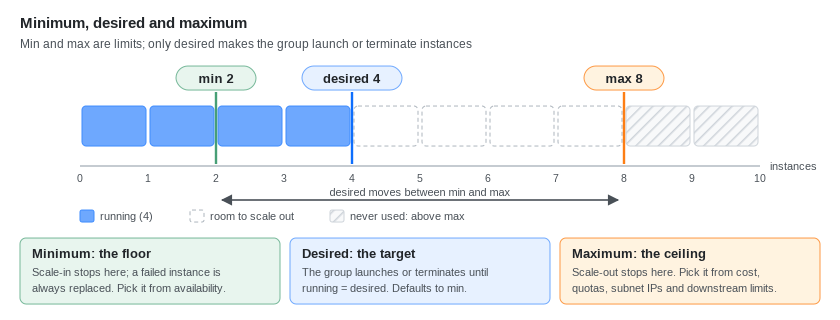
- The group continuously launches or terminates instances until the number of running instances equals desired.
- Min and max are limits, not targets. Nothing launches because of
max, and nothing terminates because ofmin. Only desired makes the group act. - The rule is min ≤ desired ≤ max. Equal values are allowed:
2 / 2 / 2is a valid fixed fleet. - If you don’t set desired when you create the group, it defaults to the minimum.
2. What Each Number Is For
Minimum: The Floor
The minimum is the capacity you need even when nothing is happening: at night, with no traffic, after a scale-in policy has removed everything it can. Pick it from availability, not from load:
- 2 or more for anything behind a load balancer, so one instance (or one Availability Zone) can fail without an outage.
- 0 for groups that may be empty: batch workers, CI runners, dev environments switched off at night. EKS node groups that Cluster Autoscaler can scale to zero also use 0.
- A scale-in policy can’t go below it. A failed instance below the minimum is always replaced.
Desired: The Target
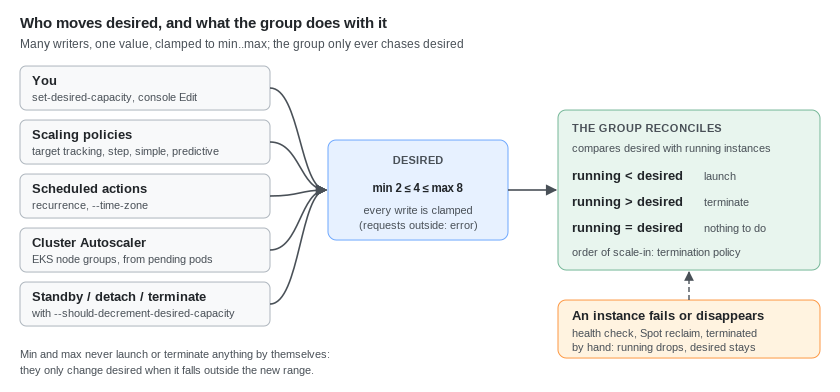
Desired is the only one of the three that changes all the time:
- You set it with
set-desired-capacity, or in the console’s Edit dialog. - Scaling policies (target tracking, step, simple, predictive) raise and lower it with the load.
- Scheduled actions set it at a given time.
- Cluster Autoscaler on EKS changes the desired size of the node group’s ASG.
- Standby, detach and terminate commands can lower it when you pass the “decrement desired capacity” option (section 7).
When desired changes, the group launches or terminates instances until it matches. If the running count drops below desired (an instance fails a health check, a Spot instance is reclaimed), the group launches a replacement. That’s the self-healing part of an ASG, and it works even with no scaling policies at all.
Maximum: The Ceiling
The maximum protects you from a policy, a bug or a traffic spike asking for more instances than you’re willing to pay for, or than the account can actually run:
- EC2 quotas: the vCPU quotas per instance family (On-Demand and Spot) apply to all instances in the account and Region.
- Subnet IP addresses: each instance needs an IP in one of the group’s subnets.
- Downstream limits: database connections, licences, API rate limits.
- Cost:
max × instance priceis the worst case.
3. Why Desired Can’t Be Below Min (or Above Max)
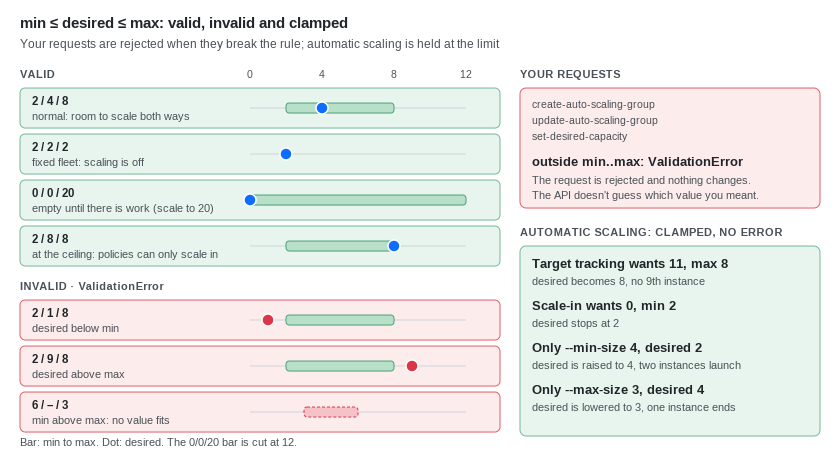
A common way to say the rule is “min can’t be less than desired”. It’s actually the other way round: min is usually less than desired, and that’s the normal case (2 / 4 / 8).
What can’t happen is desired below min or desired above max.
The reason is what the three numbers mean:
- Min is a promise: “always run at least 2”.
- Desired is an order: “run exactly 1, now”.
- With
min 2, desired 1, the group would have to keep at least 2 instances and aim for 1 at the same time. There is no number of instances that satisfies both.
The same goes for desired 9, max 8 (“run 9” vs “never more than 8”), and for min 6, max 3, where no number at all fits between the limits.
So the API doesn’t try to guess which setting you meant. The documentation for DesiredCapacity says it “must be greater than or equal to the minimum size of the group and less than or equal to the maximum size of the group”,
and a create or update that breaks the rule is rejected with a ValidationError. A set-desired-capacity call outside the current min and max is rejected the same way.
Requests Versus Automatic Scaling
Your own API calls are rejected when they break the rule. Automatic scaling is clamped instead:
| Situation | What happens |
|---|---|
| Target tracking wants 11 instances, max is 8 | Desired becomes 8. No error, and no 9th instance. The policy simply can’t go higher |
| Scale-in wants 0, min is 2 | Desired stops at 2 |
update-auto-scaling-group --min-size 4 with desired 2 and no --desired-capacity |
Desired is raised to 4 for you |
update-auto-scaling-group --max-size 3 with 4 running and no --desired-capacity |
Desired is lowered to 3 for you, and one instance is terminated |
| You send min, max and desired together and desired is outside the new range | ValidationError, nothing changes |
The two update-auto-scaling-group rows are documented behaviour of UpdateAutoScalingGroup: a new MinSize larger than the current size sets desired to the new minimum, and a new MaxSize smaller than the current
size sets desired to the new maximum. Section 6 shows both with real output.
Short Exceptions Above Max
The group can go above the maximum in a few documented cases:
- Availability Zone rebalancing: by 10 percent or one instance, whichever is greater, and only for as long as the rebalancing takes (typically minutes), so it can launch a replacement before terminating the old instance.
- Capacity Rebalancing for Spot: by up to 10 percent of the desired capacity.
- Instance weights: a group with weights (section 8) never goes above
MaxSizeby more than your largest instance weight. - Predictive scaling with
IncreaseMaxCapacityraises max itself, and the new value stays (section 11).
An instance maintenance policy (MinHealthyPercentage and MaxHealthyPercentage, section 10) lets you set your own range for replacements instead.
4. How the Three Values Move Over a Day
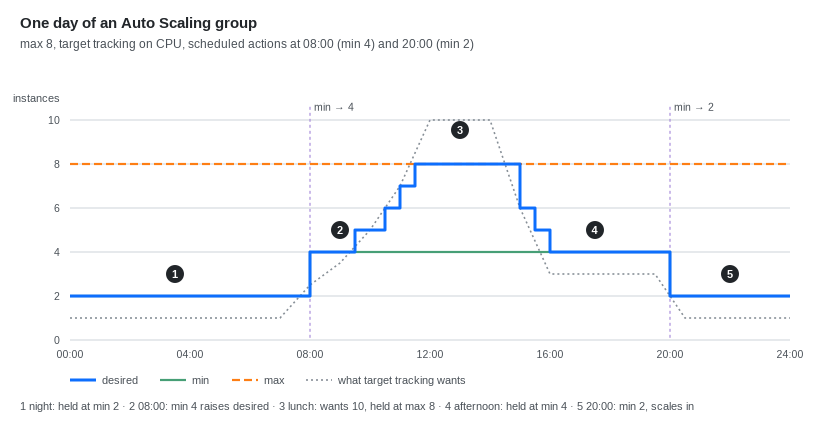
A typical web group, min 2, max 8, with target tracking on CPU and two scheduled actions:
- Night: no traffic, and target tracking would like to scale in further, but desired stays at 2 (the minimum).
- 08:00: a scheduled action sets
min 4. Desired is below the new minimum, so it’s raised to 4 as well, and two instances launch before the users arrive. - Lunch: CPU climbs and target tracking keeps raising desired. It would like 10, but it stops at 8 (the maximum).
- Afternoon: load drops and desired falls back to 4. It can’t go lower, because min is still 4.
- 20:00: a scheduled action sets
min 2again, and target tracking can now scale in to 2.
The scheduled actions as CLI commands:
# Weekdays 08:00: raise the floor before office hours
aws autoscaling put-scheduled-update-group-action \
  --auto-scaling-group-name <asg-name> \
  --scheduled-action-name office-hours-start \
  --recurrence "0 8 * * 1-5" --time-zone "Europe/Bucharest" \
  --min-size 4 --max-size 8

# Weekdays 20:00: lower it again
aws autoscaling put-scheduled-update-group-action \
  --auto-scaling-group-name <asg-name> \
  --scheduled-action-name office-hours-end \
  --recurrence "0 20 * * 1-5" --time-zone "Europe/Bucharest" \
  --min-size 2 --max-size 8
The recurrence is in UTC unless you add --time-zone. Check what is stored:
$ aws autoscaling describe-scheduled-actions --auto-scaling-group-name web \
    --query 'ScheduledUpdateGroupActions[].[ScheduledActionName,Recurrence,TimeZone,MinSize,MaxSize]' --output table
----------------------------------------------------------------------
|                      DescribeScheduledActions                      |
+---------------------+---------------+--------------------+----+----+
|  office-hours-start |  0 8 * * 1-5  |  Europe/Bucharest  |  4 |  8 |
|  office-hours-end   |  0 20 * * 1-5 |  Europe/Bucharest  |  2 |  8 |
+---------------------+---------------+--------------------+----+----+
5. Choosing the Values
| Workload | Min | Desired | Max | Why |
|---|---|---|---|---|
| Single self-healing server (bastion, legacy app) | 1 | 1 | 1 | No scaling. The ASG only replaces the instance if it fails |
| Web or API behind a load balancer | 2 | 2 | 10 | Two AZs for availability, room to scale for peaks |
| Fixed fleet, rolling updates only | 3 | 3 | 3 | Same size always; instance refresh replaces instances |
| Queue workers or batch | 0 | 0 | 20 | Scale on queue depth, empty when idle |
| Dev or test, off at night | 0 at night, 1 by day (scheduled) | Same as min | 2 | Pay only during working hours |
| EKS node group with Cluster Autoscaler | 1 to 3 | Leave to the autoscaler | 10+ | Cluster Autoscaler changes desired from pending pods |
Rules of thumb:
- Min: what you need to survive the loss of one instance or one AZ at the lowest load. Spread across at least two AZs.
- Max: what you can afford and what the quotas, subnets and downstream services can take. Leave room above your highest peak, because a policy that reaches max can’t help any more.
- Desired: set it at creation (or leave it to default to min), then let the policies own it. Don’t keep resetting it from a script or from infrastructure code (section 14).
- Min = max turns scaling off. Policies still run, but they can never move desired.
6. CLI
Create a group. Desired is optional and defaults to min:
aws autoscaling create-auto-scaling-group \
  --auto-scaling-group-name <asg-name> \
  --launch-template LaunchTemplateName=<template-name>,Version='$Default' \
  --vpc-zone-identifier "<subnet-id-a>,<subnet-id-b>" \
  --min-size 2 --max-size 8
Read the three values and the running count. Created without --desired-capacity, the group got desired 2, the minimum:
$ aws autoscaling describe-auto-scaling-groups \
    --auto-scaling-group-names web \
    --query 'AutoScalingGroups[0].{Min:MinSize,Desired:DesiredCapacity,Max:MaxSize,InService:length(Instances[?LifecycleState==`InService`])}' \
    --output table
----------------------------------------
|       DescribeAutoScalingGroups      |
+----------+-------------+------+------+
|  Desired |  InService  | Max  | Min  |
+----------+-------------+------+------+
|  2       |  2          |  8   |  2   |
+----------+-------------+------+------+
Change only desired (it must stay between the current min and max):
aws autoscaling set-desired-capacity \
  --auto-scaling-group-name <asg-name> \
  --desired-capacity 4
By default set-desired-capacity ignores any cooldown. Add --honor-cooldown to have the request rejected while the group is in a cooldown period.
Changing Min or Max Moves Desired
Raising only the minimum above desired raises desired; lowering only the maximum below it lowers desired. The same group, read with the query above after each command:
$ aws autoscaling update-auto-scaling-group --auto-scaling-group-name web --min-size 4
+----------+-------------+------+------+
|  Desired |  InService  | Max  | Min  |
+----------+-------------+------+------+
|  4       |  4          |  8   |  4   |
+----------+-------------+------+------+

$ aws autoscaling update-auto-scaling-group --auto-scaling-group-name web --max-size 3 --min-size 1
+----------+-------------+------+------+
|  Desired |  InService  | Max  | Min  |
+----------+-------------+------+------+
|  3       |  3          |  3   |  1   |
+----------+-------------+------+------+
Send all three when you change more than one, so the request is checked as a whole:
aws autoscaling update-auto-scaling-group \
  --auto-scaling-group-name <asg-name> \
  --min-size 3 --max-size 12 --desired-capacity 3
Scale a group down to zero:
Warning: setting min and desired to 0 terminates every instance in the group. Data on instance store volumes, and on EBS volumes with “delete on termination”, is lost permanently. Anything behind the group’s load balancer stops answering.
aws autoscaling update-auto-scaling-group \
  --auto-scaling-group-name <asg-name> \
  --min-size 0 --desired-capacity 0
See why desired changed (scaling policies, scheduled actions and manual changes all show up here):
aws autoscaling describe-scaling-activities \
  --auto-scaling-group-name <asg-name> --max-items 10 \
  --query 'Activities[].[StartTime,StatusCode,Description]' --output table
7. Standby, Detach and Terminate
These three commands take an instance out of the group. Each one asks whether desired should go down with it:
| Command | Option | Desired | What the group does |
|---|---|---|---|
enter-standby |
--should-decrement-desired-capacity (required, or --no-…) |
Lowered by 1 with the option | Instance stays running but out of service. Without the option, a replacement launches |
exit-standby |
none | Raised by 1 | The instance goes back in service |
detach-instances |
--should-decrement-desired-capacity (required, or --no-…) |
Lowered by 1 with the option | Instance keeps running outside the group. Without the option, a replacement launches |
terminate-instance-in-auto-scaling-group |
--should-decrement-desired-capacity (required, or --no-…) |
Lowered by 1 with the option | Instance terminates. Without the option, a replacement launches |
A group at 2 / 4 / 8, read after each command:
$ aws autoscaling enter-standby --auto-scaling-group-name web \
    --instance-ids <instance-id-1> --should-decrement-desired-capacity
Desired 3, InService 3            # the instance is in Standby, not replaced

$ aws autoscaling exit-standby --auto-scaling-group-name web --instance-ids <instance-id-1>
Desired 4, InService 4

$ aws autoscaling detach-instances --auto-scaling-group-name web \
    --instance-ids <instance-id-2> --no-should-decrement-desired-capacity
Desired 4, InService 4            # a new instance replaced the detached one

$ aws autoscaling terminate-instance-in-auto-scaling-group \
    --instance-id <instance-id-3> --should-decrement-desired-capacity
Desired 3, InService 3
The decrement option is how you shrink a group by a specific instance: lowering desired alone lets the termination policy pick which instance goes.
8. Weights and vCPUs: When the Numbers Aren’t Instances
With a mixed instances policy that sets instance weights, min, desired and max are counted in units, not instances. The API reference says you “must specify these sizes with the same units that you use for weighting instances”.
# m7i.large counts as 2 units, m7i.xlarge as 4: desired 8 means 8 units
aws autoscaling create-auto-scaling-group \
  --auto-scaling-group-name <asg-name> \
  --vpc-zone-identifier "<subnet-id-a>,<subnet-id-b>" \
  --min-size 4 --max-size 32 --desired-capacity 8 \
  --mixed-instances-policy '{"LaunchTemplate":{"LaunchTemplateSpecification":{"LaunchTemplateName":"<template-name>","Version":"$Default"},
    "Overrides":[{"InstanceType":"m7i.large","WeightedCapacity":"2"},{"InstanceType":"m7i.xlarge","WeightedCapacity":"4"}]}}'
Desired 8 is four m7i.large, two m7i.xlarge, or a mix. What changes with weights:
- Desired can be exceeded. If 2 units are missing and only a 4-unit instance can launch, the group ends 2 units above desired.
- Max can be exceeded by up to your largest weight (4 units here), the hard limit in the documentation.
- Keep desired at least two to three times the largest weight, the guide’s recommendation, so one big instance doesn’t overshoot by a lot.
- Warm pools (section 9) aren’t supported with weighted groups.
With attribute-based instance type selection, --desired-capacity-type sets the unit directly: units (the default, which means instances), vcpu or memory-mib. Then --min-size 8 --max-size 64 --desired-capacity 16 means 16 vCPUs:
aws autoscaling create-auto-scaling-group \
  --auto-scaling-group-name <asg-name> \
  --vpc-zone-identifier "<subnet-id-a>,<subnet-id-b>" \
  --desired-capacity-type vcpu \
  --min-size 8 --max-size 64 --desired-capacity 16 \
  --mixed-instances-policy '{"LaunchTemplate":{"LaunchTemplateSpecification":{"LaunchTemplateName":"<template-name>","Version":"$Default"},
    "Overrides":[{"InstanceRequirements":{"VCpuCount":{"Min":2,"Max":8},"MemoryMiB":{"Min":4096}}}]}}'
vcpu and memory-mib work only with attribute-based selection.
9. Warm Pools: Instances That Don’t Count
A warm pool keeps pre-initialized instances, usually stopped, next to the group. They are not part of desired: an instance counts toward desired only when it leaves the pool and goes in service.
How big the pool is:
| Setting | Pool size |
|---|---|
| Default | max − desired (desired 6, max 10: 4 warm instances) |
--max-group-prepared-capacity N |
N − desired (desired 6, N 8: 2 warm instances) |
--min-size M on the warm pool |
At least M, even when desired is above N |
$ aws autoscaling put-warm-pool --auto-scaling-group-name web \
    --min-size 2 --max-group-prepared-capacity 6 --pool-state Stopped

$ aws autoscaling describe-warm-pool --auto-scaling-group-name web --query WarmPoolConfiguration
{
    "MaxGroupPreparedCapacity": 6,
    "MinSize": 2,
    "PoolState": "Stopped"
}
The group stayed at 2 / 3 / 8 after the warm pool was added: desired didn’t change. With desired 3 the pool holds 6 − 3 = 3 instances. Stopped warm instances cost only their EBS volumes and Elastic IPs.
10. Instance Maintenance Policy: A Range Around Desired
When instances are replaced (health check failure, instance refresh, maximum instance lifetime, rebalancing), an instance maintenance policy sets how far below and above desired the group may go:
MinHealthyPercentage: share of desired that must stay healthy and in service, 0 to 100.MaxHealthyPercentage: share of desired the group may grow to while replacing, 100 to 200.
aws autoscaling update-auto-scaling-group \
  --auto-scaling-group-name <asg-name> \
  --instance-maintenance-policy MinHealthyPercentage=90,MaxHealthyPercentage=120
| Desired | 90 / 120 means | During replacements |
|---|---|---|
| 10 | at least 9, at most 12 | 2 new instances can launch before 2 old ones terminate |
| 100 | at least 90, at most 120 | up to 20 launch first |
100 / 110(or higher max) is launch before terminating: no capacity is lost.90 / 100(or lower min) is terminate and launch: never more than desired, so no extra cost.- The policy doesn’t limit scaling: policies and scheduled actions still move desired between min and max at the same time.
- Without a policy, health check replacements and instance refresh terminate first; rebalancing launches first.
11. Predictive Scaling Can Raise Max
Predictive scaling forecasts the load and sets capacity ahead of time. By default (HonorMaxCapacity) it stays under max like any other policy. With IncreaseMaxCapacity it may raise max when the forecast is close to or above it:
aws autoscaling put-scaling-policy \
  --auto-scaling-group-name <asg-name> --policy-name predict-cpu \
  --policy-type PredictiveScaling \
  --predictive-scaling-configuration '{
    "MetricSpecifications":[{"TargetValue":50,"PredefinedMetricPairSpecification":{"PredefinedMetricType":"ASGCPUUtilization"}}],
    "Mode":"ForecastAndScale",
    "MaxCapacityBreachBehavior":"IncreaseMaxCapacity",
    "MaxCapacityBuffer":10}'
$ aws autoscaling describe-policies --auto-scaling-group-name web \
    --query 'ScalingPolicies[].[PolicyName,PolicyType,PredictiveScalingConfiguration.MaxCapacityBreachBehavior,PredictiveScalingConfiguration.MaxCapacityBuffer]' --output text
predict-cpu	PredictiveScaling	IncreaseMaxCapacity	10
MaxCapacityBufferis a percentage of the forecast, 0 to 100, and is required withIncreaseMaxCapacity. The API reference example: forecast 50, max 40, buffer 10, effective max 55.- With buffer 0 the group may go above max up to the forecast, but not beyond it.
- The raised max stays. It becomes the group’s new max and doesn’t go back down until you change it yourself.
Modedefaults toForecastOnly, which only forecasts and never changes capacity.
If you use IncreaseMaxCapacity, alarm on max as well as on desired (next section).
12. Alarm When Desired Reaches Max
A group at max fails silently: nothing errors, the application slows down. The group metrics are free at 1-minute granularity, but they are off until you enable them:
$ aws autoscaling enable-metrics-collection --auto-scaling-group-name web \
    --granularity 1Minute --metrics GroupDesiredCapacity GroupMaxSize

$ aws autoscaling describe-auto-scaling-groups --auto-scaling-group-names web \
    --query 'AutoScalingGroups[0].EnabledMetrics[].Metric' --output text
GroupDesiredCapacity	GroupMaxSize
Then a metric math alarm on desired − max, which is 0 when the group is at max. metrics.json:
[
  {"Id":"desired","ReturnData":false,"MetricStat":{"Metric":{"Namespace":"AWS/AutoScaling","MetricName":"GroupDesiredCapacity","Dimensions":[{"Name":"AutoScalingGroupName","Value":"web"}]},"Period":60,"Stat":"Maximum"}},
  {"Id":"max","ReturnData":false,"MetricStat":{"Metric":{"Namespace":"AWS/AutoScaling","MetricName":"GroupMaxSize","Dimensions":[{"Name":"AutoScalingGroupName","Value":"web"}]},"Period":60,"Stat":"Maximum"}},
  {"Id":"atmax","Label":"desired minus max","ReturnData":true,"Expression":"desired - max"}
]
$ aws cloudwatch put-metric-alarm --alarm-name web-at-max \
    --comparison-operator GreaterThanOrEqualToThreshold --threshold 0 \
    --evaluation-periods 15 --datapoints-to-alarm 15 --treat-missing-data notBreaching \
    --metrics file://metrics.json --alarm-actions <sns-topic-arn>

$ aws cloudwatch describe-alarms --alarm-names web-at-max \
    --query 'MetricAlarms[0].[AlarmName,ComparisonOperator,Threshold,EvaluationPeriods,Metrics[2].Expression]' --output text
web-at-max	GreaterThanOrEqualToThreshold	0.0	15	desired - max
The alarm fires after 15 minutes at max. Comparing with max (instead of a fixed number) keeps it right when a scheduled action or predictive scaling changes max.
13. When Desired and Running Differ
Desired is the target; the running count lags while instances launch, warm up or fail to launch. If InService stays below Desired, the activity history says why:
aws autoscaling describe-scaling-activities \
  --auto-scaling-group-name <asg-name> --max-items 20 \
  --query 'Activities[?StatusCode==`Failed`].[StartTime,StatusMessage]' --output text
| Cause | What to look for | What to do |
|---|---|---|
| No capacity for the instance type in an AZ | InsufficientInstanceCapacity |
Add instance types (mixed instances policy) or AZs |
| vCPU quota reached | VcpuLimitExceeded |
Check the quota below, request an increase |
| Subnet out of IP addresses | InsufficientFreeAddressesInSubnet |
Larger or more subnets |
| Bad launch template (AMI, key, security group, profile) | The EC2 error for that field | Fix the template, then a new version |
| Warm-up or lifecycle hook | Instances in Pending or Pending:Wait |
Wait, or check the hook |
The On-Demand vCPU quota for the standard families (A, C, D, H, I, M, R, T, Z) is L-1216C47A; the Spot one is L-34B43A08:
aws service-quotas get-service-quota --service-code ec2 --quota-code L-1216C47A \
  --query 'Quota.[QuotaName,Value]' --output text

aws ec2 describe-subnets --subnet-ids <subnet-id-a> <subnet-id-b> \
  --query 'Subnets[].[SubnetId,AvailabilityZone,AvailableIpAddressCount]' --output table
max × vCPUs per instance must fit in the quota together with every other instance of those families in the Region.
14. Terraform, CloudFormation and EKS
Terraform
In aws_autoscaling_group, min_size and max_size are required and desired_capacity is optional:
resource "aws_autoscaling_group" "web" {
  name                = "<asg-name>"
  min_size            = 2
  max_size            = 8
  desired_capacity    = 2
  vpc_zone_identifier = ["<subnet-id-a>", "<subnet-id-b>"]

  launch_template {
    id      = aws_launch_template.web.id
    version = "$Default"
  }

  lifecycle {
    # Scaling policies own desired; don't reset it on every apply
    ignore_changes = [desired_capacity]
  }
}
Without the lifecycle block, a change made outside Terraform is reverted on the next apply. The group was applied with desired_capacity = 2, then a scale-out (here by hand) set desired to 6:
$ aws autoscaling set-desired-capacity --auto-scaling-group-name web --desired-capacity 6
$ terraform plan
Terraform will perform the following actions:

  # aws_autoscaling_group.web will be updated in-place
  ~ resource "aws_autoscaling_group" "web" {
      ~ desired_capacity                 = 6 -> 2
        id                               = "web"
        name                             = "web"
        # (31 unchanged attributes hidden)

        # (3 unchanged blocks hidden)
    }

Plan: 0 to add, 1 to change, 0 to destroy.
At peak time that apply would terminate 4 instances. With ignore_changes = [desired_capacity] the same state gives:
$ terraform plan
No changes. Your infrastructure matches the configuration.
Leaving desired_capacity out of the code works too: the group starts at min, and after the same set-desired-capacity 6 the plan also showed no changes. ignore_changes is the choice when you
want an explicit starting value in the code.
CloudFormation
MinSize and MaxSize are required, and DesiredCapacity is optional (it defaults to MinSize). The same min ≤ desired ≤ max rule applies. A complete template:
AWSTemplateFormatVersion: "2010-09-09"
Parameters:
  SubnetIds:
    Type: List<AWS::EC2::Subnet::Id>
Resources:
  WebLaunchTemplate:
    Type: AWS::EC2::LaunchTemplate
    Properties:
      LaunchTemplateName: web
      LaunchTemplateData:
        ImageId: <ami-id>
        InstanceType: t3.micro
  WebGroup:
    Type: AWS::AutoScaling::AutoScalingGroup
    Properties:
      MinSize: "2"
      MaxSize: "8"
      DesiredCapacity: "2"
      VPCZoneIdentifier: !Ref SubnetIds
      LaunchTemplate:
        LaunchTemplateId: !Ref WebLaunchTemplate
        Version: !GetAtt WebLaunchTemplate.LatestVersionNumber
aws cloudformation deploy --stack-name web --template-file asg.yaml \
    --parameter-overrides SubnetIds=<subnet-id-a>,<subnet-id-b>
aws cloudformation describe-stack-resources --stack-name web \
    --query 'StackResources[].[LogicalResourceId,ResourceType,ResourceStatus]' --output table
The group is named after the stack (web-WebGroup-WUOAGZQCH972) and came up at 2 / 2 / 8 with both instances in service.
EKS Managed Node Groups
Managed node groups have the same three settings under scalingConfig (minSize, desiredSize, maxSize), with the same rule, and EKS applies them to the node group’s ASG:
aws eks update-nodegroup-config \
  --cluster-name <cluster-name> --nodegroup-name <nodegroup-name> \
  --scaling-config minSize=2,maxSize=10,desiredSize=3
- Cluster Autoscaler changes the desired size between min and max from pending pods. It never goes outside them, so set max high enough for the largest scale-out you expect. See Kubernetes Cluster Autoscaler.
- Karpenter doesn’t use node group sizes at all. It launches instances directly and has its own limits in the NodePool.
15. Gotchas
- Desired isn’t the same as running. The running count lags while instances launch or fail to launch (section 13).
- A max that is too low fails silently. The group stays at max while the application slows down. Alarm on it (section 12).
- Min 0 behind a load balancer means an outage when scale-in empties the group, or when a scheduled action sets min 0 at the wrong time.
- Min = max disables scaling. Policies don’t complain; they just can’t move desired.
- Changing only min or only max can move desired (section 6). Raising min launches instances; lowering max terminates them.
- Detach, standby and terminate with the decrement option lower desired too. Without it, the group launches a replacement (section 7).
- With weights, the numbers are units, not instances, and desired and max can be exceeded (section 8).
- Predictive scaling can leave max higher than you set it (section 11).
- Infrastructure code resetting desired: see the Terraform output in section 14.