Why tee Output Goes Missing in cloud-init
tee inside cloud-init scripts (runcmd, bootcmd, user-data shell scripts) usually works: the output lands in your file and in /var/log/cloud-init-output.log. When it doesn’t, the cause is almost never tee itself but something around it: a redirect, the list form of runcmd, bash-only syntax under /bin/sh, or the output directive. Every example below was booted with cloud-init 26.2 on Ubuntu 24.04.5 (NoCloud datasource), where /bin/sh is dash 0.5.12. Related: cloud-init Heredocs and Logging and cloud-init: bootcmd vs runcmd.
The Usual Starting Point
#cloud-config
runcmd:
  - echo "hello" | tee /tmp/hello.txt
  - apt-get install -y nginx 2>&1 | tee -a /var/log/my-setup.log
This one works. In the test boot /tmp/hello.txt contained hello and hello was in cloud-init-output.log; the nginx install wrote 58 lines to /var/log/my-setup.log, and the same lines were in cloud-init-output.log. If your output is missing, one of the causes below is in play.
Why tee Usually Works
cloud-init Already Pipes Through tee
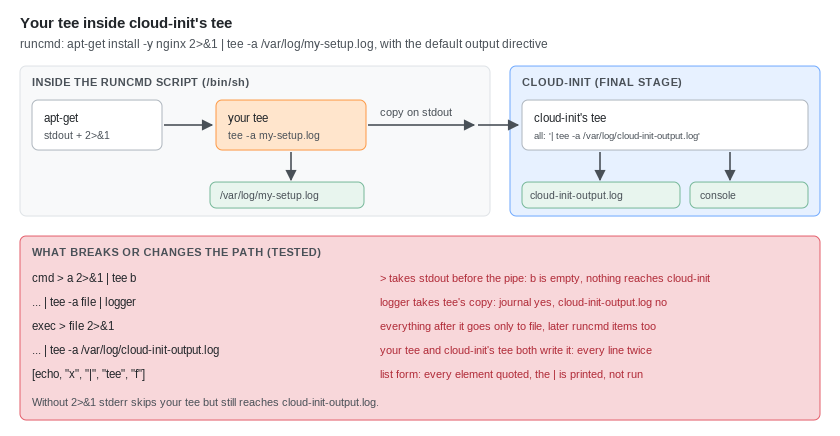
cloud-init’s default output configuration, in /etc/cloud/cloud.cfg.d/05_logging.cfg, sends the stdout and stderr of every stage through tee:
output: {all: '| tee -a /var/log/cloud-init-output.log'}
Your tee sits inside that stream. It writes one copy to your file and passes the other copy on through its stdout, which is cloud-init’s stdout, which goes through cloud-init’s own tee into cloud-init-output.log and the console:
How runcmd Runs Your Line
cloud-init doesn’t run runcmd items one by one. The runcmd module writes all of them into one script, /var/lib/cloud/instance/scripts/runcmd, and the scripts_user module runs it with /bin/sh in the Final stage. A string item becomes a line of that script as written; a list item becomes a line with every element quoted. That decides two of the causes below.
What Actually Makes Output Disappear
Each pattern below was run in its own boot; this is where its output ended up:
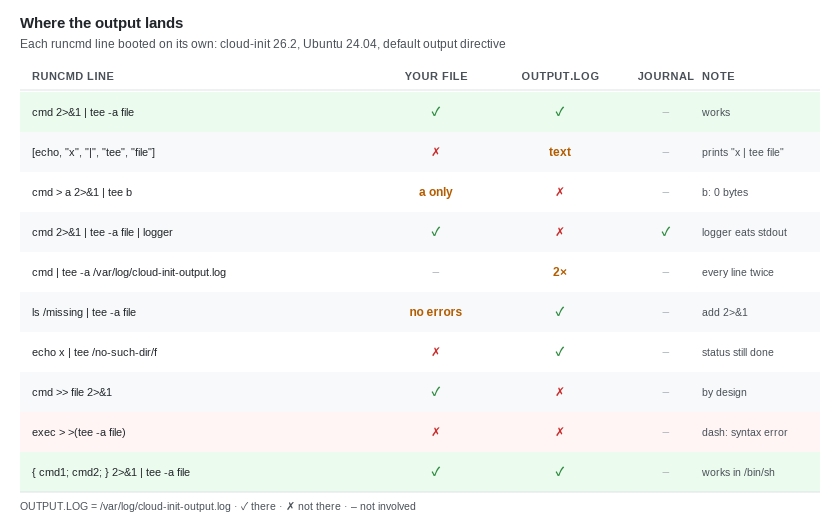
- List-form runcmd. The
|is quoted, so it’s printed, not run. - A redirect before the pipe.
> filetakes stdout before the pipe gets it;teereceives nothing. - Something else takes stdout.
exec > file,>> file, or| loggerat the end of the pipe: the output goes there and not to cloud-init. - The
outputdirective.>instead of>>or| tee -a, a value cloud-init doesn’t recognise, or afinalstage sent elsewhere. - Bash-only syntax.
exec > >(tee ...)is a syntax error underdash, and the wholeruncmdscript stops. - A directory that doesn’t exist.
teeprints an error, writes no file, and cloud-init still reportsdone.
Buffering is not on that list: it only delays output, it doesn’t lose it (see Scenario 3).
Common Scenarios and Fixes
Scenario 1: tee in List-Form runcmd (Pipe Not Interpreted)
#cloud-config
# BROKEN — every element is quoted, so | is just an argument to echo
runcmd:
  - [echo, "setup complete", "|", "tee", "/tmp/status.txt"]
cloud-init quoted each element into the script:
#!/bin/sh
'echo' 'setup complete' '|' 'tee' '/tmp/status.txt'
cloud-init-output.log got the line setup complete | tee /tmp/status.txt, and /tmp/status.txt was never created. Use the string form, so the shell sees the pipe:
#cloud-config
# WORKS — the string is a line of the /bin/sh script
runcmd:
  - echo "setup complete" | tee /tmp/status.txt
Scenario 2: Output Missing from cloud-init-output.log
#cloud-config
runcmd:
  - apt-get update 2>&1 | tee /var/log/apt-setup.log
This works: the output goes to /var/log/apt-setup.log (your tee) and to /var/log/cloud-init-output.log (cloud-init’s tee). If it’s missing from cloud-init-output.log, check the redirects in the line itself, then the output setting, which can come from the image or from user-data:
# The image's setting
grep -rn "^output" /etc/cloud/cloud.cfg.d/

# An output: key in your user-data
sudo grep -n -A4 "^output" /var/lib/cloud/instance/cloud-config.txt
The grep over cloud.cfg.d only shows the default (05_logging.cfg:71); an output: from user-data shows up only in cloud-config.txt (or cloud-init query userdata).
A redirect before the pipe empties it:
#cloud-config
runcmd:
  # BROKEN — > takes stdout, the pipe gets nothing
  - echo "redirect-marker" > /tmp/redir.txt 2>&1 | tee /tmp/redir-tee.txt
/tmp/redir.txt got the text, /tmp/redir-tee.txt was created with 0 bytes, and nothing reached cloud-init-output.log.
If the output directive uses > instead of | tee -a or >>, each stage overwrites the file and only the last stage’s output survives. With output: {all: "> /var/log/cloud-init-output.log"} the file had 3 lines after boot: the Final stage’s start line, the runcmd output and the finish line; the bootcmd output was gone.
Scenario 3: Buffering Delays Output
A C program that writes into a pipe switches from line to block buffering, so its lines arrive together when the buffer fills or the program exits. In the test, three lines written one second apart came out of grep in the same second, and one per second with stdbuf -oL:
--- grep, block buffered when writing to a pipe
1795614530 line 1
1795614530 line 2
1795614530 line 3
--- stdbuf -oL grep
1795614530 line 1
1795614531 line 2
1795614532 line 3
Nothing is lost either way: the final log has every line. Use these when you watch the log live (tail -f) and need the lines as they happen:
#cloud-config
runcmd:
  # Force line-buffered output (C programs using stdio)
  - stdbuf -oL some-c-tool 2>&1 | tee -a /var/log/setup.log

  # Or run the command under a pseudo-terminal
  - script -qc "some-tool --verbose" /dev/null | tee -a /var/log/setup.log
unbuffer does the same but isn’t installed by default: it failed with unbuffer: not found (exit 127) until the expect package was installed. apt-get doesn’t need any of this: piped through tee, it wrote its 40 lines over 3 seconds as it went. stdbuf has no effect on programs that manage their own buffers (Python, Perl, Java); use their own switches (python3 -u, $| = 1).
Scenario 4: You Want Output in Both a Custom File and cloud-init-output.log
Plain 2>&1 | tee -a file already does that, because cloud-init captures whatever tee passes on:
#cloud-config
runcmd:
  # Option A: tee to your file, cloud-init captures the copy on stdout
  - apt-get install -y nginx 2>&1 | tee -a /var/log/setup.log

  # Option B: the same pipeline in an explicit bash (useful for bash-only syntax)
  - bash -c 'apt-get install -y nginx 2>&1 | tee -a /var/log/setup.log'
Scenario 5: Using tee with sudo Inside runcmd
runcmd already runs as root, so tee doesn’t need sudo:
#cloud-config
# UNNECESSARY — runcmd runs as root
runcmd:
  - echo "setting" | sudo tee /etc/some/config

# SIMPLER — just use tee directly
runcmd:
  - echo "setting" | tee /etc/some/config
Both wrote the file (once /etc/some existed). The second runcmd: key replaces the first one in YAML, so use only one of them.
The output Directive Explained
output controls where cloud-init sends each stage’s stdout and stderr. A value is not run by a shell, and must start with | (pipe), > (overwrite) or >> (append). It is a string for both streams, a [stdout, stderr] list, or an output:/error: mapping:
#cloud-config
output:
  init:
    output: "> /var/log/cloud-init.out"
    error: "> /var/log/cloud-init.err"
  config: "| tee -a /var/log/cloud-config.log"
  final:
    - ">> /var/log/cloud-final.out"
    - ">> /var/log/cloud-final.err"
What the test showed:
- Only one
output:key. YAML keeps the last of twooutput:keys and drops the first, andcloud-init schemastill saysValid schema. - The prefix is required.
config: "tee -a /var/log/cloud-config.log"(no|) was ignored without a warning: noRedirectingline in/var/log/cloud-init.logand no file. finalis whereruncmdgoes. With thefinallist above, theruncmdoutput went tocloud-final.outandcloud-final.errand not tocloud-init-output.log. cloud-init’s own start and finish lines are written to stderr, so they land in the.errfile.- Stages you don’t name keep
all. User-data that set onlyconfig: ">> /var/log/only-config.log"sent the Config stage there, andruncmdoutput still reachedcloud-init-output.logthrough the defaultall. initstarts late. The Network stage reads user-data partway through, so the early part of a boot is already in the old target;cloud-init.outand.errstayed empty in a boot withoutbootcmdoutput.
The stages map to:
| Stage | What runs there |
|---|---|
init |
Network stage — bootcmd, write_files, mounts, users, ssh |
config |
Config stage — locale, ntp, runcmd (writes the script) |
final |
Final stage — packages, scripts_user (runs the runcmd script) |
Your runcmd commands execute in the final stage. More on the value forms, including a 2>&1 that ends up in the file name, in cloud-init Heredocs and Logging.
When tee Is Actually Useful in cloud-init
#cloud-config
runcmd:
  # 1. Write to a custom log file AND let cloud-init capture it
  - bash -c 'my-installer.sh 2>&1 | tee -a /var/log/my-app-install.log'

  # 2. Write to a file that needs to exist for another process
  - mkdir -p /run/myapp
  - echo "READY" | tee /run/myapp/init-complete

  # 3. Append to a config file
  - echo "10.0.0.5 db.internal" | tee -a /etc/hosts

  # 4. Write to multiple files simultaneously
  - mkdir -p /etc/myapp /var/run/myapp
  - echo "node_id=abc123" | tee /etc/myapp/id /var/run/myapp/id
Create the directories first. Without the mkdir -p lines, tee printed tee: /run/myapp/init-complete: No such file or directory, created none of the three files, and cloud-init status still reported done: the script’s exit code is its last command’s, and a failed tee in the middle doesn’t change it.
When to Skip tee Entirely
For simple logging you don’t need tee: cloud-init already captures everything.
#cloud-config
runcmd:
  # These all appear in /var/log/cloud-init-output.log automatically
  - echo "Starting setup..."
  - apt-get update
  - apt-get install -y nginx
  - systemctl enable --now nginx
  - echo "Setup complete"
If you want a separate log file and don’t need the output in cloud-init-output.log, use plain redirection:
#cloud-config
runcmd:
  - apt-get install -y nginx >> /var/log/setup.log 2>&1
This output will not appear in cloud-init-output.log, because stdout and stderr no longer go to cloud-init.
Debugging Missing Output
# 1. The output setting: the image's default, and any output: from user-data
grep -rn "^output" /etc/cloud/cloud.cfg.d/
sudo grep -n -A4 "^output" /var/lib/cloud/instance/cloud-config.txt

# 2. Check that cloud-init-output.log exists and has content
ls -la /var/log/cloud-init-output.log
wc -l /var/log/cloud-init-output.log

# 3. Only the Final stage at the top? A stage used > (overwrite) instead of >> (append)
head -5 /var/log/cloud-init-output.log

# 4. The script cloud-init built: quoted list items, redirects before pipes, bash-only syntax
sudo cat /var/lib/cloud/instance/scripts/runcmd

# 5. Errors and warnings from the run
cloud-init status --long
To see the output again, re-run the script with the same shell cloud-init uses: sudo sh -x /var/lib/cloud/instance/scripts/runcmd. bash -x hides dash problems (process substitution works there), and either way every command runs again, installs and appends included.
Solutions
Option 1: Send stderr to tee Too
tee only sees stdout. Without 2>&1 your file gets no error messages, though they still reach cloud-init-output.log through cloud-init’s capture:
command 2>&1 | tee -a /var/log/your-log.log
With ls /nonexistent-path | tee -a /var/log/o1.log, o1.log stayed empty and the error line was in cloud-init-output.log; with 2>&1 it was in both.
Option 2: Pipe to logger for the Journal
command 2>&1 | tee -a /var/log/your-log.log | logger -t cloud-init
The line reached /var/log/your-log.log and the journal (journalctl -t cloud-init), but not cloud-init-output.log: logger consumes tee’s stdout.
Option 3: Redirect a Whole Block
In runcmd (/bin/sh), group the commands and pipe the group:
{
  command-one
  command-two
} 2>&1 | tee -a /var/log/your-log.log
exec > >(tee -a /var/log/your-log.log) does the same in bash only: use it in a write_files script that starts with #!/bin/bash, never directly in runcmd.
Option 4: Don’t tee Into cloud-init’s Own Log
# DUPLICATES every line
command 2>&1 | tee -a /var/log/cloud-init-output.log
The line is written once by your tee and once more by cloud-init’s: in the test it was in cloud-init-output.log twice. Plain command already lands there.
Best Practice: Group and Pipe in runcmd
#cloud-config
runcmd:
  - |
    {
      echo "Starting initialization..."
      # Your commands here
      echo "Initialization complete"
    } 2>&1 | tee -a /var/log/my-init.log
Everything in the group goes to /var/log/my-init.log and, through cloud-init’s tee, to cloud-init-output.log.
Warning: the common
exec > >(tee -a /var/log/my-init.log)version fails inruncmd./bin/shisdash, which has no process substitution: the boot stopped at line 2 withSyntax error: redirection unexpected,cloud-init statusreportederror, and none of the commands ran.
Complete Example
#cloud-config
runcmd:
  - |
    {
      echo "=== Starting Custom Initialization ==="
      date

      # Install packages
      apt-get update
      apt-get install -y docker.io

      # Configure services
      systemctl enable docker
      systemctl start docker

      echo "=== Initialization Complete ==="
      date
    } 2>&1 | tee -a /var/log/custom-init.log
In the test boot, the same structure wrote 106 lines to its log file, the closing line was also in cloud-init-output.log, and docker was active afterwards.
Common Patterns
Pattern 1: Simple Command Logging
echo "Installing Docker..." 2>&1 | tee -a /var/log/setup.log
apt-get install -y docker.io 2>&1 | tee -a /var/log/setup.log
Pattern 2: Function with Logging
log_and_run() {
    echo "Running: $*" 2>&1 | tee -a /var/log/setup.log
    "$@" 2>&1 | tee -a /var/log/setup.log
}

log_and_run apt-get update
log_and_run apt-get install -y docker.io
Works in runcmd as is (dash supports functions): setup.log got the Running: apt-get update and Running: apt-get install -y docker.io lines followed by each command’s output.
Pattern 3: Entire Script Block
#cloud-config
runcmd:
  - |
    {
      echo "Starting setup at $(date)"
      apt-get update
      apt-get install -y docker.io
      echo "Setup complete at $(date)"
    } 2>&1 | tee -a /var/log/setup.log
Summary
When tee output goes missing, the cause is almost always one of these:
- List-form runcmd — the
|is quoted, not run. Use the string form. - Redirect before the pipe —
> filetakes stdout,teegets nothing. - Something else takes stdout —
exec >,>> fileor| logger: the output leavescloud-init-output.log. - The output directive —
>instead of>>, a value without|,>or>>(ignored), or afinalstage sent elsewhere. - Bash-only syntax —
exec > >(tee ...)stops the wholeruncmdscript underdash. Group and pipe instead. - A missing directory —
teewrites nothing and the boot still reportsdone.
Buffering only delays lines; it doesn’t lose them. And tee -a /var/log/cloud-init-output.log doesn’t help: it doubles every line.
When in doubt: use string-form commands, skip tee for simple logging (cloud-init captures it), and add tee only when you need a custom file alongside cloud-init’s log.