ctr Cheatsheet (containerd CLI)
ctr is the low-level command-line client for containerd, the container runtime under Kubernetes on EKS, GKE, kind and most self-managed clusters. It talks to containerd’s own gRPC API, unlike crictl, which uses the Kubernetes CRI API. ctr is a debugging tool: it has no logs command, no image builds, and doesn’t accept short image names.
Everything below was run as root on a kind node with containerd and ctr v2.3.4 and runc 1.4.3 (Kubernetes 1.37.0).
How containerd Is Organised
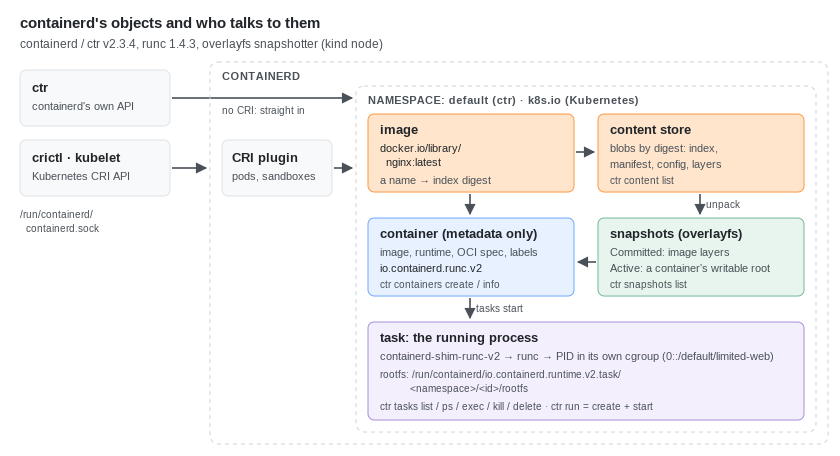
- Image: a name (
docker.io/library/nginx:latest) pointing at blobs in the content store. - Snapshot: an unpacked image layer, or a container’s writable layer, on the overlayfs snapshotter.
- Container: only metadata (image, runtime, OCI spec, labels). Nothing runs yet.
- Task: the running process of a container.
ctr runcreates the container and starts the task in one step. - Namespace: everything above lives in one. ctr uses
default; Kubernetes usesk8s.io.
Basic Structure
ctr [global options] command [command options] [arguments...]
Short command names work too: ctr i (images), ctr c (containers), ctr t (tasks), ctr ns (namespaces).
Global Options
| Flag | Environment variable | Description |
|---|---|---|
--address, -a |
CONTAINERD_ADDRESS |
containerd’s gRPC socket (default: /run/containerd/containerd.sock) |
--namespace, -n |
CONTAINERD_NAMESPACE |
Namespace (default: default) |
--timeout |
Total timeout for the command | |
--connect-timeout |
Timeout for connecting to containerd | |
--debug |
Debug output |
export CONTAINERD_NAMESPACE=k8s.io saves typing -n k8s.io on a Kubernetes node.
$ ctr version
Client:
  Version:  v2.3.4
  Revision: db8809540e1a7a9da5d518876894933ff55692ab
  Go version: go1.26.7

Server:
  Version:  v2.3.4
  Revision: db8809540e1a7a9da5d518876894933ff55692ab
  UUID: a4966bc5-8f17-434e-aec5-fe30c4fb2beb
Images
Full Names Only
ctr doesn’t expand short names the way Docker does. Always write docker.io/library/nginx:latest:
$ ctr images pull nginx:latest
ctr: failed to resolve image: parse "dummy://nginx:latest": invalid port ":latest" after host

$ ctr images remove nginx:latest ubuntu:20.04
time="2026-11-27T09:37:18Z" level=warning msg="nginx:latest: image not found"
time="2026-11-27T09:37:18Z" level=warning msg="ubuntu:20.04: image not found"
Pull
# Pull (for the node's own platform)
ctr images pull docker.io/library/nginx:latest

# Pull another platform
ctr images pull --platform linux/amd64 docker.io/library/nginx:latest

# Pull every platform in the index (needed before export --all-platforms)
ctr images pull --all-platforms docker.io/library/alpine:3.23
Completed pull from OCI Registry (docker.io/library/nginx:latest) elapsed: 5.4 s total: 59.4 M (11.0 MiB/s)
List and Check
$ ctr images list
REF                            TYPE                                    DIGEST                                                                  SIZE     PLATFORMS                                                                                              LABELS
docker.io/library/alpine:3.23  application/vnd.oci.image.index.v1+json sha256:469c9ea410b9215eaee7976ba6c0639039b444be8e5d638f7abbada189971eb2 4.0 MiB  linux/386,linux/amd64,linux/arm/v6,linux/arm/v7,linux/arm64/v8,linux/ppc64le,linux/riscv64,linux/s390x -
docker.io/library/nginx:latest application/vnd.oci.image.index.v1+json sha256:6a3df739b6312289e87d70947d900669c1b3087474ece5814b9c01bbf2e6dde3 59.4 MiB linux/386,linux/amd64,linux/arm/v5,linux/arm/v7,linux/arm64/v8,linux/ppc64le,linux/riscv64,linux/s390x -

$ ctr images list -q
docker.io/library/alpine:3.23
docker.io/library/nginx:latest
The digest is always a column; there is no --digests flag (flag provided but not defined: -digests).
ctr images check shows whether all content is present and the image is unpacked (ready to run):
$ ctr images check
REF                            TYPE                                    DIGEST                                                                  STATUS         SIZE              UNPACKED
docker.io/library/alpine:3.23  application/vnd.oci.image.index.v1+json sha256:469c9ea410b9215eaee7976ba6c0639039b444be8e5d638f7abbada189971eb2 complete (2/2) 4.0 MiB/4.0 MiB   false
docker.io/library/nginx:latest application/vnd.oci.image.index.v1+json sha256:6a3df739b6312289e87d70947d900669c1b3087474ece5814b9c01bbf2e6dde3 complete (8/8) 59.3 MiB/59.3 MiB true
Tag and Remove
$ ctr images tag docker.io/library/nginx:latest my-registry/nginx:v1.0
my-registry/nginx:v1.0

$ ctr images remove my-registry/nginx:v1.0
my-registry/nginx:v1.0

$ ctr images rm docker.io/library/nginx:latest
docker.io/library/nginx:latest
Export and Import
ctr images export nginx.tar docker.io/library/nginx:latest
ctr images import nginx.tar
The export was 62 MB, and the import took 0.3 s. --all-platforms only works if every platform was pulled first; after a normal pull it fails and still leaves a broken 1.5 KB file:
$ ctr images export --all-platforms nginx-all.tar docker.io/library/nginx:latest
ctr: failed to get reader: content digest sha256:00d07fcd62c985ecf18999476c950c61b6c7b9430b2c7828a617c4fa02776b7a: not found
Look Inside an Image Without Running It
$ ctr images mount docker.io/library/alpine:3.23 /mnt/img
sha256:4154419d13c4db5f2e910214abf684812a6cc507f3e8d77e793da4ce07adedfd
/mnt/img

$ cat /mnt/img/etc/alpine-release
3.23.8

$ ctr images unmount /mnt/img

$ ctr images usage --snapshotter overlayfs docker.io/library/alpine:3.23
KEY                                                                     SIZE    INODES
sha256:4154419d13c4db5f2e910214abf684812a6cc507f3e8d77e793da4ce07adedfd 8.9 MiB 515
Containers
A container is only metadata. Creating one starts nothing.
$ ctr containers create docker.io/library/nginx:latest nginx-container
$ ctr containers create --runtime io.containerd.runc.v2 docker.io/library/nginx:latest my-container

$ ctr containers list
CONTAINER          IMAGE                             RUNTIME
my-container       docker.io/library/nginx:latest    io.containerd.runc.v2
nginx-container    docker.io/library/nginx:latest    io.containerd.runc.v2

$ ctr containers list -q
my-container
nginx-container
Info and Labels
$ ctr containers info nginx-container
{
    "ID": "nginx-container",
    "Labels": {
        "io.containerd.image.config.stop-signal": "SIGQUIT",
        "maintainer": "NGINX Docker Maintainers <docker-maint@nginx.com>"
    },
    "Image": "docker.io/library/nginx:latest",
    "Runtime": {
        "Name": "io.containerd.runc.v2",
...
The output also has the full OCI Spec. ctr containers label sets labels; called without labels it doesn’t list them, it fails. Read labels from info:
$ ctr containers label nginx-container team=platform
maintainer=NGINX Docker Maintainers <docker-maint@nginx.com>,team=platform,io.containerd.image.config.stop-signal=SIGQUIT

$ ctr containers label nginx-container
ctr: container.Snapshotter field is immutable: invalid argument
Delete
ctr containers delete my-container
There’s no --force (flag provided but not defined: -force). A container with a running task can’t be deleted:
ctr: cannot delete a non stopped container: {running 0 0001-01-01 00:00:00 +0000 UTC}
Tasks (Running Containers)
Run: Create and Start in One Step
# Run in the foreground, remove when it exits
ctr run --rm docker.io/library/ubuntu:22.04 temp-container cat /etc/os-release

# Interactive shell
ctr run --rm -t docker.io/library/ubuntu:22.04 temp-container bash

# Detached
ctr run -d docker.io/library/nginx:latest web-server

# Environment variables
ctr run --rm --env VAR1=value1 --env VAR2=value2 docker.io/library/ubuntu:22.04 my-container sh -c 'echo $VAR1 $VAR2'

# Host network
ctr run --rm --net-host docker.io/library/nginx:latest web-host

# Memory limit, in bytes
ctr run -d --memory-limit 536870912 docker.io/library/ubuntu:22.04 limited-web sleep 300
value1 value2
Networking: without flags, ctr run gives the container no network, only lo. That’s the default, and there’s no --net-none flag (flag provided but not defined: -net-none). --net-host shares the node’s interfaces (the test listed lo, eth0 and the node’s veth interfaces), and --cni attaches the container to a CNI network.
Memory limit: it isn’t visible from inside the container, but it is in the task’s cgroup on the node:
$ cat /proc/<pid>/cgroup
0::/default/limited-web
$ cat /sys/fs/cgroup/default/limited-web/memory.max
536870912
Start a Task for an Existing Container
ctr tasks start runs in the foreground, attached to the container’s output, until the process ends. Add -d to detach:
ctr tasks start -d nginx-container
There’s no -t on tasks start (flag provided but not defined: -t): a TTY is set when the container is created, with ctr containers create -t. If a foreground ctr tasks start is stopped, the task ends with it.
List, Inspect, Exec
$ ctr tasks list
TASK               PID     STATUS
web-server         1973    RUNNING
limited-web        2370    RUNNING
nginx-container    2602    RUNNING

$ ctr tasks ps nginx-container
PID     INFO
2602    -
2639    -
2640    -

$ ctr tasks exec --exec-id my-session nginx-container nginx -v
nginx version: nginx/1.31.10
--exec-id is required and must be unique per running exec. Add -t for an interactive shell: ctr tasks exec -t --exec-id shell nginx-container sh.
$ ctr tasks metrics limited-web
ID             TIMESTAMP
limited-web    seconds:1795772265  nanos:851612643

METRIC                VALUE
pids.current          1
pids.limit            18446744073709551615
cpu.usage_usec        3633
...
Pause, Resume, Kill, Delete
ctr tasks pause nginx-container     # STATUS: PAUSED
ctr tasks resume nginx-container    # STATUS: RUNNING
ctr tasks kill nginx-container      # STATUS: STOPPED
ctr tasks kill --signal SIGKILL nginx-container
ctr tasks delete nginx-container
killwithout--signalsends the image’s stop signal (SIGQUITfor nginx, from theio.containerd.image.config.stop-signallabel above).-asignals every process in the container.- A running task can’t be deleted:
task must be stopped before deletion: running: failed precondition. ctr tasks delete -fkills and deletes in one step (task limited-web exit with non-zero exit code 137).
Attach
ctr tasks attach ticker
attach streams the task’s output and forwards signals to the task. Ctrl-C or a SIGTERM doesn’t detach you, it goes to the container’s process. The test container ran sh as PID 1, which ignores SIGTERM, so timeout 3 ctr tasks attach ticker kept streaming; the attach had to be killed from another shell.
Namespaces
$ ctr namespaces list
NAME    LABELS
default
k8s.io

$ ctr namespaces create my-namespace
$ ctr -n my-namespace images pull docker.io/library/alpine:3.23

$ ctr namespaces remove my-namespace
ctr: unable to delete my-namespace: namespace "my-namespace" must be empty, but it still has images, blobs, snapshots on "overlayfs" snapshotter: failed precondition
Remove the images first. Their blobs and snapshots are freed by containerd’s garbage collector a moment later; right after images rm the namespace still had blobs, snapshots, and 5 seconds later ctr namespaces remove my-namespace worked.
Content Store
$ ctr content list
DIGEST									SIZE	AGE		LABELS
sha256:016a4b0dc063fab5ee35211e3329dd1c39fe769b594bc455905ad7083afe4520	9.096kB	About a minute	containerd.io/distribution.source.docker.io=library/nginx
sha256:05ed9b607a9c505cc6e103630f4367699f2b18cbda0d573b76aaa3385edee4ab	241B	About a minute	containerd.io/distribution.source.docker.io=library/alpine

$ ctr content get sha256:016a4b0dc063fab5ee35211e3329dd1c39fe769b594bc455905ad7083afe4520
{"architecture":"riscv64","config":{"ExposedPorts":{"80/tcp":{}},"Env":["PATH=/usr/local/sbin:/usr/local/bin:/usr/sbin:/usr/bin:/sbin:/bin","NGINX_VERSION=1.31.9", ...
ctr content fetch docker.io/library/busybox:1.37   # download all content
ctr content rm sha256:<digest>                      # permanently delete a blob
There’s no ctr content info (No help topic for 'info'); content get prints the blob itself. content fetch downloads without unpacking, but it does create an image record: docker.io/library/busybox:1.37 appeared in ctr images list afterwards.
Snapshots
$ ctr snapshots list
KEY                                                                     PARENT                                                                  KIND
sha256:1b069e7c868777e7af4a71edd4a62913d19ba3f6f5403789e2fd24403591b50d sha256:26e23f55fcf29a05a14a0468713cc8b2fb272a86c28ab16ceabaa624bdf04b69 Committed
sha256:1f75ccad0a0d377a87a5f8c58b8a254a5dcfb680fe54cc9cce526208b85968ea                                                                         Committed

$ ctr snapshots prepare my-snapshot sha256:1b069e7c868777e7af4a71edd4a62913d19ba3f6f5403789e2fd24403591b50d
$ ctr snapshots usage my-snapshot
KEY         SIZE    INODES
my-snapshot 4.0 KiB 1

$ ctr snapshots remove my-snapshot
Committed snapshots are read-only image layers; Active ones (like my-snapshot, or a container’s root filesystem) are writable. ctr snapshots info <key> shows the parent chain and labels.
Plugins, Events and Server Info
$ ctr plugins list | grep -i runtime
io.containerd.runtime.v2                  task                     linux/arm64/v8    ok
io.containerd.cri.v1                      runtime                  linux/arm64/v8    ok

$ ctr plugins list | awk '$NF!="ok"'
TYPE                                      ID                       PLATFORMS         STATUS
io.containerd.snapshotter.v1              blockfile                linux/arm64/v8    skip
io.containerd.snapshotter.v1              erofs                    linux/arm64/v8    skip
io.containerd.server.v1                   metrics                  -                 skip
ctr events streams everything containerd does. One ctr run --rm ... true:
2026-11-27 09:42:29.383044827 +0000 UTC default /snapshot/prepare {"key":"evt","parent":"sha256:4154419d13c4...
2026-11-27 09:42:29.387512341 +0000 UTC default /containers/create {"id":"evt","image":"docker.io/library/alpine:3.23",...
2026-11-27 09:42:29.40856419 +0000 UTC default /tasks/create {"container_id":"evt","bundle":"/run/containerd/io.containerd.runtime.v2.task/default/evt",...
2026-11-27 09:42:29.412089186 +0000 UTC default /tasks/start {"container_id":"evt","pid":2530}
2026-11-27 09:42:29.4181907 +0000 UTC default /tasks/delete {"container_id":"evt","pid":2530,"exited_at":{...}}
Other read-only commands: ctr info (server UUID and PID), ctr leases list, and ctr oci spec (the default OCI spec, "ociVersion": "1.3.0").
Complete Container Lifecycle
ctr images pull docker.io/library/nginx:latest                   # 1. image
ctr containers create docker.io/library/nginx:latest web-server  # 2. container (metadata)
ctr tasks start -d web-server                                    # 3. task (process), detached
ctr tasks list                                                   # 4. RUNNING
ctr tasks exec -t --exec-id debug web-server sh                  # 5. shell inside
ctr tasks kill web-server                                        # 6. STOPPED
ctr tasks delete web-server                                      # 7. remove the task
ctr containers delete web-server                                 # 8. remove the container
ctr images remove docker.io/library/nginx:latest                 # 9. optional
Kubernetes Nodes (k8s.io Namespace)
$ ctr -n k8s.io containers list
CONTAINER                                                           IMAGE                                                          RUNTIME
280c96b00ef93c9c3d46f77d9f20aaea0b09535d6dd54a99ac14f63a68fb4c88    registry.k8s.io/kube-proxy-arm64:v1.37.0                       io.containerd.runc.v2
2cb9bf237554e6e7e6e207139fcca499c95bfd67b6892c543fd83c1b5e130282    registry.k8s.io/pause:3.10                                     io.containerd.runc.v2
...
Containers are listed by ID and image, so ctr -n k8s.io containers list | grep <pod-name> finds nothing. Filter on the label the kubelet sets instead; the result includes the pod’s pause sandbox:
$ ctr -n k8s.io containers list 'labels."io.kubernetes.pod.name"==web'
CONTAINER                                                           IMAGE                                  RUNTIME
477094ae7c1dfb3ed94074fad91e17c97fb6430e1907b0f083c1a0726f8b3770    docker.io/library/nginx:1.29-alpine    io.containerd.runc.v2
8b00ba73bf923b07ed434096954db2db79065281d2d4bb24d5bedd8d68fdba8a    registry.k8s.io/pause:3.10             io.containerd.runc.v2

$ ctr -n k8s.io containers info 477094ae7c1d... | grep io.kubernetes
        "io.kubernetes.container.name": "web",
        "io.kubernetes.pod.name": "web",
        "io.kubernetes.pod.namespace": "default",
crictl shows the same with pod names, which is usually easier:
$ crictl ps --name web
CONTAINER           IMAGE               CREATED                  STATE               NAME                ATTEMPT             POD ID              POD                 NAMESPACE
477094ae7c1df       7f7dcd27f920b       Less than a second ago   Running             web                 0                   8b00ba73bf923       web                 default
Mounts and Disk
The container’s root filesystem is an overlay mount named after its ID:
$ grep 477094ae7c1d /proc/mounts
overlay /run/containerd/io.containerd.runtime.v2.task/k8s.io/477094ae7c1dfb3ed94074fad91e17c97fb6430e1907b0f083c1a0726f8b3770/rootfs overlay rw,relatime,lowerdir=...

$ df -h | grep overlay
overlay          20G  2.6G   16G  15% /
overlay          20G  2.6G   16G  15% /run/containerd/io.containerd.runtime.v2.task/k8s.io/ee541dfb20063fad40456fc8a415c6bb85bd01e14f0478f5731b21f426d298e9/rootfs
ctr -n k8s.io snapshots usage and ctr -n k8s.io content list show what images take on disk.
Don’t Manage Pods with ctr
Kubernetes owns everything in k8s.io. Stopping a pod’s container from below doesn’t stop the pod: after crictl stop on the web container, the kubelet started a new one within seconds (RESTARTS 1). Use ctr there to look, and kubectl to change things.
ctr vs crictl vs docker
ctr |
crictl |
docker |
|
|---|---|---|---|
| Talks to | containerd’s gRPC API | the CRI API (containerd’s CRI plugin, CRI-O) | the Docker daemon |
| Namespaces | Yes (-n k8s.io) |
Always Kubernetes’ (k8s.io on containerd) |
No |
| Pod names | No (container IDs, labels) | Yes (crictl pods, ps --name) |
No |
| Images | pull, tag, import, export, mount | pull, list, remove, inspect | Full, including build |
| Containers | create, run, exec, kill, pause, delete | runp, create, start, stop, rm, exec, logs | Full |
| Logs | No | crictl logs |
docker logs |
| On EKS nodes | Yes (comes with containerd) | Yes | No (dockershim was removed in Kubernetes 1.24) |
| Best for | Low-level containerd debugging, image ops | Debugging pods on a node | Development, building images |
Quick Reference
# Images (full names only)
ctr images pull docker.io/library/<image>:<tag>
ctr images list
ctr images check
ctr images remove <ref>
ctr images tag <source> <target>
ctr images export <file.tar> <ref>
ctr images import <file.tar>
ctr images mount <ref> <dir> && ctr images unmount <dir>

# Containers (metadata)
ctr containers create <image> <name>
ctr containers list
ctr containers info <name>
ctr containers delete <name>

# Tasks (processes)
ctr run --rm -t <image> <name> <command>
ctr run -d <image> <name>
ctr tasks start -d <container>
ctr tasks list
ctr tasks exec -t --exec-id <id> <container> <cmd>
ctr tasks kill [--signal SIGKILL] <container>
ctr tasks delete [-f] <container>

# Kubernetes nodes
export CONTAINERD_NAMESPACE=k8s.io
ctr containers list 'labels."io.kubernetes.pod.name"==<pod>'
Important Notes
- Full image names:
docker.io/library/nginx:latest, nevernginx:latest. - Order:
tasks kill→tasks delete→containers delete, ortasks delete -fto skip the kill. tasks startis foreground unless you add-d.- No network by default:
ctr rungives the container onlylo; use--net-hostor--cni. attachforwards signals:Ctrl-Cgoes to the container, it doesn’t detach.k8s.iois Kubernetes’: look with ctr, change withkubectl. The kubelet recreates what you stop.- Root: ctr needs root, or access to the containerd socket.