Terraform: How to Find a Resource’s .arn and .id
Almost every Terraform configuration passes one resource’s identifier to another: a role ARN into a policy, a VPC ID into a security group, a queue ARN into a subscription. The attribute is usually called arn or id, but what id contains depends on the resource type, and the value only exists after the resource is created. This article shows where to look it up, how to read it from state, and how to reference it from for_each, count and modules. Everything was run with Terraform 1.17.2 and the AWS provider 5.100.0 against LocalStack, an AWS emulator, which is why the account ID is 000000000000.
1. The Short Answer
resource "aws_iam_role_policy_attachment" "app" {
  role       = aws_iam_role.app.name           # <TYPE>.<NAME>.<ATTRIBUTE>
  policy_arn = aws_iam_policy.read_logs.arn
}
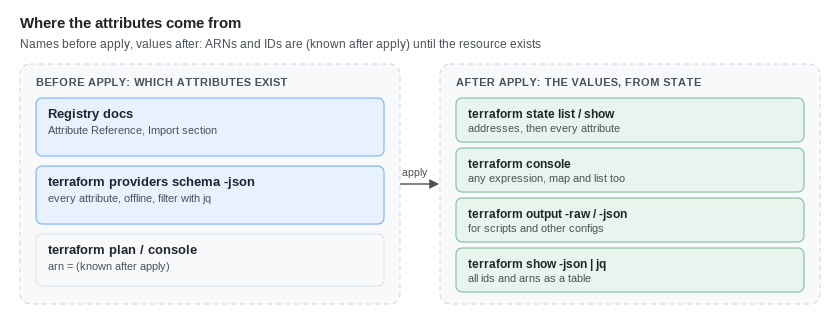
A reference is <resource type>.<local name>.<attribute>. To find out which attributes exist and what they hold:
terraform state list                                  # every resource address
terraform state show aws_sqs_queue.orders             # every attribute of one resource
echo 'aws_sqs_queue.orders.arn' | terraform console   # one value
terraform output -raw queue_arn                       # an output, for scripts
2. What .id Actually Holds
id is the provider’s own identifier for the resource, the value it uses to read it back from AWS. It isn’t always an AWS “ID”:
| Resource | id |
arn |
|---|---|---|
aws_vpc |
vpc-87e79899a99af5b29 |
arn:aws:ec2:eu-central-1:000000000000:vpc/vpc-87e7... |
aws_security_group |
sg-b00d94055c6430554 |
arn:aws:ec2:...:security-group/sg-b00d... |
aws_s3_bucket |
demo-logs-bucket (the name) |
arn:aws:s3:::demo-logs-bucket |
aws_iam_role |
app-role (the name) |
arn:aws:iam::000000000000:role/app-role |
aws_iam_policy |
the ARN | arn:aws:iam::000000000000:policy/read-logs |
aws_sns_topic |
the ARN | arn:aws:sns:eu-central-1:000000000000:alerts |
aws_sqs_queue |
the queue URL | arn:aws:sqs:eu-central-1:000000000000:orders |
aws_iam_role_policy_attachment |
generated: app-role-20261124211423903500000001 |
none |
So aws_sqs_queue.orders.id is the URL (the same value as .url), not the queue’s name or ARN, and a role’s .id is its name. When a resource has an arn attribute, use .arn for anything that needs an ARN, even where .id happens to hold the same value: the meaning of .arn doesn’t change between resource types or provider versions.
Some resources have no arn at all. An attachment, an association or a rule (aws_iam_role_policy_attachment, aws_route_table_association, aws_vpc_security_group_ingress_rule…) only links two things, and asking for .arn fails with This object has no argument, nested block, or exported attribute named "arn".
Some have two identifiers: an IAM role has unique_id (AROA...) next to its name-based id, and an IAM policy has policy_id next to its ARN-based id. The unique IDs are generated by AWS and change when the role or policy is deleted and recreated under the same name; other resources almost always want the ARN or the name.
3. Before Apply: the Docs and the Provider Schema
The Attribute Reference section of each resource’s page in the Terraform Registry lists everything the resource exports (arn, id, url…) and, for many resources, what id contains. The Import section at the bottom gives the exact ID format terraform import expects.
The same list comes from the provider itself, offline, once terraform init has run:
# Attributes the provider computes for aws_sqs_queue (set by AWS, not by you)
terraform providers schema -json \
  | jq -r '.provider_schemas["registry.terraform.io/hashicorp/aws"].resource_schemas.aws_sqs_queue.block.attributes
           | to_entries[] | select(.value.computed == true and (.value.optional|not)) | .key'

# All attributes of a resource
terraform providers schema -json \
  | jq -r '.provider_schemas["registry.terraform.io/hashicorp/aws"].resource_schemas.aws_iam_role_policy_attachment.block.attributes | keys[]'
For aws_sqs_queue that printed arn and url; for aws_iam_role_policy_attachment only id, policy_arn and role, so you know there’s no .arn before you write the reference. The AWS provider 5.100 schema describes 1526 resource types (6.x: 1771), so filter it with jq rather than reading it.
Before apply, ARNs and IDs don’t exist yet. terraform plan shows them as (known after apply), and so does the console:
echo 'aws_sqs_queue.orders.arn' | terraform console # (known after apply)
References still work: Terraform orders the resources so the one that produces the ARN is created first. What doesn’t work is using such a value where Terraform needs it during planning:
# Fails: Invalid for_each argument ... aws_sqs_queue.new.arn is a string, known only after apply
for_each = toset([aws_sqs_queue.new.arn])

# Works: keys are known, the ARN is only a value
for_each = { orders = aws_sqs_queue.new.arn }
for_each keys and count must be known at plan time; unknown values are fine as map values or as ordinary arguments.
4. After Apply: State, Console, Outputs and JSON
terraform state list and state show
terraform state list
terraform state show aws_sqs_queue.orders
terraform state show 'aws_sqs_queue.per_env["dev"]'           # for_each: quote the address
terraform state show 'module.audit_queue.aws_sqs_queue.this'  # inside a module
terraform state show aws_iam_role.app | grep -E '^\s+(arn|id|unique_id)\s'
state list shows the exact addresses to use, including [0], ["dev"] and module. prefixes. state show prints every attribute of one instance. It works only on instances that exist: for a resource that failed to create it said No instance found for the given address!.
terraform console
The console evaluates any expression against the current state, which makes it the fastest way to try a reference before writing it into a file:
terraform console
> aws_sqs_queue.orders.arn
> aws_sqs_queue.per_env["dev"].arn
> { for k, q in aws_sqs_queue.per_env : k => q.arn }
> aws_sns_topic.numbered[*].arn
> module.audit_queue.arn
> data.aws_caller_identity.current.account_id
Each line returned the value it names: the ARN, a map of ARNs by key, a list of ARNs, and so on. Typing just the resource address (aws_sqs_queue.per_env) prints the whole object with all its attributes. In scripts, pipe the expression in: echo 'aws_sqs_queue.orders.arn' | terraform console.
Outputs
output "queue_arn"          { value = aws_sqs_queue.orders.arn }
output "per_env_queue_arns" { value = { for k, q in aws_sqs_queue.per_env : k => q.arn } }
terraform output                          # all outputs
terraform output -raw queue_arn           # a plain string, no quotes: for scripts
terraform output -json per_env_queue_arns # maps and lists
-raw only works for strings, numbers and booleans: on the map it failed with Unsupported value for raw output, and -json returned {"dev":"arn:aws:sqs:...:jobs-dev","prod":"arn:aws:sqs:...:jobs-prod"}. Outputs are also how another configuration reads your ARNs, through terraform_remote_state or a data source.
terraform show -json
Every address with its id and arn in one table:
terraform show -json | jq -r '.values.root_module.resources[] | [.address, .values.id // "-", .values.arn // "-"] | @tsv' | column -t
terraform show -json | jq -r '.values.root_module.child_modules[].resources[] | [.address, .values.arn] | @tsv'
terraform state pull | jq -r '.resources[] | select(.type=="aws_sqs_queue") | .instances[] | [(.index_key // "-"), .attributes.arn] | @tsv'
Resources inside modules are under child_modules, not root_module. terraform state pull gives the raw state file, where instances of for_each and count carry their index_key.
5. References With for_each, count and Modules
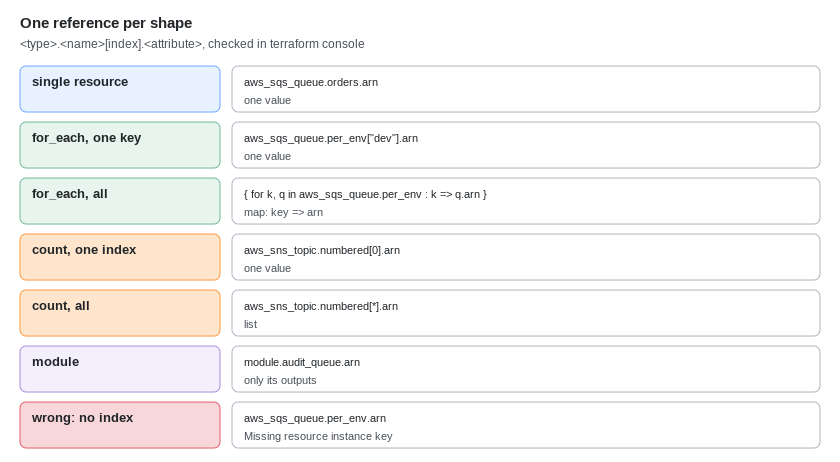
aws_sqs_queue.orders.arn                         # single resource
aws_sqs_queue.per_env["dev"].arn                 # for_each: by key
{ for k, q in aws_sqs_queue.per_env : k => q.arn }  # for_each: all, as a map
values(aws_sqs_queue.per_env)[*].arn             # for_each: all, as a list
aws_sns_topic.numbered[0].arn                    # count: by index
aws_sns_topic.numbered[*].arn                    # count: all, as a list
module.audit_queue.arn                           # a module's output
The errors you get when the reference doesn’t fit the resource:
| Reference | Error |
|---|---|
aws_sqs_queue.per_env.arn (has for_each) |
Missing resource instance key … its attributes must be accessed on specific instances |
aws_sns_topic.numbered.arn (has count) |
Missing resource instance key, suggests aws_sns_topic.numbered[count.index] |
module.audit_queue.aws_sqs_queue.this.arn |
This object does not have an attribute named "aws_sqs_queue" |
aws_iam_role_policy_attachment.app_read_logs.arn |
This object has no argument, nested block, or exported attribute named "arn" |
aws_sqs_queue.orders.arm (typo) |
... named "arm". Did you mean "arn"? |
A module’s resources are private: from outside you can only read what the module declares as an output. If a module doesn’t export the ARN you need, add the output to the module (or read the resource with a data source).
6. Resources Terraform Doesn’t Manage: Data Sources
For an ARN of something created elsewhere (by hand, by another team, by another state), read it with a data source instead of hard-coding it:
data "aws_caller_identity" "current" {}      # account_id, arn of the caller
data "aws_region" "current" {}               # .name in provider 5.x, .region in 6.x
data "aws_partition" "current" {}            # aws, aws-cn, aws-us-gov

data "aws_iam_role" "existing" {
  name = "app-role"                          # look it up by name, get .arn, .unique_id
}
data.aws_iam_role.existing.arn returned arn:aws:iam::000000000000:role/app-role, and data.aws_caller_identity.current gave the account ID and the caller’s ARN. The region attribute moved between major provider versions: data.aws_region.current.name works in 5.x, and in 6.x it’s .region (5.x rejected .region with Unsupported attribute).
Building an ARN Yourself
When a resource doesn’t export the ARN another resource needs (or it isn’t in Terraform at all), build it from the parts instead of hard-coding the account or partition:
locals {
  orders_arn = format("arn:%s:sqs:%s:%s:%s",
    data.aws_partition.current.partition,
    data.aws_region.current.name,
    data.aws_caller_identity.current.account_id,
    aws_sqs_queue.orders.name)
}
The AWS provider also has provider functions for this (Terraform 1.8 and later):
provider::aws::arn_build("aws", "sqs", "eu-central-1", "000000000000", "orders")
provider::aws::arn_parse(aws_iam_role.app.arn)   # { account_id, partition, region, resource, service }
arn_build returned the same arn:aws:sqs:eu-central-1:000000000000:orders as the queue’s own .arn, and arn_parse split the role ARN into service = "iam", resource = "role/app-role" and the account. Prefer the resource’s own .arn when it exists; build ARNs only for what Terraform doesn’t know.
7. IDs for terraform import
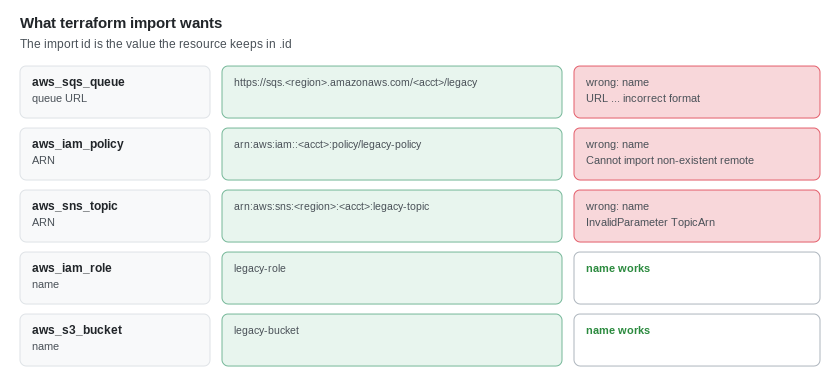
The id in an import block is the same identifier the resource stores as .id, so the table in section 2 is also an import table. Five resources created outside Terraform (with the AWS CLI), imported in one plan:
import {
  to = aws_sqs_queue.legacy
  id = "https://sqs.eu-central-1.amazonaws.com/123456789012/legacy"   # the queue URL
}
import {
  to = aws_iam_policy.legacy
  id = "arn:aws:iam::123456789012:policy/legacy-policy"              # the ARN
}
import {
  to = aws_iam_role.legacy
  id = "legacy-role"                                                  # the name
}
import {
  to = aws_s3_bucket.legacy
  id = "legacy-bucket"                                                # the name
}
import {
  to = aws_sns_topic.legacy
  id = "arn:aws:sns:eu-central-1:123456789012:legacy-topic"           # the ARN
}
aws sqs get-queue-url --queue-name legacy --query QueueUrl --output text
aws iam get-policy --policy-arn arn:aws:iam::123456789012:policy/legacy-policy --query Policy.Arn --output text
aws sns list-topics --query 'Topics[?ends_with(TopicArn, `legacy-topic`)].TopicArn' --output text
terraform plan          # "will be imported" for each
terraform apply
With those IDs the plan said 5 to import and the apply Import complete for each. With names everywhere instead, three of them failed, each differently:
| Resource | Wrong ID | Error |
|---|---|---|
aws_sqs_queue |
legacy (name) |
SQS Queue URL (legacy) is in the incorrect format |
aws_sns_topic |
legacy-topic (name) |
InvalidParameter: Invalid parameter: TopicArn |
aws_iam_policy |
legacy-policy (name) |
Cannot import non-existent remote object |
The IAM policy error is the misleading one: the policy existed, but the provider looked it up by ARN, found nothing for a bare name, and reported it as missing. Check the resource’s Import section in the docs for the format before guessing.
8. Quick Reference
| You need | Command or expression |
|---|---|
| Which attributes a resource exports | Registry docs, Attribute Reference; or terraform providers schema -json \| jq ... |
| Every resource address | terraform state list |
| All attributes of one resource | terraform state show <address> |
| One value, interactively | terraform console, then the expression |
| One value in a script | terraform output -raw <name> or echo '<expr>' \| terraform console |
| All IDs and ARNs as a table | terraform show -json \| jq ... |
| An ARN of something not in Terraform | A data source (data.aws_iam_role…), or format() / provider::aws::arn_build |
| The import ID format | Registry docs, Import section; equals what the resource stores as .id |
Gotchas
.idmeans something different per resource: a name (S3, IAM role), a URL (SQS), an ARN (IAM policy, SNS topic), an AWS ID (VPC, security group) or a generated string (attachments). Use.arnwhen you need an ARN.- Not every resource has
.arn. Attachments and associations don’t. - ARNs are
(known after apply)during plan, so they can’t befor_eachkeys or acount. for_eachandcountresources need an index:["key"]or[0], or a splat /forexpression for all of them.- A module only exposes its outputs, not its resources.
terraform output -rawrefuses maps and lists; use-json.- Import IDs follow
.id: queue URL, policy ARN, topic ARN, role or bucket name. data.aws_regionchanged attribute names between AWS provider 5.x (.name) and 6.x (.region).- Don’t hard-code account IDs or partitions in ARNs; take them from
aws_caller_identityandaws_partition.