S3 Object Lock: Governance vs Compliance Mode, Legal Holds and Event Holds
S3 Object Lock stores object versions in a write-once-read-many (WORM) model: a locked version cannot be overwritten or deleted until its retention period ends or its hold is removed. It is how you keep backups out of reach of ransomware, protect audit records from a mistaken script, and meet record-keeping rules. S3 Object Lock has been assessed by Cohasset Associates for SEC 17a-4, CFTC and FINRA requirements.
There are two retention modes, governance and compliance, and two kinds of holds, legal holds and the newer event holds (variable retention). This article compares them, shows the commands, and corrects one claim that often appears in comparison tables. The facts come from the S3 User Guide on Object Lock and the AWS Backup and Glacier guides; the commands were checked with AWS CLI 2.39.3. Bucket names, keys and version IDs are examples.
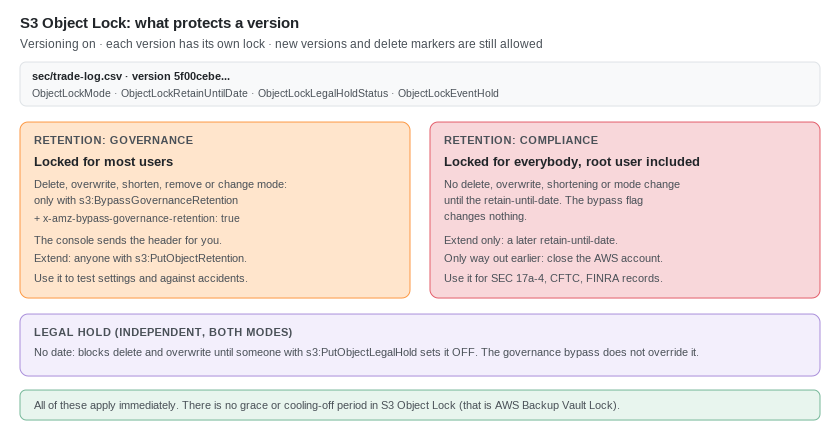
1. Governance vs Compliance at a Glance
| Governance mode | Compliance mode | |
|---|---|---|
| Who can delete or overwrite a locked version | Principals with s3:BypassGovernanceRetention who send x-amz-bypass-governance-retention: true |
Nobody, including the account root user, until the retain-until-date |
| Shorten or remove the retention | Yes, with the bypass permission and header | No |
| Change the mode | Only with the bypass permission and header, like any other change to the lock settings | No |
| Extend the retention | Yes, anyone with s3:PutObjectRetention |
Yes, anyone with s3:PutObjectRetention (extending is the only change allowed) |
| Delete before the date | With bypass | Only by closing the AWS account |
| Starts protecting | Immediately when the version is written or the retention is set | Immediately. There is no grace or cooling-off period in S3 Object Lock |
| Typical use | Protection against accidents and most users, testing retention settings before compliance | Regulatory WORM records (SEC 17a-4, CFTC, FINRA), backups that even an admin must not delete |
About the “72-hour cooling-off period”: that is AWS Backup Vault Lock in compliance mode, which can be changed or removed during a grace time of at least 3 days before it becomes immutable (section 10). S3 Object Lock has no such window: a compliance-mode retention is final the moment it is applied. That is why AWS recommends testing with governance first.
Two more facts that comparison tables often get wrong:
- Neither mode stops new versions or delete markers. A
PUTto the same key creates a new version, and aDELETEwithout a version ID adds a delete marker. The locked version stays underneath (section 7). - The lock protects one version. Different versions of the same key can have different modes and dates.
2. Turning Object Lock On
Object Lock needs versioning, and once it is on it cannot be turned off, and versioning cannot be suspended on that bucket.
# New bucket (versioning is enabled automatically)
aws s3api create-bucket --bucket corp-worm-records --object-lock-enabled-for-bucket \
  --create-bucket-configuration LocationConstraint=eu-central-1

# Existing bucket: enable versioning first, then Object Lock
aws s3api put-bucket-versioning --bucket <bucket> --versioning-configuration Status=Enabled
aws s3api put-object-lock-configuration --bucket <bucket> --object-lock-configuration '{"ObjectLockEnabled":"Enabled"}'
- Enabling it on an existing bucket does not lock the objects already there. Apply retention to them with
put-object-retentionor an S3 Batch Operations job. - A bucket with Object Lock cannot be the destination of server access logs.
- Uploads with a retention period need a
Content-MD5or checksum header. The AWS CLI v2 and current SDKs send a checksum by default; with raw REST calls, add one.
3. Retention Periods and Bucket Defaults
A retention period has a retain-until-date stored in the version’s metadata. Set it per object, or give the bucket a default retention so every new version gets one:
# Default: every new version is locked in governance mode for 30 days
aws s3api put-object-lock-configuration --bucket corp-worm-records \
  --object-lock-configuration '{"ObjectLockEnabled":"Enabled","Rule":{"DefaultRetention":{"Mode":"GOVERNANCE","Days":30}}}'

aws s3api get-object-lock-configuration --bucket corp-worm-records

# An explicit lock on upload overrides the default
aws s3api put-object --bucket corp-worm-records --key sec/trade-log.csv --body trade-log.csv \
  --object-lock-mode COMPLIANCE --object-lock-retain-until-date 2033-11-02T00:00:00Z
- A default needs a mode and a period, in
DaysorYears, not both. - The default is applied at write time: S3 adds the period to the version’s creation time. A file uploaded at 21:47 UTC on 2 November under the 30-day default reads back as
"Until": "2026-12-02T21:47:49+00:00"with"Mode": "GOVERNANCE"fromhead-object. - Changing the default affects new versions only.
- Extending a retention is always allowed: send a later retain-until-date. In compliance mode that is the only change S3 accepts.
- The longest retention a bucket policy can allow is 100 years.
# Read the lock on one version
aws s3api head-object --bucket corp-worm-records --key gov/statement.pdf \
  --query '{Mode:ObjectLockMode,Until:ObjectLockRetainUntilDate,LegalHold:ObjectLockLegalHoldStatus,EventHold:ObjectLockEventHold,HoldDays:ObjectLockEventHoldDurationDays}'
4. Governance Mode in Practice
A governance-locked version behaves like a compliance one for everybody except principals that hold s3:BypassGovernanceRetention and ask for the bypass in the request.
$ aws s3api delete-object --bucket corp-worm-records --key gov/statement.pdf --version-id 432eab9f-dc3f-447d-8180-75f2583783e5

aws: [ERROR]: An error occurred (AccessDenied) when calling the DeleteObject operation: Access Denied
With the permission and the flag, the same delete goes through, and so does shortening or removing the retention:
aws s3api delete-object --bucket corp-worm-records --key gov/statement.pdf \
  --version-id 432eab9f-dc3f-447d-8180-75f2583783e5 --bypass-governance-retention

aws s3api put-object-retention --bucket corp-worm-records --key gov/statement.pdf --version-id <version-id> \
  --retention '{"Mode":"GOVERNANCE","RetainUntilDate":"2026-11-10T00:00:00Z"}' --bypass-governance-retention
- The S3 console sends the bypass header automatically. A user with the permission can delete governance-locked objects in the console without noticing.
- Give
s3:BypassGovernanceRetentionto one break-glass role, and deny it to everyone else in the bucket policy:
{
  "Version": "2012-10-17",
  "Statement": [
    {
      "Sid": "OnlyBreakGlassCanBypass",
      "Effect": "Deny",
      "Principal": "*",
      "Action": "s3:BypassGovernanceRetention",
      "Resource": "arn:aws:s3:::corp-worm-records/*",
      "Condition": {
        "ArnNotEquals": { "aws:PrincipalArn": "arn:aws:iam::123456789012:role/worm-break-glass" }
      }
    }
  ]
}
- Governance is the right mode to try out retention settings: you can undo them. Move to compliance when the settings are final.
5. Compliance Mode in Practice
In compliance mode the bypass flag changes nothing:
$ aws s3api delete-object --bucket corp-worm-records --key sec/trade-log.csv \
    --version-id 5f00cebe-26d7-4f87-82ca-4c0a3920d13c --bypass-governance-retention

aws: [ERROR]: An error occurred (AccessDenied) when calling the DeleteObject operation: Access Denied
- No user, role or root user can delete, overwrite, shorten, remove or change the mode of the version until the retain-until-date.
- The only way to get rid of it earlier is to close the AWS account.
- You can still extend the date:
aws s3api put-object-retention --bucket corp-worm-records --key sec/trade-log.csv \
  --version-id 5f00cebe-26d7-4f87-82ca-4c0a3920d13c \
  --retention '{"Mode":"COMPLIANCE","RetainUntilDate":"2034-11-02T00:00:00Z"}'
Warning: a compliance lock on the wrong objects, or for 100 years by mistake, costs storage for the whole period and cannot be undone. Set compliance defaults only after testing the same settings in governance, and restrict who may set long periods (section 9).
Object Lock protects the object, not your ability to read it: if objects are encrypted with a KMS key and that key is deleted, the locked objects stay but cannot be decrypted. Protect the key too.
6. Legal Holds
A legal hold blocks overwrite and delete like a retention period, but it has no date: it stays until someone removes it. It is independent of the retention period and works in either mode.
aws s3api put-object-legal-hold --bucket corp-worm-records --key gov/statement.pdf \
  --version-id 432eab9f-dc3f-447d-8180-75f2583783e5 --legal-hold Status=ON
aws s3api get-object-legal-hold --bucket corp-worm-records --key gov/statement.pdf --version-id <version-id>
- Anyone with
s3:PutObjectLegalHoldcan place or remove it. Restrict that permission like the bypass one. - The governance bypass does not override a legal hold. With the hold
ON, the delete with--bypass-governance-retentionabove still returnedAccessDenied; afterStatus=OFFit succeeded and returned the deletedVersionId. - If the retention period ends while a hold is on, the version stays protected. If you remove the hold during the retention period, the retention still applies.
- Use it for litigation, audits or investigations where the end date is unknown.
7. Deletes, Delete Markers, Lifecycle and Replication
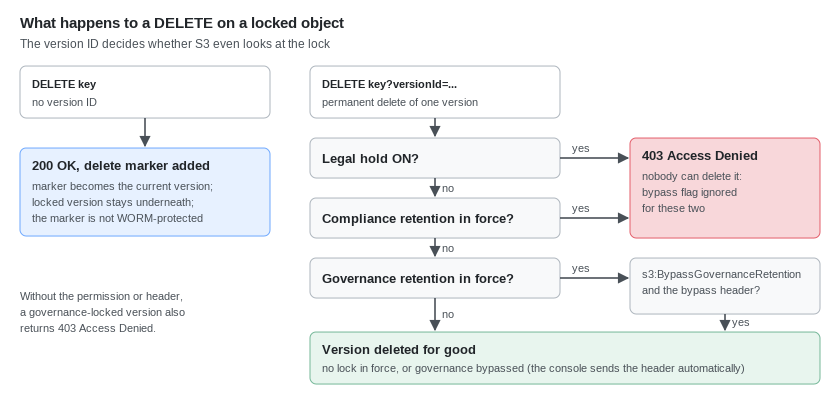
| Request | Result on a locked version |
|---|---|
DELETE without a version ID |
200 OK: a delete marker becomes the current version. The locked version is still there |
DELETE with a version ID |
403 Access Denied, unless governance mode with bypass |
PUT to the same key |
Succeeds and creates a new version; the old one keeps its lock |
$ aws s3api delete-object --bucket corp-worm-records --key sec/trade-log.csv
{
    "DeleteMarker": true,
    "VersionId": "cea31265-1b36-4577-8822-aea73a28baca"
}
The locked version is then listed as noncurrent ("Latest": false) under the delete marker ("Latest": true). Delete the marker to make the object visible again.
- Delete markers are not WORM-protected, whatever the lock on the object below.
- Lifecycle still runs: it can add delete markers and transition locked versions between storage classes (the lock stays), but it never permanently deletes a locked version. See the S3 Lifecycle guide.
- Replication copies the lock settings (mode, date, legal hold, event hold) with the object. The destination bucket must have Object Lock too, and the replication role needs
s3:GetObjectRetentionands3:GetObjectLegalHoldon the source.
8. Variable Retention: Event Holds
Sometimes the clock should start later: seven years after a contract ends, a year after a claim closes. Variable retention does this with an event hold and an event hold duration:
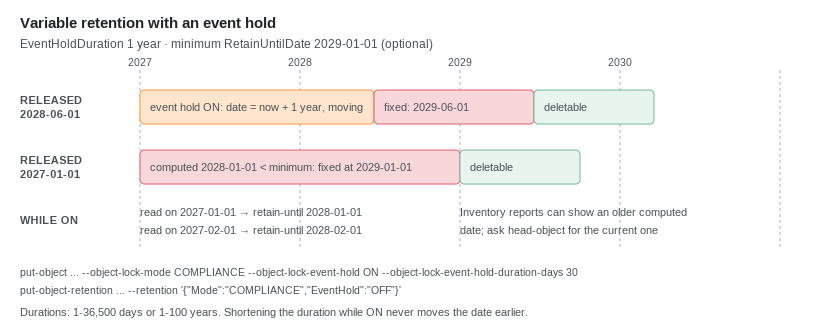
- While the hold is
ON, the object is protected and the retain-until-date is now plus the duration, so it keeps moving forward. - When you release the hold (
OFF), S3 fixes the retain-until-date at release time plus the duration. - An optional
RetainUntilDateacts as a minimum: the final date is the later of the two. - Durations are 1 to 36,500 days or 1 to 100 years, one or the other.
# Upload with an event hold (compliance mode, 30 days after release)
aws s3api put-object --bucket corp-worm-records --key claims/claim-4711.pdf --body claim-4711.pdf \
  --object-lock-mode COMPLIANCE --object-lock-event-hold ON --object-lock-event-hold-duration-days 30

# Or on an existing version, with a minimum date
aws s3api put-object-retention --bucket corp-worm-records --key claims/claim-4711.pdf \
  --retention '{"Mode":"COMPLIANCE","EventHold":"ON","EventHoldDuration":{"Days":30},"RetainUntilDate":"2027-01-01T00:00:00Z"}'

# The event happened: release the hold (no duration in this call)
aws s3api put-object-retention --bucket corp-worm-records --key claims/claim-4711.pdf \
  --retention '{"Mode":"COMPLIANCE","EventHold":"OFF"}'

# Bucket default: every new version starts with a 90-day event hold
aws s3api put-object-lock-configuration --bucket corp-worm-records --object-lock-configuration \
  '{"ObjectLockEnabled":"Enabled","Rule":{"DefaultRetention":{"Mode":"COMPLIANCE","Days":365,"DefaultEventHold":{"Days":90}}}}'
A request that sets an event hold fails with 400 Bad Request when it has no mode, no duration or both days and years, a duration together with OFF, or a duration out of range. Shortening the
duration while the hold is on never moves the retain-until-date earlier. Replication copies the hold, and the destination computes its own final date when the release is replicated.
9. Limiting Retention with a Bucket Policy
A mistaken 100-year compliance lock is expensive. A bucket policy can cap or enforce periods with condition keys:
{
  "Version": "2012-10-17",
  "Statement": [
    {
      "Sid": "MaxTenYears",
      "Effect": "Deny",
      "Principal": "*",
      "Action": "s3:PutObjectRetention",
      "Resource": "arn:aws:s3:::corp-worm-records/*",
      "Condition": { "NumericGreaterThan": { "s3:object-lock-remaining-retention-days": "3653" } }
    },
    {
      "Sid": "MinNinetyDayEventHold",
      "Effect": "Deny",
      "Principal": "*",
      "Action": "s3:PutObjectRetention",
      "Resource": "arn:aws:s3:::corp-worm-records/*",
      "Condition": { "NumericLessThan": { "s3:object-lock-event-hold-duration-days": "90" } }
    }
  ]
}
aws s3api put-bucket-policy --bucket corp-worm-records --policy file://retention-limits.json
s3:object-lock-remaining-retention-dayschecks the period in a request. While an event hold is on, S3 moves the date forward on its own, so it can pass that limit: also restricts3:object-lock-event-hold(ON/OFF) if that matters.- Years are converted to days as 365 per year, so write limits in days.
- The keys check requests, not bucket defaults. To control defaults, restrict
s3:PutBucketObjectLockConfiguration.
10. S3 Object Lock vs AWS Backup Vault Lock vs Glacier Vault Lock
Three AWS features lock data, and their “compliance” settings differ:
| S3 Object Lock | AWS Backup Vault Lock | S3 Glacier Vault Lock (legacy vaults) | |
|---|---|---|---|
| Locks | Object versions | A backup vault’s recovery points (min and max retention) | A vault access policy |
| Modes | Governance, compliance, plus legal and event holds | Governance (no ChangeableForDays), compliance (with it) |
One lock policy |
| Before it is final | Nothing: applied at once | Compliance: a grace time of 3 to 36,500 days (at least 72 hours) during which the lock can be changed or deleted | 24 hours in InProgress to call complete-vault-lock, otherwise it is discarded |
| After that | Compliance retention can only be extended | Vault lock cannot be changed or deleted | Policy cannot be changed |
# AWS Backup Vault Lock: compliance mode (3-day grace time), then governance mode
aws backup put-backup-vault-lock-configuration --backup-vault-name records \
  --changeable-for-days 3 --min-retention-days 7 --max-retention-days 2555
aws backup put-backup-vault-lock-configuration --backup-vault-name records \
  --min-retention-days 7 --max-retention-days 2555

# Still in the grace time: remove the lock
aws backup delete-backup-vault-lock-configuration --backup-vault-name records
11. Seeing What Is Locked
head-object/get-object-retention/get-object-legal-holdfor one version (sections 3 and 6). While an event hold is on, they return the current computed date.- S3 Inventory can list the retain-until-date, mode, legal hold status, event hold status and event hold duration for every object. Reports can be up to 48 hours old, so computed event-hold dates in them lag.
- S3 Storage Lens shows Object Lock-enabled bytes and object counts.
- Event notifications:
s3:ObjectRetention:Putfires on every explicitPutObjectRetention, including releasing an event hold and extending a date. - CloudTrail records
PutObjectRetention,PutObjectLegalHoldand the delete attempts as data events.
12. Tips and Gotchas
- Test in governance, then switch to compliance. A compliance mistake can only be fixed by waiting or by closing the account.
- Keep
s3:BypassGovernanceRetentionands3:PutObjectLegalHoldon few principals. With the bypass permission, the console deletes governance-locked versions without warning. - Locking a version is not hiding it. Delete markers and new versions still work; read the version history, not just the current object.
- Enable it for good. Object Lock and versioning can never be turned off on that bucket.
- Existing objects need explicit retention (Batch Operations) after Object Lock is enabled on an existing bucket.
- Cap the periods with a bucket policy, and remember event holds keep moving the date until released.
- Protect the KMS key of encrypted locked objects, and turn on Object Lock in replication destinations too.
- Know which lock you mean. The 72-hour grace time is AWS Backup Vault Lock, the 24-hour window is Glacier Vault Lock; S3 Object Lock has neither.