Kustomize vs Helm: Overlays, Charts, Merge Rules and Using Both
Two ways to manage Kubernetes manifests across environments. Kustomize patches plain YAML; Helm renders templates from a packaged chart and tracks each install as a release. This article shows how each one works, where each one surprises people, and how to combine them.
Everything below was run with kubectl 1.37.2 (built-in Kustomize v5.8.1), Helm 4.3.1 and a k3s 1.35 cluster; outputs are real, names are examples.
1. Overview
| Kustomize | Helm | |
|---|---|---|
| Approach | Patch and overlay plain YAML | Render Go templates with values |
| Philosophy | “Keep YAML as YAML”, no templating | “Charts are packages”, parameterized templates |
| Built into kubectl | Yes (kubectl apply -k, kubectl kustomize) |
No (separate helm binary) |
| Packaging | None | Charts: versioned, distributed through repositories or OCI registries |
| Dependencies | None (an overlay can include remote bases) | Chart dependencies (subcharts) |
| Lifecycle | None, it only generates YAML | Releases: install, upgrade, rollback, uninstall |
| State in the cluster | None | One Secret per release revision (sh.helm.release.v1.<name>.v<n>) |
| Logic | None (patches, components, replacements) | if, range, functions, helpers, hooks |
| Learning curve | Low | Medium |
| Best for | In-house apps with small differences between environments | Third-party software, packages for others, complex parameters |
2. How Kustomize Works
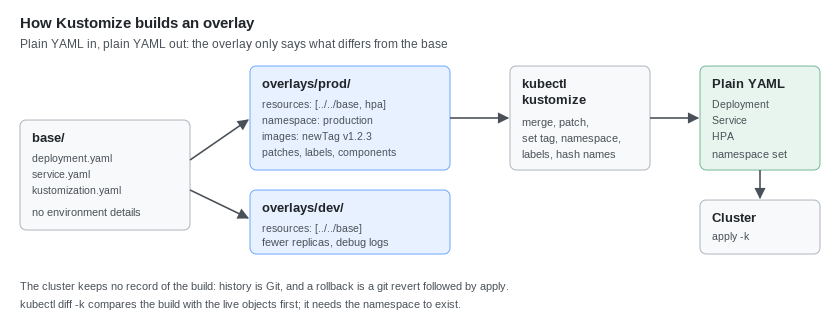
A base holds plain manifests. Each overlay points at the base and adds what differs: patches, an image tag, a namespace, labels, extra resources. The output is plain YAML.
base/
├── deployment.yaml
├── service.yaml
└── kustomization.yaml
overlays/
├── dev/
│   └── kustomization.yaml
└── prod/
    ├── kustomization.yaml
    ├── replica-patch.yaml
    └── hpa.yaml
Base
# base/deployment.yaml
apiVersion: apps/v1
kind: Deployment
metadata:
  name: my-app
spec:
  replicas: 1
  selector:
    matchLabels:
      app: my-app
  template:
    metadata:
      labels:
        app: my-app
    spec:
      containers:
      - name: app
        image: my-app:latest
        ports:
        - containerPort: 8080
        resources:
          requests:
            cpu: 100m
            memory: 128Mi
# base/kustomization.yaml
apiVersion: kustomize.config.k8s.io/v1beta1
kind: Kustomization
resources:
- deployment.yaml
- service.yaml
Overlay (Production)
# overlays/prod/kustomization.yaml
apiVersion: kustomize.config.k8s.io/v1beta1
kind: Kustomization
resources:
- ../../base
- hpa.yaml

namespace: production

patches:
- path: replica-patch.yaml

images:
- name: my-app
  newTag: v1.2.3

labels:
- pairs:
    env: production
# overlays/prod/replica-patch.yaml
apiVersion: apps/v1
kind: Deployment
metadata:
  name: my-app
spec:
  replicas: 5
  template:
    spec:
      containers:
      - name: app
        resources:
          requests:
            cpu: 500m
            memory: 512Mi
          limits:
            cpu: 1000m
            memory: 1Gi
The Deployment that kubectl kustomize overlays/prod produces:
apiVersion: apps/v1
kind: Deployment
metadata:
  labels:
    env: production
  name: my-app
  namespace: production
spec:
  replicas: 5
  selector:
    matchLabels:
      app: my-app
  template:
    metadata:
      labels:
        app: my-app
    spec:
      containers:
      - image: my-app:v1.2.3
        name: app
        ports:
        - containerPort: 8080
        resources:
          limits:
            cpu: 1000m
            memory: 1Gi
          requests:
            cpu: 500m
            memory: 512Mi
The namespace, replicas, tag and resources come from the overlay; the patch did not touch the ports, so they stay. Kustomize also sorts keys alphabetically.
labels, not commonLabels
commonLabels still works but is deprecated, and every build says so:
# Warning: 'commonLabels' is deprecated. Please use 'labels' instead. Run 'kustomize edit fix' to update your Kustomization automatically.
It is also dangerous: commonLabels adds the label to selectors too, and a Deployment’s spec.selector cannot change, so adding a label to an
existing app breaks the next apply. labels: asks:
labels:
- pairs:
    env: production
  includeSelectors: false   # default; true is what commonLabels did
  includeTemplates: true    # also label the Pod template (default false)
Apply
kubectl kustomize overlays/prod      # render only
kubectl diff -k overlays/prod        # compare with the cluster
kubectl apply -k overlays/prod
kubectl delete -k overlays/prod      # delete what the overlay defines
kubectl diff -k needs the namespace to exist; otherwise it stops at the first namespaced object:
Error from server (NotFound): namespaces "production" not found
Its exit code is 2 for errors and 1 when there are differences, so CI can tell them apart. Create the namespace first, or put a Namespace
manifest in the overlay.
3. How Helm Works
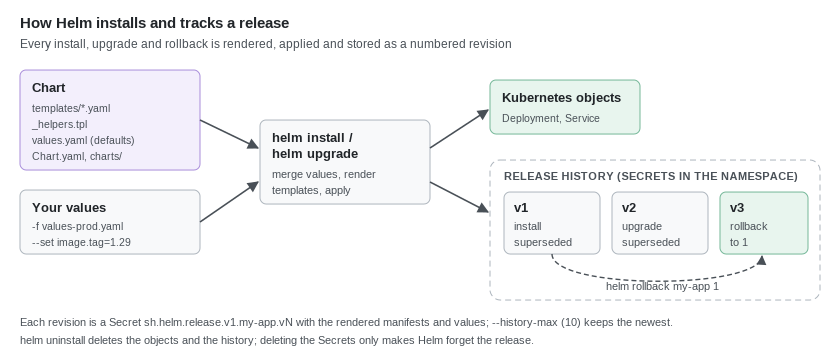
A chart is templates plus default values. helm install renders the templates with your values, applies the result and records a release.
my-chart/
├── Chart.yaml
├── values.yaml
├── templates/
│   ├── deployment.yaml
│   ├── service.yaml
│   ├── hpa.yaml
│   ├── _helpers.tpl
│   └── NOTES.txt
└── charts/           # dependencies
Chart Template
# templates/deployment.yaml (shortened from helm create)
apiVersion: apps/v1
kind: Deployment
metadata:
  name: {{ include "my-chart.fullname" . }}
  labels:
    {{- include "my-chart.labels" . | nindent 4 }}
spec:
  replicas: {{ .Values.replicaCount }}
  selector:
    matchLabels:
      {{- include "my-chart.selectorLabels" . | nindent 6 }}
  template:
    metadata:
      labels:
        {{- include "my-chart.selectorLabels" . | nindent 8 }}
    spec:
      containers:
      - name: {{ .Chart.Name }}
        image: "{{ .Values.image.repository }}:{{ .Values.image.tag | default .Chart.AppVersion }}"
        ports:
        - containerPort: {{ .Values.service.port }}
        resources:
          {{- toYaml .Values.resources | nindent 12 }}
Values
# values-prod.yaml (only what differs from values.yaml)
replicaCount: 5
image:
  tag: "1.29"
resources:
  requests:
    cpu: 50m
    memory: 64Mi
$ helm create my-chart
$ helm template my-app ./my-chart -f values-prod.yaml | grep -E 'replicas:|image:|cpu:'
  replicas: 5
          image: "nginx:1.29"
              cpu: 50m
      image: busybox
(busybox is the chart’s test Pod.)
Install, Upgrade, History, Rollback
helm install my-app ./my-chart -n kh-test --create-namespace --wait
helm upgrade my-app ./my-chart -f values-prod.yaml -n kh-test
helm history my-app -n kh-test
kubectl -n kh-test get secrets -l owner=helm
helm rollback my-app 1 -n kh-test
REVISION	UPDATED                 	STATUS    	CHART         	APP VERSION	DESCRIPTION
1       	Thu Nov  5 09:17:58 2026	superseded	my-chart-0.1.0	1.16.0     	Install complete
2       	Thu Nov  5 09:17:59 2026	deployed  	my-chart-0.1.0	1.16.0     	Upgrade complete

NAME                           TYPE                 DATA   AGE
sh.helm.release.v1.my-app.v1   helm.sh/release.v1   1      1s
sh.helm.release.v1.my-app.v2   helm.sh/release.v1   1      0s

Rollback was a success! Happy Helming!
2       	Thu Nov  5 09:17:59 2026	superseded	my-chart-0.1.0	1.16.0     	Upgrade complete
3       	Thu Nov  5 09:18:00 2026	deployed  	my-chart-0.1.0	1.16.0     	Rollback to 1
- A rollback is a new revision. Rolling back to 1 created revision 3, a copy of 1; the history keeps all three (up to
--history-max, 10 by default). - Each revision is a Secret holding the rendered manifests and values, compressed. Deleting those Secrets makes Helm forget the release, not the resources.
helm uninstallremoves the resources and the history (--keep-historykeeps the Secrets).
Helm 4 Changes That Matter Here
| Helm 3 | Helm 4 |
|---|---|
--atomic |
--rollback-on-failure (implies --wait=watcher) |
--wait (one behaviour) |
--wait=watcher (with --wait alone), hookOnly (default without the flag) or legacy |
| Client-side apply | --server-side true, false or auto (default auto: same method as the previous release) |
--post-renderer ./script |
--post-renderer <plugin-name>: post-renderers must be postrenderer/v1 plugins (section 9) |
| Plugins installed as they are | helm plugin install verifies signatures by default; --verify=false skips it |
4. Merge Rules: What a Patch Replaces and What It Merges
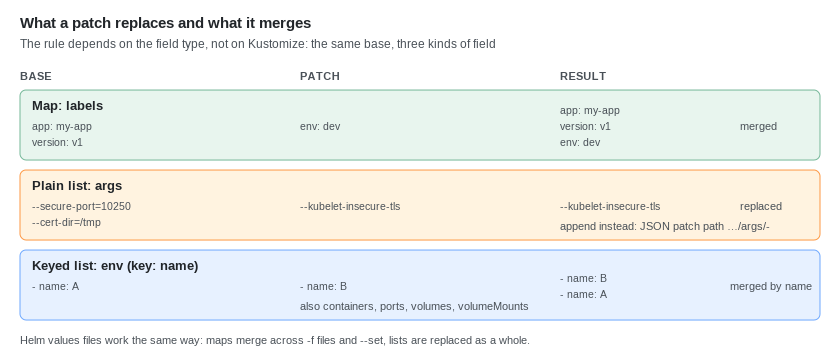
A strategic merge patch does not treat every list the same way. The Kubernetes types say how each list merges: lists with a merge key (usually
name) merge item by item, plain lists are replaced.
Base container with three args and one env, plus a sidecar; the patch sets one arg and one env var:
# base: deploy.yaml (excerpt)
      containers:
      - name: metrics-server
        image: registry.k8s.io/metrics-server/metrics-server:v0.8.0
        args:
        - --secure-port=10250
        - --cert-dir=/tmp
        - --metric-resolution=15s
        env:
        - name: A
          value: "1"
      - name: sidecar
        image: busybox:1.37
# patch: smp.yaml
apiVersion: apps/v1
kind: Deployment
metadata:
  name: metrics-server
spec:
  template:
    spec:
      containers:
      - name: metrics-server
        args:
        - --kubelet-insecure-tls
        env:
        - name: B
          value: "2"
Result of kubectl kustomize:
      containers:
      - args:
        - --kubelet-insecure-tls
        env:
        - name: B
          value: "2"
        - name: A
          value: "1"
        image: registry.k8s.io/metrics-server/metrics-server:v0.8.0
        name: metrics-server
      - image: busybox:1.37
        name: sidecar
| List | Merge key | What the patch did |
|---|---|---|
containers |
name |
Merged: metrics-server patched, sidecar kept |
env |
name |
Merged: B added, A kept |
ports, volumes, volumeMounts, initContainers |
containerPort / name / mountPath / name |
Merged by key |
args, command, tolerations |
none | Replaced: the three original args are gone |
To append to a plain list, use a JSON patch with /- at the end of the path:
patches:
- target:
    kind: Deployment
    name: metrics-server
  patch: |-
    - op: add
      path: /spec/template/spec/containers/0/args/-
      value: --kubelet-insecure-tls
      - args:
        - --secure-port=10250
        - --cert-dir=/tmp
        - --metric-resolution=15s
        - --kubelet-insecure-tls
A JSON patch addresses items by index (containers/0), so it breaks silently if the order changes; prefer it only for plain lists. Two
strategic-merge directives cover the other cases: $patch: replace under a keyed list replaces it instead of merging, and an item with
$patch: delete (and its key) removes that one item.
Helm values follow the same rule. Maps merge across values.yaml, -f files and --set; lists are replaced:
# values.yaml               # values-list.yaml
args:                       args:
- --secure-port=10250       - --kubelet-insecure-tls
- --cert-dir=/tmp           labels:
labels:                       env: prod
  app: my-app
  labels:
    app: my-app
    env: prod
data:
  args: "--kubelet-insecure-tls"
Charts work around it with separate lists such as extraArgs or extraEnv that the template appends to the defaults; the metrics-server chart’s
args value is one (section 9).
5. Optional Features: Components
“Turn monitoring on in prod only” is where people reach for Helm’s if. Kustomize’s answer is a component: a reusable bundle of resources and
patches that any overlay can include.
components/monitoring/
├── kustomization.yaml
└── servicemonitor.yaml
# components/monitoring/kustomization.yaml
apiVersion: kustomize.config.k8s.io/v1alpha1
kind: Component
resources:
- servicemonitor.yaml
patches:
- target:
    kind: Deployment
  patch: |-
    - op: add
      path: /spec/template/metadata/annotations
      value:
        prometheus.io/scrape: "true"
        prometheus.io/port: "8080"
# overlays/prod/kustomization.yaml
resources:
- ../../base
components:
- ../../components/monitoring
$ kubectl kustomize overlays/prod | grep -E "^kind:|prometheus.io"
kind: Deployment
        prometheus.io/port: "8080"
        prometheus.io/scrape: "true"
kind: ServiceMonitor
$ kubectl kustomize overlays/dev | grep -E "^kind:|prometheus.io"
kind: Deployment
Unlike a second base, components apply on top of the overlay’s resources, so several of them (monitoring, an ingress, a debug sidecar) can be combined freely.
6. Generators and Replacements
# kustomization.yaml
resources:
- deployment.yaml
- db-service.yaml

configMapGenerator:
- name: app-config
  literals:
  - LOG_LEVEL=warn

replacements:
- source:
    kind: Service
    name: my-app-db
    fieldPath: metadata.name
  targets:
  - select:
      kind: Deployment
      name: my-app
    fieldPaths:
    - spec.template.spec.containers.[name=app].env.[name=DB_HOST].value
$ kubectl kustomize . | grep -E 'name: app-config|DB_HOST|value: my-app-db'
  name: app-config-dfk4bdbtkk
        - name: DB_HOST
          value: my-app-db
            name: app-config-dfk4bdbtkk
# after changing LOG_LEVEL=warn to LOG_LEVEL=debug:
  name: app-config-47668c6k28
            name: app-config-47668c6k28
- Generated names get a content hash. A changed value means a new ConfigMap name, the Deployment’s reference changes with it, and the Pods roll.
A Helm chart needs a
checksum/configannotation to get the same effect.generatorOptions: {disableNameSuffixHash: true}turns it off. - Old generated ConfigMaps stay in the cluster until something prunes them:
kubectl apply --prune, Argo CD with pruning on, or Flux withprune: true. secretGeneratorliterals and files are plain text in Git. Use it with SOPS, Sealed Secrets or External Secrets, not with real passwords inliterals:.replacementscopies a field from one object into others. It replaces the oldvars, which are deprecated.
7. Key Differences
Templating vs Patching
Helm, logic in templates:
{{- if .Values.autoscaling.enabled }}
apiVersion: autoscaling/v2
kind: HorizontalPodAutoscaler
metadata:
  name: {{ include "my-chart.fullname" . }}
spec:
  minReplicas: {{ .Values.autoscaling.minReplicas }}
  maxReplicas: {{ .Values.autoscaling.maxReplicas }}
{{- end }}
Kustomize, the file is in the overlay or it is not (or in a component):
# overlays/prod/kustomization.yaml
resources:
- ../../base
- hpa.yaml    # only prod has the HPA
By Task
| Task | Kustomize | Helm |
|---|---|---|
| Image tag per environment | images: |
image.tag in values |
| Replicas per environment | Patch | replicaCount in values |
| A resource in one environment | Overlay resources: or a component |
{{- if .Values.x }} |
| Namespace | namespace: |
-n / --namespace |
| Labels and annotations | labels: / commonAnnotations: |
Template helpers |
| ConfigMaps | configMapGenerator: (hash suffix, automatic rollout) |
Template + checksum/config annotation |
| Secrets | secretGenerator: (plain text in Git) |
Template from values (also plain text) |
| A value from another object | replacements: |
Template expression |
| Loops | Not supported | range |
| Append to a list | JSON patch /- |
Chart-specific extra* values |
| Rollback | git revert and apply again |
helm rollback (new revision) |
8. Third-Party Software and Packaging
Helm is how most projects ship:
# cert-manager, from an OCI registry
helm install cert-manager oci://quay.io/jetstack/charts/cert-manager --version v1.21.3 \
  -n cert-manager --create-namespace --set crds.enabled=true

# Prometheus, Alertmanager and Grafana
helm install monitoring kube-prometheus-stack --repo https://prometheus-community.github.io/helm-charts \
  --version 92.18.0 -n monitoring --create-namespace -f monitoring-values.yaml

# Argo CD
helm install argocd argo-cd --repo https://argoproj.github.io/argo-helm --version 10.13.1 \
  -n argocd --create-namespace -f argocd-values.yaml
The ingress-nginx project was retired in March 2026 (its last chart is 4.15.1); new clusters should pick another ingress controller or move to the Gateway API.
OCI Charts
Charts can live in any OCI registry (ECR, GHCR, Harbor, Docker Hub) next to the images; no helm repo add, no index.yaml:
helm package my-chart
helm push my-chart-0.1.0.tgz oci://localhost:5050/charts --plain-http
helm show chart oci://localhost:5050/charts/my-chart --version 0.1.0 --plain-http
helm registry login <registry>for private registries;--plain-httponly for a local registry without TLS.helm pull oci://... -d dirneedsdirto exist.- On macOS,
localhost:5000is taken by the AirPlay Receiver, which answers registry requests with403: Forbidden; run a test registry on another port.
9. Using Both
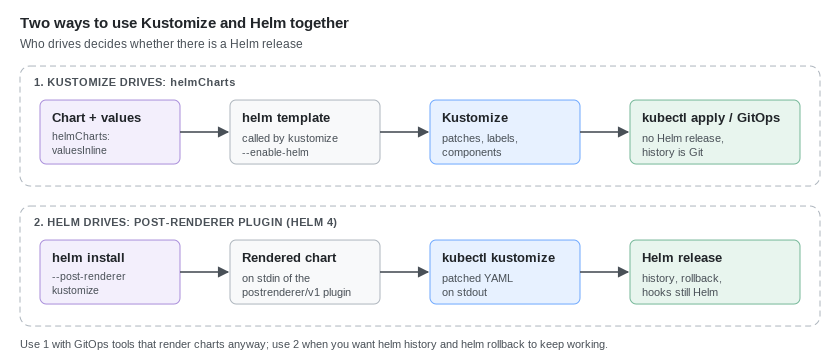
Kustomize Renders the Chart: helmCharts
# kustomization.yaml
helmCharts:
- name: metrics-server
  repo: https://kubernetes-sigs.github.io/metrics-server/
  version: 3.13.0
  releaseName: metrics-server
  namespace: kube-system
  valuesInline:
    args:
    - --kubelet-insecure-tls
kubectl kustomize --enable-helm . # or: kustomize build --enable-helm .
      - args:
        - --secure-port=10250
        - --cert-dir=/tmp
        - --kubelet-preferred-address-types=InternalIP,ExternalIP,Hostname
        - --kubelet-use-node-status-port
        - --metric-resolution=15s
        - --kubelet-insecure-tls
        image: registry.k8s.io/metrics-server/metrics-server:v0.8.0
The chart’s args value is appended after its own defaults. Kustomize calls the helm binary (Helm 4 works), downloads the chart into charts/,
and the result is plain YAML: no Helm release, no helm history, hooks become ordinary resources. Patches and labels in the same
kustomization.yaml then apply to the chart’s output, which is how you fix a chart without forking it.
Helm Installs, Kustomize Patches: Post-Renderers
A post-renderer receives the rendered chart on stdin and returns manifests on stdout; the release, history and rollback stay Helm’s. In Helm 4 it must be a plugin:
# kustomize-post/plugin.yaml
apiVersion: v1
type: postrenderer/v1
name: kustomize
version: 0.1.0
runtime: subprocess
runtimeConfig:
  platformCommand:
  - command: ${HELM_PLUGIN_DIR}/kustomize.sh
#!/bin/sh
# kustomize-post/kustomize.sh: Helm passes the rendered chart on stdin; $1 is the overlay directory
set -e
cat > "$1/all.yaml"
kubectl kustomize "$1"
# post/kustomization.yaml
resources:
- all.yaml
labels:
- pairs:
    team: platform
$ helm plugin install ./kustomize-post
Installing plugin from local directory (development mode)
Installed plugin: kustomize
$ helm template my-app ./my-chart --post-renderer kustomize --post-renderer-args "$PWD/post" | grep -E '^kind:|team: platform'
kind: ServiceAccount
    team: platform
kind: Service
    team: platform
kind: Deployment
    team: platform
kind: Pod
    team: platform
The same flags work on helm install and helm upgrade. Hooks (here the chart’s test Pod) go through the post-renderer too in Helm 4.
A failing post-renderer only says plugin "kustomize" exited with error; run the script by hand on helm template output to see the real message.
GitOps
| Argo CD | Flux | |
|---|---|---|
| Kustomize | Native: runs kustomize build |
Native: Kustomization resource |
| Helm | Runs helm template and applies the output: no Helm release in the cluster, helm list shows nothing |
HelmRelease uses the Helm SDK: a real release, helm history works |
| Rollback | Sync to an older Git revision | Helm rollback, or Git revert |
| Hooks | Mapped to Argo CD sync hooks | Real Helm hooks |
A common layout: third-party software as Helm charts (versions pinned in Git), in-house apps as Kustomize overlays, both synced by the same GitOps tool.
10. Helm in Production: Four Surprises
The Release Keeps Your Values, Passwords Included
Each release Secret holds the chart, the rendered manifests and every value you passed. It is gzipped and base64-encoded, not encrypted:
$ helm install app ./sec -n kh-sec --set db.password='S3cr3t-Pa55'
$ helm get values app -n kh-sec
USER-SUPPLIED VALUES:
db:
  password: S3cr3t-Pa55
$ kubectl -n kh-sec get secret sh.helm.release.v1.app.v1 -o jsonpath='{.data.release}' \
    | base64 -d | base64 -d | gunzip | jq -c .config
{"db":{"password":"S3cr3t-Pa55"}}
Anyone who can read Secrets in the namespace can read every value of every revision. Keep real secrets out of values: reference an existing Secret
(existingSecret: in most charts), or use External Secrets or Sealed Secrets. Flux’s HelmRelease creates the same release Secrets; Argo CD keeps
the values in the Application or in Git, readable to anyone who can read those.
One Release Revision Must Fit in One Secret
A Secret is limited to 1 MiB, and the release stores the chart’s files and the rendered output. A chart with two ConfigMaps of about 400 KB of random data:
$ helm install big ./big -n kh-big
Error: INSTALLATION FAILED: create: failed to create: Secret "sh.helm.release.v1.big.v1" is invalid: data: Too long: may not be more than 1048576 bytes
With twice the data, the request does not even reach Secret validation:
Error: INSTALLATION FAILED: create: failed to create: Request entity too large: limit is 3145728
Nothing is installed in either case: Helm writes the release record first. Large CRD bundles and dashboards-as-ConfigMaps hit this; split them into
several releases, keep big files out of the chart directory (.helmignore), or set HELM_DRIVER=sql to store releases in PostgreSQL.
Values on helm upgrade
The same release, upgraded from chart version 1 (replicas: 1) to version 2 (adds the default logLevel: info), after an install with
--set replicas=3:
| Upgrade command | replicas |
logLevel |
|---|---|---|
helm upgrade rv ./v2 (no values) |
3 (kept) |
info (new default) |
helm upgrade rv ./v2 --reuse-values |
3 |
unset (new default missed) |
helm upgrade rv ./v2 --reset-then-reuse-values |
3 |
info |
helm upgrade rv ./v2 --set logLevel=debug |
1 (old --set dropped) |
debug |
v1 --set replicas=3:              {"logLevel":"<unset>","replicas":"3"}
v2, no flags:                     {"logLevel":"info","replicas":"3"}
v2 --reuse-values:                {"logLevel":"<unset>","replicas":"3"}
v2 --reset-then-reuse-values:     {"logLevel":"info","replicas":"3"}
v2 --set logLevel=debug:          {"logLevel":"debug","replicas":"1"}
As soon as you pass any value, Helm forgets the values of the previous release. Keep all values in files under version control and pass them on
every upgrade (-f values.yaml -f values-prod.yaml); then the result never depends on what the last person typed.
lookup Needs a Cluster
lookup reads live objects while rendering, for example to keep a generated password across upgrades:
{{- $existing := lookup "v1" "Secret" .Release.Namespace "app-password" }}
apiVersion: v1
kind: Secret
metadata:
  name: app-password
data:
  {{- if $existing }}
  password: {{ index $existing.data "password" }}   # keep the existing one
  {{- else }}
  password: {{ randAlphaNum 16 | b64enc }}          # first install
  {{- end }}
install: ZmpQZlhMTm1mYUp1ZXFqeg==
upgrade: ZmpQZlhMTm1mYUp1ZXFqeg==
$ helm template lk ./lk -n kh-lk | grep password      # run twice
  password: cU9DNE0zOHdKUTVkVk9NeA==          # first install
  password: NXM1andLcXZmZHZCT2tSTQ==          # first install
$ helm template lk ./lk -n kh-lk --dry-run=server | grep password
  password: ZmpQZlhMTm1mYUp1ZXFqeg==   # keep the existing one
helm install and helm upgrade keep the password. Plain helm template has no cluster, so lookup returns nothing and every render invents a new
password. Argo CD renders charts this way, so a chart like this changes the password on every sync; so does Kustomize’s helmCharts. Check a
chart’s templates for lookup before you deploy it without Helm.
11. Kustomize in Production: Remote Bases and Versions
A base can come straight from Git. Pin it with ?ref= to a tag or commit, or every build takes whatever the branch has now:
# kustomization.yaml
resources:
- https://github.com/kubernetes-sigs/kustomize//examples/helloWorld?ref=kustomize/v5.8.1
namePrefix: demo-
$ kubectl kustomize remote | grep -E "^kind:|^  name:|image:"
kind: ConfigMap
  name: demo-the-map
kind: Service
  name: demo-the-service
kind: Deployment
  name: demo-the-deployment
        image: monopole/hello:1
The // separates the repository from the directory inside it. Kustomize clones the repository on every build (25 seconds for this one), and the
build fails when GitHub or the network does. For anything you depend on, vendor the base into your repository instead.
Which Kustomize renders your YAML? kubectl bundles its own, the standalone kustomize binary has another, and Argo CD and Flux ship theirs:
$ kubectl version --client
Client Version: v1.37.2
Kustomize Version: v5.8.1
Fields and defaults change between Kustomize versions (commonLabels warnings, labels, components, Helm support), so a build that works on your
laptop can render differently in the pipeline. Check kustomize version, and in Argo CD argocd version, which lists the Kustomize it uses; pin the
same version in CI.
12. Validate Before You Apply
# Helm: lint and check values against values.schema.json
helm lint ./my-chart -f values-prod.yaml

# Both: let the API server validate without changing anything
kubectl apply --dry-run=server -k overlays/prod
helm install my-app ./my-chart -f values-prod.yaml -n production --dry-run=server
A values.schema.json next to values.yaml turns bad values into errors on lint, install, upgrade and template:
{
  "$schema": "https://json-schema.org/draft-07/schema#",
  "type": "object",
  "required": ["replicaCount", "image"],
  "properties": {
    "replicaCount": {"type": "integer", "minimum": 1},
    "image": {
      "type": "object",
      "properties": {"tag": {"type": "string"}}
    }
  }
}
$ helm lint ./my-chart --set replicaCount=0 --set image.tag=1.29
- at '/replicaCount': minimum: got 0, want 1

Error: 1 chart(s) linted, 1 chart(s) failed
$ helm install x ./my-chart --set replicaCount=two
my-chart:
- at '/replicaCount': got string, want integer
A client-side dry run only checks that the YAML parses; the server-side one runs the real API validation, admission webhooks included. A misspelled
field (protcol instead of protocol) and a port written as a string:
$ kubectl apply --dry-run=client -k badk
deployment.apps/my-app created (dry run)
$ kubectl apply --dry-run=server -k badk
Error from server (BadRequest): error when creating "badk": Deployment in version "v1" cannot be handled as a Deployment: strict decoding error: unknown field "spec.template.spec.containers[0].ports[0].protcol"
Error from server (BadRequest): error when creating "badk": Deployment in version "v1" cannot be handled as a Deployment: json: cannot unmarshal string into Go struct field ContainerPort.spec.template.spec.containers.ports.containerPort of type int32
(Two separate runs, one per mistake.) helm install --dry-run=server renders with lookup working and reports STATUS: pending-install without
creating anything.
13. Moving From One to the Other
A chart you only use in-house, to Kustomize: render it once into files and make them a base.
helm template metrics-server metrics-server --repo https://kubernetes-sigs.github.io/metrics-server/ \
  --version 3.13.0 -n kube-system --output-dir rendered
mkdir base && find rendered -name '*.yaml' -exec cp {} base/ \;
cd base && { echo 'resources:'; ls *.yaml | sed 's/^/- /'; } > kustomization.yaml
apiservice.yaml
clusterrole-aggregated-reader.yaml
clusterrole.yaml
clusterrolebinding-auth-delegator.yaml
clusterrolebinding.yaml
deployment.yaml
rolebinding.yaml
service.yaml
serviceaccount.yaml
- The files still carry
helm.sh/chart: metrics-server-3.13.0andapp.kubernetes.io/managed-by: Helmlabels, though no release exists any more; remove them with a patch, or they mislead the next person. - Hooks become ordinary resources: a
pre-installJob is applied with everything else, with no ordering and no deletion policy. Check everyhelm.sh/hookannotation by hand. - Upgrading the software now means rendering the new chart version and diffing it against the base: you trade
helm upgradefor a reviewable diff. - If the software is already installed with Helm, do not
helm uninstall(that deletes the objects,--keep-historyonly keeps the record). Delete the release Secrets instead (kubectl -n kube-system delete secret -l owner=helm,name=metrics-server): Helm forgets the release andkubectl apply -ktakes over the existing objects.
Overlays you start distributing, to Helm: turn each overlay difference into a value (replicas, tag, resources, optional parts as
.Values.x.enabled), check with helm template that every environment renders the same YAML as kubectl kustomize, and publish the chart to an OCI
registry (section 8).
14. When to Use Each
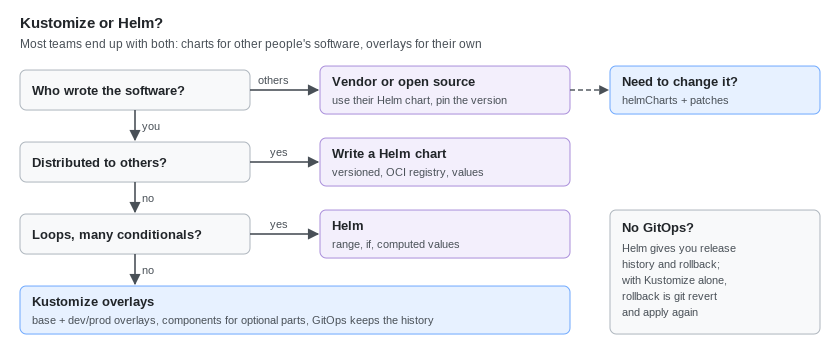
Kustomize when:
- The differences between environments are small: replicas, image tags, resources, a few extra objects.
- You want plain, readable YAML and no template syntax.
- The app is in-house, not distributed to others.
- You deploy with GitOps, where Git is the history.
- You need to adjust a third-party chart’s output without forking it.
Helm when:
- You install third-party software (it ships as charts).
- You need loops, many conditionals or values computed from others.
- You want release history and
helm rollbackwithout a GitOps tool. - You distribute the app as a package, with dependencies (subcharts) and hooks (pre-install, post-upgrade Jobs).
15. Useful Commands
# Kustomize
kubectl kustomize overlays/prod
kubectl kustomize --enable-helm overlays/prod       # with helmCharts
kubectl diff -k overlays/prod
kubectl apply -k overlays/prod
kubectl delete -k overlays/prod
kustomize edit fix                                  # standalone binary: rewrite deprecated fields

# Helm
helm search repo cert-manager                       # repositories added with helm repo add
helm search hub prometheus                          # Artifact Hub
helm show values oci://quay.io/jetstack/charts/cert-manager --version v1.21.3
helm install <release> <chart> -f values.yaml -n <ns> --create-namespace
helm upgrade --install <release> <chart> -f values.yaml -n <ns> --rollback-on-failure
helm template <release> <chart> -f values.yaml
helm get values <release> -n <ns>                   # values the release was installed with
helm get manifest <release> -n <ns>                 # what Helm applied
helm list -A
helm history <release> -n <ns>
helm rollback <release> <revision> -n <ns>
helm uninstall <release> -n <ns>

# Diff before an upgrade: helm-diff plugin (Helm 4 checks plugin signatures; --verify=false if it has none)
helm plugin install https://github.com/databus23/helm-diff
helm diff upgrade <release> <chart> -f values.yaml -n <ns>