terraform init -upgrade and Version Constraints
Overview
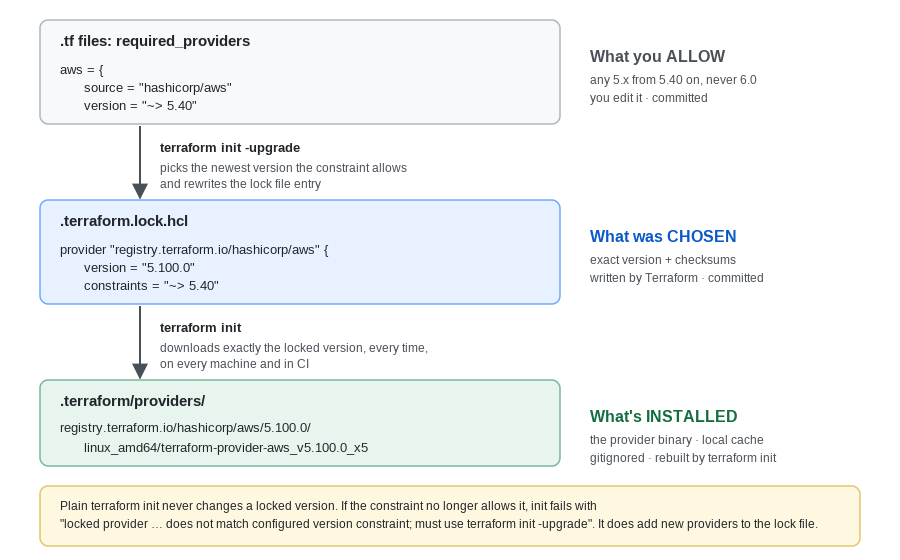
terraform init -upgrade tells Terraform to ignore the versions pinned in .terraform.lock.hcl and resolve providers and modules again — selecting the newest versions that still satisfy your version constraints. Without -upgrade, terraform init respects whatever is already locked and only downloads what’s missing.
Understanding when to use -upgrade and how to write effective version constraints keeps your infrastructure reproducible while still allowing controlled updates.
What terraform init Does Normally
A plain terraform init:
- Reads
.terraform.lock.hclto determine exact provider versions and hashes - Downloads any providers or modules not already cached in
.terraform/ - Initializes the backend
It will never change a locked version. If your lock file says aws = 5.40.0, init downloads exactly that, even if 5.60.0 is available.
What -upgrade Changes
terraform init -upgrade
With -upgrade, Terraform:
- Ignores the existing
.terraform.lock.hclentries - Re-resolves all providers and modules against the declared constraints
- Selects the newest version satisfying each constraint
- Updates
.terraform.lock.hclwith the new versions and hashes - Downloads the new provider binaries and module sources
Think of it like npm update vs npm install — one resolves fresh, the other installs what’s locked.
When to Use -upgrade
| Scenario | Why |
|---|---|
| You want newer provider versions | Pull latest within your constraints |
| A provider bug was fixed upstream | Get the patch without manually editing the lock file |
You changed version constraints in .tf files |
The lock file still has the old version; -upgrade resolves the new constraint |
| A newer module version was published within your constraint | Registry modules are re-resolved (a changed source or version only needs plain terraform init) |
| CI is building against stale cached providers | Force fresh resolution to match current constraints |
| You’re auditing what’s available | See what Terraform would select today |
When NOT to use -upgrade
- Normal day-to-day
plan/apply— you want deterministic, locked versions - In production CI pipelines without review — upgrades can introduce breaking changes
- When you haven’t tested the newer version locally first
Version Constraint Syntax
Terraform uses a constraint syntax for providers and modules that’s similar to other package managers but has its own specifics.
Operators
| Operator | Meaning | Example |
|---|---|---|
= |
Exact version (default if no operator) | = 5.40.0 |
!= |
Exclude a version | != 5.41.0 |
>, >=, <, <= |
Comparison | >= 5.0.0 |
~> |
Pessimistic constraint (most common) | ~> 5.40 |
The ~> (Pessimistic) Operator
This is the operator you’ll use most. It allows only the rightmost version component to increment:
| Constraint | Allows | Does NOT allow |
|---|---|---|
~> 5.40 |
5.40.x, 5.41.x, 5.99.x |
6.0.0 |
~> 5.40.0 |
5.40.0, 5.40.1, 5.40.99 |
5.41.0 |
~> 3.0 |
3.0.x, 3.1.x, 3.99.x |
4.0.0 |
The difference between ~> 5.40 and ~> 5.40.0 is significant:
~> 5.40= any5.xwherex >= 40(allows minor bumps)~> 5.40.0= only5.40.x(allows only patches)
Combining Constraints
You can combine multiple constraints with a comma (logical AND):
version = ">= 5.40.0, < 6.0.0"
This is equivalent to ~> 5.40 but more explicit.
Where Constraints Are Declared
Provider Constraints
In the required_providers block:
terraform {
  required_providers {
    aws = {
      source  = "hashicorp/aws"
      version = "~> 5.40"
    }
    kubernetes = {
      source  = "hashicorp/kubernetes"
      version = ">= 2.25.0, < 3.0.0"
    }
  }
}
You can also add constraints in provider blocks (but required_providers is preferred):
provider "aws" {
  version = "~> 5.40"  # Legacy style — use required_providers instead
  region  = "eu-central-1"
}
Module Constraints
When calling a module from a registry:
module "vpc" {
  source  = "terraform-aws-modules/vpc/aws"
  version = "~> 5.0"
  # ...
}
For git-sourced modules, constraints aren’t supported — you pin with a ref:
module "vpc" {
  source = "git::https://github.com/org/terraform-vpc.git?ref=v2.1.0"
}
Terraform Core Constraint
Pin the Terraform CLI version itself:
terraform {
  required_version = ">= 1.6.0, < 2.0.0"
}
This prevents running your config with an incompatible Terraform binary. Unlike providers, this isn’t tracked in the lock file — it’s checked at runtime.
When to Configure Constraints
Always constrain providers
Unconstrained providers default to “any version”, which means:
terraform init -upgradecould jump from5.xto6.x(major breaking change)- Without a committed lock file, team members could resolve different versions
- CI builds become non-deterministic
Recommended constraint strategies
| Situation | Recommended Constraint | Reasoning |
|---|---|---|
| Stable production | ~> 5.40.0 (patch only) |
Minimize risk, patches are usually safe |
| Active development | ~> 5.40 (minor + patch) |
Get new features/resources, minors are backward-compatible |
| Experimental / greenfield | >= 5.0.0, < 6.0.0 |
Maximum flexibility within a major version |
| Shared module (published) | >= 5.0.0 (wide range) |
Don’t force consumers into narrow ranges |
| Pinned for compliance | = 5.40.0 (exact) |
Audited version only, no drift |
When to tighten constraints
- After a provider release broke your infrastructure
- When operating under compliance/audit requirements
- When a team is large and you need everyone on the same page
- In modules consumed by many teams (avoid cascading breakage)
When to loosen constraints
- A resource or feature you need was added in a newer version
- Security patches are being published and you want them automatically
- You’re the sole consumer and can validate quickly
The Lock File (.terraform.lock.hcl)
The lock file is the actual enforcement mechanism. Constraints define what’s allowed; the lock file records what was chosen.
# .terraform.lock.hcl (auto-generated, do not edit manually)
provider "registry.terraform.io/hashicorp/aws" {
  version     = "5.100.0"
  constraints = "~> 5.40"
  hashes = [
    "h1:edXOJWE4ORX8Fm+dpVpICzMZJat4AX0VRCAy/xkcOc0=",
    "zh:054b8dd49f0549c9a7cc27d159e45327b7b65cf404da5e5a20da154b90b8a644",
    "zh:0b97bf8d5e03d15d83cc40b0530a1f84b459354939ba6f135a0086c20ebbe6b2",
    # ... 13 more zh: entries (14 platform zips plus the manifest.json)
  ]
}
Key facts:
- Commit this file to version control
- It records the
constraintsthat were active when the version was selected - It stores cryptographic hashes for integrity verification
terraform initnever changes a locked version, but it does update the file: it adds providers you added to the configuration (with their hashes) and removes ones you no longer useterraform init -upgrademoves locked providers to the newest version your constraints allowterraform providers lockadds hashes for other platforms-lock=falsehas nothing to do with this file: it skips the state lock
Hash formats
The lock file contains multiple hash types:
| Prefix | Meaning |
|---|---|
h1: |
Hash of the files inside the provider package (Go dirhash). Platform-specific |
zh: |
Legacy: SHA256 of the provider’s zip, taken from its signed SHA256SUMS. One per platform zip (plus the manifest.json) |
The zh: list covers every platform the provider is built for, but by default Terraform only records the h1: for your current platform. To support multiple platforms (common for teams with mixed OS):
terraform providers lock \
  -platform=linux_amd64 \
  -platform=darwin_arm64 \
  -platform=darwin_amd64
Practical Workflows
Controlled provider upgrade
# 1. Check what's currently locked
grep "version" .terraform.lock.hcl

# 2. Upgrade within constraints
terraform init -upgrade

# 3. Review what changed
git diff .terraform.lock.hcl

# 4. Run plan to check for issues
terraform plan

# 5. If everything looks good, commit the updated lock file
git add .terraform.lock.hcl
git commit -m "chore: upgrade providers within constraints"
Upgrading past your current constraint
# 1. Update the constraint in your .tf file
#    version = "~> 5.40" → version = "~> 5.50"

# 2. Run init -upgrade to resolve the new constraint
terraform init -upgrade

# 3. Check the changelog for breaking changes between 5.40 and 5.50

# 4. Plan and review
terraform plan

# 5. Commit both the .tf change and the lock file
git add main.tf .terraform.lock.hcl
git commit -m "chore: upgrade AWS provider to ~> 5.50"
Upgrading a single provider (without touching others)
Terraform doesn’t have a built-in flag to upgrade only one provider, but you can:
# Option 1: Temporarily tighten other providers to exact versions
# (tedious, not recommended)

# Option 2: Upgrade all, review, and discard if it's more than you want
terraform init -upgrade
git diff .terraform.lock.hcl          # review every provider that moved
git checkout -- .terraform.lock.hcl   # discard all of it if needed

# Option 3 (recommended): Just upgrade all within constraints
# If your constraints are well-configured, upgrading all is safe
terraform init -upgrade
Since constraints protect you from major version jumps, upgrading everything within constraints is usually the correct approach. If you’re nervous, review git diff .terraform.lock.hcl before committing.
CI/CD pipeline pattern
# CI should NOT use -upgrade unless it's a dedicated "dependency update" job
# Normal CI:
terraform init
terraform plan -out=tfplan
terraform apply tfplan

# Dedicated dependency update job (weekly/scheduled):
terraform init -upgrade
terraform plan -out=tfplan
# Review plan output, create PR with updated lock file
Module Upgrades
Modules behave differently from providers during -upgrade:
- Registry modules —
-upgradere-fetches the latest version matching your constraint - Git modules — The
refis fixed;-upgradere-clones but the version doesn’t change unless you update theref - Local modules (source =
"./modules/foo") — Always read fresh from disk,-upgradehas no effect
Module version constraints vs provider constraints
| Aspect | Providers | Modules |
|---|---|---|
Locked in .terraform.lock.hcl |
Yes | No |
Cached in .terraform/ |
Yes (binaries) | Yes (source code) |
-upgrade re-resolves |
Yes | Yes |
| Same version on every machine | Yes, through the lock file | Only with an exact version or a fixed git ref |
This means module versions are not locked in .terraform.lock.hcl. Every terraform init (with or without -upgrade) will fetch the latest module version matching the constraint — unless the source is already cached in .terraform/modules/.
To get deterministic module versions:
- Use exact constraints:
version = "5.2.0" - Or rely on the cached
.terraform/modules/directory (fragile) - Or use git refs for source:
?ref=v5.2.0
Common Pitfalls
1. Forgetting to commit the lock file after -upgrade
terraform init -upgrade
# ... test locally, everything works ...
# Push code without .terraform.lock.hcl
# CI runs `terraform init` — gets a DIFFERENT version than you tested
Always commit .terraform.lock.hcl after upgrading.
2. Using -upgrade in production CI without review
# BAD: CI auto-upgrades on every run
- run: terraform init -upgrade
- run: terraform apply -auto-approve
This means every CI run could pick up a new provider version. Upgrades should be deliberate, reviewed, and tested.
3. Overly loose constraints
aws = {
  source  = "hashicorp/aws"
  version = ">= 4.0.0"  # Allows 4.x, 5.x AND 6.x — major version jumps!
}
When you eventually run -upgrade, you jump from 4.67.0 straight to the newest release, 6.68.0 today, across two major versions of breaking changes.
4. Overly tight constraints in shared modules
# In a published module:
aws = {
  source  = "hashicorp/aws"
  version = "= 5.40.0"  # Forces ALL consumers to use exactly this version
}
This creates conflicts when consumers use different provider versions. Shared modules should use wide constraints (>= 5.0.0).
5. Not constraining the Terraform CLI version
# Without this, someone with Terraform 0.12 could run your 1.6+ config
terraform {
  required_version = ">= 1.6.0"
}
New syntax features, state format changes, and provider protocol versions can all break if the wrong Terraform binary is used.
6. Assuming -upgrade only affects providers
-upgrade also re-fetches modules. If you have a module constraint like ~> 5.0 and a new minor was published, it will be pulled in — potentially changing resource configurations.
Relationship Between Constraints, Lock File, and -upgrade
Key Takeaways
terraform init= install what’s locked, never upgradeterraform init -upgrade= re-resolve versions within constraints, update the lock file~> 5.40= allow5.40+but not6.0(most common constraint)~> 5.40.0= allow only patches (5.40.x)- Always commit
.terraform.lock.hcl - Use
-upgradedeliberately, not routinely - Tighten constraints for stability, loosen for flexibility
- Constrain providers, modules, AND the Terraform CLI version
- Module versions are NOT locked in
.terraform.lock.hcl— pin them with exact versions or git refs