Ansible Ad-Hoc Commands Cheatsheet
Ad-hoc commands run one module against your hosts without writing a playbook. They’re ideal for one-off operations, quick checks and live troubleshooting across a fleet.
Scope
Everything below was run with ansible-core 2.21.4 (the Ansible 14.4 package) on the control node against two Ubuntu 24.04 hosts (web01, web02) and one Rocky Linux 9 host (db01). Outputs are from those runs. For playbooks, inventories, variables, roles and Vault see the Ansible Cheatsheet.
The inventory used throughout:
[webservers]
web01
web02

[databases]
db01

[ubuntu]
web01
web02

[rhel]
db01

[production]
web01
db01
Basic Syntax
ansible <pattern> -m <module> -a "<arguments>" [options]
ansible <pattern> -i <inventory> -m <module> -a "<arguments>" [options]
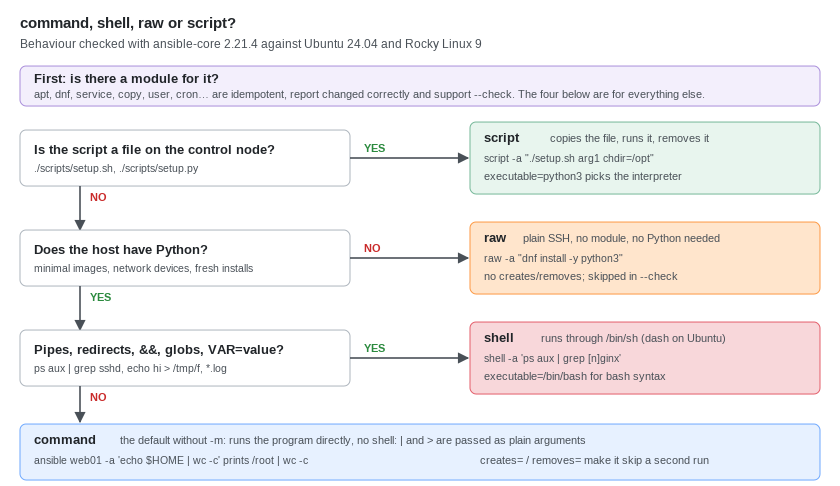
Without -m Ansible runs the command module. Module arguments are key=value pairs in one -a string; a second -a replaces the first instead of adding to it.
How an Ad-Hoc Command Runs
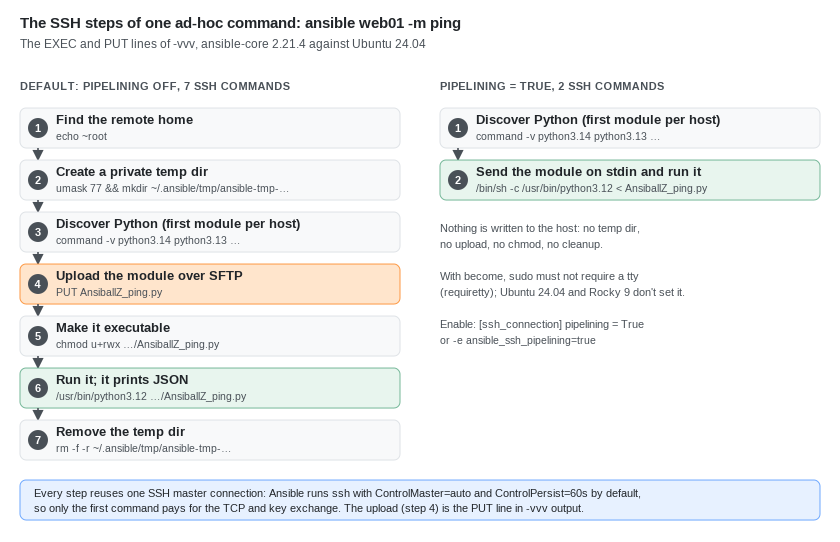
Each module is a small Python program. Ansible wraps it into AnsiballZ_<module>.py, sends it over SSH, runs it with the host’s Python and reads back JSON. With -vvv you can count the SSH round trips: seven per host for ping by default, two with pipelining:
Common Options
| Option | Short | Description |
|---|---|---|
--become |
-b |
Execute with sudo/privilege escalation |
--become-user=USER |
Run as specific user (default: root) | |
--ask-become-pass |
-K |
Prompt for the sudo password |
--become-password-file=FILE |
Read the sudo password from a file | |
--ask-pass |
-k |
Prompt for the SSH password (needs sshpass) |
--inventory=FILE |
-i |
Inventory file, directory or host1,host2, list |
--user=USER |
-u |
Connect as this user |
--private-key=KEY |
SSH private key file | |
--forks=N |
-f N |
Number of parallel processes (default: 5) |
--timeout=SECS |
-T |
SSH connection timeout (default: 10), not a task time limit |
--limit=SUBSET |
-l |
Limit to specific hosts/groups |
--check |
-C |
Dry run (no changes made) |
--diff |
-D |
Show file differences |
--background=SECS |
-B |
Run asynchronously, fail after SECS |
--poll=SECS |
-P |
Poll interval for -B (0 = fire and forget) |
--extra-vars |
-e |
Set variables (key=value or JSON) |
-v / -vv / -vvv / -vvvv |
Increase verbosity | |
--list-hosts |
Show matched hosts without executing |
Three options from older guides are gone or going:
--gather-factsdoesn’t exist;ansibleexits with its usage message (exit code 2). Ad-hoc commands never gather facts, only-m setupdoes.--asyncand--pollas a pair never existed; the long names are--backgroundand--poll.-o/--one-lineand--treestill work but warn:The '-o' argument is deprecated. This feature will be removed from ansible-core version 2.23.
Host Patterns
# All hosts
ansible all -m ping

# List all hosts from inventory
ansible all --list-hosts
ansible-inventory --graph
ansible-inventory --list --yaml

# Specific group or host
ansible webservers -m ping
ansible web01 -m ping

# Multiple hosts (comma-separated)
ansible web01,web02,db01 -m ping

# Multiple groups (union)
ansible webservers:databases -m ping

# Exclude hosts from a group (quote: ! and & mean something to the shell)
ansible 'webservers:!web02' -m ping

# Intersection of groups (hosts in BOTH groups)
ansible 'webservers:&production' -m ping

# Wildcard patterns
ansible 'web*' -m ping
ansible '192.168.1.*' -m ping

# Regex pattern (prefix with ~)
ansible '~web[0-9]+' -m ping

# Slices of a group: both ends are included
ansible 'webservers[0]' --list-hosts      # first host
ansible 'webservers[0:1]' --list-hosts    # first TWO hosts
ansible 'webservers[-1]' --list-hosts     # last host

# Limit execution to a subset
ansible all --limit 'web01,web02' -m ping
ansible all --limit @failed_hosts.txt -m ping

# List matched hosts without running anything
ansible webservers --list-hosts
$ ansible 'webservers[0:1]' --list-hosts
  hosts (2):
    web01
    web02
There is no step syntax: 'all[::2]' matches nothing (Could not match supplied host pattern, ignoring: all[::2]). Ranges like web[01:05] work only inside the inventory file, where they define hosts, not in patterns. The Ansible Cheatsheet has a diagram of every pattern operator.
Connection & Authentication
# Specify inventory
ansible all -i inventory.ini -m ping
ansible all -i /etc/ansible/hosts -m ping

# Connect as specific user
ansible all -u ubuntu -m ping
ansible all -u root --ask-pass -m ping

# Use specific SSH key
ansible all --private-key=~/.ssh/id_ed25519 -m ping

# Use sudo
ansible all --become -m ping
ansible all --become --become-user=root -m ping
ansible all --become --ask-become-pass -m ping

# Combined options
ansible webservers -i inventory.ini -u admin --become \
  --private-key=~/.ssh/admin_key -m ping

# Enable SSH pipelining (fewer SSH round trips, see the diagram above)
ansible all -m ping -e 'ansible_ssh_pipelining=true'
SSH multiplexing needs no option: -vvv shows Ansible already runs ssh -C -o ControlMaster=auto -o ControlPersist=60s by default.
Silence the Interpreter Warning
ansible-core 2.21 warns on every host where it discovered Python:
[WARNING]: Host 'web01' is using the discovered Python interpreter at '/usr/bin/python3.12', but future installation of another Python interpreter could cause a different interpreter to be discovered.
Pin the interpreter per host or group (ansible_python_interpreter=/usr/bin/python3), or keep discovery and drop the warning in ansible.cfg:
[defaults]
interpreter_python = auto_silent
Ping & Connectivity
# Basic connectivity test
ansible all -m ping

# Test specific group
ansible webservers -m ping

# Verbose ping
ansible all -m ping -v

# Test with specific user
ansible all -m ping -u ansible

# Test with sudo
ansible all -m ping -b
ping checks SSH and a usable Python, it doesn’t send ICMP:
web01 | SUCCESS => {
    "ansible_facts": {
        "discovered_interpreter_python": "/usr/bin/python3.12"
    },
    "changed": false,
    "ping": "pong"
}
Command Execution
Four modules run commands. Pick by what the command needs:
command Module (Safe: No Shell Features)
# Simple commands (no pipes, no redirects, no shell expansion)
ansible all -m command -a "date"
ansible all -m command -a "whoami"
ansible all -m command -a "uptime"
ansible all -m command -a "uname -a"
ansible all -m command -a "cat /etc/os-release"
ansible all -m command -a "du -sh /var/log"

# Change working directory
ansible all -m command -a "ls -la chdir=/var/log"

# Only run if file does NOT exist (creates)
ansible all -m command -a "touch /tmp/marker creates=/tmp/marker"

# Only run if file DOES exist (removes)
ansible all -m command -a "rm /tmp/marker removes=/tmp/marker"

# Run as different user
ansible all -m command -a "whoami" -b --become-user=www-data
command passes | and other shell syntax as plain arguments, so a pipe silently does something else:
$ ansible web01 -a 'echo $HOME | wc -c'
web01 | CHANGED | rc=0 >>
/root | wc -c
With creates=/removes= a second run is skipped and reported as SUCCESS instead of CHANGED:
web01 | SUCCESS | rc=0 >>
skipped, since /tmp/marker existsDid not run command since '/tmp/marker' exists
shell Module (Supports Pipes, Redirects, Variables)
# Commands with pipes
ansible all -m shell -a "ps aux | head -10"
ansible all -m shell -a "ss -tlnp | grep :80"

# Commands with redirects
ansible all -m shell -a "echo 'test' > /tmp/test.txt"
ansible all -m shell -a "tail -20 /var/log/syslog > /tmp/last-logs.txt"

# Remote variables: single quotes outside, so the local shell leaves $HOME alone
ansible all -m shell -a 'echo $HOME'
ansible all -m shell -a "APP_ENV=production /opt/app/deploy.sh" -b

# Complex shell commands
ansible all -m shell -a "df -h | grep -vE '^Filesystem|tmpfs|cdrom'"
ansible all -m shell -a "hostname && whoami && date"

# Use bash instead of /bin/sh
ansible all -m shell -a "echo \$0 executable=/bin/bash"
ansible all -m shell -a 'echo $0' -e ansible_shell_executable=/bin/bash
The quotes decide where $HOME is expanded. Connected as ansible, double quotes let the control node’s shell put its own /root in before Ansible runs:
$ ansible web01 -u ansible -m shell -a "echo $HOME"
web01 | CHANGED | rc=0 >>
/root
$ ansible web01 -u ansible -m shell -a 'echo $HOME'
web01 | CHANGED | rc=0 >>
/home/ansible
shell uses /bin/sh, which is dash on Ubuntu (readlink /proc/$$/exe printed /usr/bin/dash); bash-only syntax needs executable=/bin/bash.
script Module (Run Local Script Remotely)
# Copy and execute a local script on all remote hosts
ansible all -m script -a "./scripts/setup.sh"
ansible all -m script -a "./scripts/setup.sh" -b

# Script with arguments
ansible all -m script -a "./scripts/configure.sh arg1 arg2"

# Script with working directory
ansible all -m script -a "./scripts/install.sh chdir=/opt"

# Execute with specific interpreter (in the same -a string)
ansible all -m script -a "./scripts/setup.py executable=python3"
Two -a options don’t merge, the second one wins:
$ ansible web01 -m script -a ./scripts/setup.py -a executable=python3
[ERROR]: Task failed: one of the following is required: _raw_params, cmd
raw Module (No Python Required on Target)
# Useful for bootstrapping systems without Python
ansible all -m raw -a "uptime"
ansible ubuntu -m raw -a "apt-get install -y python3" -b
ansible rhel -m raw -a "dnf install -y python3" -b
Exit Codes and Failures
| Exit code | When | Example from the lab |
|---|---|---|
0 |
Every host succeeded, or the pattern matched no host (only a warning) | ansible nosuchhost -m ping |
1 |
Error before running, e.g. --limit left no host |
Specified inventory, host pattern and/or --limit leaves us with no hosts to target. |
2 |
A task failed on at least one host, or a bad option (usage message) | ansible web01 -m command -a false |
4 |
A host was unreachable | Failed to connect to the host via ssh: ... Connection timed out |
command and shell mark any non-zero return code as a failure, which catches commands that only use the code to report something:
$ ansible web01 -m shell -a "grep -c 'Failed password' /var/log/auth.log" -b
web01 | FAILED | rc=1 >>
0The command exited with a non-zero return code.
grep -c with no match, test -f missing && ... and systemctl status on a stopped or missing unit (rc=4) all show FAILED. Use | wc -l, || true, or systemctl is-active.
Package Management
APT (Ubuntu/Debian)
# Update cache
ansible ubuntu -m apt -a "update_cache=yes" -b

# Install package
ansible ubuntu -m apt -a "name=nginx state=present" -b

# Install multiple packages
ansible ubuntu -m apt -a "name=nginx,git,vim,curl state=present update_cache=yes" -b

# Install specific version (look it up with: apt-cache policy nginx)
ansible ubuntu -m apt -a "name=nginx=1.24.0-2ubuntu7.19 state=present" -b

# Upgrade package to latest
ansible ubuntu -m apt -a "name=nginx state=latest" -b

# Remove package
ansible ubuntu -m apt -a "name=apache2 state=absent" -b

# Purge package (remove + delete configs)
ansible ubuntu -m apt -a "name=apache2 state=absent purge=yes" -b

# Full system upgrade (preview with --check first)
ansible ubuntu -m apt -a "upgrade=dist update_cache=yes" -b --check

# Autoremove unused packages
ansible ubuntu -m apt -a "autoremove=yes" -b

# Clean package cache
ansible ubuntu -m apt -a "autoclean=yes" -b

# Install from .deb file already on the host
ansible ubuntu -m apt -a "deb=/tmp/package.deb state=present" -b
A version that isn’t in the repository fails: no available installation candidate for nginx=1.18.0-0ubuntu1.
DNF (RHEL/Rocky/AlmaLinux/Fedora)
The yum module name still works on EL8 and later, it runs dnf.
# Install package
ansible rhel -m dnf -a "name=nginx state=present" -b

# Install multiple packages (allowerasing: EL9 images ship curl-minimal, which conflicts with curl)
ansible rhel -m dnf -a "name=git,vim,curl state=present allowerasing=yes" -b

# Install specific version
ansible rhel -m dnf -a "name=httpd-2.4.62 state=present" -b

# Update package
ansible rhel -m dnf -a "name=nginx state=latest" -b

# Update all packages (preview with --check first)
ansible rhel -m dnf -a "name=* state=latest update_cache=yes" -b --check

# Security updates only
ansible rhel -m dnf -a "name=* state=latest security=yes" -b

# Remove package
ansible rhel -m dnf -a "name=httpd state=absent" -b

# Install from URL (import the signing key first, or the GPG check fails)
ansible rhel -m rpm_key -a "key=https://dl.fedoraproject.org/pub/epel/RPM-GPG-KEY-EPEL-9" -b
ansible rhel -m dnf -a "name=https://dl.fedoraproject.org/pub/epel/epel-release-latest-9.noarch.rpm state=present" -b

# Install package group
ansible rhel -m dnf -a "name='@Development Tools' state=present" -b

# List advisories, then install one
ansible rhel -m command -a "dnf updateinfo list --available" -b
ansible rhel -m command -a "dnf update -y --advisory RLSA-2026:88459" -b
Without allowerasing=yes the curl install fails with package curl-minimal-7.76.1-40.el9.aarch64 from @System conflicts with curl provided by curl-7.76.1-40.el9_8.9.aarch64. Without the key the URL install fails with Failed to validate GPG signature for epel-release-9-11.el9.noarch. Advisory IDs depend on the distribution: RHSA/RHBA on RHEL, RLSA/RLBA on Rocky.
The command module no longer accepts warn=no: Unsupported parameters for (ansible.legacy.command) module: warn. It was removed in ansible-core 2.14.
package Module (Cross-Platform)
# Works on both apt and dnf systems
ansible all -m package -a "name=git state=present" -b
ansible all -m package -a "name=vim state=latest" -b
ansible all -m package -a "name=httpd state=absent" -b
Package names still differ per distribution (httpd vs apache2), so cross-platform only covers the module, not the name.
Service Management
# Start service
ansible all -m service -a "name=nginx state=started" -b

# Stop service
ansible all -m service -a "name=apache2 state=stopped" -b

# Restart service (sshd works on both Ubuntu and RHEL; ssh only on Ubuntu)
ansible all -m service -a "name=sshd state=restarted" -b

# Reload service
ansible all -m service -a "name=nginx state=reloaded" -b

# Enable at boot
ansible all -m service -a "name=nginx enabled=yes" -b

# Start + enable
ansible all -m service -a "name=nginx state=started enabled=yes" -b

# Disable at boot
ansible all -m service -a "name=apache2 enabled=no" -b

# Check status (is-active returns 0 when running; status returns 3 or 4 otherwise)
ansible all -m command -a "systemctl is-active nginx" -b
ansible all -m shell -a "systemctl status nginx" -b

# All services as facts
ansible all -m service_facts

# systemd-specific (supports daemon_reload)
ansible all -m systemd_service -a "name=nginx state=started" -b
ansible all -m systemd_service -a "name=nginx state=restarted daemon_reload=yes" -b
A service that isn’t installed fails, even when you only want it stopped: Could not find the requested service apache2: host. On Rocky, name=ssh fails the same way, because the unit is sshd.
File Operations
Copy (Local → Remote)
# Copy file
ansible all -m copy -a "src=/local/file.txt dest=/remote/file.txt"

# Copy with ownership and permissions
ansible all -m copy -a "src=index.html dest=/var/www/html/ owner=www-data group=www-data mode=0644" -b

# Copy with backup of existing file (backup = nginx.conf.<pid>.<date>@<time>~)
ansible all -m copy -a "src=nginx.conf dest=/etc/nginx/nginx.conf backup=yes" -b

# Copy directory contents (trailing slash) or the directory itself (no slash)
ansible all -m copy -a "src=configs/ dest=/etc/myapp/" -b      # /etc/myapp/app.conf
ansible all -m copy -a "src=configs dest=/etc/myapp/" -b       # /etc/myapp/configs/app.conf

# Create file with inline content (\n becomes a real newline)
ansible all -m copy -a "content='Hello World\n' dest=/tmp/hello.txt"

# Copy a file that is already on the host
ansible all -m copy -a "src=/etc/hosts dest=/etc/hosts.backup remote_src=yes" -b

# Copy and validate before placing
ansible all -m copy -a "src=sshd_config dest=/etc/ssh/sshd_config validate='sshd -t -f %s' backup=yes" -b
When validation fails, the file is not replaced:
"msg": "failed to validate",
"stderr_lines": [
    "/tmp/bad_sshd_config: line 1: Bad configuration option: Bogus",
    "/tmp/bad_sshd_config: terminating, 1 bad configuration options"
File Module (Manage File Properties)
# Create empty file
ansible all -m file -a "path=/tmp/test.txt state=touch"

# Create directory
ansible all -m file -a "path=/opt/myapp state=directory mode=0755" -b

# Create nested directories (the new parents get the same mode)
ansible all -m file -a "path=/opt/myapp/config/ssl state=directory mode=0750" -b

# Remove file, or a directory with everything in it
ansible all -m file -a "path=/tmp/unwanted.txt state=absent"
ansible all -m file -a "path=/tmp/olddir state=absent"

# Change permissions (octal or symbolic)
ansible all -m file -a "path=/opt/script.sh mode=0755"
ansible all -m file -a "path=/opt/script.sh mode=u+x,g-w"

# Change ownership
ansible all -m file -a "path=/var/www/html owner=www-data group=www-data recurse=yes" -b

# Create symbolic link
ansible all -m file -a "src=/opt/myapp/current dest=/opt/myapp/live state=link"
Fetch (Remote → Local)
# Download file from all remote hosts (lands in /tmp/hostnames/<host>/etc/hostname)
ansible all -m fetch -a "src=/etc/hostname dest=/tmp/hostnames/"

# Flat structure: put the host name in the file name, or every host overwrites the same file
ansible all -m fetch -a "src=/etc/hostname dest=/tmp/flat/{{ inventory_hostname }}-hostname flat=yes"
With dest=/tmp/logs/ flat=yes on two hosts, both wrote /tmp/logs/hostname and only the last one survived. fetch verifies the checksum by default (validate_checksum=yes).
File Content Editing
# Add a line to a file
ansible all -m lineinfile -a "path=/etc/hosts line='192.168.1.100 myserver' state=present" -b

# Remove a line matching pattern
ansible all -m lineinfile -a "path=/etc/hosts regexp='^192.168.1.100' state=absent" -b

# Replace text in file
ansible all -m replace -a "path=/etc/config regexp='old_value' replace='new_value'" -b

# Insert a block of text (\n becomes a newline)
ansible all -m blockinfile -a "path=/etc/hosts block='192.168.1.100 server1\n192.168.1.101 server2'" -b

# Remove that block again
ansible all -m blockinfile -a "path=/etc/hosts state=absent" -b

# Template a file
ansible all -m template -a "src=nginx.conf.j2 dest=/etc/nginx/nginx.conf" -b
blockinfile wraps the block in markers so it can find it again:
# BEGIN ANSIBLE MANAGED BLOCK
192.168.1.100 server1
192.168.1.101 server2
# END ANSIBLE MANAGED BLOCK
Ad-hoc commands don’t gather facts, so a template that uses one fails: 'ansible_processor_vcpus' is undefined. Pass the value with -e, or use a playbook.
User & Group Management
# Create user
ansible all -m user -a "name=john state=present" -b

# Create user with details
ansible all -m user -a "name=alice state=present create_home=yes shell=/bin/bash" -b

# Create user with specific UID (fails if the UID is taken: "useradd: UID 1001 is not unique")
ansible all -m user -a "name=bob uid=1101 state=present" -b

# Add user to groups (the groups must exist)
ansible all -m user -a "name=charlie groups=sudo,docker append=yes" -b

# Set password (hashed on the control node; use Vault for the real value)
ansible all -m user -a "name=dave password={{ 'secretpass' | password_hash('sha512') }}" -b

# Lock user account
ansible all -m user -a "name=john password_lock=yes" -b

# Change shell
ansible all -m user -a "name=john shell=/bin/zsh" -b

# Remove user and home directory
ansible all -m user -a "name=olduser state=absent remove=yes" -b

# Create user and disable password aging
ansible all -m user -a "name=daniel uid=1501 create_home=yes shell=/bin/bash comment='Daniel'" -b
ansible all -m user -a "name=daniel password_expire_max=-1 password_expire_min=-1 password_expire_warn=-1" -b

# Create group (optionally with GID), remove group
ansible all -m group -a "name=developers state=present" -b
ansible all -m group -a "name=apps gid=1500 state=present" -b
ansible all -m group -a "name=oldgroup state=absent" -b

# Deploy SSH authorized key
ansible all -m authorized_key -a "user=ansible key=\"{{ lookup('file', '~/.ssh/id_ed25519.pub') }}\"" -b
shell=/bin/zsh is accepted even when zsh isn’t installed, and the user then can’t log in. The password hash lands in /etc/shadow as $6$rounds=65600$...; the module output shows "password": "NOT_LOGGING_PASSWORD".
System Information (Facts)
# Gather all facts
ansible all -m setup

# Filter specific facts (wildcards and comma-separated lists work)
ansible all -m setup -a "filter=ansible_distribution*"
ansible all -m setup -a "filter=ansible_distribution,ansible_distribution_version"
ansible all -m setup -a "filter=ansible_os_family"
ansible all -m setup -a "filter=ansible_memory_mb"
ansible all -m setup -a "filter=ansible_processor*"
ansible all -m setup -a "filter=ansible_mounts"
ansible all -m setup -a "filter=ansible_default_ipv4"
ansible all -m setup -a "filter=ansible_interfaces"

# Gather subset of facts (faster)
ansible all -m setup -a "gather_subset=network,hardware"
ansible all -m setup -a "gather_subset=!all"

# Custom facts (/etc/ansible/facts.d/*.fact on the host, shown under ansible_local)
ansible all -m setup -a "filter=ansible_local"
$ ansible db01 -m setup -a "filter=ansible_os_family"
db01 | SUCCESS => {
    "ansible_facts": {
        "ansible_os_family": "RedHat",
gather_subset=!all still returns the minimal set (distribution, architecture, date, DNS and so on). An INI file /etc/ansible/facts.d/app.fact with [app] and version=1.4 showed up as ansible_local.app.app.version.
Cron Jobs
# Add cron job
ansible all -m cron -a "name='backup logs' minute=0 hour=2 job='/opt/backup.sh'" -b

# Add cron job for specific user
ansible all -m cron -a "name='user backup' user=backup minute=30 hour=1 job='/home/backup/script.sh'" -b

# Remove cron job (by name)
ansible all -m cron -a "name='backup logs' state=absent" -b

# List cron jobs
ansible all -m command -a "crontab -l" -b
ansible all -m command -a "crontab -l -u backup" -b
The name becomes a marker comment, which is how the module finds the job again:
#Ansible: backup logs
0 2 * * * /opt/backup.sh
Mount Operations
# Mount filesystem and add it to fstab
ansible all -m ansible.posix.mount -a "path=/mnt/data src=/dev/sdb1 fstype=ext4 state=mounted" -b

# Unmount (the fstab line stays)
ansible all -m ansible.posix.mount -a "path=/mnt/data state=unmounted" -b

# Unmount and remove from fstab
ansible all -m ansible.posix.mount -a "path=/mnt/data state=absent" -b

# Add to fstab (without mounting now)
ansible all -m ansible.posix.mount -a "path=/mnt/data src=/dev/sdb1 fstype=ext4 state=present" -b

# Check mounts
ansible all -m command -a "findmnt /mnt/data"
ansible all -m shell -a "df -h | grep -v tmpfs"
Archive Operations
# Create archive
ansible all -m archive -a "path=/var/log dest=/tmp/logs.tar.gz format=gz" -b

# Create zip
ansible all -m archive -a "path=/etc/nginx dest=/tmp/nginx-config.zip format=zip" -b

# Extract archive (already on remote)
ansible all -m unarchive -a "src=/tmp/archive.tar.gz dest=/opt/ remote_src=yes" -b

# Extract archive from control machine
ansible all -m unarchive -a "src=archive.tar.gz dest=/opt/" -b

# Download and extract from URL
ansible all -m unarchive -a "src=https://github.com/octocat/Hello-World/archive/refs/heads/master.tar.gz dest=/opt/ remote_src=yes" -b
Download & URL Operations
# Download file
ansible all -m get_url -a "url=https://example.com/file.tar.gz dest=/tmp/file.tar.gz"

# Download with permissions
ansible all -m get_url -a "url=https://example.com/script.sh dest=/opt/script.sh mode=0755" -b

# Download with checksum
ansible all -m get_url -a "url=https://dl.fedoraproject.org/pub/epel/RPM-GPG-KEY-EPEL-9 dest=/tmp/epel.key checksum=sha256:fcf0eab4f05a1c0de6363ac4b707600a27a9d774e9b491059e59e6921b255a84"

# Download with custom headers (headers is a dict: JSON inside the k=v string)
ansible all -m get_url -a "url=https://api.example.com/data dest=/tmp/data.json headers='{\"Authorization\": \"Bearer token123\"}'"

# HTTP requests
ansible all -m uri -a "url=https://www.google.com/generate_204 status_code=204"
ansible all -m uri -a "url=https://api.example.com/health method=GET return_content=yes"

# Check port connectivity
ansible all -m wait_for -a "host=google.com port=443 timeout=10"
ansible all -m wait_for -a "port=22 timeout=1"
A wrong checksum stops the download from being saved: The checksum for ... did not match 0000...; it was fcf0eab4f05a1c0de6363ac4b707600a27a9d774e9b491059e59e6921b255a84. A header given as plain text fails: argument 'headers' is of type str and we were unable to convert to dict.
Synchronize (rsync)
Needs rsync on the control node and on the hosts.
# Sync files from control machine to targets (push)
ansible all -m synchronize -a "src=/local/path/ dest=/remote/path/"

# Sync with delete (mirror: removes extra files on remote)
ansible all -m synchronize -a "src=/local/path/ dest=/remote/path/ delete=yes"

# Pull files from remote to local
ansible all -m synchronize -a "src=/remote/path/ dest=/local/path/ mode=pull"
SSL/TLS Operations
The modules are in community.crypto and need the Python cryptography package on the host (python3-cryptography).
# Generate private key
ansible all -m community.crypto.openssl_privatekey -a "path=/etc/ssl/private/server.key size=2048" -b

# Generate a CSR with a subject, then a self-signed certificate from it
ansible all -m community.crypto.openssl_csr -a "path=/etc/ssl/server.csr privatekey_path=/etc/ssl/private/server.key common_name=web01.example.com" -b
ansible all -m community.crypto.x509_certificate -a "path=/etc/ssl/certs/server.crt csr_path=/etc/ssl/server.csr privatekey_path=/etc/ssl/private/server.key provider=selfsigned" -b

# Check it
ansible all -m command -a "openssl x509 -in /etc/ssl/certs/server.crt -noout -subject -dates"
subject=CN = web01.example.com
notBefore=Nov 16 13:36:37 2026 GMT
notAfter=Nov 13 13:36:37 2036 GMT
The old name openssl_certificate is still redirected to x509_certificate. Without a CSR the certificate gets an empty subject (subject=).
Git Operations
# Clone repository
ansible all -m git -a "repo=https://github.com/user/repo.git dest=/opt/repo"

# Clone specific branch or tag
ansible all -m git -a "repo=https://github.com/user/repo.git dest=/opt/repo version=develop"

# Shallow clone
ansible all -m git -a "repo=https://github.com/user/repo.git dest=/opt/repo depth=1"

# Update to latest
ansible all -m git -a "repo=https://github.com/user/repo.git dest=/opt/repo version=HEAD"
The output shows the commit before and after, so you can see whether anything changed. A branch that doesn’t exist fails with Failed to checkout develop.
Firewall
The modules call the firewall tools, so those must be installed first (Failed to find required executable "ufw").
# UFW (Ubuntu): allow SSH before enabling
ansible ubuntu -m ufw -a "rule=allow port=22 proto=tcp" -b
ansible ubuntu -m ufw -a "rule=allow port=80 proto=tcp" -b
ansible ubuntu -m ufw -a "rule=allow port=443 proto=tcp" -b
ansible ubuntu -m ufw -a "state=enabled" -b

# Firewalld (RHEL): permanent alone only changes the saved config, immediate applies it now
ansible rhel -m firewalld -a "service=http state=enabled permanent=yes immediate=yes" -b
ansible rhel -m firewalld -a "port=8080/tcp state=enabled permanent=yes immediate=yes" -b

# iptables
ansible all -m iptables -a "chain=INPUT protocol=tcp destination_port=22 jump=ACCEPT" -b

# Check status
ansible ubuntu -m command -a "ufw status" -b
ansible rhel -m command -a "firewall-cmd --list-all" -b
Database Operations
The hosts need the Python driver (python3-PyMySQL, python3-psycopg2).
# MySQL/MariaDB: root logs in through the Unix socket
ansible databases -m ansible.mysql.mysql_db -a "name=mydb state=present login_unix_socket=/var/lib/mysql/mysql.sock" -b
ansible databases -m ansible.mysql.mysql_user -a "name=dbuser password=secret priv=mydb.*:ALL state=present login_unix_socket=/var/lib/mysql/mysql.sock" -b
ansible databases -m ansible.mysql.mysql_db -a "name=mydb state=dump target=/tmp/mydb.sql login_unix_socket=/var/lib/mysql/mysql.sock" -b

# PostgreSQL: run as the postgres user
ansible databases -m postgresql_db -a "name=mydb" -b --become-user=postgres
ansible databases -m postgresql_user -a "name=dbuser password=secret" -b --become-user=postgres
ansible databases -m postgresql_privs -a "db=mydb type=database privs=ALL roles=dbuser" -b --become-user=postgres
Without the socket (or a /root/.my.cnf with socket=), MariaDB answers Access denied for user 'root'@'localhost'. The community.mysql names still work but warn community.mysql.mysql_db has been deprecated. Use ansible.mysql.mysql_db instead. For PostgreSQL, -b alone gives Peer authentication failed for user "postgres". postgresql_user no longer has priv (Unsupported parameters for (postgresql_user) module: priv); grants are in postgresql_privs.
Process Management
# List processes
ansible all -m shell -a "ps aux | head -20"

# Find specific process (pgrep doesn't match itself, ps | grep does)
ansible all -m command -a "pgrep -a nginx"
ansible all -m shell -a "ps aux | grep [n]ginx"

# Kill process (pkill returns 1, so FAILED, when nothing matched)
ansible all -m command -a "pkill nginx" -b

# Check listening ports
ansible all -m command -a "ss -tlnp" -b

# Check system load
ansible all -m shell -a "top -b -n1 | head -5"
ansible all -m command -a "cat /proc/loadavg"
killall is in the psmisc package, which minimal images don’t have: /bin/sh: 1: killall: not found.
Log Analysis
# System logs (syslog on Ubuntu, messages on RHEL; both need rsyslog)
ansible ubuntu -m command -a "tail -20 /var/log/syslog" -b
ansible rhel -m command -a "tail -20 /var/log/messages" -b

# Auth logs (wc -l, unlike grep -c, doesn't fail on zero matches)
ansible ubuntu -m shell -a "grep 'Failed password' /var/log/auth.log | tail -5" -b
ansible ubuntu -m shell -a "grep 'Failed password' /var/log/auth.log | wc -l" -b

# Service logs
ansible webservers -m command -a "tail -20 /var/log/nginx/error.log" -b

# Journald (works without rsyslog)
ansible all -m command -a "journalctl -n 20" -b
ansible all -m command -a "journalctl -u nginx -n 10" -b
ansible all -m command -a "journalctl -p err -n 10" -b

# Boot messages
ansible all -m shell -a "dmesg | tail -20" -b
Reboot
# Reboot all systems (waits until they are back)
ansible all -m reboot -b

# Reboot with custom timeout
ansible all -m reboot -a "reboot_timeout=600" -b

# Reboot with message
ansible all -m reboot -a "msg='Scheduled maintenance reboot'" -b

# One host at a time
ansible webservers -m reboot -b -f 1
With --check, reboot reports "rebooted": true without rebooting.
Background Jobs and Timeouts
# Run in the background, check every 10 s, give up after an hour
ansible all -m shell -a "/opt/long-script.sh" -b -B 3600 -P 10

# Fire and forget: returns a job id at once
ansible all -m shell -a "/opt/long-script.sh" -b -B 3600 -P 0

# Check the job later (same become user as the job)
ansible all -m async_status -a "jid=j143420716446.7446" -b

# Limit how long a task may run (seconds)
ANSIBLE_TASK_TIMEOUT=300 ansible all -m shell -a "/opt/long-script.sh" -b
-P 0 prints the job id and the file where the result lands:
web01 | CHANGED => {
    "ansible_job_id": "j143420716446.7446",
    "changed": true,
    "finished": false,
    "results_file": "/root/.ansible_async/j143420716446.7446",
    "started": true
}
The job file lives in the home of the user that ran it, so checking a -b job without -b answers could not find job.
-T/--timeout only limits the SSH connection: sleep 5 with -T 1 succeeded. The task timeout stops it: Task failed: Timed out after 2 second(s).
Logging
# Log output to file (set via environment variable)
ANSIBLE_LOG_PATH=/tmp/ansible.log ansible all -m shell -a "uptime"

# Or configure in ansible.cfg:
# [defaults]
# log_path = /var/log/ansible.log
2026-11-16 13:38:53,062 p=5252 u=root n=ansible INFO| web01 | CHANGED | rc=0 >>
Note:
ignore_errors,whenandretriesare playbook-only directives. Ad-hoc commands have no conditions:-e "ansible_os_family=='RedHat'"only sets a variable, and the command ran on all three hosts. Pick the hosts with a pattern (ansible rhel ...) instead.
Inventory Patterns
# Standard inventory file
ansible -i inventory.ini webservers -m ping

# Inline inventory (note the trailing comma for a single host)
ansible -i web01, all -m ping

# Dynamic inventory plugin or script
ansible -i aws_ec2.yml all -m ping

# Multiple inventory sources (merged)
ansible -i staging -i production all -m ping

# Limit to specific hosts from inventory
ansible all -m ping --limit web01,web02

# Limit using a file of hosts
ansible all -m ping --limit @failed_hosts.txt

# Show one host's variables
ansible-inventory --host web01
Groups like tag_Environment_production exist only when a dynamic inventory creates them (for example keyed_groups in the amazon.aws.aws_ec2 plugin).
Performance
# Increase parallelism (default: 5)
ansible all -m ping -f 50

# Enable pipelining (2 SSH round trips per module instead of 7)
ansible all -m ping -e 'ansible_ssh_pipelining=true'

# See the current values
ansible-config dump | grep -E '^(DEFAULT_FORKS|ANSIBLE_PIPELINING|DEFAULT_TIMEOUT|TASK_TIMEOUT)'
ANSIBLE_PIPELINING(default) = False
DEFAULT_FORKS(default) = 5
DEFAULT_TIMEOUT(default) = 10
TASK_TIMEOUT(default) = 0
An ansible.cfg for ad-hoc work:
[defaults]
inventory = inventory.ini
forks = 20
interpreter_python = auto_silent

[ssh_connection]
pipelining = True
Pipelining needs requiretty to be off in sudoers when you use become; current Ubuntu and RHEL don’t set it.
Debugging
# Verbose output levels
ansible all -m ping -v        # result and the config file used
ansible all -m ping -vv       # plus the Ansible version and paths
ansible all -m ping -vvv      # plus every SSH command (ESTABLISH, EXEC, PUT)
ansible all -m ping -vvvv     # plus plugin loading and callback details

# Dry run with diff
ansible all -m copy -a "content='new\n' dest=/tmp/hello.txt" --check --diff

# Test sudo access
ansible all -m command -a "whoami" -b

# Check Python version on targets
ansible all -m command -a "python3 --version"

# Module arguments without leaving the terminal
ansible-doc -s ping
ansible-doc copy

# Save output to file
ansible all -m command -a "uptime" > results.txt
--- before: /tmp/hello.txt
+++ after: /tmp/hello.txt
@@ -1 +1 @@
-Hello World
+new

web01 | CHANGED => {
    "changed": true
}
--check can’t predict a command or shell result, so they are skipped (web01 | SKIPPED) unless they have creates= or removes=.
Practical Recipes
# System health check
ansible all -m shell -a "uptime && free -h && df -h /"

# Quick security audit
ansible ubuntu -m shell -a "grep 'Failed password' /var/log/auth.log | wc -l" -b

# Mass service restart, one host at a time
ansible webservers -m service -a "name=nginx state=restarted" -b -f 1

# Back up a config file from every host
ansible all -m fetch -a "src=/etc/nginx/nginx.conf dest=/backup/{{ inventory_hostname }}-nginx.conf flat=yes"

# Install, configure, start
ansible webservers -m package -a "name=nginx state=present" -b && \
ansible webservers -m copy -a "src=nginx.conf dest=/etc/nginx/nginx.conf backup=yes validate='nginx -t -c %s'" -b && \
ansible webservers -m service -a "name=nginx state=restarted enabled=yes" -b

# Back up before a change
ansible all -m copy -a "src=/etc/hosts dest=/etc/hosts.backup remote_src=yes" -b && \
ansible all -m lineinfile -a "path=/etc/hosts line='192.168.1.100 newhost'" -b

# Copy a script, run it, clean up (or use -m script in one step)
ansible all -m copy -a "src=./scripts/setup.sh dest=/tmp/setup.sh mode=0755" -b
ansible all -m command -a "/tmp/setup.sh" -b
ansible all -m file -a "path=/tmp/setup.sh state=absent" -b

# Disk cleanup
ansible ubuntu -m apt -a "autoremove=yes autoclean=yes" -b

# Disable root password login (matches the commented default too, validated before saving)
ansible all -m lineinfile -a "path=/etc/ssh/sshd_config regexp='^#?PermitRootLogin' line='PermitRootLogin prohibit-password' validate='sshd -t -f %s'" -b
ansible all -m service -a "name=sshd state=restarted" -b

# Run only if a file exists (FAILED with rc=1 on hosts without it)
ansible all -m shell -a "test -f /etc/nginx/nginx.conf && /opt/scripts/nginx-check.sh" -b

# Update scripts with limited parallelism
ansible all -m script -a "./scripts/system-update.sh" -b -f 3
Tips
- Use
scriptfor local scripts you want to execute remotely. - Use
shellfor pipes, redirects and variables; quote with single quotes so$VARis expanded on the host. - Use
commandfor simple, safe command execution (no shell injection). - Prefer a module (
apt,service,user, …) overshell: it is idempotent and supports--check. - Test first with
--checkand on one host (--limit web01). - Check the pattern with
--list-hostsbefore running anything destructive. - Use
-B/-Pfor long-running operations, andANSIBLE_TASK_TIMEOUTto cap them. - Use verbosity flags (
-vto-vvvv) for debugging;-vvvshows the SSH commands. - Logging: set
ANSIBLE_LOG_PATHfor an audit trail. - Security: use
--ask-become-passinstead of passwordless sudo in sensitive environments.
Useful Aliases
# Add to ~/.bashrc or ~/.zshrc
alias a='ansible'
alias ap='ansible-playbook'
alias aping='ansible all -m ping'
alias afacts='ansible all -m setup'
alias auptime='ansible all -a uptime'
alias adf='ansible all -a "df -h"'
alias amem='ansible all -a "free -h"'
Module Quick Reference
| Module | Purpose | Example |
|---|---|---|
ping |
Test SSH and Python | ansible all -m ping |
command |
Run command (no shell) | ansible all -m command -a "date" |
shell |
Run command (with shell) | ansible all -m shell -a "ps aux \| head" |
script |
Run local script remotely | ansible all -m script -a "./setup.sh" |
raw |
Run without Python | ansible all -m raw -a "uptime" |
copy |
Copy files to remote | ansible all -m copy -a "src=f dest=/tmp/f" |
fetch |
Fetch files from remote | ansible all -m fetch -a "src=/etc/hosts dest=./" |
file |
Manage files/dirs | ansible all -m file -a "path=/tmp/d state=directory" |
apt |
APT packages | ansible all -m apt -a "name=nginx state=present" -b |
dnf |
DNF packages | ansible all -m dnf -a "name=nginx state=present" -b |
package |
Cross-platform packages | ansible all -m package -a "name=git state=present" -b |
service |
Manage services | ansible all -m service -a "name=nginx state=started" -b |
systemd_service |
Manage systemd units | ansible all -m systemd_service -a "name=nginx daemon_reload=yes" -b |
user |
Manage users | ansible all -m user -a "name=john state=present" -b |
group |
Manage groups | ansible all -m group -a "name=devs state=present" -b |
cron |
Manage cron jobs | ansible all -m cron -a "name='job' job='/opt/run.sh'" -b |
ansible.posix.mount |
Manage mounts | ansible all -m ansible.posix.mount -a "path=/mnt src=/dev/sdb1 ..." -b |
lineinfile |
Edit single line | ansible all -m lineinfile -a "path=/etc/f line='text'" -b |
replace |
Search and replace | ansible all -m replace -a "path=/etc/f regexp='old' replace='new'" -b |
blockinfile |
Insert text block | ansible all -m blockinfile -a "path=/etc/f block='text'" -b |
get_url |
Download files | ansible all -m get_url -a "url=https://... dest=/tmp/" |
uri |
HTTP requests | ansible all -m uri -a "url=https://... method=GET" |
git |
Git operations | ansible all -m git -a "repo=url dest=/opt/repo" |
archive |
Create archives | ansible all -m archive -a "path=/var/log dest=/tmp/a.gz" |
unarchive |
Extract archives | ansible all -m unarchive -a "src=/tmp/a.gz dest=/opt/" |
setup |
Gather facts | ansible all -m setup |
async_status |
Check a background job | ansible all -m async_status -a "jid=j123.456" |
debug |
Debug output | ansible all -m debug -a "msg='hello'" |
wait_for |
Wait for condition | ansible all -m wait_for -a "port=80 timeout=10" |
reboot |
Reboot system | ansible all -m reboot -b |