Terraform Variables: Declaration, Validation, Precedence and Sensitive Values
Input variables are how a Terraform configuration takes values from outside. This post covers declaring them, the types and how Terraform converts what you pass in, validation, where values can come from and which one wins, and sensitive and ephemeral values. Every example was run, and the errors shown are the real ones.
Scope
Everything below was run with Terraform 1.17.1 on macOS (arm64). Precedence, types, validation and functions were tested with configurations that only have output blocks and terraform_data resources, so no provider or cloud account was involved. The AWS resource snippets were checked with terraform validate against hashicorp/aws 6.73.0; validate works offline and makes no API calls.
Declaring a Variable
variable "variable_name" {
  description = "Description of the variable"
  type        = string
  default     = "default_value"
  sensitive   = false
  nullable    = true
  ephemeral   = false
}
All arguments are optional. Without default the variable is required: Terraform asks for it interactively, showing the description:
var.region
  AWS region to deploy to

  Enter a value:
In CI, with -input=false, a missing value is an error instead:
Error: No value for required variable

  on main.tf line 1:
   1: variable "region" {
Where Values Come From and Which One Wins
# Environment variables: TF_VAR_ plus the variable name
export TF_VAR_instance_name="staging-server"
export TF_VAR_instance_count=3

# Files loaded automatically from the working directory
terraform.tfvars
terraform.tfvars.json
*.auto.tfvars
*.auto.tfvars.json

# Command line
terraform apply -var="instance_name=dev-server" -var="instance_count=1"
terraform apply -var-file="prod.tfvars"
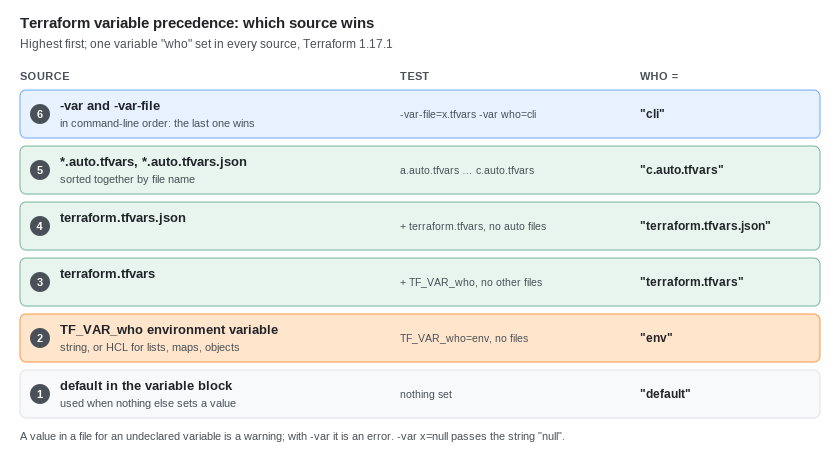
To see the order, one variable who was set in every possible place at once, and the winning source removed after each run:
| Sources present | who = |
|---|---|
default, TF_VAR_who, terraform.tfvars, terraform.tfvars.json, a.auto.tfvars, b.auto.tfvars.json, c.auto.tfvars |
"c.auto.tfvars" |
same without c.auto.tfvars |
"b.auto.tfvars.json" |
same without b.auto.tfvars.json |
"a.auto.tfvars" |
same without a.auto.tfvars |
"terraform.tfvars.json" |
same without terraform.tfvars.json |
"terraform.tfvars" |
only the default and TF_VAR_who |
"env" |
| only the default | "default" |
-var who=cli -var-file=x.tfvars |
"x.tfvars" |
-var-file=x.tfvars -var who=cli |
"cli" |
-var-file=x.tfvars -var-file=y.tfvars |
"y.tfvars" |
So, from lowest to highest:
- The
defaultin the declaration. TF_VAR_environment variables.terraform.tfvars.terraform.tfvars.json.*.auto.tfvarsand*.auto.tfvars.json, sorted together by file name:b.auto.tfvars.jsonoverridesa.auto.tfvarsand is overridden byc.auto.tfvars.-varand-var-fileon the command line, in the order given: the last one wins.
A value for a variable that isn’t declared is only a warning in a file, but an error on the command line:
Warning: Value for undeclared variable

The root module does not declare a variable named "not_declared" but a value
was found in file "z.tfvars".

Error: Value for undeclared variable
Complex Values From the Environment and the Command Line
TF_VAR_ and -var values for anything but a string are parsed as HCL:
export TF_VAR_allowed_ports='[8080, 8443]'
export TF_VAR_server_config='["m7g.large", 50, false]'
terraform apply -var='allowed_ports=[1,2]'
Without the brackets, TF_VAR_allowed_ports='8080,8443' fails with Error: Extra characters after expression.
-var x=null does not pass a null for a string variable: it passes the four-letter string "null". To pass a real null, use a tfvars file (x = null).
Variable Types
variable "instance_name" {
  type    = string
  default = "my-instance"
}

variable "instance_count" {
  type    = number
  default = 3
}

variable "enable_monitoring" {
  type    = bool
  default = true
}

variable "availability_zones" {
  type    = list(string)
  default = ["us-west-2a", "us-west-2b", "us-west-2c"]
}

variable "unique_tags" {
  type    = set(string)
  default = ["web", "production", "critical", "web"]
}

variable "instance_sizes" {
  type    = map(number)
  default = { dev = 1, test = "2", prod = 5 }
}

variable "server_config" {
  type    = tuple([string, number, bool])
  default = ["t3.micro", 20, true]
}

variable "database_config" {
  type = object({
    engine    = string
    encrypted = bool
  })
  default = { engine = "mysql", encrypted = "true", extra = 1 }
}

variable "flexible_config" {
  type    = any
  default = { name = "example", count = 3, enabled = true }
}
Terraform converts every value to the declared type, which can change it. What these defaults became:
set = toset([
  "critical",
  "production",
  "web",
])
sizes = tomap({
  "dev" = 1
  "prod" = 5
  "test" = 2
})
db = {
  "encrypted" = true
  "engine" = "mysql"
}
- A set removes the duplicate
"web"and has no order of its own (shown sorted); you can’t index it with[0]. - A map or list of numbers turns the string
"2"into the number2; a value that can’t be converted is an error. - An object keeps only the declared attributes (the
extra = 1is dropped silently) and converts"true"totrue. - A tuple has a fixed length and a type per position.
anykeeps whatever it gets. It saves typing, but nothing checks the structure: prefer anobjecttype.
Optional Attributes
variable "complex_config" {
  type = object({
    name     = string
    version  = string
    replicas = number

    resources = optional(object({
      cpu    = string
      memory = string
    }), {
      cpu    = "100m"
      memory = "128Mi"
    })

    health_check = optional(object({
      path = string
      port = number
    }), null)

    tier = optional(string)
  })
}
With complex_config = { name = "app", version = "1.0", replicas = 2 }:
complex = {
  "health_check" = null /* object */
  "name" = "app"
  "replicas" = 2
  "resources" = {
    "cpu" = "100m"
    "memory" = "128Mi"
  }
  "tier" = tostring(null)
  "version" = "1.0"
}
An optional attribute without a default is null; with a default, the default fills in. A required attribute that’s missing fails:
Error: Invalid value for input variable

Unsuitable value for var.complex_config set using -var="complex_config=...":
attribute "replicas" is required.
null, default and nullable
| Declaration | Value passed in a tfvars file | Result |
|---|---|---|
default = "fallback" (nullable by default) |
x = null |
null replaces the default |
default = "fallback", nullable = false |
x = null |
"fallback": null means “use the default” |
Set nullable = false when the module can’t handle null, so callers can pass null to mean “use your default” (a common pattern in module wrappers).
Validation
variable "environment" {
  type = string

  validation {
    condition     = contains(["dev", "test", "stage", "prod"], var.environment)
    error_message = "Environment must be one of: dev, test, stage, prod."
  }
}
Error: Invalid value for variable

  on main.tf line 1:
   1: variable "environment" {
    ├────────────────
    │ var.environment is "production"

Environment must be one of: dev, test, stage, prod.
Test the Rule Against Real Values
A rule that looks right can reject valid input. This instance type check from many guides:
condition = can(regex("^[a-z][0-9]+\\.", var.instance_type))
accepts t3.micro, but rejects m7g.large, c6gn.16xlarge, m7i-flex.large and u-6tb1.metal: all real EC2 types. And a range check on a number accepts 2.5. Fixed versions:
variable "instance_type" {
  type    = string
  default = "t3.micro"

  validation {
    condition     = can(regex("^[a-z][a-z0-9-]*\\.[a-z0-9]+$", var.instance_type))
    error_message = "Instance type must look like family.size, for example t3.micro or m7g.large."
  }
}

variable "instance_count" {
  type    = number
  default = 3

  validation {
    condition     = var.instance_count >= 1 && var.instance_count <= 10 && floor(var.instance_count) == var.instance_count
    error_message = "Instance count must be a whole number between 1 and 10."
  }
}

variable "vpc_cidr" {
  type    = string
  default = "10.0.0.0/16"

  validation {
    condition     = try(cidrsubnet(var.vpc_cidr, 0, 0) == var.vpc_cidr, false)
    error_message = "VPC CIDR must be a network address in CIDR notation, for example 10.0.0.0/16."
  }
}
| Input | Result |
|---|---|
t3.micro, m7g.large, c6gn.16xlarge, m7i-flex.large, u-6tb1.metal |
accepted |
t3micro, T3.micro |
Instance type must look like family.size, ... |
instance_count = 2.5 |
Instance count must be a whole number between 1 and 10. |
10.0.0.0/16, 172.16.0.0/12 |
accepted |
10.0.0.5/16, 10.0.0.0/33, abc |
VPC CIDR must be a network address ... |
The usual CIDR check, can(cidrhost(var.vpc_cidr, 0)), accepts 10.0.0.5/16, which has host bits set. cidrsubnet(x, 0, 0) returns the network address (10.0.0.0/16), so comparing it with the input catches that, and try(..., false) turns invalid input into a failed check instead of an error.
Several Rules and Cross-Variable Checks
A variable can have several validation blocks; each failing one prints its own message. Since Terraform 1.9 a rule can also refer to other variables:
variable "max_count" {
  type    = number
  default = 5

  validation {
    condition     = var.max_count >= var.instance_count
    error_message = "max_count must be >= instance_count."
  }
}
Error: Invalid value for variable

  on main.tf line 25:
    │ var.instance_count is 3
    │ var.max_count is 2

max_count must be >= instance_count.
Within one object, compare its own attributes:
variable "scaling_config" {
  type = object({
    min_size         = number
    max_size         = number
    desired_capacity = number
  })

  validation {
    condition = (
      var.scaling_config.min_size <= var.scaling_config.desired_capacity &&
      var.scaling_config.desired_capacity <= var.scaling_config.max_size
    )
    error_message = "Must satisfy: min_size <= desired_capacity <= max_size."
  }
}
Validating Lists of Objects
variable "network_config" {
  type = object({
    vpc_cidr = string
    public_subnets = list(object({
      cidr = string
      az   = string
      name = string
    }))
  })

  validation {
    condition     = try(cidrsubnet(var.network_config.vpc_cidr, 0, 0) == var.network_config.vpc_cidr, false)
    error_message = "VPC CIDR must be a network address in CIDR notation."
  }

  validation {
    condition     = length(var.network_config.public_subnets) >= 1
    error_message = "At least one public subnet must be specified."
  }

  validation {
    condition = alltrue([
      for subnet in var.network_config.public_subnets :
      try(cidrsubnet(subnet.cidr, 0, 0) == subnet.cidr, false)
    ])
    error_message = "All subnet CIDRs must be network addresses in CIDR notation."
  }
}
Using Variables
locals {
  # Interpolation, and a direct reference
  full_name = "${var.project_name}-${var.environment}"
  type      = var.instance_type

  # Conditional
  instance_count = var.environment == "prod" ? var.prod_instance_count : 1

  # for expressions
  uppercase_zones  = [for zone in var.availability_zones : upper(zone)]
  environment_tags = { for key, value in var.tags : key => "${var.environment}-${value}" }
  production_zones = [for zone in var.availability_zones : zone if var.environment == "prod"]

  # Pick one environment out of a map of objects
  env_config = var.environments[var.environment]
}
Dynamic Blocks
variable "sg_name" {
  type    = string
  default = "web"
}

variable "ingress_rules" {
  type = list(object({
    from_port   = number
    to_port     = number
    protocol    = string
    cidr_blocks = list(string)
  }))
  default = [
    { from_port = 80, to_port = 80, protocol = "tcp", cidr_blocks = ["0.0.0.0/0"] },
    { from_port = 443, to_port = 443, protocol = "tcp", cidr_blocks = ["0.0.0.0/0"] },
  ]
}

resource "aws_security_group" "example" {
  name = var.sg_name

  dynamic "ingress" {
    for_each = var.ingress_rules
    content {
      from_port   = ingress.value.from_port
      to_port     = ingress.value.to_port
      protocol    = ingress.value.protocol
      cidr_blocks = ingress.value.cidr_blocks
    }
  }
}
One Resource per List Item: for_each, Not count
A rule per port, written with for_each over a set so that removing a port from the middle of the list doesn’t shift and recreate the others:
variable "allowed_ports" {
  type    = list(number)
  default = [80, 443, 22]
}

variable "security_group_id" {
  type = string
}

resource "aws_security_group_rule" "ingress" {
  for_each          = toset([for p in var.allowed_ports : tostring(p)])
  type              = "ingress"
  protocol          = "tcp"
  from_port         = each.value
  to_port           = each.value
  cidr_blocks       = ["0.0.0.0/0"]
  security_group_id = var.security_group_id
}
aws_security_group_rule needs type, protocol and security_group_id; without them terraform validate reports The argument "protocol" is required, but no definition was found. (and the same for the other two). Newer AWS provider versions recommend aws_vpc_security_group_ingress_rule, one resource per rule.
Functions for Working With Variables
Results from terraform console:
| Expression | Result |
|---|---|
format("%s-%s-%03d", "web", "prod", 7) |
"web-prod-007" |
title("hello world-app") |
"Hello World-App" |
split(",", "a,b,,c") |
["a", "b", "", "c"] |
merge({a=1, b=2}, {b=3}) |
{ a = 1, b = 3 } (last wins) |
slice(["a","b","c"], 0, 2) |
["a", "b"] |
slice(["a"], 0, 2) |
end index must not be greater than the length of the list |
cidrsubnet("10.0.0.0/16", 8, 1) |
"10.0.1.0/24" |
tonumber("08") |
8 |
tobool("true") |
true |
tobool("yes") |
cannot convert "yes" to bool; only the strings "true" or "false" are allowed |
upper(null) |
argument must not be null |
Type Checks: tostring() Isn’t One
locals {
  is_string = can(tostring(var.flexible_input))
}
With flexible_input = 5, can(tostring(...)) is true, because a number converts to a string. can(tolist(...)) is false and can(tostring(["a"])) is false, so the conversions only tell you what a value can become. type(var.flexible_input) (number) works only in terraform console, not in a configuration. If the shape matters, declare a real type instead of any.
try() vs coalesce()
try() returns the first argument that evaluates without an error, and a null is not an error. With custom_instance_type = null:
> try(var.custom_instance_type, var.environment_defaults[var.environment].instance_type, "t3.micro")
tostring(null)

> coalesce(var.custom_instance_type, try(var.environment_defaults[var.environment].instance_type, null), "t3.micro")
"t3.micro"
Use try() for lookups that may fail (a missing map key or attribute: try(var.database_config.port, 3306) gives 3306), and coalesce() to skip nulls. try() can’t hide a typo in a variable name either: that’s a static Reference to undeclared input variable error before anything is evaluated.
The same applies to optional values in general:
variable "custom_domain" {
  type    = string
  default = null
}

resource "random_id" "suffix" {
  byte_length = 4
}

locals {
  domain_name = coalesce(var.custom_domain, "${random_id.suffix.hex}.example.com")
}
Use empty collections rather than null for optional lists and maps, so for_each, length() and merge() work without checks:
variable "additional_tags" {
  type    = map(string)
  default = {}
}
Sensitive Variables
variable "database_password" {
  type      = string
  sensitive = true
}

variable "api_keys" {
  type      = map(string)
  sensitive = true
  default   = {}
}
sensitive = true hides the value in plan and apply output:
  # terraform_data.db will be created
  + resource "terraform_data" "db" {
      + id     = (known after apply)
      + input  = {
          + password = (sensitive value)
          + user     = "admin"
        }
What it does not do:
- Keep it out of the state. After apply,
terraform.tfstatecontained"password": "s3cr3t-Passw0rd"in clear text. Encrypt and restrict access to the state backend. - Survive every path.
terraform showdisplayed the same password in clear text in theoutputattribute of theterraform_dataresource: the provider returned it without the sensitive mark.
Sensitivity spreads to everything derived from the value. An output that uses it must be marked:
Error: Output refers to sensitive values

  on main.tf line 14:
  14: output "pw_length" {

To reduce the risk of accidentally exporting sensitive data that was intended
to be only internal, Terraform requires that any root module output
containing sensitive data be explicitly marked as sensitive, to confirm your
intent.
With sensitive = true on the output, terraform apply prints pw_length = <sensitive>, while terraform output pw_length prints the value (15).
Sensitive values can’t be for_each keys, because the keys appear in resource addresses:
Error: Invalid for_each argument

  on main.tf line 19, in resource "terraform_data" "keys":
  19:   for_each = var.api_keys
    ├────────────────
    │ var.api_keys has a sensitive value

Sensitive values, or values derived from sensitive values, cannot be used as
for_each arguments.
When only the values are secret, iterate over the keys:
resource "terraform_data" "keys" {
  for_each = toset(nonsensitive(keys(var.api_keys)))
  input    = each.key
}
Ephemeral Variables
Since Terraform 1.10, ephemeral = true makes a variable that is never written to the plan file or the state. It may only be used where Terraform doesn’t persist values: provider configuration, ephemeral resources, write-only arguments and other ephemeral values.
variable "token" {
  type      = string
  ephemeral = true
}
Anywhere else, Terraform refuses it:
Error: Invalid use of ephemeral value

  with terraform_data.eph,
  on main.tf line 18, in resource "terraform_data" "eph":
  18:   input = local.header

Ephemeral values are not valid for "input", because it is not a write-only
attribute and must be persisted to state.
Going through a local doesn’t help: local.header = "Bearer ${var.token}" is ephemeral too. Root module outputs can’t be ephemeral either (Ephemeral outputs are not allowed in context of a root module); only module outputs can.
Use sensitive for secrets that must end up in a resource (a database password Terraform has to set), and ephemeral for credentials Terraform only needs while it runs (a provider token).
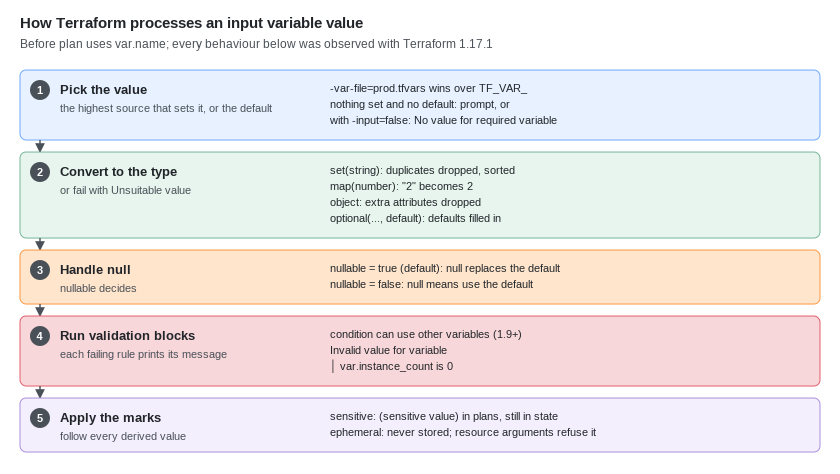
How a Value Is Processed
Complex Example: Multi-Environment Map
variable "project_name" {
  type    = string
  default = "web"
}

variable "environment" {
  type    = string
  default = "dev"
}

variable "environments" {
  type = map(object({
    instance_type = string
    min_size      = number
    max_size      = number
    tags          = map(string)
  }))

  default = {
    dev = {
      instance_type = "t3.micro"
      min_size      = 1
      max_size      = 2
      tags          = { Environment = "development" }
    }
    prod = {
      instance_type = "m7g.large"
      min_size      = 3
      max_size      = 10
      tags          = { Environment = "production" }
    }
  }

  validation {
    condition     = alltrue([for e in values(var.environments) : e.min_size <= e.max_size])
    error_message = "min_size must not be greater than max_size."
  }
}

locals {
  env_config = var.environments[var.environment]
}

resource "aws_launch_template" "app" {
  instance_type = local.env_config.instance_type

  tag_specifications {
    resource_type = "instance"
    tags          = merge(local.env_config.tags, { Name = "${var.project_name}-${var.environment}" })
  }
}
An environment name that isn’t a key of the map fails where it’s used, not where it’s set:
Error: Invalid index

  on main.tf line 17, in locals:
  17: locals { env_config = var.environments[var.environment] }
    ├────────────────
    │ var.environment is "qa"
    │ var.environments is map of object with 1 element

The given key does not identify an element in this collection value.
Since validation rules can refer to other variables, contains(keys(var.environments), var.environment) in a rule on environment gives a clearer message.
Best Practices
- Always add
description: it’s shown in the interactive prompt and in generated module docs. - Use precise types (
object(...)rather thanmap(any)orany); conversion happens anyway, the type makes it predictable. - Use
optional()with defaults for object attributes callers rarely set. - Test validation rules against real values, including ones that should pass.
- Use
coalesce()for null fallbacks andtry()for lookups that may fail. - Mark secrets
sensitive, keep the state encrypted, and preferephemeralfor credentials that don’t need to be stored. - Pass values in one place per environment (
-var-file=prod.tfvars); with several*.auto.tfvarsfiles the file name decides who wins.
Naming Conventions
# Good: descriptive, snake_case, booleans start with a verb
variable "vpc_cidr_block" { type = string }
variable "enable_monitoring" { type = bool }
variable "allowed_ingress_ports" { type = list(number) }

# Bad: abbreviations, unclear, inconsistent
variable "vpc_cb" { type = string }
variable "flag1" { type = bool }
variable "Ports" { type = list(number) }
Secure Defaults With Negated Booleans
variable "public_access" {
  type        = bool
  description = "Allow public access to the bucket"
  default     = false
}

resource "aws_s3_bucket" "example" {}

resource "aws_s3_bucket_public_access_block" "example" {
  bucket = aws_s3_bucket.example.id

  block_public_acls       = !var.public_access
  block_public_policy     = !var.public_access
  ignore_public_acls      = !var.public_access
  restrict_public_buckets = !var.public_access
}
public_access = false (the default) turns all four blocks on.