AWS Certificate Manager (ACM): Free TLS Certificates for Your AWS Services
AWS Certificate Manager (ACM) creates, stores and renews TLS certificates (the “SSL certificates” that give a site its padlock), and installs them on the AWS services that terminate HTTPS for you: load balancers, CloudFront, API Gateway and others. Public certificates for those services are free, renew by themselves, and the private key never leaves AWS, so there is no key file to lose, no renewal calendar and no certificate to copy to servers.
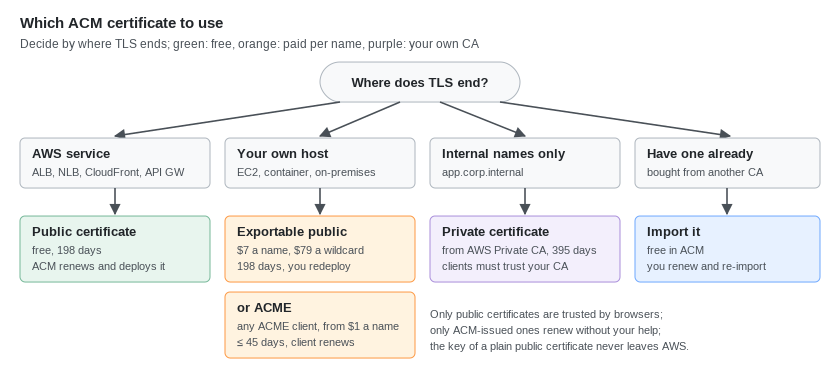
This article explains the certificate types, how validation works, which Region a certificate must live in, renewal, importing, exporting, quotas, the commands and the usual mistakes. The facts come from the ACM User Guide and the ACM pricing page (November 2026). The commands were checked with AWS CLI 2.39.3. Account IDs, ARNs and domain names are placeholders.
1. What ACM Gives You
| Need | ACM answer |
|---|---|
| HTTPS on an Application or Network Load Balancer | A public ACM certificate on the listener |
| HTTPS on CloudFront with your own domain | A public certificate in us-east-1 |
| HTTPS on an API Gateway custom domain | A public certificate in the matching Region (section 3) |
Certificates for names inside your company (app.corp.internal) |
Private certificates from AWS Private CA |
| A certificate you already bought | Import it into ACM (renewal is then your job) |
| HTTPS directly on an EC2 instance, a container or an on-premises server | An exportable public certificate (you get the private key, paid per name), or ACME with a standard ACME client (paid per name, certificates last at most 45 days) |
ACM certificates can secure one name, several names, or wildcards (*.example.com). A wildcard protects an unlimited number of
subdomains at one level.
2. Certificate Types
| Type | Issued by | Trusted by | Renewal | Cost |
|---|---|---|---|---|
| Public | Amazon Trust Services, Amazon’s public CA | All major browsers, Java, iOS and Android | Automatic (managed renewal) | No charge. You pay for the AWS resources that use it |
| Exportable public | Amazon Trust Services | Same as public | Automatic, but you deploy the renewed certificate | $7 per name, $79 per wildcard, at issuance and at each renewal |
| ACME | Amazon Trust Services, through an ACM ACME endpoint | Same as public | Your ACME client (not ACM managed renewal) | From $1 per name, $5 per wildcard, at each issuance |
| Private | AWS Private CA (your own CA, a separate service) | Only clients that trust your CA | Managed by ACM when requested through ACM | The Private CA has its own price |
| Imported | A third-party CA | Whatever that CA is trusted for | You must renew and re-import | No charge |
ACM public certificates are valid for 198 days. New public certificates use RSA 2048 (the default), ECDSA P-256 (EC_prime256v1)
or ECDSA P-384 (EC_secp384r1). Other key types are for imported certificates only.
Exportable is a choice you make when you request the certificate (--options Export=ENABLED): it cannot be changed later, and
public certificates created before June 17, 2025 cannot be exported. A private certificate signed by AWS Private CA can also be
exported for use anywhere in your internal PKI.
3. Regions: the Rule That Causes Most Problems
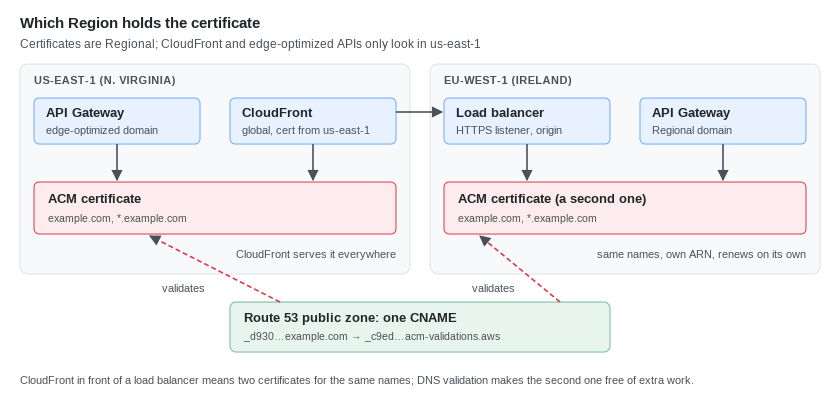
Certificates are Regional resources. You cannot copy a certificate to another Region. To use a certificate in two Regions you request or import one in each Region (and, for ACM-issued certificates, validate each name in each Region; with DNS validation the same CNAME record works for every Region, so this costs nothing).
| Where you use it | Region of the certificate |
|---|---|
| Load balancer and most other services | The same Region as the service |
| CloudFront | US East (N. Virginia), us-east-1, whatever Region your origin is in |
| API Gateway Regional custom domain | The same Region as the API |
| API Gateway edge-optimized custom domain | us-east-1 (the edge-optimized endpoint uses CloudFront) |
So an application in eu-west-1 with CloudFront in front needs a certificate in eu-west-1 for the load balancer and another one in
us-east-1 for CloudFront. That is the most common “the certificate does not appear in the list” cause: you are looking in the wrong
Region. Each copy renews on its own.
3.1 The same certificate in two Regions
Request the same names in each Region. --idempotency-token makes a repeated run within an hour return the same ARN instead of a
second certificate:
for r in eu-west-1 us-east-1; do
  aws acm request-certificate --region "$r" --domain-name example.com \
    --subject-alternative-names "*.example.com" --validation-method DNS \
    --idempotency-token example-com --query CertificateArn --output text
done
arn:aws:acm:eu-west-1:123456789012:certificate/c7580b69-fe6f-474b-9271-d07959b19251
arn:aws:acm:us-east-1:123456789012:certificate/8240bcbc-3ef0-49d6-9b83-3fef83465e63
Both ask for the same validation record, so the CNAME you already have validates the second Region as well:
for r in eu-west-1 us-east-1; do
  arn=$(aws acm list-certificates --region "$r" \
    --query "CertificateSummaryList[?DomainName=='example.com'].CertificateArn | [0]" --output text)
  aws acm describe-certificate --region "$r" --certificate-arn "$arn" \
    --query 'Certificate.DomainValidationOptions[0].ResourceRecord.Name' --output text
done
_d930b28be6c5927595552b219965053e.example.com.
_d930b28be6c5927595552b219965053e.example.com.
4. Requesting a Certificate and Validating the Domain
You must prove that you control each name in the certificate.
| DNS validation | Email validation | |
|---|---|---|
| How | You add a CNAME record that ACM gives you | ACM emails the domain’s contacts and someone clicks a link |
| Renewal | Automatic, as long as the record stays in place and the certificate is in use | Needs a person to respond at renewal |
| Best for | Everything, especially automation | When you cannot edit DNS |
| Future | The only method for new certificates once email is retired | Being retired during 2027 for new certificates and renewals |
Always choose DNS validation. An existing email-validated certificate can be moved to DNS validation without requesting a new one (section 4.2). There is also HTTP validation (a redirect served by CloudFront), but only for CloudFront distribution tenants, and it does not support wildcards.
4.1 How the CNAME works
ACM shows a record name, a record type (CNAME) and a record value for each name:
Record name : _<long-string>.example.com.
Record type : CNAME
Record value: _<other-long-string>.<random>.acm-validations.aws.
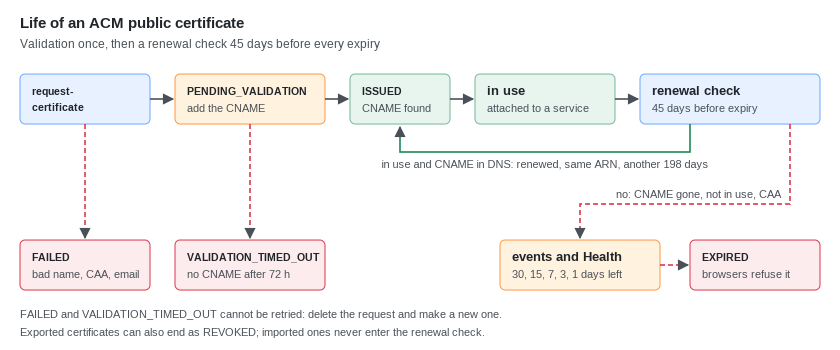
- The record is added once. ACM renews the certificate automatically for as long as the certificate is in use and the CNAME stays in place. Deleting the record, or removing the certificate from the service, stops automatic renewal.
- A wildcard and its base domain (
*.example.comandexample.com) use the same CNAME (see the output below). - The CNAME works for any Region, and for any later certificate with the same names, so you can request replacements or copies in other Regions without new records.
- If your DNS provider adds the domain name to what you type, enter only the first label (
_abc123), not the full name, or you get_abc123.example.com.example.com.and validation fails. - CNAME resolution fails if more than eight CNAMEs are chained together.
- If ACM cannot validate within 72 hours, the status becomes Validation timed out, and you must request a new certificate.
- With Route 53, the console has a Create records in Route 53 button. The status can still read
Pending validationfor up to 30 minutes after you add the record.
4.2 Commands
Request a certificate for the apex and a wildcard, validated by DNS:
CERT=$(aws acm request-certificate --domain-name example.com \
  --subject-alternative-names "*.example.com" --validation-method DNS \
  --region eu-west-1 --query CertificateArn --output text)
Show the CNAME records ACM wants:
aws acm describe-certificate --certificate-arn "$CERT" --region eu-west-1 \
  --query 'Certificate.DomainValidationOptions[].[DomainName,ResourceRecord.Name,ResourceRecord.Value]' --output table
------------------------------------------------------------------------------------------------------------------------------------------
|                                                           DescribeCertificate                                                          |
+---------------+--------------------------------------------------+---------------------------------------------------------------------+
|  example.com  |  _d930b28be6c5927595552b219965053e.example.com.  |  _c9edd76ee4a0e2a74388032f3861cc50.ykybfrwcxw.acm-validations.aws.  |
|  *.example.com|  _d930b28be6c5927595552b219965053e.example.com.  |  _c9edd76ee4a0e2a74388032f3861cc50.ykybfrwcxw.acm-validations.aws.  |
+---------------+--------------------------------------------------+---------------------------------------------------------------------+
Both names share one record. ACM cannot create it in Route 53 through the API, so create it yourself:
aws route53 change-resource-record-sets --hosted-zone-id <hosted-zone-id> --change-batch '{
  "Changes": [{
    "Action": "UPSERT",
    "ResourceRecordSet": {
      "Name": "_d930b28be6c5927595552b219965053e.example.com.",
      "Type": "CNAME",
      "TTL": 300,
      "ResourceRecords": [{"Value": "_c9edd76ee4a0e2a74388032f3861cc50.ykybfrwcxw.acm-validations.aws."}]
    }
  }]
}'
Wait until it is issued, then check the status:
aws acm wait certificate-validated --certificate-arn "$CERT" --region eu-west-1
aws acm describe-certificate --certificate-arn "$CERT" --region eu-west-1 \
  --query 'Certificate.[Status,NotAfter,InUseBy]'
The waiter checks every 60 seconds and gives up after 5 attempts (5 minutes), so run it again if DNS is slow; it exits with an error
at once if the certificate goes to FAILED.
Move an email-validated certificate to DNS validation:
aws acm update-certificate-options --certificate-arn <certificate-arn> --options ValidationMethod=DNS
Status values: PENDING_VALIDATION (waiting for you), ISSUED, INACTIVE, EXPIRED, VALIDATION_TIMED_OUT, REVOKED,
FAILED. InUseBy lists the resources that use the certificate; an empty list means nothing uses it, and it will not renew.
5. Using the Certificate
You attach the certificate by its ARN in the service. For example, an HTTPS listener on a load balancer:
aws elbv2 create-listener --load-balancer-arn <alb-arn> --protocol HTTPS --port 443 \
  --certificates CertificateArn="$CERT" \
  --ssl-policy ELBSecurityPolicy-TLS13-1-2-2021-06 \
  --default-actions Type=forward,TargetGroupArn=<target-group-arn>
After that, InUseBy shows the listener:
[
    "ISSUED",
    [
        "arn:aws:elasticloadbalancing:eu-west-1:123456789012:listener/app/web/8d940249546d2472/1302f087598e541d"
    ]
]
List the available TLS policies with aws elbv2 describe-ssl-policies --query 'SslPolicies[].Name' --output text; the newer
...-PQ-2025-09 variants add post-quantum key exchange. An ALB can hold several certificates on one listener and picks the right one
by the name the client asks for (SNI). A CloudFront distribution takes one certificate, set in ViewerCertificate.
The certificate must cover the name that clients use. A certificate for example.com does not cover www.example.com, and a
wildcard *.example.com does not cover example.com itself nor a.b.example.com.
5.1 Check what is actually served
The console shows what ACM holds; a client sees what the listener serves for the name it asks for. openssl s_client with
-servername sends the name the way a browser does (SNI):
openssl s_client -connect app.example.com:443 -servername app.example.com </dev/null 2>/dev/null \
  | openssl x509 -noout -subject -issuer -dates -ext subjectAltName
subject=CN=app.example.com
issuer=CN=Test CA
notBefore=Nov  3 12:50:11 2026 GMT
notAfter=Dec  3 12:50:11 2026 GMT
X509v3 Subject Alternative Name:
    DNS:app.example.com
(That run was against a test server with its own CA; on an ACM certificate the issuer is an Amazon intermediate, and notAfter is
198 days after notBefore.)
- A different name gets a different certificate on a listener with several certificates. Ask for each name you serve.
- Without SNI (
-noservername, old clients) the listener’s default certificate comes back, which is the first one you set. - The chain: add
-showcertsand check that eachi:(issuer) line matches thes:(subject) of the next certificate. - Expiry in a script:
openssl x509 -noout -checkend $((45*86400))exits with 1 if the certificate expires within 45 days.
To test a load balancer before you change DNS, point the name at its address for one request:
curl -sv --resolve www.example.com:443:<alb-ip> https://www.example.com/ -o /dev/null 2>&1 \
  | grep -E "SSL connection|subject:|expire date|issuer:|subjectAltName"
* SSL connection using TLSv1.3 / TLS_AES_256_GCM_SHA384 / X25519MLKEM768 / RSASSA-PSS
*   subject: CN=www.example.com
*   expire date: Dec  3 12:50:11 2026 GMT
*   issuer: CN=Test CA
*   subjectAltName: "www.example.com" matches cert's "www.example.com"
The last line is the check that matters: curl confirms the certificate covers the name you asked for.
6. Renewal
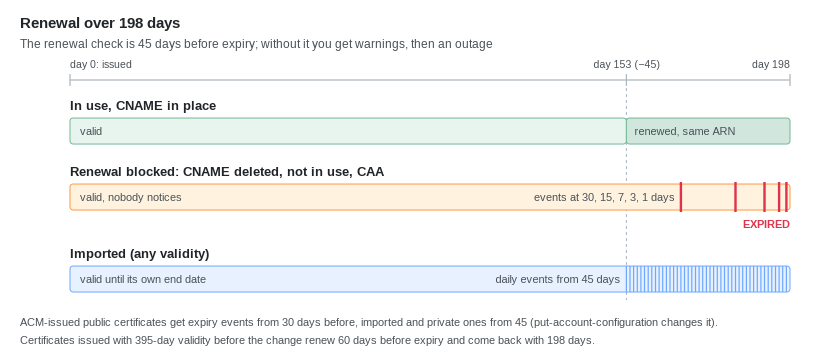
- ACM public certificates renew automatically when the certificate is in use by an integrated service (or has been exported) and every DNS validation record is still in public DNS. ACM checks this 45 days before expiry. Older certificates issued with a 395-day validity renew 60 days before expiry and come back with 198 days.
- If ACM cannot validate a domain at renewal, it sends AWS Health and EventBridge events at 30, 15, 7, 3 and 1 day before expiry.
- You stop automatic renewal by removing the certificate from the service or deleting the CNAME. Do that on purpose only.
- A renewed certificate keeps the same ARN, so nothing needs to change on the load balancer. Each Region’s copy renews separately.
- Exportable certificates renew too, but you must export the new one and deploy it to your servers: listen for the
ACM Certificate Availableevent. - Imported certificates are not renewed (
RenewalEligibilityisINELIGIBLE). Obtain a new certificate and re-import it to the same ARN so the attached services pick it up. - For a third-party certificate on CloudFront, re-import at least 24 hours before it expires, because CloudFront can take up to 24 hours to pick up a change.
6.1 Import a certificate
aws acm import-certificate --certificate fileb://cert.pem --private-key fileb://key.pem \
  --certificate-chain fileb://chain.pem --region eu-west-1
{
    "CertificateArn": "arn:aws:acm:eu-west-1:123456789012:certificate/db810dfa-4555-44c8-9152-2f5c3797353f"
}
Re-import to the same ARN to replace it:
aws acm import-certificate --certificate-arn <certificate-arn> --certificate fileb://cert.pem \
  --private-key fileb://key.pem --certificate-chain fileb://chain.pem
The private key is read from a file, so it stays out of shell history, but keep that file in a secret store and delete local copies.
6.2 Export a certificate
For a certificate requested with --options Export=ENABLED. The private key comes back encrypted with the passphrase you pass:
aws acm request-certificate --domain-name api.example.com --validation-method DNS \
  --key-algorithm EC_prime256v1 --options Export=ENABLED
aws acm export-certificate --certificate-arn <certificate-arn> --passphrase fileb://passphrase.txt
The output holds Certificate, CertificateChain and an ENCRYPTED PRIVATE KEY block. If a key is exposed, revoke the certificate
(only exported certificates can be revoked):
aws acm revoke-certificate --certificate-arn <certificate-arn> --revocation-reason KEY_COMPROMISE
6.3 Alarms and events for expiry
ACM publishes a daily DaysToExpiry metric (namespace AWS/CertificateManager, dimension CertificateArn). An alarm 30 days out:
aws cloudwatch put-metric-alarm --alarm-name acm-app-example-com-expiry \
  --namespace AWS/CertificateManager --metric-name DaysToExpiry \
  --dimensions Name=CertificateArn,Value=<certificate-arn> \
  --statistic Minimum --period 86400 --evaluation-periods 1 \
  --threshold 30 --comparison-operator LessThanOrEqualToThreshold \
  --alarm-actions arn:aws:sns:eu-west-1:123456789012:ops
ACM also sends a daily ACM Certificate Approaching Expiration EventBridge event, from 45 days before expiry for private and imported
certificates and from 30 days for public ones. Change the start for the account, and route the events to SNS:
aws acm put-account-configuration --expiry-events DaysBeforeExpiry=45 --idempotency-token acm1
aws events put-rule --name acm-expiry --event-pattern '{
  "source": ["aws.acm"],
  "detail-type": ["ACM Certificate Approaching Expiration", "ACM Certificate Renewal Action Required"]
}'
aws events put-targets --rule acm-expiry --targets Id=sns,Arn=arn:aws:sns:eu-west-1:123456789012:ops
ACM Certificate Renewal Action Required fires when a managed renewal is stuck (a missing CNAME, a CAA record, and so on). The SNS
topic’s access policy must allow events.amazonaws.com to publish.
6.4 Check the renewal status
aws acm describe-certificate --certificate-arn "$CERT" \
  --query 'Certificate.{Status:Status,Renewal:RenewalEligibility,Summary:RenewalSummary}'
RenewalEligibilityisELIGIBLEonce the certificate is in use (or exported),INELIGIBLEfor an unused, imported or expired one.RenewalSummaryappears once ACM has started a renewal.RenewalStatusisPENDING_AUTO_RENEWAL,PENDING_VALIDATION(ACM cannot find the CNAME for a name, listed in itsDomainValidationOptions),SUCCESSorFAILED, andRenewalStatusReasonsays why (section 10).
7. Private Certificates
ACM can request a certificate from a CA in AWS Private CA (in your account, or shared with you through AWS RAM). It is not trusted by browsers: you install the CA’s root certificate in your clients’ trust stores.
aws acm request-certificate --domain-name app.corp.internal \
  --certificate-authority-arn arn:aws:acm-pca:eu-west-1:123456789012:certificate-authority/<ca-id> \
  --idempotency-token app-corp
aws acm describe-certificate --certificate-arn <certificate-arn> \
  --query 'Certificate.[Type,Status,CertificateAuthorityArn]'
[
    "PRIVATE",
    "ISSUED",
    "arn:aws:acm-pca:eu-west-1:123456789012:certificate-authority/5613cf07-576e-44da-96db-25e812e00850"
]
- No validation: it is
ISSUEDat once. Names only have to be DNS-compliant, so.internalnames work. - Valid 395 days (13 months). ACM tries to renew after 11 months, when the certificate is in use or has been exported. The CA’s own certificate must outlive the requested one, or the request fails.
- Keys: RSA 2048, ECDSA P-256 or P-384, and the family (RSA or ECDSA) must match the CA’s key.
-
Renewal needs permission on the CA. For a CA in the same account, let ACM issue from it:
aws acm-pca create-permission --certificate-authority-arn <ca-arn> \
  --principal acm.amazonaws.com --actions IssueCertificate GetCertificate ListPermissions
For a shared CA, ACM uses the service-linked role
AWSServiceRoleForCertificateManager, created the first time you use the CA (aws iam get-role --role-name AWSServiceRoleForCertificateManagershows it). - Export it with
aws acm export-certificateand a passphrase (section 6.2) to use it on your own hosts; after each renewal export it again. - Test the renewal of an exported private certificate with
aws acm renew-certificate --certificate-arn <arn>, then readRenewalSummary.
ACM or AWS Private CA directly? Request through ACM when ACM should hold the key and renew it. Call AWS Private CA’s
issue-certificate yourself when you need another validity, custom extensions or your own CSR; ACM does not renew those.
8. Terraform
The usual pattern: one certificate per Region, validation records created from domain_validation_options, and an
aws_acm_certificate_validation resource that waits until the certificate is ISSUED (attach that resource’s ARN, not the
certificate’s, so the listener waits for validation).
terraform {
  required_providers {
    aws = {
      source  = "hashicorp/aws"
      version = "~> 6.0"
    }
  }
}

provider "aws" {
  region = "eu-west-1"
}

# CloudFront certificates must live in us-east-1
provider "aws" {
  alias  = "us_east_1"
  region = "us-east-1"
}

variable "domain" {
  default = "example.com"
}

data "aws_route53_zone" "this" {
  name = var.domain
}

resource "aws_acm_certificate" "alb" {
  domain_name               = var.domain
  subject_alternative_names = ["*.${var.domain}"]
  validation_method         = "DNS"
  key_algorithm             = "EC_prime256v1"

  lifecycle {
    create_before_destroy = true
  }
}

resource "aws_acm_certificate" "cloudfront" {
  provider                  = aws.us_east_1
  domain_name               = var.domain
  subject_alternative_names = ["*.${var.domain}"]
  validation_method         = "DNS"

  lifecycle {
    create_before_destroy = true
  }
}

# keyed by domain name, which is known at plan time; the apex and the wildcard get the same
# record, so allow_overwrite lets the second one write it again, and the us-east-1 copy reuses it
resource "aws_route53_record" "validation" {
  for_each = {
    for o in aws_acm_certificate.alb.domain_validation_options : o.domain_name => {
      name   = o.resource_record_name
      type   = o.resource_record_type
      record = o.resource_record_value
    }
  }

  zone_id         = data.aws_route53_zone.this.zone_id
  name            = each.value.name
  type            = each.value.type
  ttl             = 300
  records         = [each.value.record]
  allow_overwrite = true
}

resource "aws_acm_certificate_validation" "alb" {
  certificate_arn         = aws_acm_certificate.alb.arn
  validation_record_fqdns = [for r in aws_route53_record.validation : r.fqdn]
}

resource "aws_acm_certificate_validation" "cloudfront" {
  provider                = aws.us_east_1
  certificate_arn         = aws_acm_certificate.cloudfront.arn
  validation_record_fqdns = [for r in aws_route53_record.validation : r.fqdn]
}

output "alb_certificate_arn" {
  value = aws_acm_certificate_validation.alb.certificate_arn
}

output "cloudfront_certificate_arn" {
  value = aws_acm_certificate_validation.cloudfront.certificate_arn
}
- Key the
for_eachbydomain_name. Keying byresource_record_namelooks cleaner (one record instead of two) but fails withInvalid for_each argument, because the record names are only known after the certificate exists. create_before_destroy: adding a name replaces the certificate; the new one is created and attached before the old one is deleted, otherwise the delete fails while the listener still uses it.- Both resources write the same record, and both Regions’ certificates validate from it, as the apply shows.
Checked with Terraform 1.17.1 and AWS provider 6.71.0 (terraform fmt, validate and an apply).
9. IAM Guardrails
ACM has condition keys for RequestCertificate: acm:ValidationMethod, acm:DomainNames, acm:KeyAlgorithm, acm:Export,
acm:CertificateAuthority and acm:CertificateKeyPairOrigin. Used in a Deny statement, in an identity policy or an SCP, they enforce
your certificate rules for everyone:
{
  "Version": "2012-10-17",
  "Statement": [
    {
      "Sid": "DenyEmailValidation",
      "Effect": "Deny",
      "Action": "acm:RequestCertificate",
      "Resource": "*",
      "Condition": {"StringEquals": {"acm:ValidationMethod": "EMAIL"}}
    },
    {
      "Sid": "OnlyOurDomains",
      "Effect": "Deny",
      "Action": "acm:RequestCertificate",
      "Resource": "*",
      "Condition": {"ForAnyValue:StringNotLike": {"acm:DomainNames": ["example.com", "*.example.com"]}}
    },
    {
      "Sid": "OnlyEcdsaKeys",
      "Effect": "Deny",
      "Action": "acm:RequestCertificate",
      "Resource": "*",
      "Condition": {"StringNotEquals": {"acm:KeyAlgorithm": ["EC_prime256v1", "EC_secp384r1"]}}
    },
    {
      "Sid": "NoExportableCertificates",
      "Effect": "Deny",
      "Action": "acm:RequestCertificate",
      "Resource": "*",
      "Condition": {"StringEquals": {"acm:Export": "ENABLED"}}
    }
  ]
}
ForAnyValue:StringNotLikedenies the request if any name in it falls outside the list. InStringLike,*also matches dots, so*.example.comallows every subdomain level (and the literal wildcard name).- To forbid wildcard certificates, deny
ForAnyValue:StringLikeon"${*}.*"(${*}is a literal asterisk). {"Null": {"acm:CertificateAuthority": "false"}}in a Deny blocks private certificate requests;StringNotLikeon a CA ARN allows only that CA.acm:Exportis how you keep paid exportable certificates under control.- The keys also apply to certificates requested through an ACME endpoint, with values taken from the CSR.
10. Troubleshooting
| Symptom | Likely cause | Fix |
|---|---|---|
| Certificate not in the console or CLI list | Wrong Region; or list-certificates without --includes, which returns only RSA 2048 certificates |
Switch Region; add --includes keyTypes=RSA_2048,EC_prime256v1,EC_secp384r1 |
PENDING_VALIDATION for hours |
CNAME missing, mistyped, doubled (.example.com.example.com), or in a private hosted zone |
dig +short CNAME <record-name> must return the record value from public DNS |
VALIDATION_TIMED_OUT |
72 hours passed without validation | Delete it and request again |
FAILED, NO_AVAILABLE_CONTACTS |
Email validation and no mailbox or MX record for the domain | Use DNS validation |
FAILED, ADDITIONAL_VERIFICATION_REQUIRED |
A high-profile domain, or an Amazon-owned one (amazonaws.com, cloudfront.net, elasticbeanstalk.com) |
Contact AWS Support; use your own domain |
FAILED, INVALID_PUBLIC_DOMAIN |
Not a valid public top-level domain (app.corp.internal) |
Fix the name, or use a private certificate |
FAILED, OTHER |
Usually a typo in a name | Request again with the right names |
CAA_ERROR at request or renewal |
A CAA record that does not allow Amazon | Add 0 issue "amazon.com" (check with dig +short CAA example.com) |
RenewalEligibility INELIGIBLE |
Not used by any service, imported, or expired | Attach it, or re-import / request a new one |
RenewalStatus PENDING_VALIDATION |
The CNAME was deleted | Put the record back (same name and value) |
PCA_ACCESS_DENIED, SLR_NOT_FOUND |
ACM cannot issue from the private CA | Grant the permission or recreate the service-linked role (section 7) |
ResourceInUseException on delete |
The certificate is still attached | Detach it from every ARN in InUseBy |
| Old certificate still served | CloudFront takes up to 24 hours after a re-import; or SNI picked another listener certificate | Wait, and check with openssl s_client -servername (section 5.1) |
A renewal problem also arrives as an ACM Certificate Renewal Action Required event with the same RenewalStatusReason, so the
EventBridge rule from section 6.3 catches it.
11. Cleanup
Expired, revoked, failed and timed-out certificates count toward the 2,500 quota, and an issued certificate that nothing uses will
not renew. Pass every key type you use, because list-certificates returns only RSA 2048 certificates by default:
KEYS=keyTypes=RSA_2048,EC_prime256v1,EC_secp384r1

# dead certificates
aws acm list-certificates --includes $KEYS \
  --certificate-statuses EXPIRED VALIDATION_TIMED_OUT FAILED REVOKED \
  --query 'CertificateSummaryList[].[CertificateArn,DomainName,Status]' --output text

# issued but unused: delete, or attach before they expire
aws acm list-certificates --includes $KEYS --certificate-statuses ISSUED \
  --query 'CertificateSummaryList[?InUse==`false`].[DomainName,Type,NotAfter]' --output table

# everything issued, soonest expiry first
aws acm list-certificates --includes $KEYS --certificate-statuses ISSUED \
  --query 'sort_by(CertificateSummaryList, &NotAfter)[].[NotAfter,DomainName,Type,InUse]' --output table
Keep ISSUED in the last query: sort_by fails on certificates that have no NotAfter yet, such as pending ones. Then delete the
dead ones:
for arn in $(aws acm list-certificates --includes $KEYS \
    --certificate-statuses EXPIRED VALIDATION_TIMED_OUT FAILED \
    --query 'CertificateSummaryList[].CertificateArn' --output text); do
  aws acm delete-certificate --certificate-arn "$arn"
done
Run it in every Region you use, and remember us-east-1 for CloudFront.
12. Quotas
| Item | Default |
|---|---|
| ACM certificates per account per Region (expired and revoked count) | 2,500 |
| ACM certificates requested per year (last 365 days) | 5,000 (twice the quota, if you delete certificates to stay under it) |
| Imported certificates | 2,500, and 5,000 per year |
| Domain names per ACM certificate | 10 by default, up to 100 on request. Does not apply to imported certificates |
| Domain names per ACME certificate | 100 (fixed) |
| Private CAs | 200 |
| ACME endpoints | 50 per account per Region |
| API rates | RequestCertificate 5 per second, DescribeCertificate 10, ImportCertificate 1, ListCertificates 8 |
Certificates issued by AWS Private CA and through ACME do not count toward the 2,500 and 5,000 totals. With 10 names per certificate, use a wildcard when you have many subdomains.
13. Cost
- Public certificates for integrated services are free. You pay for the resources that use them (load balancer, CloudFront, API Gateway).
- Exportable public certificates: $7 per name and $79 per wildcard name, charged at issuance and again at each renewal. A certificate
for
example.com,*.example.comandexample1.comcosts 2 × $7 + $79 = $93. The first 10,000export-certificatecalls a month are free. - ACME certificates: charged per name at each issuance and renewal, $1.00 for the first 1,000 names a month, then $0.50 and $0.25, and $5.00 per wildcard (then $2.50). Since they last at most 45 days, plan for at least one charge per name per month.
- AWS Private CA is a separate paid service, see the AWS Private CA pricing.
- Importing a certificate is not charged.
14. Tips and Gotchas
- Wrong Region is the top issue. CloudFront needs
us-east-1. Everything else needs the service’s own Region. - Pick DNS validation. Keep the CNAME forever. Do not “clean up” records that start with
_and end inacm-validations.aws. - Request the names you will need, including the apex and
www, or a wildcard plus the apex. You cannot add names to an issued ACM certificate: request a new one (the existing CNAMEs still validate the old names). - A certificate in
PENDING_VALIDATIONfor days usually means the CNAME is wrong (doubled domain, typo, wrong zone) or in a private hosted zone. Validation needs a public DNS record. - CAA records in your DNS can block issuance and renewal. If you use CAA, the value must contain one of
amazon.com,amazontrust.com,awstrust.comoramazonaws.com. - A certificate that nothing uses does not renew. Requesting one in advance for a later launch is fine, but attach it before it expires.
- You cannot get the private key of a normal public ACM certificate. That is by design. For your own servers, request an exportable certificate or use ACME.
- Deleting a certificate in use is refused until you detach it from every service.
- Do not let imported certificates expire. Alarm on
DaysToExpiry. - Email validation needs working mailboxes (such as admin@ and postmaster@) and a human at each renewal, and it is going away: move to DNS now.
- Expired and revoked certificates still count toward the quota. Delete the old ones.
- For internal-only names use Private CA, not a public certificate: every public certificate is written to public certificate transparency logs, so its names are visible to anyone.